
Python Dataclasses: Model Simple Records with Fields and Defaults
You have written this class before. Maybe not this exact one, but its twin: a small container for a name, a price, a count. You typed __init__, you typed…

Key topics
You have written this class before. Maybe not this exact one, but its twin: a small container for a name, a price, a count. You typed __init__, you typed self.name = name four times, and you printed the object only to get back something like <__main__.Product object at 0x7f3a9c1d2e50>.
That address is not information. It is Python telling you it has no idea how to describe your object, so it fell back to the default.
Here is the fix in one sentence: a dataclass is a class where Python writes the boring parts from your field declarations. You keep the fields. Python keeps the boilerplate.
The Boilerplate You Keep Retyping
Start with the hand-written version. This is the class a beginner writes when they need to hold a product record:
class Product:
    def __init__(self, name, quantity, price):
        self.name = name
        self.quantity = quantity
        self.price = price

item = Product("Notebook", 3, 4.50)
print(item)
<__main__.Product object at 0x7f3a9c1d2e50>
Look at which lines carry meaning and which lines are mechanical. self.name = name carries no intent — it is a copy operation you perform because Python requires it. The same is true for quantity and price. If you add a fourth field tomorrow, you edit the constructor signature and add a fourth assignment. Two edits, one field, every time.
The print output is worse. Python has no idea what a Product is, so it shows you the memory address. You cannot debug a list of products when every one of them prints as an address.
You already know classes, objects, attributes, and methods from the earlier articles in this path. This article is about removing the parts of a class that carry no meaning, so the parts that do carry meaning are easier to see.
Knowledge check
Check your understanding
Answer this question before you continue.
Your First Dataclass in Four Lines
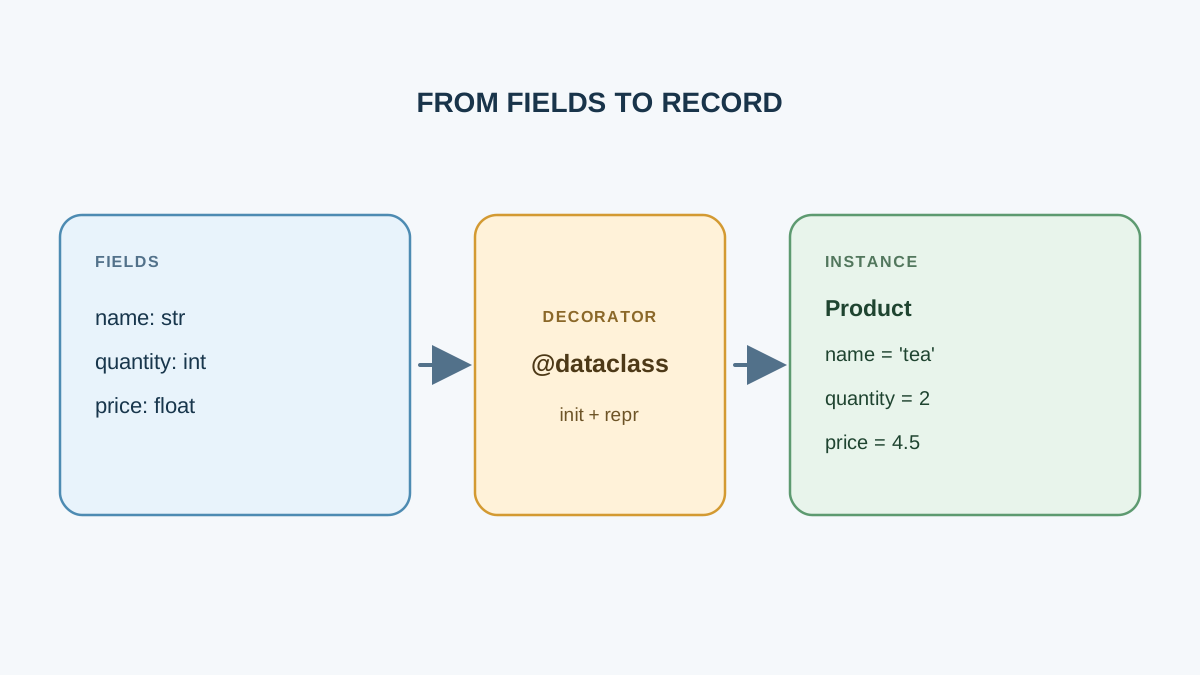
Import the decorator, apply it above the class, and declare your fields with type annotations:
from dataclasses import dataclass

@dataclass
class Product:
    name: str
    quantity: int
    price: float

item = Product("Notebook", 3, 4.50)
print(item)
Product(name='Notebook', quantity=3, price=4.50)
That is the whole mechanism. No __init__. No self.name = name. No custom __repr__. The output shows the class name and every field with its value, in the order you declared them.
A decorator is a function that wraps a class or function and modifies it. @dataclass reads your annotated fields and generates __init__ and __repr__ for you. The annotations — name: str, quantity: int — are what tell it which fields exist and in what order.
Note: The annotations describe intent and drive generation, but they are not enforced at runtime.
Product("Notebook", "three", 4.50)runs without complaint. Type checking tools will flag it; Python itself will not.
You can also instantiate with keyword arguments, which is worth doing once your records grow past three fields:
item = Product(name="Notebook", quantity=3, price=4.50)
The order no longer matters, and the call site reads like a description instead of a puzzle.
Knowledge check
Check your understanding
Answer this question before you continue.
Defaults, and the Mutable Default Trap
Give a field a default with normal assignment syntax:
from dataclasses import dataclass

@dataclass
class Product:
    name: str
    quantity: int = 1
    price: float = 0.0

print(Product("Notebook"))
print(Product("Pen", 5, 1.20))
Product(name='Notebook', quantity=1, price=0.0)
Product(name='Pen', quantity=5, price=1.20)
There is an ordering rule here. Fields without defaults must come before fields with defaults. Break it and Python stops you immediately:
@dataclass
class Product:
    name: str = "Unknown"
    quantity: int
TypeError: non-default argument 'quantity' follows default argument
The reason is simple: the generated __init__ uses positional arguments, and Python cannot put a required parameter after an optional one. Reorder the fields and the error disappears.
The mutable default trap
Now the mistake that bites nearly every beginner. Suppose you want each product to carry a list of tags:
from dataclasses import dataclass

@dataclass
class Product:
    name: str
    tags: list = []

a = Product("Notebook")
b = Product("Pen")

a.tags.append("stationery")

print("a.tags:", a.tags)
print("b.tags:", b.tags)
a.tags: ['stationery']
b.tags: ['stationery']
You appended to a and b changed. Both instances are pointing at the same list object, because the default value was created once when the class was defined, not once per instance. This is the same trap as mutable default arguments in plain functions, and it is just as quiet.
The fix is field(default_factory=list):
from dataclasses import dataclass, field

@dataclass
class Product:
    name: str
    tags: list = field(default_factory=list)

a = Product("Notebook")
b = Product("Pen")

a.tags.append("stationery")

print("a.tags:", a.tags)
print("b.tags:", b.tags)
a.tags: ['stationery']
b.tags: []
default_factory takes a zero-argument callable — here, list itself — and calls it fresh for every new instance. Each product gets its own empty list.
Common mistake: Writing
tags: list = []and assuming each instance gets a fresh list. It does not. Use a plain default for immutable values like strings, numbers, and booleans. Usedefault_factoryfor lists, dictionaries, and sets.
Knowledge check
Check your understanding
Answer this question before you continue.
Dataclass vs Dictionary vs Hand-Written Class
You now have three ways to hold a record. Here is when each one earns its place:
| Dictionary | Hand-written class | Dataclass | |
|---|---|---|---|
| Attribute access | item["name"] | item.name | item.name |
| Shape declaration | None — keys appear at runtime | Constructor signature | Annotated fields at the top of the class |
| Typo feedback | Misspelled key fails when that line runs | Misspelled attribute fails when that line runs | Same runtime behavior; editors and type checkers may flag unknown attributes when configured |
| Editor help | None — keys are invisible | Full autocomplete | Full autocomplete |
| Equality | Compares contents | Compares identity by default | Compares field values |
| Printing | Readable | Memory address unless you write __repr__ | Readable, generated |
| Adding behavior | Awkward — functions live elsewhere | Full control, full cost | Full control, no boilerplate cost |
| Use this when | Shape is loose, unknown, or throwaway | Construction logic or invariants dominate | Shape is known and repeated |
A dictionary is the fastest thing to type and the right tool when you genuinely do not know what keys will exist — parsing a config file with optional sections, for example. But nothing tells you which keys are expected, and item["nmae"] fails only when that line runs.
A hand-written class gives you total control. If your constructor needs to validate input, derive values, or enforce an invariant — a price that cannot be negative, a start date that must precede an end date — write it by hand and make the rules explicit.
A dataclass sits in the middle. The shape is declared, the methods are generated, and you can still add your own methods when the record grows behavior.
Tip: A dataclass is still a normal class. It is not a separate kind of object, and it does not limit you. If you later need custom construction logic, you add
__init__yourself and the decorator steps aside.
Knowledge check
Check your understanding
Answer this question before you continue.
Adding Behavior Without Losing the Point
Records rarely stay pure data. Add a method the same way you would in any class:
from dataclasses import dataclass

@dataclass
class Product:
    name: str
    quantity: int
    price: float

    def total(self) -> float:
        return self.quantity * self.price

item = Product("Notebook", 3, 4.50)
print(item.total())
13.5
If you need a value computed once at construction — say, a formatted label — use __post_init__, which runs automatically after the generated constructor finishes:
from dataclasses import dataclass, field

@dataclass
class Product:
    name: str
    quantity: int
    price: float
    label: str = field(init=False)

    def __post_init__(self):
        self.label = f"{self.name} x{self.quantity}"

print(Product("Notebook", 3, 4.50).label)
Notebook x3
And when you need to hand your record to code that expects a plain dictionary — a JSON encoder, a template, a logging call — convert it with asdict():
from dataclasses import asdict, dataclass

@dataclass
class Product:
    name: str
    quantity: int
    price: float

item = Product("Notebook", 3, 4.50)
print(asdict(item))
{'name': 'Notebook', 'quantity': 3, 'price': 4.5}
That is the escape hatch. You get named fields while you work, and a plain dictionary when you leave.
Practice: Build a Small Record Type
Define a dataclass for a record you actually care about — a book, a task, a workout, a transaction. Your version needs:
- At least three fields, with one field carrying a default.
- One list field using
field(default_factory=list). - One method that returns a computed or formatted value.
- Two instances, printed and compared with
==.
That last step is worth pausing on. Dataclasses generate __eq__, so two instances with matching field values compare as equal — something a hand-written class does not do by default.
a = Product("Notebook", 3, 4.50)
b = Product("Notebook", 3, 4.50)
print(a == b)
True
If two instances you expect to be equal come back False, check every field. A list that looks empty in one and holds a stray value in the other is enough to break equality, and the generated repr will show you exactly which field differs.
Extension: convert one instance with asdict() and print the result. Then decide whether the dictionary or the record was easier to work with.
What to Do Next
Use this rule when you are unsure: if the shape of your data is known and you keep writing the same constructor, use a dataclass. If the shape is loose or temporary, a dictionary is fine. If construction logic or invariants dominate, write the class by hand.
The fastest way to lock this in is to run the practice task and read the actual output — not to reread this article. Change a default, break the field ordering on purpose, watch the error, fix it. The error message will teach you the rule faster than the rule will.
From here, the natural next step in this path is using these record types inside larger structures: a list of records, a record that holds other records, and eventually inheritance when one record type is a specialized version of another.
Knowledge check
Final check
Finish the article by checking the ideas you just learned.
References
Want a more structured Python path?
Use the Python Starter Pack to turn scattered tutorials into a focused practice path.
Python for Artificial Intelligence Starter Pack
Build a Python foundation you can actually use. The Python for AI Starter Pack brings together a guided path through setup, core programming concepts, data structures, files, JSON, APIs, debugging, and practical projects—so you can move quickly from running your first program to understanding and building useful software.
- 264-page illustrated PDF
- 12 guided Python chapters
- Visual concept diagrams
- Self-assessment quizzes
- Bonus deep-dive sections
- Files, JSON, APIs, debugging & projects
- Foundation for data, automation & AI
Coming soon


