
Inheritance in Python: Reusing Code with OOP
You've built one class, tested it, and it works. Now you need a second class that does almost the same thing. So you copy the code, paste it, and change a…

Key topics
You've built one class, tested it, and it works. Now you need a second class that does almost the same thing. So you copy the code, paste it, and change a few lines. It works again—but now you own two copies of nearly identical logic. Change one and forget the other, and your program quietly starts behaving inconsistently.
That copy-paste moment is exactly the problem python inheritance solves. Instead of duplicating shared behavior across classes, you write it once in a parent class and let child classes reuse it. This article builds on the basics of classes and objects, so if you're comfortable defining a simple class, you're ready to go.
Why write the same code twice?
Let's make the problem concrete. Suppose you're building a small program that tracks different types of employees. You start with a Manager class:
class Manager:
    def __init__(self, name):
        self.name = name

    def introduce(self):
        print(f"Hi, I'm {self.name} and I manage a team.")
Now you need an Engineer class. It also has a name and needs an introduce() method. The easiest instinct is to copy the code and change a few words:
class Engineer:
    def __init__(self, name):
        self.name = name

    def introduce(self):
        print(f"Hi, I'm {self.name} and I write code.")
This works, but it creates a maintenance trap. If you later decide every employee should also have an email address, you have to update both classes. Miss one, and your program behaves inconsistently.
Inheritance fixes this by putting shared behavior in one place. You write the common code once, and every class that inherits from that parent automatically gets it.
What inheritance means in Python
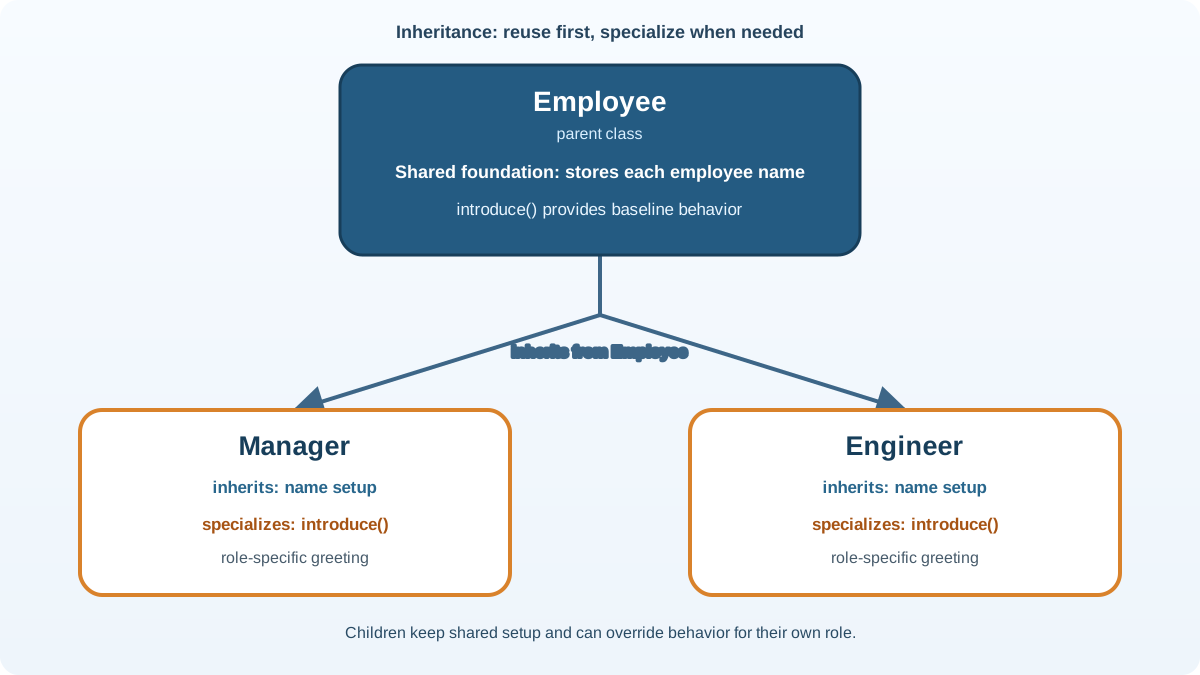
In Python, inheritance creates a relationship between two classes:
- The parent class (also called a base or superclass) holds the shared, general behavior.
- The child class (also called a derived or subclass) inherits from the parent and can add its own specialized behavior.
This is often described as an is-a relationship. A Dog is an Animal. A Manager is an Employee. When that sentence reads naturally, inheritance is probably a good fit.
The syntax for python class inheritance is minimal. You put the parent class name in parentheses after the child class name:
class Animal:
    def eat(self):
        print("I can eat.")

class Dog(Animal):
    pass

dog = Dog()
dog.eat()
I can eat.
The Dog class didn't define an eat() method, but it can still call it because it inherited everything from Animal. The parentheses in class Dog(Animal): are what create that connection.
Why switch from employees to animals? Because the animal example strips away everything except the mechanism. There's no job title, no team size, no extra attributes to distract you. You can see exactly what inheritance does: the child gains the parent's behavior with zero extra code.
Now let's carry that lesson back to the employee problem.
Knowledge check
Check your understanding
Answer this question before you continue.
Adding your own behavior to a child class
A child class isn't just a copy of its parent. It can add new methods and attributes while keeping everything it inherited.
Let's extend the animal example. The Dog class inherits eat() from Animal, but we also give it a bark() method that Animal doesn't have:
class Animal:
    def eat(self):
        print("I can eat.")

class Dog(Animal):
    def bark(self):
        print("Woof!")

dog = Dog()
dog.eat()
dog.bark()
I can eat.
Woof!
Notice what happened: dog.eat() works because of inheritance, and dog.bark() works because it's defined directly on Dog. The child class has access to both its own methods and its parent's methods.
Now apply that to the original problem. Both Manager and Engineer share a name attribute and an introduce() method. That shared behavior belongs in a parent class:
class Employee:
    def __init__(self, name):
        self.name = name

    def introduce(self):
        print(f"Hi, I'm {self.name}.")

class Manager(Employee):
    def introduce(self):
        print(f"Hi, I'm {self.name} and I manage a team.")

class Engineer(Employee):
    def introduce(self):
        print(f"Hi, I'm {self.name} and I write code.")
The shared name setup now lives in one place. If you need to add an email attribute later, you update Employee once, and both child classes get it automatically. That's the maintenance payoff from the opening.
Knowledge check
Check your understanding
Answer this question before you continue.
Overriding a method to change behavior
Sometimes a child class needs to behave differently from its parent. Maybe the parent's version of a method doesn't fit the child's situation.
Method overriding means redefining an inherited method in the child class with the same name. When you call that method on a child object, Python runs the child's version instead of the parent's.
class Animal:
    def make_sound(self):
        print("Some generic animal sound.")

class Dog(Animal):
    def make_sound(self):
        print("Woof!")

class Cat(Animal):
    def make_sound(self):
        print("Meow!")

dog = Dog()
cat = Cat()
dog.make_sound()
cat.make_sound()
Woof!
Meow!
The Animal class is unchanged. We didn't edit the original—we just created child classes that provide their own versions of make_sound(). That's the same pattern the Manager and Engineer classes used above: each child specializes the inherited introduce() method without touching the shared parent code.
One important caveat: overriding isolates your change in the child class, but it doesn't guarantee safety everywhere. Code that uses a Dog object now depends on the dog's version of make_sound(). If you change that override, you need to test the places where Dog is used. The parent stays stable; the child's callers still expect the child's behavior.
Knowledge check
Check your understanding
Answer this question before you continue.
Using super() to build on the parent
Here's a common beginner stumble. When a child class defines its own __init__() method, it replaces the parent's __init__(). That means any setup the parent used to do—like setting the name attribute—suddenly doesn't happen.
class Employee:
    def __init__(self, name):
        self.name = name

class Manager(Employee):
    def __init__(self, name, team_size):
        self.name = name  # Duplicated from parent!
        self.team_size = team_size
This works, but it duplicates code. If the parent's __init__() later changes, the child won't automatically get the update.
The super() function solves this. It lets a child class call the parent's version of a method. Inside __init__, it's the standard way to reuse the parent's attribute setup:
class Employee:
    def __init__(self, name):
        self.name = name

class Manager(Employee):
    def __init__(self, name, team_size):
        super().__init__(name)
        self.team_size = team_size

manager = Manager("Alex", 5)
print(manager.name)
print(manager.team_size)
Alex
5
super().__init__(name) runs the parent's __init__() method, which sets self.name. Then the child adds its own team_size attribute. Both the parent's setup and the child's extra setup work together.
Common mistake: Forgetting to call
super().__init__()in a child class that defines its own__init__(). The parent's setup never runs, so attributes likeself.namedon't exist. You'll usually see anAttributeErrorwhen the child later tries to access one of those missing attributes. If you see that error, check whether your child's__init__()is calling the parent's version.
Knowledge check
Check your understanding
Answer this question before you continue.
When inheritance helps and when it does not
Inheritance is a tool, not a default. The anchor criterion is simple: use inheritance when there's a genuine is-a relationship.
Good fit: Manager is an Employee. Dog is an Animal. SavingsAccount is a BankAccount. The child is a more specific version of the parent.
Poor fit: A Car needs a Driver. That's a has-a relationship, not an is-a relationship. You wouldn't make Car inherit from Driver; you'd give the Car class an attribute that holds a driver object. This alternative approach, called composition, is worth knowing about, but for now the rule is: if "is a" doesn't sound right, inheritance probably isn't the answer.
Also keep hierarchies shallow. A chain of five or six parent-child levels gets hard to follow because behavior is spread across many files. In my experience, one or two levels of inheritance handle most real-world needs. If you're reaching for a third level, step back and ask whether you're modeling a genuine specialization or just forcing classes into a family tree.
Where inheritance shows up in real code
Inheritance isn't just an academic exercise. You'll see it in real projects constantly.
A common example is an employee system. You define a base Employee class with shared attributes like name and email. Then FullTimeEmployee, PartTimeEmployee, and Contractor each inherit from it and add their own pay calculation logic. When the company adds a new employee type, you create another child class instead of rewriting the shared parts.
Many Python libraries and frameworks also use inheritance to let you extend their classes. When you create a custom class that inherits from a framework's built-in class, you're using the same mechanism you just learned—reusing the parent's functionality and customizing only what you need.
Your next step
Inheritance becomes real when you run it. Write a small parent class called Vehicle with an __init__() that sets make and model, plus a describe() method. Then create two child classes—Car and Motorcycle—that each add their own method and override describe() in a way that fits their type. Run the program and inspect the output.
When you're comfortable with that, the natural next direction is learning how multiple classes can share a common interface through polymorphism—but first, get comfortable reusing and customizing code with inheritance.
Knowledge check
Final check
Finish the article by checking the ideas you just learned.
References
Want a more structured Python path?
Use the Python Starter Pack to turn scattered tutorials into a focused practice path.
Python for Artificial Intelligence Starter Pack
Build a Python foundation you can actually use. The Python for AI Starter Pack brings together a guided path through setup, core programming concepts, data structures, files, JSON, APIs, debugging, and practical projects—so you can move quickly from running your first program to understanding and building useful software.
- 264-page illustrated PDF
- 12 guided Python chapters
- Visual concept diagrams
- Self-assessment quizzes
- Bonus deep-dive sections
- Files, JSON, APIs, debugging & projects
- Foundation for data, automation & AI
Coming soon


