
OOP Basics in Python: Classes and Objects
You have written scripts that run top to bottom. You have grouped steps into functions so you can call them again. Then your program grows, and something…

Key topics
You have written scripts that run top to bottom. You have grouped steps into functions so you can call them again. Then your program grows, and something starts to feel off. The data about one thing—say, a customer or a task—is scattered across several variables, and the functions that work on that data live somewhere else entirely.
Object-oriented programming is one response to that scattered feeling. It is a way to bundle related data and behavior together so your code reads like a collection of things that can act, instead of a long list of steps. But here is the part most tutorials skip: classes are a tool, not a requirement. The real question is whether your data and the actions on that data naturally travel together.
What Is Object-Oriented Programming?
Object-oriented programming—OOP for short—is a way to organize code by grouping related data and behavior into objects. An object is simply a bundle that holds both information and the actions that can be performed with that information.
Think about the difference from what you already know. When you write procedural code, you create variables to hold data and functions to act on that data. The two live separately. You might have a dictionary called user and a function called send_email(user). The connection between them exists only in your head.
With OOP, the data and the actions travel together. A User object holds the user's name and email address, and it also knows how to send itself an email. The relationship is built into the code.
Here is the part that surprises most beginners: OOP does not change what your program does. A program written with classes can produce exactly the same output as one written with functions and variables. What changes is how the code is organized, how easy it is to read, and how easy it is to extend later.
Python does not force you to use OOP. You can write perfectly good programs with plain functions for a long time. But Python supports classes fully, and many of the libraries you will use on the job are built around them. Learning the basics of Python OOP means you can both write your own classes and understand code that other people have written.
Knowledge check
Check your understanding
Answer this question before you continue.
Classes Are Blueprints, Objects Are the Real Things
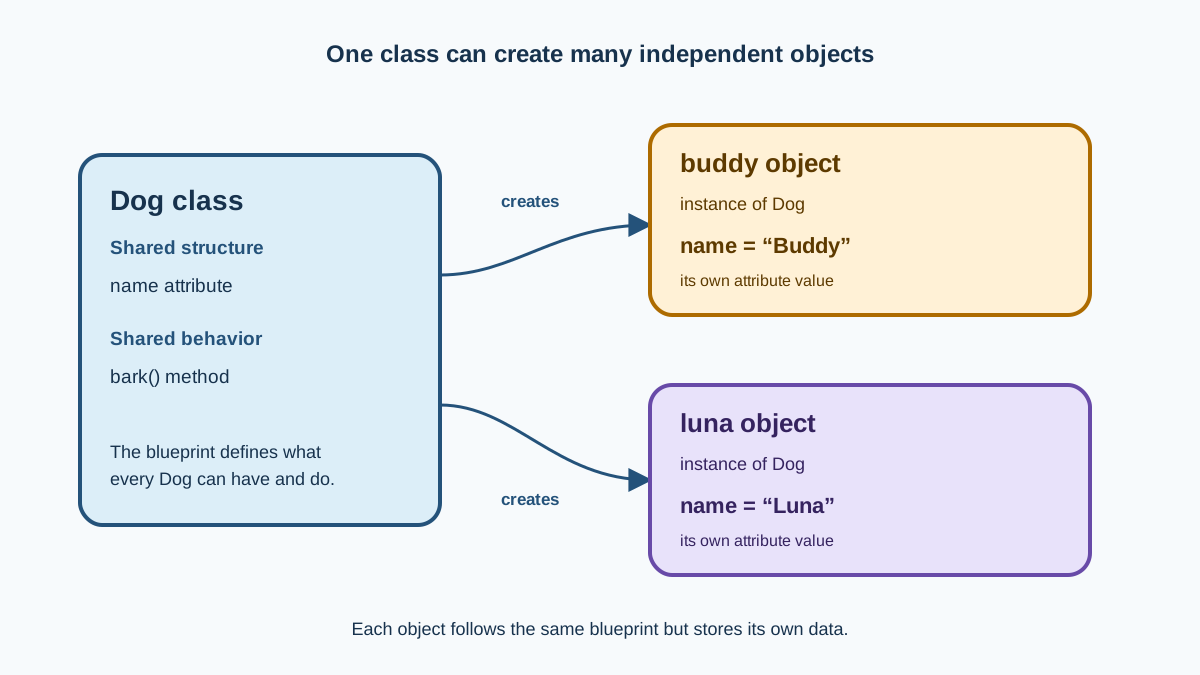
The single most important idea in Python OOP is the difference between a class and an object.
A class is a blueprint. It describes what a thing looks like and what it can do, but it is not the thing itself. An object is a specific instance built from that blueprint, with its own actual data.
A recipe is a class. The cookies you bake from it are objects. Every cookie follows the same recipe, but each one is a separate, real cookie.
Here is what that looks like in Python:
class Dog:
    def __init__(self, name):
        self.name = name

buddy = Dog("Buddy")
luna = Dog("Luna")

print(buddy.name)
print(luna.name)
Buddy
Luna
The Dog class defines what every dog object will have: a name. Then we create two separate dog objects, each with its own name. buddy and luna are independent. Changing one does not affect the other.
This is the mental model to hold onto: the class is the template, and each object you create from it is a real, separate instance with its own data.
Knowledge check
Check your understanding
Answer this question before you continue.
Attributes: Data That Belongs to an Object
Objects store their own data in attributes. An attribute is just a variable that belongs to a specific object.
In the Dog example, name is an attribute. Each dog object has its own name value.
But where does that attribute get set? Look at the __init__ method in the example. This method runs automatically whenever you create a new object. Its job is to give the new object its starting values.
The self parameter confuses nearly every beginner, so let us settle it now. self refers to the specific object being created or used. When you write self.name = name, you are saying: "On this particular object, store the name that was passed in."
class Dog:
    def __init__(self, name, age):
        self.name = name
        self.age = age

buddy = Dog("Buddy", 3)
luna = Dog("Luna", 5)

print(f"{buddy.name} is {buddy.age} years old")
print(f"{luna.name} is {luna.age} years old")
Buddy is 3 years old
Luna is 5 years old
Each object keeps its own data. buddy.age is 3, and luna.age is 5. They were built from the same class, but they do not share their attribute values.
Methods: Actions an Object Can Perform
Objects can also carry behavior. A function that belongs to a class is called a method. Methods are just functions you already know how to write—the only difference is that they are defined inside a class and they act on the object's own data.
You call a method on an object using dot notation: object.method().
class Dog:
    def __init__(self, name, age):
        self.name = name
        self.age = age

    def bark(self):
        print(f"{self.name} says Woof!")

    def birthday(self):
        self.age += 1

buddy = Dog("Buddy", 3)
buddy.bark()
print(f"Buddy is {buddy.age}")
buddy.birthday()
print(f"After birthday, Buddy is {buddy.age}")
Buddy says Woof!
Buddy is 3
After birthday, Buddy is 4
Notice what birthday() does. It changes the object's own data. The method reads self.age, adds 1, and stores the new value back. That is the power of bundling data and behavior together: the method knows exactly where to find the data it needs.
Knowledge check
Check your understanding
Answer this question before you continue.
Why Bother? Where OOP Shows Up in Real Code
You might be thinking: "I can do all of this with dictionaries and functions." You can. For small programs, that is often the right call.
But classes start to earn their keep when you work with real libraries and frameworks. Many of the tools you will use in a programming job are built around Python classes and objects.
Think about a data-cleaning script that processes rows from a spreadsheet. Without classes, you might write a function that takes a row dictionary and returns a cleaned dictionary. The data and the cleaning logic are separate. With a class, each row becomes an object with attributes for the column values and methods for cleaning or validating that row:
class SalesRow:
    def __init__(self, date, amount):
        self.date = date
        self.amount = amount

    def cleaned_amount(self):
        return float(self.amount.replace("$", ""))
The same pattern shows up everywhere. A web application might model a customer as an object with attributes like name and email and methods like place_order(). An automation script might model a task with a status and a method to mark it complete.
Here is the practical point: even if you never write your own class, you will constantly use objects created from classes written by other people. When a library gives you a request object or a session object, you call methods on it with dot notation. Understanding how classes work means you can read those libraries, use them correctly, and debug them when something goes wrong.
Common Beginner Mistakes
Every beginner hits the same few walls when learning Python classes. Here are the ones to expect.
Forgetting self in a method definition. Every method that acts on an object's data needs self as its first parameter. If you forget it, Python will complain when you call the method.
class Dog:
    def __init__(self, name):
        self.name = name

    def greet():  # Missing self!
        print("Woof!")

buddy = Dog("Buddy")
buddy.greet()
TypeError: greet() takes 0 positional arguments but 1 was given
The fix is to add self as the first parameter:
    def greet(self):
        print("Woof!")
Confusing the class with an object. The class is the blueprint. You cannot call an instance method on the class itself. You must first create an object.
class Dog:
    def __init__(self, name):
        self.name = name

    def greet(self):
        print(f"{self.name} says Woof!")

# Wrong: calling a method on the class
Dog.greet()

# Right: create an object first
buddy = Dog("Buddy")
buddy.greet()
TypeError: Dog.greet() missing 1 required positional argument: 'self'
Buddy says Woof!
Forgetting the parentheses when creating an object. To create an object, you call the class like a function: Dog("Buddy"). If you write buddy = Dog without parentheses, you have just made another name for the class, not an object.
These mistakes are normal. They are part of learning the shape of the syntax. When you hit one, read the error message, check whether self is present, and confirm you created an object with parentheses.
Knowledge check
Check your understanding
Answer this question before you continue.
When to Use Classes (and When Not To)
Classes are a tool, not a requirement. Knowing when not to use them is part of learning Python OOP basics.
A good rule of thumb: use a class when you have several pieces of data that always travel together, and actions that always operate on that data. If you keep passing the same group of variables into the same group of functions, a class will probably make the code clearer.
Skip classes for short scripts where a few variables and functions are simpler. If you are writing a 20-line script to rename files or parse a log, a class adds ceremony without adding clarity.
Choosing the simpler option is a sign of judgment, not weakness. I have seen beginners force every small script into classes because they thought that was what professional programmers do. The professionals are the ones who know when a plain function is the better tool.
Your Next Step
Open a Python file and write your own small class. Try a Student class with two attributes—name and grade—and one method called introduce() that prints something like "Hi, I'm Alex and I'm in grade 7." Create two student objects with different data, call the method on each, and confirm each object prints its own information.
Run it. Break it. Fix it. That loop is how the concept becomes yours.
You now know the core of Python OOP: classes are blueprints, objects are the real things built from them, attributes hold each object's data, and methods act on that data. The natural next step is inheritance—creating new classes from existing ones—but that is a topic for another day. For now, build a few small classes, get comfortable with self and __init__, and let the mental model settle.
Knowledge check
Final check
Finish the article by checking the ideas you just learned.
References
Want a more structured Python path?
Use the Python Starter Pack to turn scattered tutorials into a focused practice path.
Python for Artificial Intelligence Starter Pack
Build a Python foundation you can actually use. The Python for AI Starter Pack brings together a guided path through setup, core programming concepts, data structures, files, JSON, APIs, debugging, and practical projects—so you can move quickly from running your first program to understanding and building useful software.
- 264-page illustrated PDF
- 12 guided Python chapters
- Visual concept diagrams
- Self-assessment quizzes
- Bonus deep-dive sections
- Files, JSON, APIs, debugging & projects
- Foundation for data, automation & AI
Coming soon


