
OOP vs Procedural Programming in Python: What's the Difference?
You've been writing Python for a while now. Your scripts run top to bottom. You define a few functions, call them with some data, and get results. It feels…

Key topics
You've been writing Python for a while now. Your scripts run top to bottom. You define a few functions, call them with some data, and get results. It feels like following a recipe, and it works.
Then you open a tutorial or a codebase and suddenly hit class, self, and __init__. The code is organized into blueprints called classes, and objects are created from them. It feels like a different language entirely.
Here's what nobody tells you: you weren't doing it wrong. Python supports both styles, and the real question isn't which one is "better." It's how each style organizes your data and the functions that act on it.
By the end of this article, you'll be able to look at a problem, ask the right questions about it, and pick the style that makes your code easier to read and maintain—not just more impressive-looking.
Why This Confusion Happens
Most beginners learn Python as a list of instructions. Define a variable, call a function, print the result. That's procedural programming, and it's a perfectly valid way to write Python.
Then object-oriented programming (OOP) shows up, and it feels like the training wheels came off. Classes look like a separate dialect. You might wonder: Is this what "real" programmers do? Was my earlier code childish?
Neither is true. Python is what's called a multi-paradigm language—it supports procedural, object-oriented, and even functional styles. You can write a small script with plain functions, a large system with classes, or a mix of both in the same file.
The difference between object oriented vs procedural Python comes down to one idea: where your data lives and how your functions interact with it.
Procedural Code: A Recipe of Steps
Procedural programming is the style you already know. You write a sequence of steps using variables and functions. The data (like a number or a list) is passed into functions, and the functions return results.
Here's a tiny example: tracking a bank account balance.
balance = 1000

def deposit(amount):
    global balance
    balance += amount
    return balance

def withdraw(amount):
    global balance
    if amount <= balance:
        balance -= amount
        return balance
    else:
        return "Insufficient funds"

print(deposit(500))
print(withdraw(200))
print(withdraw(2000))
1500
1300
Insufficient funds
Notice what's happening here. The balance variable sits on its own, and the functions reach in and modify it. The data and the functions that act on it are separate. If you wanted to track two accounts, you'd need two balance variables and you'd have to be careful to pass the right one to each function.
This style is simple and direct. For short scripts, one-off automation, or linear tasks, it's often the clearest way to get the job done.
Knowledge check
Check your understanding
Answer this question before you continue.
Object-Oriented Code: Blueprints and Instances
Object-oriented programming takes a different approach. Instead of keeping data and functions separate, it bundles them together into objects.
If you've read the OOP basics article, you know the core idea: a class is a blueprint, and an object is one instance built from that blueprint. The class defines what data the object holds and what methods (functions attached to the object) can act on that data.
Let's rewrite the bank account example using a class:
class BankAccount:
    def __init__(self, starting_balance):
        self.balance = starting_balance

    def deposit(self, amount):
        self.balance += amount
        return self.balance

    def withdraw(self, amount):
        if amount <= self.balance:
            self.balance -= amount
            return self.balance
        else:
            return "Insufficient funds"

account = BankAccount(1000)
print(account.deposit(500))
print(account.withdraw(200))
print(account.withdraw(2000))
1500
1300
Insufficient funds
The output is identical. But look at what changed structurally. The balance data now lives inside the object, and the deposit and withdraw methods act on that object's own data. Data and behavior travel together.
Want a second account? Just create another instance:
checking = BankAccount(1000)
savings = BankAccount(5000)

checking.withdraw(300)
savings.deposit(1000)

print(checking.balance)
print(savings.balance)
700
6000
Each object keeps track of its own balance. You don't have to manage separate variables or worry about passing the wrong one to a function. The object carries its own state with it.
Knowledge check
Check your understanding
Answer this question before you continue.
The Real Difference in One Table
Here's the oop vs procedural Python comparison in a nutshell:
| Aspect | Procedural | Object-Oriented |
|---|---|---|
| Code organization | Functions and variables | Classes and objects |
| Where data lives | Passed around between functions | Bundled inside each object |
| Reuse pattern | Copy or rewrite functions for new cases | Create new objects from the same blueprint |
| Best for | Short scripts, linear tasks, quick automation | Multiple independent instances that each keep their own state |
| Mental model | A recipe of steps | Blueprints and the things built from them |
The core distinction is simple: procedural code keeps data and functions apart, while OOP binds them together.
When to Use Each Style
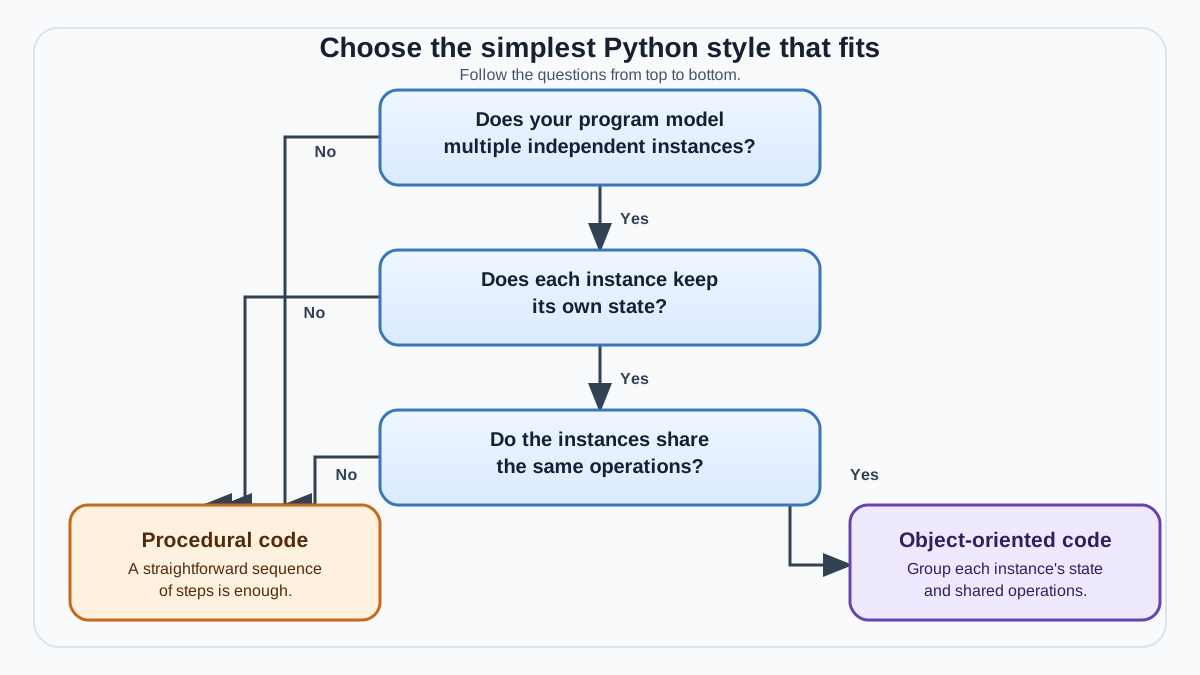
Here's the practical decision rule I teach beginners:
Use procedural code when you have a task to complete. Use OOP when you have things to model—things that exist independently and each carry their own state.
A quick script that renames files in a folder? Procedural. A one-off data cleanup? Procedural. A linear task where you just need steps to run in order? Procedural is almost always the clearer choice.
Reach for OOP when you're modeling many similar things that each need to keep their own state. A bank account system, a game with multiple players, a program that tracks employees, products, or orders—these benefit from classes because each object bundles its own data with the methods that change it.
Before you commit to a class, ask yourself three questions:
- Will there be multiple independent instances? If you only ever need one account, one player, or one order, a class may be overkill.
- Does each instance need to remember its own state? If the data is just passed through a few functions and discarded, you probably don't need an object.
- Do the same operations apply to each instance? If yes, a class gives you one blueprint instead of repeated code.
Here's a useful boundary: sharing data alone doesn't justify a class. If a few functions all read from the same list or dictionary, passing that data as an argument is often clearer than wrapping everything in an object. The class earns its place when you have multiple things that each need to remember their own version of that data—like two bank accounts with different balances.
There's also a "when not to use" side. Forcing classes onto a tiny script adds ceremony without payoff. You'll write more lines, read more boilerplate, and gain nothing. A 20-line automation script does not need a class.
Knowledge check
Check your understanding
Answer this question before you continue.
A Common Beginner Mistake
The most common mistake I see beginners make is assuming OOP is always the "professional" choice. They wrap every small script in classes because it feels more advanced.
Here's what that costs you: more code to read, more code to maintain, and more mental overhead for no real benefit. A class with one method that runs once is just a function wearing a costume.
Writing clean procedural code is a legitimate skill. Some of the best scripts I've written are plain functions doing one job well. The goal isn't to use OOP everywhere. The goal is to pick the style that makes your code easier to read and change.
It's also worth knowing that real Python projects rarely pick just one style. A typical program might use procedural code for the main flow—reading a file, calling functions in order—while using a class or two where state actually needs a boundary. Mixing styles is normal. The skill is recognizing which parts of your program benefit from each approach.
Knowledge check
Check your understanding
Answer this question before you continue.
Your Next Step
Here's a concrete exercise that will make the difference stick. Take a small script you've already written—something with a few functions that share data. Rewrite it using a class. Then compare the two versions side by side.
Treat the rewrite as an experiment, not an upgrade. The class version might be clearer, or it might just be longer. Ask yourself two questions:
- Which version is easier to read?
- Which version would be easier to change if you needed to add a second instance of the same thing?
If the class version doesn't win on at least one of those questions, the procedural version was probably the right call. If you want hands-on practice with classes, work through the OOP practice exercises to build your confidence.
Knowledge check
Final check
Finish the article by checking the ideas you just learned.
References
Want a more structured Python path?
Use the Python Starter Pack to turn scattered tutorials into a focused practice path.
Python for Artificial Intelligence Starter Pack
Build a Python foundation you can actually use. The Python for AI Starter Pack brings together a guided path through setup, core programming concepts, data structures, files, JSON, APIs, debugging, and practical projects—so you can move quickly from running your first program to understanding and building useful software.
- 264-page illustrated PDF
- 12 guided Python chapters
- Visual concept diagrams
- Self-assessment quizzes
- Bonus deep-dive sections
- Files, JSON, APIs, debugging & projects
- Foundation for data, automation & AI
Coming soon


