
Attributes and Methods in Python Classes
A class is a blueprint, but the blueprint is not the point. The point is what happens when you build real objects from it—each one carrying its own facts…

Key topics
A class is a blueprint, but the blueprint is not the point. The point is what happens when you build real objects from it—each one carrying its own facts and able to take its own actions. Those facts are attributes. Those actions are methods. Once this distinction clicks, reading Python code gets dramatically easier.
What Attributes and Methods Actually Are
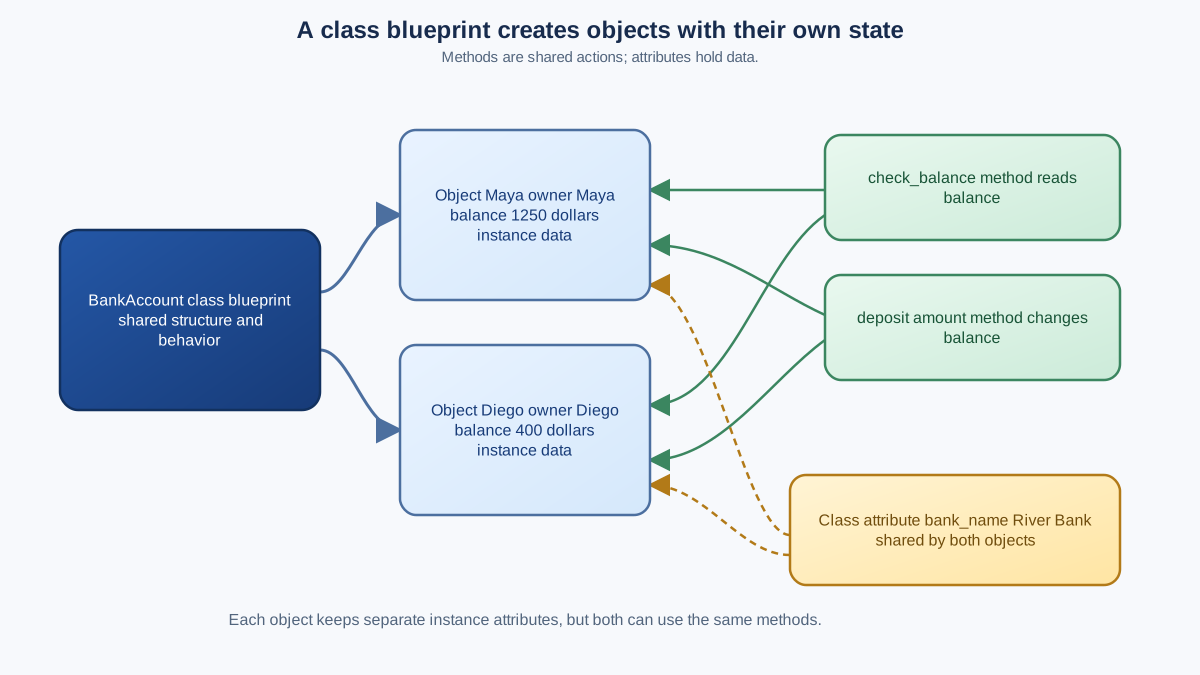
If you've worked through the basics of classes and objects, you know that a class is a template and an object is one instance built from that template. But what actually lives inside an instance?
Two kinds of things:
- Attributes are the data an object stores—its facts. A bank account has a balance. A pet has a name. A user has an email address.
- Methods are the actions an object can take—its behaviors. A bank account can accept a deposit. A pet can bark. A user can update their profile.
Think of it this way: attributes answer "what does this object know?" and methods answer "what can this object do?"
One quick clarification before we build: in Python, a method is technically an attribute too—a function attached to a class. But for everyday coding, it helps to treat them as two different jobs. An attribute is a named value. A method is a function you call with parentheses. This article focuses on regular instance methods, not the special @classmethod decorator you may see later.
Let's build one small example we'll use throughout this tutorial: a BankAccount class. Every account needs to remember its balance, and every account needs to be able to handle deposits and withdrawals.
Knowledge check
Check your understanding
Answer this question before you continue.
Instance Attributes: Data That Belongs to One Object
The most common kind of attribute is an instance attribute—data that belongs to a specific object, not to the class as a whole.
You define instance attributes inside a special method called __init__, which Python runs automatically when you create a new object. The first parameter, self, refers to the specific object being created.
class BankAccount:
    def __init__(self, owner, balance):
        self.owner = owner
        self.balance = balance
Here, self.owner and self.balance are instance attributes. When you create two accounts, each one gets its own copy:
account_1 = BankAccount("Maya", 500)
account_2 = BankAccount("Diego", 1200)

print(account_1.owner, account_1.balance)
print(account_2.owner, account_2.balance)
Maya 500
Diego 1200
Notice what happened: both objects came from the same class, but each one stores different values. Maya's balance has nothing to do with Diego's balance. That's the whole point of instance attributes—they keep each object's state separate.
Why does this matter? Because in real programs, you'll have hundreds or thousands of objects at once. Two users, two accounts, two orders—each needs its own data without accidentally overwriting the others.
Knowledge check
Check your understanding
Answer this question before you continue.
Methods: Actions an Object Can Take
A method is just a function defined inside a class. Like __init__, every regular method takes self as its first parameter, which lets it read and modify the object's own attributes.
Let's add two methods to our BankAccount class: one that reads the balance, and one that changes it.
class BankAccount:
    def __init__(self, owner, balance):
        self.owner = owner
        self.balance = balance

    def check_balance(self):
        return self.balance

    def deposit(self, amount):
        self.balance = self.balance + amount
        return self.balance
The check_balance method reads self.balance and returns it. The deposit method updates self.balance by adding the deposit amount. You call methods using dot notation, just like accessing an attribute—but with parentheses at the end:
account = BankAccount("Maya", 500)
print(account.check_balance())
account.deposit(250)
print(account.check_balance())
500
750
The first call returns the original balance. The deposit changes the object's state, so the second call returns the new balance. The account remembered the change—that's the method working on the object's own data.
One note: self is a convention, not a Python keyword. You could name it anything, but every Python programmer expects self. Always use it.
Knowledge check
Check your understanding
Answer this question before you continue.
Class Attributes: Data Shared by Every Object
Sometimes you want data that every object shares—not a per-object copy, but one value common to the whole class. That's a class attribute.
You define class attributes directly in the class body, outside any method:
class BankAccount:
    bank_name = "Python Savings Bank"

    def __init__(self, owner, balance):
        self.owner = owner
        self.balance = balance
Now bank_name belongs to the class itself. You can access it through the class name or through any instance:
print(BankAccount.bank_name)

account = BankAccount("Maya", 500)
print(account.bank_name)
Python Savings Bank
Python Savings Bank
Every account sees the same bank name. That's the key difference: instance attributes differ per object, while class attributes are shared across all objects of the class.
Class attributes work well for class-wide constants and configuration—values that genuinely should not differ from one object to the next.
Warning: Do not use a class attribute for a default value that objects will change, especially if that value is a list or dictionary. If one object modifies a shared mutable class attribute, every object sees the change. When an object needs its own changeable data, store it on
selfas an instance attribute.
Instance vs. Class Attributes: When to Use Each
The decision rule is simple:
- Use an instance attribute when each object needs its own value.
- Use a class attribute when every object should share the same value.
| Instance Attribute | Class Attribute | |
|---|---|---|
| Where it's defined | Inside __init__ with self | Directly in the class body |
| Who owns it | One specific object | The class, shared by all objects |
| Use this when | Each object needs unique data | All objects share one value |
| Example | self.balance = balance | bank_name = "Python Savings Bank" |
There's one classic beginner trap worth knowing about. If you try to change a class attribute through one instance, Python doesn't update the shared value—it silently creates a new instance attribute that only affects that one object.
account_1 = BankAccount("Maya", 500)
account_2 = BankAccount("Diego", 1200)

account_1.bank_name = "Different Bank"
print(account_1.bank_name)
print(account_2.bank_name)
print(BankAccount.bank_name)
Different Bank
Python Savings Bank
Python Savings Bank
Maya's account now shows a different bank name, but Diego's account and the class itself still show the original. The assignment created a new instance attribute on account_1 that shadows the class attribute. If you genuinely need to change a class attribute, change it through the class name: BankAccount.bank_name = "New Name".
Knowledge check
Check your understanding
Answer this question before you continue.
Where This Shows Up in Real Code
This isn't just textbook theory. When you start using Python libraries, you'll constantly ask two questions about the objects you meet: which values are attributes, and which calls are methods?
A web framework's User object stores a name and email as attributes and has methods like save() or send_password_reset(). A data analysis tool's DataFrame stores rows and columns as attributes and has methods like mean() or dropna(). The same reading habit applies everywhere: check what the object knows, then check what it can do.
Your Practice Task
Here's your next move: build a BankAccount class from scratch with a balance attribute and deposit and withdraw methods. For withdraw, follow this decision rule: check the amount against the balance first, change self.balance only when the amount is valid, and leave the balance unchanged otherwise.
Create an account, deposit some money, withdraw some money, and print the balance after each step. Try withdrawing more than the balance and confirm the balance does not go negative.
Run it. Break it. Fix it. That's how this sticks. Once you're comfortable with attributes and methods, you're ready to move on to more advanced OOP concepts like inheritance—where classes build on other classes.
Knowledge check
Final check
Finish the article by checking the ideas you just learned.
References
Want a more structured Python path?
Use the Python Starter Pack to turn scattered tutorials into a focused practice path.
Python for Artificial Intelligence Starter Pack
Build a Python foundation you can actually use. The Python for AI Starter Pack brings together a guided path through setup, core programming concepts, data structures, files, JSON, APIs, debugging, and practical projects—so you can move quickly from running your first program to understanding and building useful software.
- 264-page illustrated PDF
- 12 guided Python chapters
- Visual concept diagrams
- Self-assessment quizzes
- Bonus deep-dive sections
- Files, JSON, APIs, debugging & projects
- Foundation for data, automation & AI
Coming soon


