
Practice Exercises: Object-Oriented Programming
You've read about classes and objects. The ideas make sense on the page. A class is a blueprint. An object is built from that blueprint. self carries each…

You've read about classes and objects. The ideas make sense on the page. A class is a blueprint. An object is built from that blueprint. self carries each object's own data. Then you close the tutorial, open a blank file, and freeze.
That gap—between I read it and I can write it—is exactly what these exercises are for. Reading OOP is passive. The concepts only stick when you write a class, run it, and watch the output confirm (or betray) your mental model.
Before You Start
These exercises assume you already know the basics: a class is a blueprint, and an object is an instance built from that blueprint. If those terms feel shaky, review the OOP basics article first, then come back here.
Each exercise follows the same shape:
- Goal — what you're building
- Starter code — a partial class to complete
- Expected behavior — what your output should look like
- Hint — a nudge if you're stuck
- Solution — the completed code
- Stretch — a challenge that changes one requirement
Here's the important part: write the code yourself before looking at the solution. Type the starter code into a .py file, run it, and compare your output to the expected result. Then check the solution. If your version works and produces the same output, you've learned something. If it doesn't, the error message is your teacher.
Exercise 1: Build a Simple Class
Goal: Create a Dog class with a name attribute and a method that returns a friendly description.
Starter code:
class Dog:
    def __init__(self, name):
        # TODO: store the dog's name

    def describe(self):
        # TODO: return a string like "Rex is a good dog."
Expected behavior:
Rex is a good dog.
Hint: __init__ runs automatically when you create an object. Inside it, self.name = name stores the name on the object. The describe method should return a string, not print one.
Try it yourself. Run the starter code. You'll get a TypeError or a missing value because the methods don't do anything yet. That's fine—the error tells you exactly which piece is missing. Fill in the TODOs, run the code again, and compare your output to the expected behavior.
Solution:
class Dog:
    def __init__(self, name):
        self.name = name

    def describe(self):
        return f"{self.name} is a good dog."

dog = Dog("Rex")
print(dog.describe())
Expected output:
Rex is a good dog.
Why return and not print? If describe printed the string, you couldn't store it, format it, or combine it with other text. Returning gives the caller control. The print() call outside the class decides what happens to the value. That separation matters more as your programs grow.
Stretch: Add a breed attribute and update describe to include it. The expected output should look like Rex is a good German Shepherd. Hint: you'll need to add a second parameter to __init__ and pass it when you create the dog.
Solution for the stretch:
class Dog:
    def __init__(self, name, breed):
        self.name = name
        self.breed = breed

    def describe(self):
        return f"{self.name} is a good {self.breed}."

dog = Dog("Rex", "German Shepherd")
print(dog.describe())
Expected output:
Rex is a good German Shepherd.
This is the smallest possible win: you defined a class, created an object, and called a method. Notice that dog and another dog created from the same class would each carry their own name and breed. That's the core of OOP—one blueprint, many independent objects.
Knowledge check
Check your understanding
Answer this question before you continue.
Exercise 2: Add Methods That Do Work
Goal: Build a Rectangle class that stores width and height, with methods that return the area and perimeter.
Starter code:
class Rectangle:
    def __init__(self, width, height):
        self.width = width
        self.height = height

    def area(self):
        # TODO: return width times height

    def perimeter(self):
        # TODO: return 2 times (width plus height)
Expected behavior:
Area: 12
Perimeter: 14
Hint: Methods can read self.width and self.height just like any other variable. Both methods should return a number, not print it.
Try it yourself. Run the starter code and call rect.area(). What happens? The method exists but returns nothing, so Python gives you None. That missing value is your clue: the method needs a return statement, not just a calculation.
Solution:
class Rectangle:
    def __init__(self, width, height):
        self.width = width
        self.height = height

    def area(self):
        return self.width * self.height

    def perimeter(self):
        return 2 * (self.width + self.height)

rect = Rectangle(3, 4)
print("Area:", rect.area())
print("Perimeter:", rect.perimeter())
Expected output:
Area: 12
Perimeter: 14
Stretch: Add a method is_square() that returns True if the rectangle is a square and False otherwise. Hint: a square has equal width and height. Test it with Rectangle(5, 5) and Rectangle(3, 4).
Solution for the stretch:
class Rectangle:
    def __init__(self, width, height):
        self.width = width
        self.height = height

    def area(self):
        return self.width * self.height

    def perimeter(self):
        return 2 * (self.width + self.height)

    def is_square(self):
        return self.width == self.height

square = Rectangle(5, 5)
print("Square:", square.is_square())
rect = Rectangle(3, 4)
print("Square:", rect.is_square())
Expected output:
Square: True
Square: False
This exercise shows the real pattern of OOP: methods turn stored data into useful answers. The object holds the data; the methods do the work. That division—data plus behavior bundled together—is what makes OOP a different way of thinking than plain functions operating on plain variables.
Knowledge check
Check your understanding
Answer this question before you continue.
Exercise 3: Track Changing State
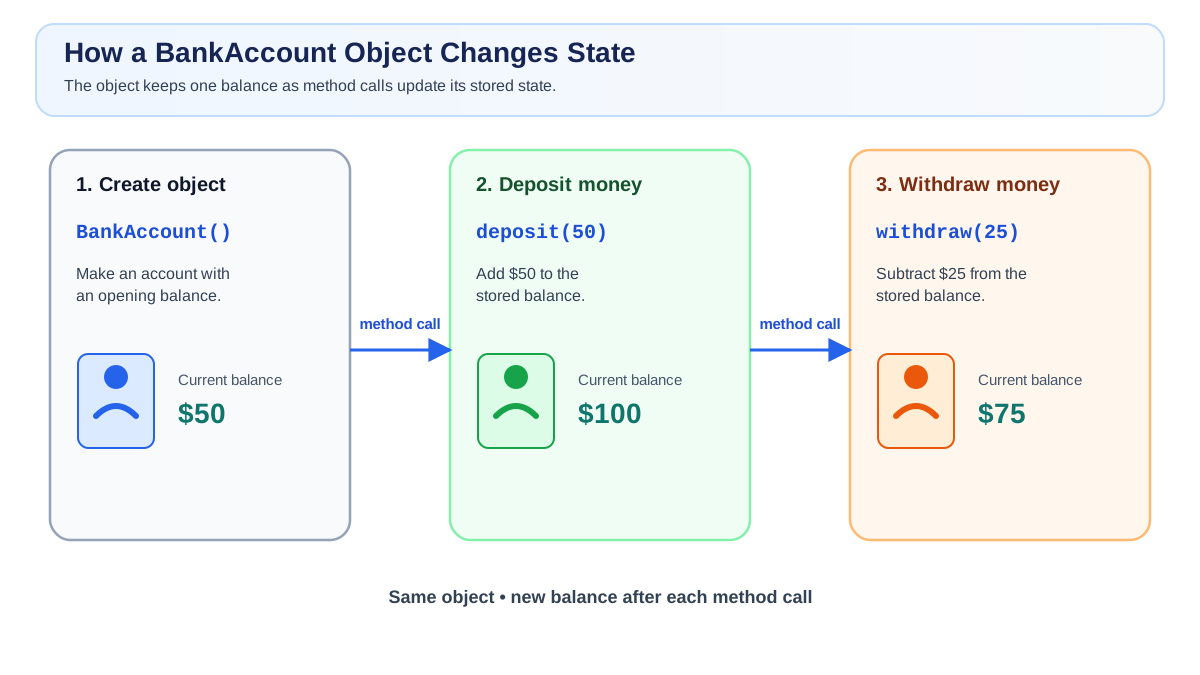
Goal: Create a BankAccount class that starts with a balance and supports deposit and withdraw methods.
Starter code:
class BankAccount:
    def __init__(self, starting_balance):
        self.balance = starting_balance

    def deposit(self, amount):
        # TODO: add amount to the balance

    def withdraw(self, amount):
        # TODO: subtract amount from the balance
Expected behavior:
Balance: 100
Balance: 75
Hint: deposit and withdraw should update self.balance, not return a new number and forget it. Use self.balance = self.balance + amount (or the shorthand self.balance += amount).
Try it yourself. Run the starter code, then call account.deposit(50) and check account.balance. What value do you see? If the balance didn't change, the method didn't update the object's state. That observation is the whole lesson: methods that change an object must assign back to self.balance.
Solution:
class BankAccount:
    def __init__(self, starting_balance):
        self.balance = starting_balance

    def deposit(self, amount):
        self.balance += amount

    def withdraw(self, amount):
        self.balance -= amount

account = BankAccount(50)
account.deposit(50)
print("Balance:", account.balance)
account.withdraw(25)
print("Balance:", account.balance)
Expected output:
Balance: 100
Balance: 75
Stretch: Modify withdraw so it prints a warning instead of letting the balance go below zero. Hint: check whether amount is greater than self.balance before subtracting.
Solution for the stretch:
class BankAccount:
    def __init__(self, starting_balance):
        self.balance = starting_balance

    def deposit(self, amount):
        self.balance += amount

    def withdraw(self, amount):
        if amount > self.balance:
            print("Warning: insufficient funds.")
        else:
            self.balance -= amount

account = BankAccount(50)
account.withdraw(75)
print("Balance:", account.balance)
account.deposit(100)
account.withdraw(25)
print("Balance:", account.balance)
Expected output:
Warning: insufficient funds.
Balance: 50
Balance: 125
This is the exercise where the mental model clicks. The object remembers its own state between method calls. When you call account.deposit(50), the account itself changes. The next time you check account.balance, you see the updated value. That's not a variable being passed around—that's an object carrying its own history.
Knowledge check
Check your understanding
Answer this question before you continue.
Common Mistakes to Watch For
These errors are normal. Every beginner hits them. Here's what they look like and how to fix them.
Forgetting self as the first parameter. Every method inside a class needs self as its first parameter, even if it doesn't use it.
# Wrong
def describe():
    return "Hello"

# Right
def describe(self):
    return "Hello"
If you forget it, Python will complain about passing the wrong number of arguments when you call the method.
Returning a value but never printing or storing it. A method that returns a number doesn't display anything. If you call rect.area() without print(), nothing appears to happen. The value is returned and then discarded.
Using an attribute before __init__ sets it. If you try to read self.balance before __init__ has assigned it, Python raises an AttributeError. Make sure every attribute you use is created in __init__.
Confusing the class with the object. Dog is the class. dog = Dog("Rex") creates the object. You call methods on the object (dog.describe()), not on the class.
Knowledge check
Check your understanding
Answer this question before you continue.
Put It Together: A Small Data Cleanup Task
Now use the same pattern in a realistic scenario. Imagine you're cleaning up a list of product records. Each product has a name, a price, and a quantity in stock. You want to calculate the total value of each product.
Your task: Create a Product class with name, price, and quantity attributes. Add a method total_value() that returns price * quantity. Then loop through this list and print the total value for each product:
products = [
    Product("Laptop", 899.99, 5),
    Product("Mouse", 24.50, 20),
    Product("Keyboard", 79.00, 10),
]
Expected behavior:
Laptop: $4499.95
Mouse: $490.00
Keyboard: $790.00
Hint: You'll need a for loop that calls total_value() on each product. Use an f-string to format the output. This task uses everything from the three exercises: __init__, attributes, methods that compute from stored data, and objects working together in a list.
Solution:
class Product:
    def __init__(self, name, price, quantity):
        self.name = name
        self.price = price
        self.quantity = quantity

    def total_value(self):
        return self.price * self.quantity

products = [
    Product("Laptop", 899.99, 5),
    Product("Mouse", 24.50, 20),
    Product("Keyboard", 79.00, 10),
]

for product in products:
    print(f"{product.name}: ${product.total_value():.2f}")
Expected output:
Laptop: $4499.95
Mouse: $490.00
Keyboard: $790.00
This is the same pattern you'll use in real scripts: define a class that holds data, give it methods that answer questions about that data, then process a collection of objects. Inventory reports, log analyzers, and data cleanup scripts all follow this shape.
What to Practice Next
Here's your next move: close this article and redo all three exercises from a blank file. No peeking at the solutions. If you can write a class with __init__, create an object, and call methods that update state—you've got it.
When you're ready to go deeper, look at how attributes and methods work together in more detail. Then tackle inheritance, which lets one class reuse and extend another. That's the natural next step once classes, objects, and methods feel comfortable.
The fastest way to make OOP stick is to write a class, run it, break it, and fix it. Output is the teacher. Every error message tells you something about what your code is actually doing—and every fix builds the mental model reading alone never will.
Knowledge check
Final check
Finish the article by checking the ideas you just learned.
References
Want a more structured Python path?
Use the Python Starter Pack to turn scattered tutorials into a focused practice path.
Python for Artificial Intelligence Starter Pack
Build a Python foundation you can actually use. The Python for AI Starter Pack brings together a guided path through setup, core programming concepts, data structures, files, JSON, APIs, debugging, and practical projects—so you can move quickly from running your first program to understanding and building useful software.
- 264-page illustrated PDF
- 12 guided Python chapters
- Visual concept diagrams
- Self-assessment quizzes
- Bonus deep-dive sections
- Files, JSON, APIs, debugging & projects
- Foundation for data, automation & AI
Coming soon


