
Basic Math in Python
Python does not make you memorize a calculator manual. It hands you a small set of operators and lets you run the calculation and read the answer…

Key topics
Python does not make you memorize a calculator manual. It hands you a small set of operators and lets you run the calculation and read the answer immediately. That loop—write, run, inspect—is why math is one of the fastest ways to feel real progress in your first week of Python.
In this tutorial, you'll add, subtract, multiply, and divide numbers, then layer on exponents, remainders, and a few math functions. Every example is runnable, so you can change the numbers and watch the output change with them.
Why Math First?
Almost every program you will write touches math somewhere: a price, a score, a distance, a count, a loop that repeats a fixed number of times. If you already know how to store numbers in variables, arithmetic is the next skill that turns those stored values into useful output. In short, the basic python math operations are the bridge between holding a value and doing something with it.
Two things make Python a good place to start:
- The operators read like plain English.
+,-,*, and/behave the way you expect from a calculator. - The results are visible immediately. You run a line, you see the answer. No build step, no ceremony.
If you need a refresher on storing values first, review how variables and number types work before continuing here.
Where to Run These Examples
Before the first code block, settle one practical question: where does this code run? You have two easy options, and both work for every example in this tutorial.
- The interactive interpreter (REPL). Open a terminal, type
python, and paste a snippet at the>>>prompt. You see each result as soon as you press Enter. - A saved script. Put the code in a file named
math_practice.py, then runpython math_practice.pyfrom the terminal. The whole file runs top to bottom.
Either path gives you the same loop: change a number, rerun, and read the new output. Pick whichever feels faster today. The examples below are written as scripts, so if you use the REPL, just paste each block and watch the results appear line by line.
The Arithmetic Operators
Python gives you seven arithmetic operators. Here they are in one table so you can see the whole set before we drill into each one:
| Operator | Name | Example | Result |
|---|---|---|---|
+ | Addition | 5 + 3 | 8 |
- | Subtraction | 10 - 4 | 6 |
* | Multiplication | 6 * 3 | 18 |
/ | Division | 12 / 4 | 3.0 |
// | Floor division | 7 // 2 | 3 |
% | Modulo (remainder) | 10 % 3 | 1 |
** | Exponentiation | 4 ** 2 | 16 |
The first three are straightforward. The last four hide a few details worth understanding, because they are where beginners get tripped up.
Adding and Subtracting
Addition and subtraction are the easiest place to start because they behave exactly like a calculator.
sum_result = 5 + 3
print(sum_result)

difference = 10 - 4
print(difference)
8
6
You can also operate on variables directly. This is where arithmetic starts to feel like real programming, because the values can come from anywhere:
a = 7
b = 2
total = a + b
print(total)
9
Before you move on, notice what that last block actually did. Python reads the right side of total = a + b first, works out that 7 + 2 is 9, and then assigns the result to the name total on the left. The expression is calculated, then stored. Change a or b and rerun the file, and the output follows the new values. That is the whole loop: change a value, observe the consequence.
Multiplying and Dividing
Multiplication uses the asterisk *, and division uses the slash /.
product = 6 * 3
print(product)

quotient = 12 / 4
print(quotient)
18
3.0
Notice the second result: 3.0, not 3. In Python 3, the / operator always returns a float, even when the division comes out even. This is a deliberate design choice, and it surprises a lot of newcomers.
result = 10 / 2
print(result)
5.0
Knowledge check
Check your understanding
Answer this question before you continue.
Floor Division: The Floor, Not the Decimal Drop
When you need a whole number from a division, reach for floor division with //. But name it precisely: // returns the floor of the division—the greatest integer that is less than or equal to the result.
print(7 // 2)
print(-7 // 2)
3
-4
The first line is easy: 7 // 2 is 3. The second line is where the mental model gets tested. -7 // 2 is -4, not -3, because -3.5 floored down to the next lower integer is -4. Floor division always rounds down toward negative infinity, never toward zero.
Common mistake: Do not think of
//as "drop the decimal." That is truncation, and it is a different operation. For positive numbers the two look identical, which is why the difference hides until a negative number shows up. If you actually need to drop the decimal toward zero, that is a job forint(), not floor division. Compare the two on the same value:
print(-7 // 2)   # floor: rounds down toward negative infinity
print(int(-3.5)) # truncation: drops the decimal toward zero
-4
-3
round() is yet another tool: it rounds to the nearest value, which is what you want for a cleaned-up display, not for a floor or a truncation. Keep the three separate and you will never be surprised by a negative result again.
Knowledge check
Check your understanding
Answer this question before you continue.
Exponents and Remainders
Two operators do more than the basic four, and both earn their place quickly.
Exponentiation uses ** to raise a number to a power:
squared = 4 ** 2
print(squared)

cubed = 2 ** 3
print(cubed)
16
8
Modulo uses % to return the remainder after division:
remainder = 10 % 3
print(remainder)
1
Modulo is more useful than it first looks. It is the standard trick for checking whether a number is even or odd (number % 2), and it powers repeating patterns like cycling through a list of options.
Tip: If you are ever unsure what an operator does, run it. Type
10 % 3, run it, and read the output. The interpreter is a faster teacher than any reference table.
Order of Operations
Python follows the same precedence rules you learned in school: parentheses first, then exponents, then multiplication and division, then addition and subtraction.
result = 2 + 3 * 4
print(result)

grouped = (2 + 3) * 4
print(grouped)
14
20
The first line gives 14 because multiplication runs before addition. The second gives 20 because the parentheses force the addition first.
Common mistake: Do not assume Python reads left to right. When a result looks wrong, check precedence before you check your numbers. When in doubt, add parentheses—they cost nothing and make your intent visible.
Knowledge check
Check your understanding
Answer this question before you continue.
Math Functions: Two Different Toolboxes
Beyond the operators, Python gives you math functions from two separate places. Keep them apart in your head and you will avoid a whole class of import errors.
The math module holds named mathematical functions that need an import. It is part of the standard library, so there is nothing to install—you just bring it in.
import math

root = math.sqrt(16)
print(root)
4.0
Built-in functions live in Python itself and work with no import at all:
print(round(3.7))      # round to nearest whole number
print(abs(-5))         # absolute value
print(max(2, 8, 5, 1)) # largest value
print(min(2, 8, 5, 1)) # smallest value
4
5
8
1
The tell is in the name. math.sqrt carries the math. prefix because it lives inside the module you imported. round, abs, max, and min have no prefix because they are already built in.
Common mistake: Forgetting the
import mathline and then callingmath.sqrtproduces aNameError. If you see that error, the fix is almost always the missing import at the top of your file.
When to Reach for Each Toolbox
The three toolboxes are not interchangeable, and the choice is simpler than it sounds:
- Operators express arithmetic directly:
+,-,*,/,//,%,**. - Built-ins cover common general operations that are not really arithmetic, like
abs(),round(),max(), andmin(). - The
mathmodule supplies named mathematical functions—square roots, powers, logs, and trigonometry—that no single operator expresses.
Here is that boundary in one runnable contrast. To find the diagonal of a square whose side is a known length, you need a square root, which no operator gives you directly:
import math

side = 5
diagonal = round(math.sqrt(side ** 2 + side ** 2), 2)
print(diagonal)
7.07
The ** squares each side, math.sqrt() takes the square root, and round() cleans up the long decimal for display. Each tool answers one specific question, and you can see all three working in a single line.
Knowledge check
Check your understanding
Answer this question before you continue.
Putting It Together: One Small Calculation
Operators are drills. A calculation is where they earn their keep. Here is a compact example that combines variables, division, floor division, and modulo into one useful result: splitting a batch of items into equal groups and reporting what is left over.
items = 23
group_size = 4

full_groups = items // group_size
leftover = items % group_size

print(full_groups)
print(leftover)
5
3
Twenty-three items split into groups of four gives five full groups and three items left over. Two operators, one readable answer. That is the payoff the whole tutorial has been building toward: stored values in, a useful result out, and each operator chosen because it answers a specific question.
Choosing the Right Tool
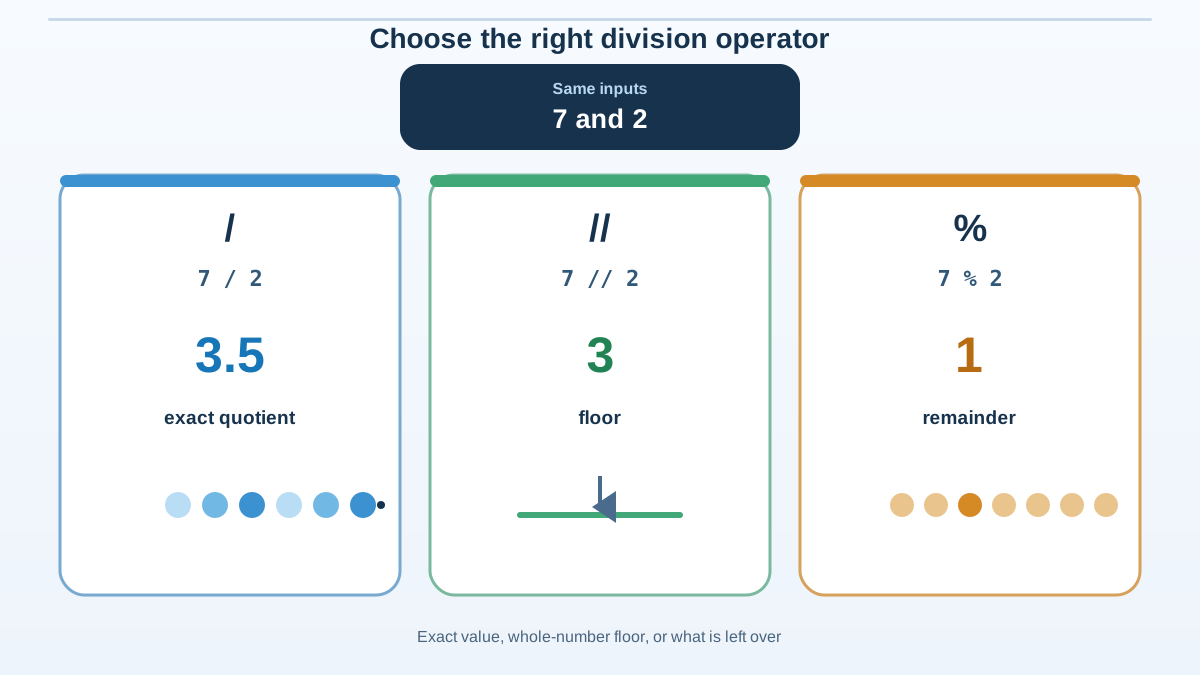
By now you have seen every operator do its job. The real skill is picking the right one for a calculation. Here is the decision rule I use:
- Use
/when you want the exact quotient, decimal included. - Use
//when you want the floor of a division, like splitting items into equal whole groups. - Use
%when you care about what is left over, like checking even or odd. - Use
**when you want a power, like squaring a value. - Use
round()when you want to clean up a displayed result, not when you need the floor.
Each choice maps to an example you have already run. 12 / 4 gives the exact quotient 3.0. 7 // 2 gives the floor 3. 10 % 3 gives the leftover 1. 4 ** 2 gives 16. And round(3.7) gives 4. When a calculation feels ambiguous, name what you actually want—the exact value, the floor, the remainder, or the power—and the operator picks itself.
Practice: Make the Operators Yours
The fastest way to lock this in is to run a small script and change the numbers. Try this:
- Add two numbers and print the result.
- Subtract one number from another.
- Multiply two numbers.
- Divide two numbers with
/and again with//, and compare the outputs. - Find the remainder of
10 % 3and check whether7 % 2is0or1. - Import
math, then usemath.sqrt()on a few numbers and print each result. - Experiment with
round(),abs(),max(), andmin().
For each one, predict the output before you run it. When your prediction is wrong, that mismatch is the lesson—read the output, adjust your mental model, and move on.
Next Step
You now have the operators that power most everyday calculations. The natural next move is to combine them with real input: ask a user for numbers and compute with them. Reading values from the keyboard turns these operators into interactive programs you can test with any numbers you type.
To see the shape of that next step, look back at the grouping example. Right now items and group_size are hard-coded numbers. Replace those two fixed values with input() calls so the same calculation works for whatever the user types—turning a fixed script into a tool anyone can run.
Knowledge check
Final check
Finish the article by checking the ideas you just learned.
References
Want a more structured Python path?
Use the Python Starter Pack to turn scattered tutorials into a focused practice path.
Python Starter Pack
A compact LearnPyFast PDF pack covering what Python is, installation, your first program, running Python code, and Python versions.
- 5 curated chapters
- Enhanced PDF edition with bundle-only learning guidance
- Offline-friendly format for focused review
- Source article links for future online updates
Coming soon


