
Python Comments and Code Style
Comments are not for Python. They are for the next human who reads your code—and that human is often you, six weeks later. The interpreter skips every line…

Key topics
Comments are not for Python. They are for the next human who reads your code—and that human is often you, six weeks later. The interpreter skips every # line without a second thought, so the only thing a comment can change is how quickly someone understands what your program actually does. That is the whole job, and it is worth learning early.
Why Comments Matter
When you write a program, you are really writing two documents at once: the code that Python runs, and the explanation that helps a person follow it. The code answers what happens. The comments answer why it happens that way.
That distinction matters more than it sounds. Code tells you that a set is being built. A good comment tells you that the set exists to remove duplicates before the data is processed. Without the second half, a future reader—or your future self—has to reverse-engineer your intent from the mechanics.
Comments also help you while you are still learning. When you revisit a script you wrote last week, a short note can save you from re-deriving your own logic. And when you eventually work on a team or in a job, clear comments are part of how you communicate with other programmers.
How to Write a Comment in Python
A comment starts with the # symbol. Everything after the # on that line is ignored by Python.
## This is a comment
print("Hello, world!")  # This is an inline comment
Hello, world!
A comment can sit on its own line above your code, or it can follow a statement on the same line. Either way, Python never executes it.
One detail beginners trip over: a # inside a string is just a character, not a comment.
text = "# This is not a comment, it's part of the string"
print(text)
## This is not a comment, it's part of the string
Knowledge check
Check your understanding
Answer this question before you continue.
Writing Multi-Line Comments
Python has no special multi-line comment syntax. The practical way to write a longer comment is to start each line with #.
## This function is the entry point for the whole script.
## It reads the input file, validates each row,
## and writes the cleaned results to a new file.
print("Done!")
Done!
You will sometimes see an unassigned triple-quoted string used as a longer note. Python ignores a string that is not assigned to a variable, so the code still runs. But that is not a comment feature, and it is not a docstring either. A docstring is the first string inside a module, function, or class, and documentation tools read it to describe that object. A standalone triple-quoted string that is not attached to anything is just an ignored expression.
def greet(name):
    """Return a friendly greeting for the given name."""
    return f"Hello, {name}!"
Use # for comments that explain code. Use docstrings for documenting what a function or module does. They serve different purposes, and mixing them up is a common beginner mistake.
The Decision Rule: Code, Comment, or Docstring?
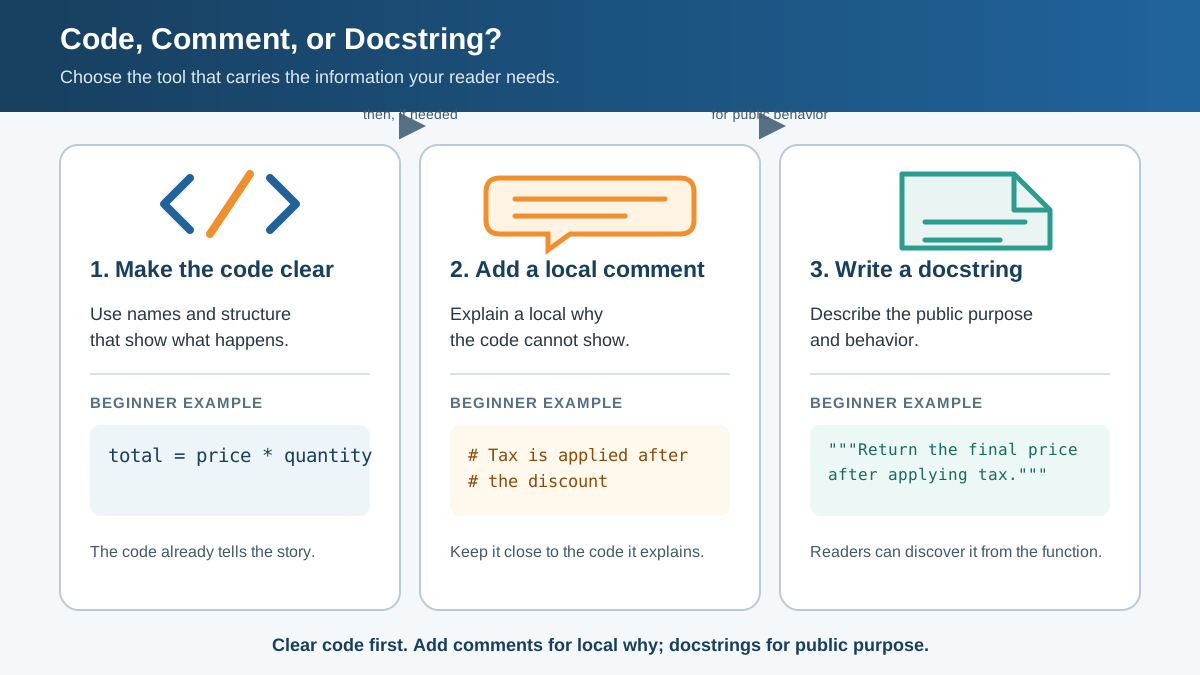
Here is the rule I keep coming back to, and it organizes everything else in this article:
- Make the code carry the obvious meaning first. Clear names and structure should explain most of what a line does.
- Use a comment for local reasoning or a non-obvious constraint—the why the code cannot show.
- Use a docstring for the public purpose of a function or module—what it does, what it takes in, and what it returns.
Let's prove that rule with one complete, runnable example.
def average(numbers):
    """Return the mean of a list of numbers."""
    total = sum(numbers)
    count = len(numbers)
    return total / count

## Skip empty entries so a missing score never drags the average down.
scores = [88, 92, None, 79, 95]
valid_scores = [score for score in scores if score is not None]
print(average(valid_scores))
88.5
Notice what each piece does. The docstring tells anyone who calls average what it returns. The comment explains a choice the code cannot show on its own: empty entries are filtered out first so a missing score never silently lowers the result. The names total, count, and valid_scores carry the rest, so no extra notes are needed. That is the whole frame: names and structure first, a comment for intent, a docstring for the public contract.
Knowledge check
Check your understanding
Answer this question before you continue.
Tips for Comments That Actually Help
Not all comments earn their place. Here are the rules I keep coming back to.
-
Explain the "why," not the "what." The code already shows what it does. Use the comment for the reasoning the code cannot show.
# Using a set to remove duplicates before counting unique_numbers = set(numbers) -
Skip the obvious. A comment that repeats the code adds noise, not clarity.
x = 5 # Set x to 5 # Not helpful -
Keep comments current. An outdated comment is worse than no comment, because it actively misleads the next reader. When you change code, update the comment that describes it.
-
Don't over-comment. If every line has a note, the notes stop meaning anything. Comment where the logic is non-obvious, and let clear code speak for itself elsewhere.
Common mistake: Writing a comment that contradicts the code. If the comment and the code disagree, the reader cannot trust either one. Keep them in sync.
Do Comments Affect How Python Runs?
Python does not execute comments. A # line is not a statement, so it never runs as part of your program. That said, tools can still read comments—documentation generators and linters look at them—so keeping them accurate matters beyond the interpreter.
Commenting out a line is a different story. When you put a # in front of a real statement, that line stops running, which changes behavior precisely because the code is skipped.
## print("This line won't run")
print("This line will run")
This line will run
This is a fast way to isolate a problem: comment out a suspect line, run the script, and see whether the behavior changes. Treat it as temporary isolation while you debug, not as a normal commenting practice. Clean up the commented-out code before you finish.
Knowledge check
Check your understanding
Answer this question before you continue.
What Is Python Code Style?
Code style is the set of conventions that keep your code readable and consistent. It is not about making code look pretty for its own sake. Consistent style means anyone on a team can open a file and understand it quickly, without re-learning a new formatting system each time.
Python has an official style guide called PEP 8. It covers the practical details that make code uniform:
- Indentation: how many spaces each level of nesting uses
- Spacing: how much space goes around operators and after commas
- Naming: how to name variables, functions, and classes
- Line length: how long a single line should be
You do not need to memorize PEP 8 to start. But knowing it exists—and following its main rules—will make your code look like it belongs in the Python ecosystem.
Style Habits That Serve the Same Rule
The style advice below is not a separate checklist. It is the same decision rule applied to formatting: make the code carry the obvious meaning, and reserve comments for intent and constraints.
-
Use four spaces for indentation. Python uses indentation to group code, so consistency is not optional. Four spaces per level is the standard.
if is_valid: print("Valid input") -
Put spaces around operators and after commas.
total = a + b print(x, y, z) -
Keep lines short. Aim for under 79 characters. Long lines are hard to read on any screen and harder to review.
-
Use descriptive names. A name should tell you what the value is for.
user_age = 25 # Clear ua = 25 # Not clear -
Document functions with a docstring when their purpose needs explaining. A one-line docstring saying what a function does and returns is enough for most helpers. Reserve longer documentation for functions whose interface is not obvious from the name.
-
Add a file-header comment only when it helps orientation. A short note at the top of a script describing what the program does can orient anyone who opens the file. It is optional and local to a project—if the filename and the first function already make the purpose obvious, skip it.
Here is the same idea in one before-and-after pair. Before, the code hides its meaning:
def p(n):
    t = 0
    for x in n:
        t = t + x
    return t / len(n)
After, names and spacing carry the meaning, and only the non-obvious choice earns a comment:
def average(numbers):
    """Return the mean of a list of numbers."""
    total = 0
    for number in numbers:
        total = total + number
    return total / len(numbers)
The second version needs almost no comments because the code explains itself. That is the goal: style is not decoration. It is how you make the code carry the obvious meaning so your comments can focus on intent.
Knowledge check
Check your understanding
Answer this question before you continue.
Why Style and Comments Help You Learn
Readable code is easier to debug. When you can follow your own logic, you can find mistakes faster and change behavior without breaking something else. That speed compounds as your programs grow from a few lines to a few hundred.
Good habits also carry into real work. In a programming job, you will read and review other people's code, and they will read yours. Clean, well-commented code is a professional skill, not a nicety.
Your Next Step
Open a small script you wrote recently and read it as if you had never seen it before. Where did you have to pause to figure out what a line does? Apply the decision rule there: improve the name or structure first, and only add a # comment if the why still is not obvious. Then check your formatting: four-space indentation, spaces around operators, descriptive names. Fix one script this way, and the habit will start to feel automatic.
The goal is not perfect comments. It is code that another person—or future you—can open and understand without a struggle.
Knowledge check
Final check
Finish the article by checking the ideas you just learned.
References
Want a more structured Python path?
Use the Python Starter Pack to turn scattered tutorials into a focused practice path.
Python Starter Pack
A compact LearnPyFast PDF pack covering what Python is, installation, your first program, running Python code, and Python versions.
- 5 curated chapters
- Enhanced PDF edition with bundle-only learning guidance
- Offline-friendly format for focused review
- Source article links for future online updates
Coming soon


