
Python Variables and Data Types
A Python variable is not a box you fill. It is a name bound to an object, and the object carries the type. Get that straight early and a whole class of…

Key topics
A Python variable is not a box you fill. It is a name bound to an object, and the object carries the type. Get that straight early and a whole class of beginner bugs stops surprising you.
What Is a Variable in Python?
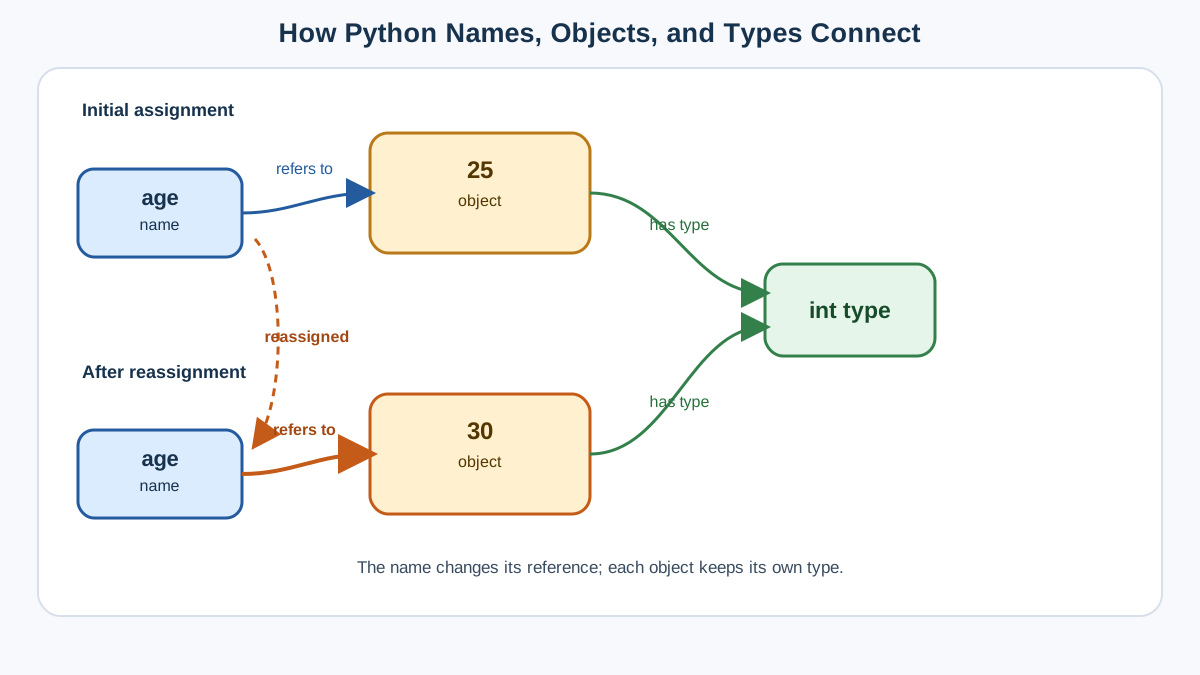
A variable is a name that refers to an object. You create one with a single equals sign:
age = 25
Read that line as "bind the name age to the object 25." Now age is a handle you can use anywhere in your program to reach that object.
age = 25
print(age)
print(age + 1)
25
26
Why bother with variables at all?
- You can reuse the same value in many places without retyping it.
- You can change what a name means in one spot, and every later read through that name picks up the new value.
- You can give data a meaningful name, which turns a pile of numbers into readable logic.
Here is the part that trips up most beginners: the name and the object are two different things. The name age does not contain 25. It points to an object that holds 25. When you assign again, you do not edit the old object—you rebind the name to a new one.
age = 25
age = 30
print(age)
30
The name age now refers to a different object. Nothing was "filled up" or "overwritten" in the box sense. The name simply points somewhere new, and only code that reads the name after that line sees the change.
Knowledge check
Check your understanding
Answer this question before you continue.
How to Name Variables
Good names are the cheapest documentation you will ever write. Python has a few hard rules and one strong convention.
Rules you cannot break:
- Use letters, numbers, and underscores (
_). - A name cannot start with a number.
- Names are case-sensitive:
scoreandScoreare different variables. - No spaces or special characters like
@or$. - Avoid reserved words such as
for,if, andwhile.
Convention you should follow: use lowercase with underscores between words, called snake_case.
user_name = "Alice"
total_score = 100
is_logged_in = True
Common mistake:
2scoreis invalid because it starts with a digit, andtotal scoreis invalid because of the space. When you see aSyntaxErroron a line that looks fine, check the name first.
Knowledge check
Check your understanding
Answer this question before you continue.
Data Types: What the Object Actually Is
Every object in Python has a type, and that type decides what you can do with it. You can add two numbers, but you cannot add a number to a word until you convert one of them.
Python is dynamically typed. You never declare a type up front; Python figures it out from the object you assign. That is convenient, but it also means a name can refer to a string at one moment and a number the next. The type belongs to the object, not to the name.
You can always ask Python what type an object is:
age = 25
name = "Alice"
print(type(age))
print(type(name))
<class 'int'>
<class 'str'>
The Core Types: int, float, and str
Start with the three types behind almost every beginner program.
Integers (int)
Whole numbers, positive or negative, with no decimal point.
age = 30
score = -7
Floats (float)
Numbers with a decimal point. Use them for measurements and any calculation that needs fractions.
temperature = 22.5
height = -1.75
Strings (str)
Text, wrapped in single or double quotes.
name = "Alice"
greeting = 'Hello, world!'
Common mistake:
price = "19.99"is a string, not a float, because of the quotes. It looks like a number, but Python treats it as text. Trying to do math on it will fail until you convert it.
| Type | What it holds | Example | Use this when |
|---|---|---|---|
int | Whole numbers | 42, -7 | Counting, indexing, whole quantities |
float | Numbers with decimals | 22.5, -1.75 | Measurements and simple decimal calculations |
str | Text | "Alice", 'hi' | Names, messages, any words |
Knowledge check
Check your understanding
Answer this question before you continue.
Why the Type Matters
The type decides which operations are legal. Add two numbers and you get a sum. Add two strings and you join them. Mix a number and a string and Python stops you.
print(2 + 3)
print("2" + "3")
5
23
The first line adds numbers. The second joins text. Same + symbol, different behavior, because the objects have different types.
print(2 + "3")
Traceback (most recent call last):
  File "<stdin>", line 1, in <module>
TypeError: unsupported operand type(s) for +: 'int' and 'str'
That TypeError is Python telling you the two objects do not speak the same language. The fix is to convert one of them, which is exactly what type conversion is for.
Changing Types with Conversion
When you need a value in a different type, Python gives you functions to convert it.
age = 25
age_str = str(age)      # "25"
print(age_str)
print(type(age_str))
25
<class 'str'>
year = "2024"
year_int = int(year)    # 2024
price = "19.99"
price_float = float(price)  # 19.99
print(year_int)
print(price_float)
2024
19.99
Warning: conversion only works when the string actually looks like a number.
int("hello")raises aValueError. If a conversion fails, check whether the string contains anything besides digits, a sign, or a decimal point.
Knowledge check
Check your understanding
Answer this question before you continue.
One Experiment That Ties It Together
Here is the whole model in one small script. Predict each output before you run it, then check yourself:
raw_price = "19.99"        # text from a form or file
price = float(raw_price)   # convert to a number
quantity = 3
total = price * quantity
print(type(raw_price))
print(type(price))
print(total)
<class 'str'>
<class 'float'>
59.97
Notice what happened. raw_price stayed a string the whole time—the name still points to the original text object. price is a new name bound to a new float object. The multiplication worked only because price and quantity were both numbers. If you had written raw_price * quantity, Python would have raised a TypeError and told you exactly why.
That is the decision rule to carry forward: inspect the object, then choose an operation or a conversion. When an operation fails, do not guess. Print type() on each value and let the output name the mismatch.
Practice: Predict the Type
Before you run this, write down what you expect each line to print:
city = "London"
population = 9000000
average_temp = 15.5
print(type(city))
print(type(population))
print(type(average_temp))
<class 'str'>
<class 'int'>
<class 'float'>
Now try the same habit on real data. A user's email address is a str. The number of items in a shopping cart is an int. A temperature reading is a float. The point is not to memorize the answers—it is to get comfortable asking type() whenever you are unsure.
Frequently Asked Questions
Can I use spaces in variable names?
No. Use underscores instead: total_score, not total score.
What happens if I add a string and an integer?
Python raises a TypeError. Convert one value to match the other first.
Are Age and age the same variable?
No. Python is case-sensitive, so they are two different names.
Do I have to declare a variable's type? No. Python infers the type from the object you assign.
Next Step
Run one tiny script that receives text, converts it to a number, and uses it in an operation. Take a price like "9.99", convert it with float(), multiply it by a quantity, and print the total. When it works, you have used every idea in this article: a name bound to an object, a type that decides what you can do, and a conversion that moves data across a boundary.
If the syntax still feels shaky, revisit the basics of Python syntax before moving on. When you are ready to go further, the next natural step is combining numbers and text in real operations.
Knowledge check
Final check
Finish the article by checking the ideas you just learned.
References
Want a more structured Python path?
Use the Python Starter Pack to turn scattered tutorials into a focused practice path.
Python Starter Pack
A compact LearnPyFast PDF pack covering what Python is, installation, your first program, running Python code, and Python versions.
- 5 curated chapters
- Enhanced PDF edition with bundle-only learning guidance
- Offline-friendly format for focused review
- Source article links for future online updates
Coming soon


