
Practice Exercises: Python Basics
Reading about variables and input() is useful. Running them is where the skill actually lands. These python basics exercises are built around one idea:…

Key topics
Reading about variables and input() is useful. Running them is where the skill actually lands. These python basics exercises are built around one idea: write the code, run it, inspect the output, then make a small change to see what breaks. That loop is how you learn Python by doing.
Before you start, make sure you are comfortable with the building blocks. If any exercise feels unfamiliar, review variables and data types, working with numbers and strings, and user input first.
How to Work Through These Exercises
Each exercise follows the same shape: a goal, starter code, expected behavior, a hint, a solution, and an explanation. Here is how to get the most out of them:
- Attempt the exercise before reading the hint. The struggle is part of the learning. If you peek at the solution immediately, you will recognize the pattern instead of owning it.
- Run every example. Do not just read the code and nod. Type it, run it, and compare the output to what you expected.
- Break things on purpose. Change a value, remove a conversion, rename a variable. The error messages you get are evidence about how Python actually works.
You can run the code in any Python environment you already have, whether that is IDLE, a terminal, or an online editor. The exercises are short enough to paste into a single file and run with python filename.py.
The One Boundary That Matters: Text vs. Numbers
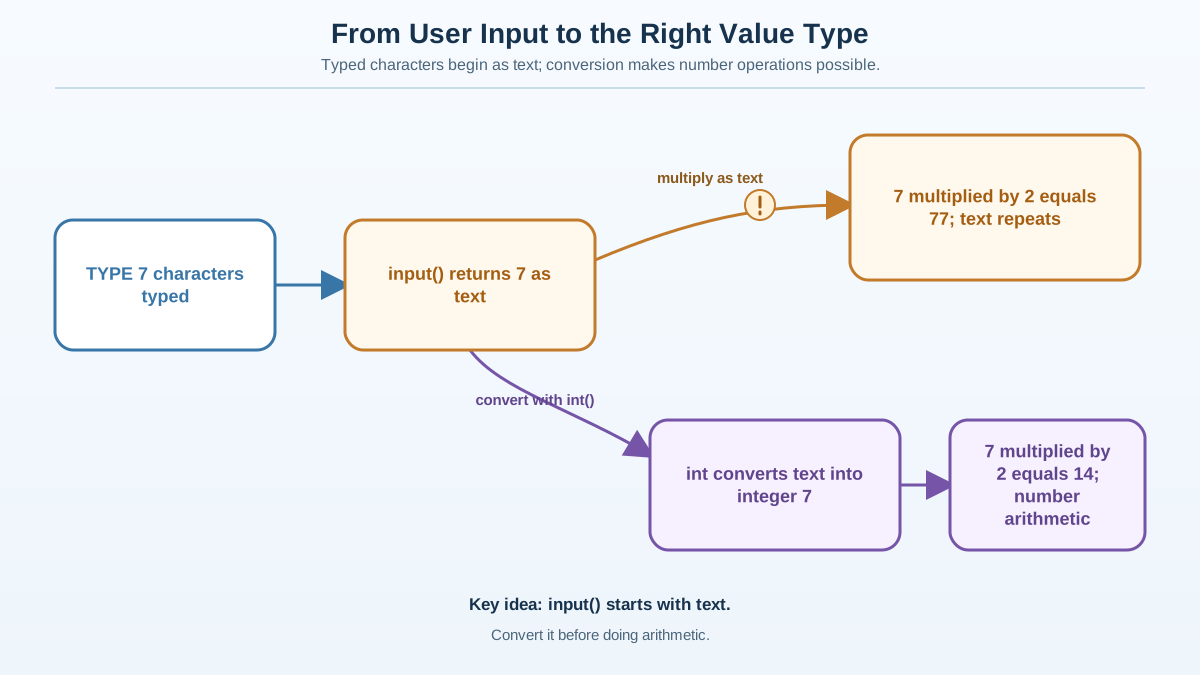
Here is the thread that runs through every exercise in this article: Python treats text and numbers as different kinds of values, and the boundary between them is where beginners trip most often.
input() always hands you text, even when the user types digits. "7" is not the number 7; it is a string made of one character. Arithmetic needs numbers. Concatenation needs strings. The moment you mix them up, Python stops and tells you exactly where you went wrong.
Keep one question in your pocket for every exercise below: what type is this value right now? If you can answer that, you can predict most beginner errors before they happen.
Knowledge check
Check your understanding
Answer this question before you continue.
Exercise 1: Variables and Naming Rules
Goal: Create variables, reassign one of them, and inspect what type each value holds.
Starter code:
name = "Alice"
age = 25
print(name)
print(age)
Expected behavior: The program prints Alice and 25, each on its own line.
Tasks:
- Add a line that prints the type of
ageusingtype(age). - Reassign
ageto a new value, like your age next year, and run the program again. - Try creating a variable named
2cooland run the program. Read the error carefully.
Hint: Variable names must start with a letter or an underscore, and they cannot contain spaces or dashes. Reserved words like print are off-limits too. type() is a built-in that tells you what kind of value a variable holds.
Solution:
name = "Alice"
age = 25
print(name)
print(age)
print(type(age))

age = 26
print(age)
print(type(age))
Expected output:
Alice
25
<class 'int'>
26
<class 'int'>
Explanation: This exercise is really about seeing the type, not just storing a value. type(age) reports <class 'int'>, which tells you age holds a number. Now reassign age to "26" with quotes and run it again: the type flips to <class 'str'>, and the value stops behaving like a number. That single observation is the foundation for every later exercise.
Extension: Try naming a variable user-name and see what error you get. The dash is a subtraction operator, so Python reads it as user minus name and complains that neither variable exists.
Exercise 2: Basic Math and Division
Goal: Practice arithmetic and predict how each operator treats its inputs.
Starter code:
a = 10
b = 4
print(a + b)
print(a - b)
print(a * b)
print(a / b)
Expected behavior: The program prints 14, 6, 40, and 2.5.
Tasks:
- Before you run anything, write down what you expect
a / bto print. Then run it and compare. - Add a line that computes the remainder of
adivided bybusing the%operator. - Change
aandbto decimal numbers like7.5and2.0, and run it again.
Hint: In Python 3, the / operator always returns a float, even when both numbers are integers. If you want whole-number division, use //.
Solution:
a = 10
b = 4
print(a + b)
print(a - b)
print(a * b)
print(a / b)
print(a % b)
Expected output:
14
6
40
2.5
2
Explanation: The / operator gives 2.5, not 2, because Python 3 returns a float for division. The % operator gives the remainder, which is 2 because 10 divided by 4 leaves a remainder of 2. This distinction matters the moment you start writing code that checks whether a number is even or odd.
Extension: Predict what 10 // 4 returns before you run it. Then run it and check whether your mental model was right.
Knowledge check
Check your understanding
Answer this question before you continue.
Exercise 3: Combining Strings
Goal: Join strings together and repair the mixed-type error that trips up beginners.
Starter code:
greeting = "Hello"
name = "Alice"
Expected behavior: The program prints a single greeting that includes both values.
Tasks:
- Combine
greetingandnameinto a variable calledmessageso it readsHello Alice. - Print
message. - Now try this line and run it:
print(greeting + " " + name + " " + 5). Read the error, then fix it so the message ends with the number5.
Hint: The + operator joins strings, but it will not add a space for you, and it refuses to join a string to a number. You need to include the space yourself and convert the number with str().
Solution:
greeting = "Hello"
name = "Alice"
message = greeting + " " + name + "!"
print(message)
print(greeting + " " + name + " " + str(5))
Expected output:
Hello Alice!
Hello Alice 5
Explanation: String concatenation is literal: Python joins exactly what you give it, nothing more. Forgetting the space is the most common mistake here, and the output makes it obvious. The second line is where the text-versus-number boundary bites: greeting + " " + name + " " + 5 fails because you cannot add a string and an integer. Wrapping the number in str(5) converts it to text, and the join works.
Extension: Try an f-string instead: message = f"{greeting} {name}!". It is cleaner when you are combining many values, and it converts numbers for you automatically. You will use f-strings as the main style in the final exercise.
Knowledge check
Check your understanding
Answer this question before you continue.
Exercise 4: Getting User Input
Goal: Read input from the user and convert it to a number when you need math.
Starter code:
color = input("What is your favorite color? ")
print("Your favorite color is " + color)
Expected behavior: The program asks a question, waits for the user to type an answer, then repeats it back.
Tasks:
- Ask the user for a number and store it in a variable.
- Print double that number.
Hint: input() always returns a string, even if the user types digits. You must convert it with int() or float() before doing math.
Solution:
color = input("What is your favorite color? ")
print("Your favorite color is " + color)

number = int(input("Enter a number: "))
print("Double that is " + str(number * 2))
Expected behavior (example run):
What is your favorite color? blue
Your favorite color is blue
Enter a number: 7
Double that is 14
Explanation: The second input() is wrapped in int() so the user's text becomes a number you can multiply. Notice the solution also wraps the result in str() before printing, because you cannot concatenate a number to a string directly.
Here is the subtle part that trips up beginners. If you skip the int() conversion and write number * 2, Python does not crash. It repeats the string: "7" * 2 gives "77", not 14. The output looks almost right, which makes it worse than an error. The multiplication works because strings support repetition, but it is not the math you wanted.
Run this to see the difference for yourself:
text = input("Enter a number: ")
print(text * 2)
Enter a number: 7
77
That is the text-versus-number boundary in action. "7" is a string, so * repeats it. 7 is a number, so * doubles it. The same symbol, two completely different behaviors, decided entirely by the type of the value.
Extension: Ask for a decimal number and use float() instead. Then print the result with two decimal places.
Knowledge check
Check your understanding
Answer this question before you continue.
Exercise 5: Putting It All Together
Goal: Combine variables, input, math, and string formatting in one small program.
Task: Write a program that asks for the user's name and age, then prints a message telling them what year they will turn 100.
Starter code:
name = input("What is your name? ")
age = int(input("How old are you? "))
Expected behavior: For a user named Alice who is 25, the program prints Alice will turn 100 in the year 2101.
Hint: You need a starting year to do the math. Use a fixed value like 2026 so the output is reproducible, and compute the target year as starting_year + (100 - age). This is a practice simplification, not a general date-handling solution.
Solution:
name = input("What is your name? ")
age = int(input("How old are you? "))

starting_year = 2026
year_100 = starting_year + (100 - age)

print(f"{name} will turn 100 in the year {year_100}")
Expected behavior (example run):
What is your name? Alice
How old are you? 25
Alice will turn 100 in the year 2101
Explanation: This exercise pulls together everything from the earlier ones. input() reads the name as a string and the age as an integer. The math starting_year + (100 - age) computes the target year. This time the message uses an f-string, so the number is formatted into the text for you—no manual str() call needed. The name stays a string, the age becomes a number, and the f-string handles the display.
Test your own version: Before you compare with the solution, run your program with these two cases and check that the output matches:
- Input
Aliceand25should printAlice will turn 100 in the year 2101. - Input
Boband50should printBob will turn 100 in the year 2076.
If your output matches both, your conversions and math are correct. Then change the age input to "twenty-five" and watch the program crash with a ValueError—that is the boundary refusing to guess what you meant.
Extension: Ask for a decimal age and use float() instead of int(). The math still works, and you will see the result come out as a float. (Wrapping input in try/except to handle bad input is a useful idea, but it belongs to a later lesson on exceptions, not this one.)
Common Beginner Mistakes
These are the errors beginners hit again and again. Each one is a small mental model fix, not a deep problem:
- Forgetting quotes around strings.
name = Alicemakes Python look for a variable calledAlice, which does not exist. Always quote text. - Doing math on
input()without converting.input()returns a string."7" * 2gives"77", not14. Convert withint()orfloat()first. - Concatenating a number to a string.
"Age: " + agefails becauseageis an integer. Wrap it instr(age)or use an f-string. - Expecting
/to return a whole number. In Python 3,10 / 4is2.5. Use//if you want2.
Next Steps
You have now practiced the core loop: write, run, inspect, adjust. That loop is the real skill, and it transfers to every topic that comes next.
Here is your next concrete task: build a small program that asks the user for a temperature in Celsius and prints the Fahrenheit equivalent. It uses everything from this article—input, conversion, math, and string formatting—with no new concepts required.
Make it testable the same way Exercise 5 was. Run it with 0 and confirm it prints 32.0. Run it with 100 and confirm it prints 212.0. Those two boundary cases tell you whether your formula and conversions are right before you trust any other input.
When you finish, change the input and run it again. Then change it to a decimal and watch how the output shifts. Every run is a small experiment, and each one sharpens the same question: what type is this value right now?
When you are ready to move beyond the basics, the same practice-first approach applies to bigger ideas. The next natural step is conditionals, where the text-versus-number boundary starts deciding which branch your program takes. Master the loop here, and you will carry it everywhere.
Knowledge check
Final check
Finish the article by checking the ideas you just learned.
References
Want a more structured Python path?
Use the Python Starter Pack to turn scattered tutorials into a focused practice path.
Python Starter Pack
A compact LearnPyFast PDF pack covering what Python is, installation, your first program, running Python code, and Python versions.
- 5 curated chapters
- Enhanced PDF edition with bundle-only learning guidance
- Offline-friendly format for focused review
- Source article links for future online updates
Coming soon


