
Break and Continue in Python Loops
A loop repeats until something tells it to stop. break and continue are the two controls that decide what happens next: break exits the whole loop, while…

Key topics
A loop repeats until something tells it to stop. break and continue are the two controls that decide what happens next: break exits the whole loop, while continue skips the rest of the current pass and starts the next one. The real skill is not memorizing the keywords. It is predicting exactly which line runs next.
Why Control Loop Flow?
Loops repeat actions—checking every item in a list, counting numbers, reading input. But most real loops do not want to run every iteration to the end. You might find what you are looking for early, or you might hit values that should be ignored.
Loop control gives you two moves:
- Stop the whole loop when you have what you need.
- Skip one iteration and move to the next without ending the loop.
Think of a conveyor belt carrying items past you. break is pulling the emergency stop: the belt halts, and nothing else moves. continue is letting the current item pass by untouched while the belt keeps feeding the next one. Both change the flow; only one stops the machine.
What Is the break Statement?
The break statement exits the loop immediately. Python stops the current iteration, skips every remaining iteration, and continues with the first line of code after the loop.
It works in both for and while loops. It is most useful when you are searching for one specific thing and want to stop as soon as you find it.
## Find the first even number in a list
numbers = [1, 3, 7, 10, 5]
for num in numbers:
    if num % 2 == 0:
        print(f"Found an even number: {num}")
        break  # Exit the loop early
Found an even number: 10
The loop stops at 10. It never looks at 5, because break already ended the loop.
Common mistake: break outside a loop
break is only valid inside a loop. Using it anywhere else raises a SyntaxError. If you see that error, check that your break is indented inside a for or while body.
Knowledge check
Check your understanding
Answer this question before you continue.
When to Use break
Reach for break when no later item matters. Continuing the loop would be wasted work:
- Searching for a match: You only need the first result, so stop once you find it.
- Ending on a condition: Something happened that makes the rest of the loop pointless.
- Handling a
while Trueloop: A loop that runs until a condition inside it says stop.
## Stop asking for input when the user types 'quit'
while True:
    user_input = input("Type something (or 'quit' to exit): ")
    if user_input == "quit":
        print("Goodbye!")
        break
    print(f"You typed: {user_input}")
Here break is the only exit. Without it, the while True loop would run forever.
Note:
while Truedeliberately creates a loop whose exit is managed inside the body. Use it when the stopping condition can only be known mid-loop, like "wait for the user to typequit." When you can express the stopping condition up front, a normalwhile conditionloop is the safer default—it cannot run forever by accident.
What Is the continue Statement?
The continue statement skips the rest of the current iteration and jumps straight to the next one. The loop keeps running; it just ignores the remaining code for this particular value.
## Print only positive numbers in a list
numbers = [3, -1, 7, -5, 2]
for num in numbers:
    if num < 0:
        continue  # Skip negative numbers
    print(f"Positive number: {num}")
Positive number: 3
Positive number: 7
Positive number: 2
The negative numbers never reach the print. The loop does not end—it simply moves past them.
Common mistake: continue skips too much
continue skips everything below it in the loop body for that iteration. If you place it before code that should always run, that code silently never runs. Put continue after the work you want to keep, not before it.
Warning: continue in a while loop can trap you
In a while loop, the code that moves the loop forward—the counter update or the state change that will eventually make the condition false—must run before a possible continue. If continue sits above that update, the loop skips it and never makes progress.
## Dangerous: the increment never runs when num is odd
num = 0
while num < 10:
    if num % 2 == 1:
        continue  # Skips the increment below -> infinite loop
    print(num)
    num += 1
0
The loop prints 0, then hits num = 1, sees it is odd, and runs continue forever. The increment at the bottom never executes, so num never reaches 10.
The fix is to guarantee progress on every pass. Move the update to the top of the body so it always runs before continue can skip anything. Because the update now happens first, the loop tests the next value each round, so the bound must shift to match the values you actually want to print:
## Safe: the increment runs first, so continue can never skip it
num = 0
while num < 10:
    num += 1
    if num % 2 == 1:
        continue
    print(num)
2
4
6
8
10
Notice what changed. The dangerous loop printed 0 first and then stalled. The safe loop increments before testing, so it never revisits the same value and cannot stall. The trade-off is that the printed range shifts—0 is gone and 10 now appears because the increment runs before the check. That is the mechanism, not a style preference: continue jumps to the next loop check, so anything that must happen every pass belongs before it. When you move the update, re-check your bound and your expected output.
When to Use continue
Use continue when later items still matter, but the current item should receive no more processing:
- Skipping invalid data: Ignore blank lines, empty strings, or malformed entries.
- Cleaning input: Process only the "good" values and move past the rest.
- Flattening nested logic: Handle a special case early with
continueso the main logic stays simple.
## Skip empty strings in a list of names
names = ["Alice", "", "Bob", "", "Charlie"]
for name in names:
    if name == "":
        continue  # Skip empty entries
    print(f"Hello, {name}!")
Hello, Alice!
Hello, Bob!
Hello, Charlie!
This is a reusable pattern: scan a stream of records, drop the unusable ones, and keep processing the rest. The loop has decided that an empty name needs no work, but the remaining names still do.
Knowledge check
Check your understanding
Answer this question before you continue.
Using break and continue Together
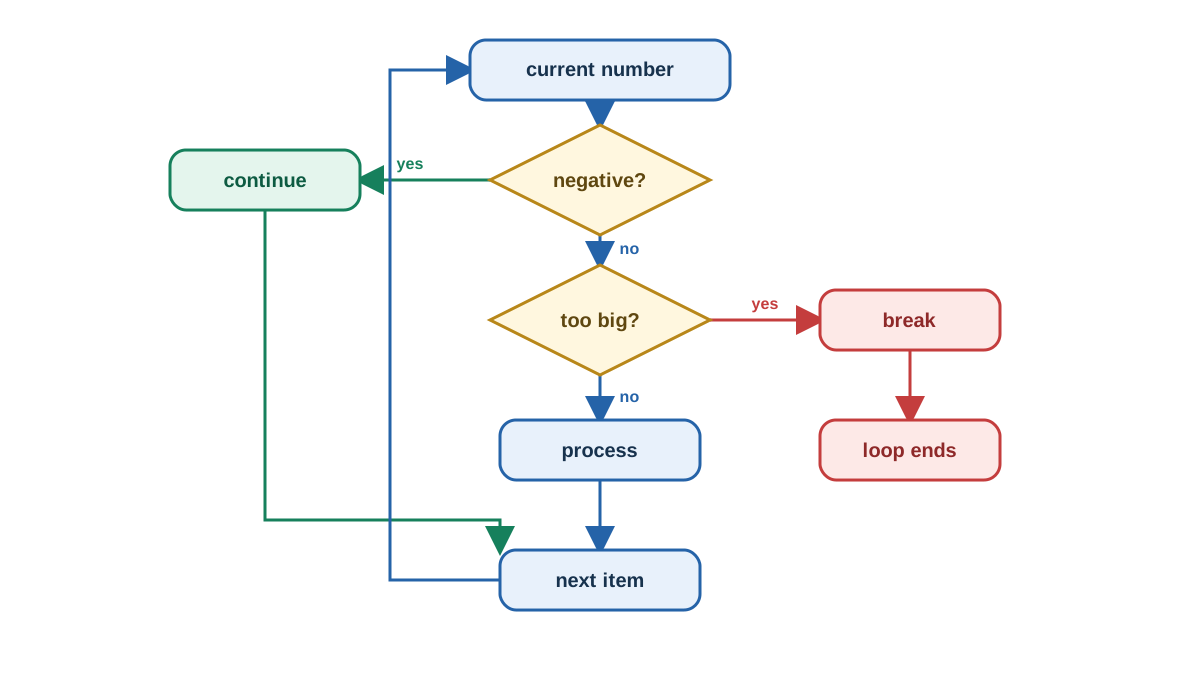
The two statements work well in the same loop when your logic needs both moves: skip some values, but stop entirely when a bigger condition is met.
numbers = [0, -1, 5, -2, 10, 99]
for num in numbers:
    if num < 0:
        continue  # Skip negative numbers
    if num > 50:
        print("Found a big number! Stopping.")
        break  # Stop the loop
    print(f"Processing: {num}")
Processing: 0
Processing: 5
Processing: 10
Found a big number! Stopping.
Trace the order: -1 and -2 are skipped by continue, 0, 5, and 10 are processed, and 99 triggers break before its print runs. That is the decision rule in action—skip the current item when later ones still matter, stop when none of them do.
Common mistake: break in nested loops
break only exits the innermost loop where it appears. If you have a loop inside a loop, a break in the inner loop leaves the outer loop running. This trips up beginners constantly, so test nested loops carefully.
Knowledge check
Check your understanding
Answer this question before you continue.
Break vs. Continue at a Glance
| Statement | What it does | Use this when | Avoid when |
|---|---|---|---|
break | Exits the entire loop | No later item matters and you want to stop | You still need to process remaining items |
continue | Skips the current iteration | Later items still matter but this one should be ignored | The loop should end entirely |
Practice: Control a Loop Yourself
Run the combined example above, then make two small edits and watch how the flow shifts:
- Change
99to-99.continueskips it, the loop never hitsbreak, and every remaining number gets processed. - Change
-1to101. Now the first negative check is skipped, and101triggersbreakbefore itsprintruns.
Each edit is one line. Run it, read the output, and ask which line runs next. That is how the decision rule sticks: break stops because no later item matters, continue skips one item because later items still matter.
When you are ready to keep building, practice break and continue in both for and while loops, then combine them with if conditions that decide when control flow should change. Together these give you the full toolkit for Python loop control.
Knowledge check
Final check
Finish the article by checking the ideas you just learned.
References
Want a more structured Python path?
Use the Python Starter Pack to turn scattered tutorials into a focused practice path.
Python Starter Pack
A compact LearnPyFast PDF pack covering what Python is, installation, your first program, running Python code, and Python versions.
- 5 curated chapters
- Enhanced PDF edition with bundle-only learning guidance
- Offline-friendly format for focused review
- Source article links for future online updates
Coming soon


