
Logical Operators in Python
You already know how to make a single decision with an if statement. Real programs rarely stop there. A login form checks that a user exists and that the…

Key topics
You already know how to make a single decision with an if statement. Real programs rarely stop there. A login form checks that a user exists and that the password matches. A game lets you play when you are old enough or when a parent approves. Python gives you three small words—and, or, and not—to combine those conditions into one decision.
In this article, you'll learn what each logical operator does, how Python actually evaluates a combined condition, and where beginners usually trip up.
What Are Logical Operators?
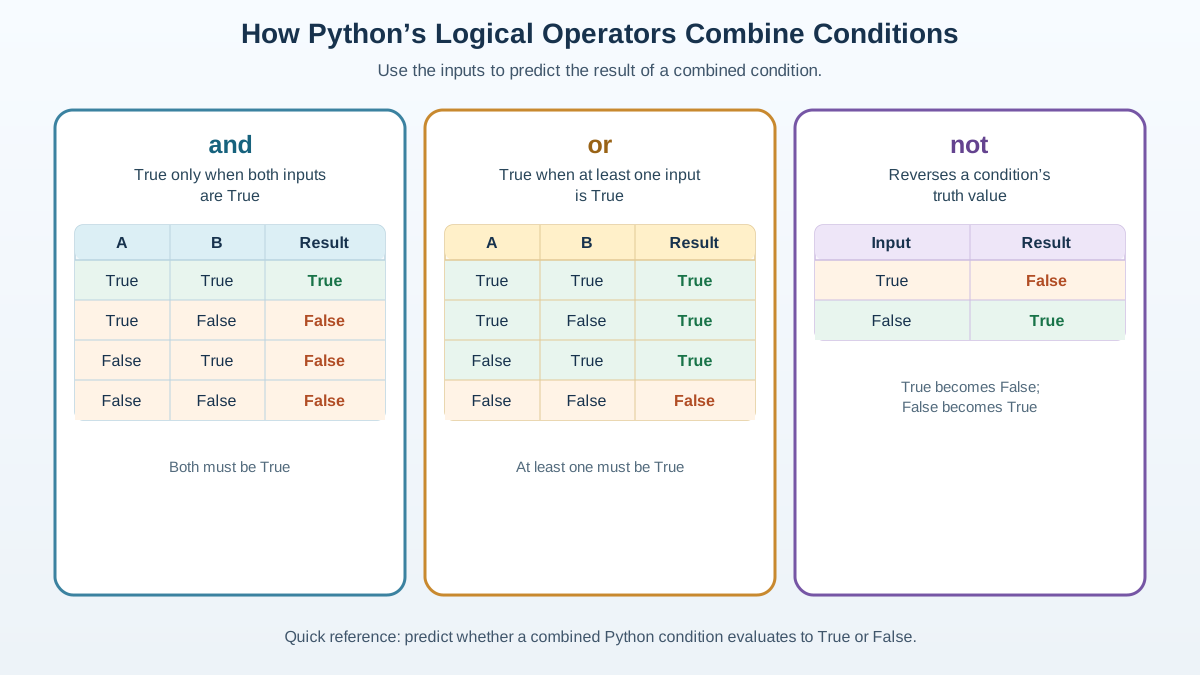
Logical operators are Python keywords that combine conditions. In an if statement, the whole expression is interpreted as True or False, and that decides which branch runs.
Python has three logical operators:
and— true only when both conditions are trueor— true when at least one condition is truenot— flips a condition to its opposite
You will use these almost every time you write an if statement that depends on more than one thing. If you need a refresher on the basics of decision making first, review how if, elif, and else choose a branch.
The and Operator
and is strict. It returns True only when every condition on both sides is true. One false condition makes the whole expression false.
age = 20
has_ticket = True

if age >= 18 and has_ticket:
    print("You can enter the concert.")
else:
    print("Sorry, you can't enter.")
You can enter the concert.
Change has_ticket to False and the message flips to the else branch. and needs all the green lights before you move.
Knowledge check
Check your understanding
Answer this question before you continue.
The or Operator
or is forgiving. It returns True when at least one condition is true, even if the other is false. It only returns False when every condition is false.
is_weekend = False
finished_homework = True

if is_weekend or finished_homework:
    print("You can play video games!")
else:
    print("No games until you finish your homework or it's the weekend.")
You can play video games!
Here is_weekend is false, but finished_homework is true, so the whole condition passes. With or, one green light is enough.
Knowledge check
Check your understanding
Answer this question before you continue.
The not Operator
not is the simplest of the three: it flips a condition. True becomes False, and False becomes True.
is_raining = False

if not is_raining:
    print("Let's go outside!")
else:
    print("Better stay indoors.")
Let's go outside!
Because is_raining is False, not is_raining evaluates to True, and the outside message prints. not is your way of saying "if this is not the case."
Knowledge check
Check your understanding
Answer this question before you continue.
How Python Evaluates a Combined Condition
Here is the part most tutorials skip, and it is the part that will save you from confusion later.
Python reads a combined condition from left to right and stops as soon as it knows the answer. This is called short-circuiting. With and, the moment one condition is false, Python stops—the rest cannot change the result. With or, the moment one condition is true, Python stops—the rest cannot change the result.
You can see this happen with a tiny experiment:
def check(label):
    print(f"checking {label}")
    return True

if check("first") or check("second"):
    print("done")
checking first
done
Because the first condition is already true, Python never calls check("second"). The or is satisfied, so the right side never runs. That is not a quirk—it is how Python saves work and why you can safely guard an operation on the right side of and.
Common Mistake: Mixing Up and and or
Beginners often reach for or when they mean and. The rule to remember: and demands everything, or accepts anyone. If you want a user to be logged in and have permission, and is correct. If you want to let in either an admin or a moderator, or is correct.
Common Mistake: Skipping Parentheses
Short-circuiting answers how far Python evaluates. A separate question is how the expression is grouped in the first place. That grouping is decided by operator precedence before any evaluation happens.
When you mix and with or, Python applies a fixed order: not binds tightest, then and, then or. That means a or b and c is read as a or (b and c), not as (a or b) and c. The two groupings are not the same, and you can prove it by choosing values where they disagree.
Say the rule is: a user may enter if they are an admin or a moderator, and they are not banned. Write that policy with parentheses first:
is_admin = False
is_moderator = True
is_banned = True

## Intended rule: (is_admin or is_moderator) and not is_banned
if (is_admin or is_moderator) and not is_banned:
    print("Access granted.")
else:
    print("Access denied.")
Access denied.
Now drop the parentheses and let Python apply its default grouping, which reads the expression as is_admin or (is_moderator and not is_banned):
is_admin = False
is_moderator = True
is_banned = True

## Default grouping: is_admin or (is_moderator and not is_banned)
if is_admin or is_moderator and not is_banned:
    print("Access granted.")
else:
    print("Access denied.")
Access granted.
Same values, same operators, different output. The parentheses changed which branch ran. Without them, Python grouped the expression its own way and let the moderator through despite the ban. When in doubt, add the parentheses—they make the grouping you intend visible to both Python and the next person who reads your code.
Tip: Read Conditions Out Loud
A combined condition should make sense as an English sentence. Read (is_admin or is_moderator) and not is_banned as "is an admin or a moderator, and is not banned." If the sentence sounds wrong, the condition probably is too.
Knowledge check
Check your understanding
Answer this question before you continue.
When Not to Use Logical Operators
Logical operators combine conditions, but they are not the right tool for every comparison. Use comparison operators like ==, >, and < when you are testing a single relationship between values. Use and, or, and not when you need to join two or more of those comparisons into one decision.
Also, do not confuse logical operators with bitwise operators like & and |. Those work on the individual bits of numbers and are a different topic. For combining conditions, stick with and, or, and not.
There is a second boundary worth knowing: a condition that is hard to say aloud is a sign you should split it. If you need three ands and an or in one line, give the pieces names.
is_old_enough = age >= 18
has_guardian = parent_approved
is_allowed = is_old_enough or has_guardian

if is_allowed and not is_banned:
    print("Access granted.")
Named variables turn a wall of logic into a sentence you can read and debug. If each failure needs a different message, split the decision into separate if branches instead of one long condition.
Practice: Build Your Own Conditions
Try writing these three conditions yourself before you look at the answers. Type each one, run it, and predict the output first.
1. Ride the roller coaster. You can ride if you are at least 12 years old and taller than 140 cm.
2. Earn dessert. You get dessert if you finished your dinner or your parent says yes.
3. Decide to go outside. Go outside only if it is not raining.
Once you have attempted all three, compare your code with the solutions below.
Solution 1: Ride the roller coaster
age = 13
height = 145

if age >= 12 and height > 140:
    print("You can ride!")
else:
    print("Sorry, you can't ride.")
You can ride!
Solution 2: Earn dessert
finished_dinner = False
parent_says_yes = True

if finished_dinner or parent_says_yes:
    print("You can have dessert!")
else:
    print("No dessert this time.")
You can have dessert!
Solution 3: Decide to go outside
is_raining = True

if not is_raining:
    print("Go outside and play!")
else:
    print("Stay indoors.")
Stay indoors.
Now change the values and watch the output change. That is the fastest way to build a feel for how each operator behaves.
Next Steps
Your immediate next move: write a small program that asks for a username and password, and use and to check both before printing "Welcome." Then add a rule that rejects a banned user with not. That single exercise ties together everything in this article.
Keep this decision rule in your pocket: and demands everything, or accepts anyone, not flips the verdict, and parentheses make the grouping explicit. When you are ready to move on, see how conditions drive repetition in loops, or learn how to exit a loop partway through with break.
Knowledge check
Final check
Finish the article by checking the ideas you just learned.
References
Want a more structured Python path?
Use the Python Starter Pack to turn scattered tutorials into a focused practice path.
Python Starter Pack
A compact LearnPyFast PDF pack covering what Python is, installation, your first program, running Python code, and Python versions.
- 5 curated chapters
- Enhanced PDF edition with bundle-only learning guidance
- Offline-friendly format for focused review
- Source article links for future online updates
Coming soon


