
If Statements in Python
An if statement is how a Python program turns a condition into a decision: check something, then run one block of code or skip it. The whole skill is…

Key topics
An if statement is how a Python program turns a condition into a decision: check something, then run one block of code or skip it. The whole skill is predicting which block runs and why. Once you can answer that for any input, elif and else are just extra branches on the same decision.
Why Decision Making Matters in Code
A program that never makes a decision runs the same instructions every time. That works for a calculator, but it is useless for anything interactive. Real programs constantly branch:
- Check a password against what the user typed.
- Show a warning when a value is too high.
- Pick a different message depending on the score.
That branching is decision making, and in Python the tool you reach for first is the if statement. Before you memorize syntax, watch what it does: it evaluates a condition, and if the condition is true, it runs the indented block that follows. If the condition is false, it skips that block entirely.
The Basic If Statement
Here is the simplest form of a Python if statement:
if condition:
    # code that runs when condition is true
Three pieces matter:
ifstarts the decision.conditionis the expression being checked, such asage >= 18.- The colon
:ends the condition line and signals that a block follows.
The block itself must be indented. Python uses indentation to decide which lines belong to the if. That is not a style preference; it is how Python knows where the block ends.
age = 20
if age >= 18:
    print("You are an adult!")
You are an adult!
Before you change anything, predict: what prints if age is 16? Nothing. The print line never runs, and the program simply continues to the next statement after the block. That prediction-and-observe habit is the core of working with conditionals.
Common mistake: Forgetting the colon.
if age >= 18without the:is aSyntaxError. The colon is not decoration; it tells Python the condition is finished and a block is coming.
Knowledge check
Check your understanding
Answer this question before you continue.
Adding an Else Branch
An if alone handles one path. When you want a fallback for the false case, add else:
if condition:
    # runs when condition is true
else:
    # runs when condition is false
temperature = 15
if temperature > 20:
    print("It's warm outside!")
else:
    print("You might need a jacket.")
You might need a jacket.
Exactly one of the two blocks runs. If the condition is true, the else block is skipped; if false, the if block is skipped. This is the if else pattern, and it is how you force a program to choose between two paths.
Now predict again: change temperature to 25. Which block runs? The first one, because 25 > 20 is true. You are not memorizing syntax anymore; you are tracing which condition wins.
Knowledge check
Check your understanding
Answer this question before you continue.
Branching on What the User Types
So far every example used a value you wrote into the code. Real programs rarely work that way. The password check from the opening is a decision made on what a user actually types, and Python reads that with input().
answer = input("Do you want to continue? ")
if answer == "yes":
    print("Continuing...")
else:
    print("Stopping.")
The condition compares answer to the string "yes". Because input() always returns text, the comparison is exact: typing Yes or YES will not match "yes", so the else branch runs. Run it a few times with different answers and watch which branch wins.
Note: The output here depends on what you type, so there is no single expected result. That is the point—the decision now comes from outside the program instead of being fixed in the code.
Chaining More Choices with Elif
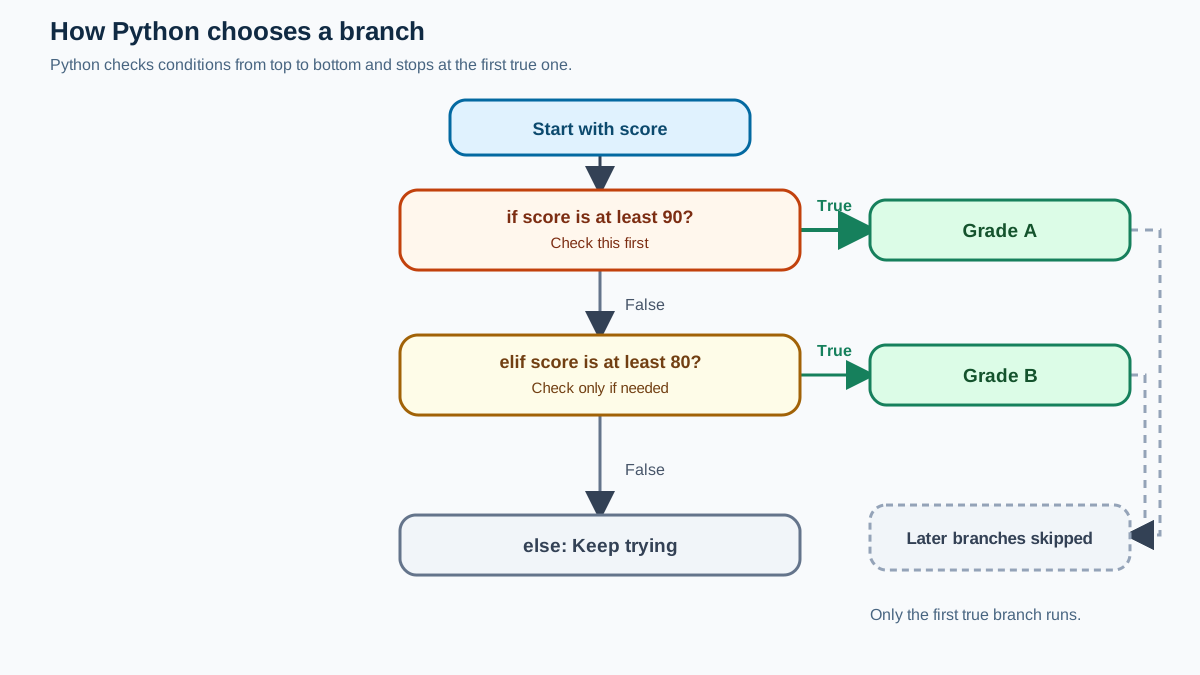
Two paths are not enough when a decision has several outcomes. That is what elif (short for "else if") is for. Python checks each condition in order and runs the block of the first one that is true, then skips the rest.
if condition1:
    # runs if condition1 is true
elif condition2:
    # runs if condition1 is false and condition2 is true
else:
    # runs if none of the above are true
score = 85
if score >= 90:
    print("Grade: A")
elif score >= 80:
    print("Grade: B")
else:
    print("Keep trying!")
Grade: B
Trace it with score = 85: the first condition (>= 90) is false, so Python moves to the elif, which is true, and prints Grade: B. The else never runs. Now change score to 95 and predict the output before running it. Then try 70. Each change should let you name the winning branch before Python does.
Order is part of the meaning here. Python stops at the first true branch, so a broad condition placed early can capture values before later branches ever get a chance. If you swapped the two checks and tested score >= 80 before score >= 90, a score of 95 would match the first branch and print Grade: B—wrong, because the >= 90 branch never gets reached. Read an elif chain top to bottom and ask which condition wins first, not which one is "most correct."
Common mistake: Using
else ifinstead ofelif. Python has noelse ifkeyword. Writeelifas one word, or you will get aSyntaxError.
The else clause is optional. If you leave it out and no condition is true, nothing in the chain runs and the program continues after the whole statement.
Knowledge check
Check your understanding
Answer this question before you continue.
Comparing Values: == vs =
A frequent beginner bug is confusing assignment with comparison. In an if condition, you are asking a question, so you compare with ==:
score = 100
if score == 100:
    print("Perfect score!")
Perfect score!
The single = assigns a value and is not a valid condition. Writing if score = 100: raises a SyntaxError. The rule is simple: = gives a value a name; == asks whether two values are equal.
Knowledge check
Check your understanding
Answer this question before you continue.
Common Mistakes to Watch For
When you see an IndentationError or SyntaxError in a conditional, work through these four checks in order:
- Indentation errors. Every line inside an
if,elif, orelseblock must be indented the same amount (four spaces is the convention). Mixed or missing indentation raises anIndentationError. - Missing colon. Every
if,elif, andelseline ends with:. =instead of==. Use==to compare,=to assign.- Wrong keyword. Use
elif, notelse if.
Treat this as a debugging checklist, not a list to memorize. When a conditional fails, the error message usually points at the exact line; check that line against these four points first. Most beginner errors in conditionals come from one of them.
Practice: Turn a Real Decision into Code
Start with a decision you make every day and write it as a Python program. An umbrella check is a good first try, and here is the finished three-way version that combines if, elif, and else:
weather = "cloudy"
if weather == "rainy":
    print("Take an umbrella.")
elif weather == "cloudy":
    print("Bring a light jacket.")
else:
    print("Leave the umbrella at home.")
Bring a light jacket.
Trace it: weather is "cloudy", so the first condition is false, the elif is true, and that branch prints. Now change weather to "rainy" and predict the output before you run it. Then try "sunny". Each value should let you name the winning branch before Python does.
The skill you are building is not typing elif; it is reading a plain-English rule and translating it into branches that pick exactly one path.
Next Steps
Finish the umbrella experiment: get all three branches working, then swap the order of two conditions and watch the output change. That experiment is the fastest way to make branch order feel real instead of theoretical.
You now have the core decision-making tool: if for one condition, else for a fallback, and elif for extra branches. The most useful next concept is combining multiple conditions in a single check with logical operators, since real decisions rarely hinge on one comparison alone.
Keep the one rule that matters: check a condition, run a block, skip the rest. Test it by changing an input and predicting the branch before you run the code. That habit is what turns syntax into judgment.
Knowledge check
Final check
Finish the article by checking the ideas you just learned.
References
Want a more structured Python path?
Use the Python Starter Pack to turn scattered tutorials into a focused practice path.
Python Starter Pack
A compact LearnPyFast PDF pack covering what Python is, installation, your first program, running Python code, and Python versions.
- 5 curated chapters
- Enhanced PDF edition with bundle-only learning guidance
- Offline-friendly format for focused review
- Source article links for future online updates
Coming soon


