
For Loops in Python
A for loop is how Python repeats an action for every item in a collection. You describe the action once, and Python runs it for each value in turn. That…

Key topics
A for loop is how Python repeats an action for every item in a collection. You describe the action once, and Python runs it for each value in turn. That one idea turns a pile of copy-pasted lines into a few lines that scale with your data.
fruits = ["apple", "banana", "cherry"]
for fruit in fruits:
    print(fruit)
apple
banana
cherry
Watch what just happened. Python took the first value, "apple", handed it to the name fruit, ran the indented print, then moved to the next value and did it again. That is the whole mechanism of a python for loop: one value arrives, one body runs, one output appears, and the loop advances until the collection runs out.
What a For Loop Is
A for loop repeats an action for each item in a collection. Read it as: "For every item in this group, run this block of code."
Here is what happens on each pass, step by step:
fruit = "apple", thenprint(fruit)runs.fruit = "banana", thenprint(fruit)runs again.fruit = "cherry", thenprint(fruit)runs one last time.
The same variable name, fruit, is rebound to one current value on each iteration. It does not accumulate the items, and it is not a position number. It is a fresh label handed the next value in line. When the loop ends, fruit keeps the last value it was given.
The variable name is your choice. fruit reads well here, but item, name, or x all work. What matters is that the loop hands you each value in turn, and the indented block runs once per value.
This process of moving through a collection one item at a time is called iteration, and the for loop is Python's main tool for it. If lists or variables are still unfamiliar, review those fundamentals before continuing.
Knowledge check
Check your understanding
Answer this question before you continue.
Choose What Supplies Each Iteration
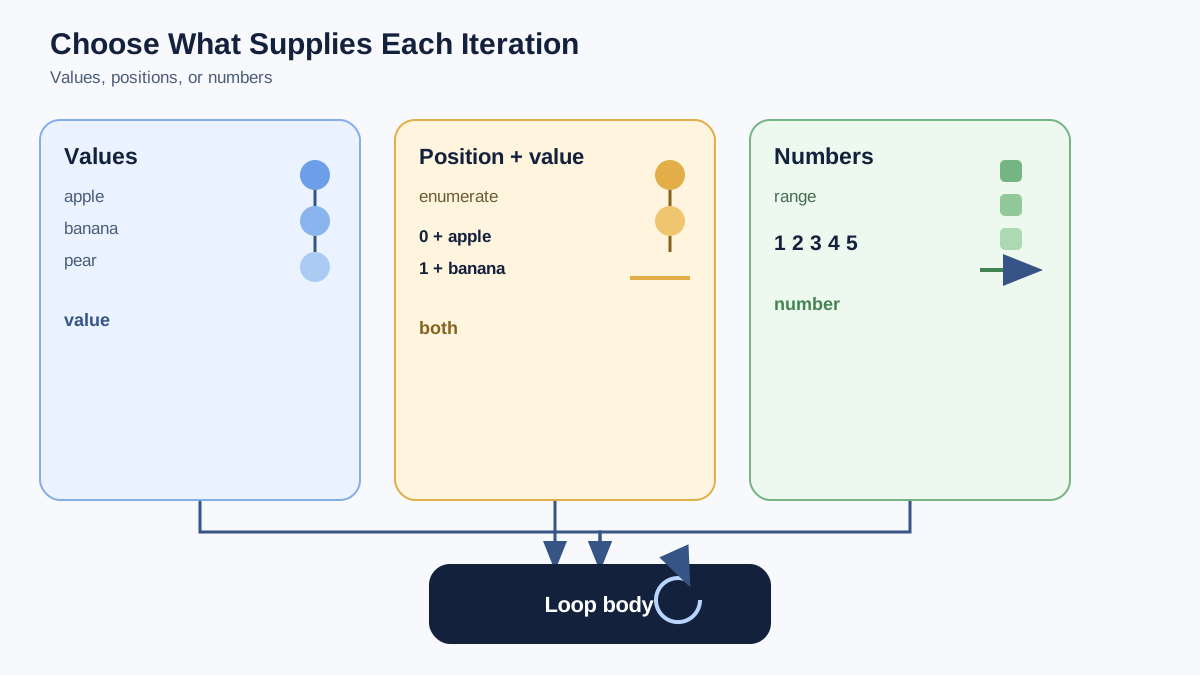
Here is the decision that organizes every loop you will write: decide what should supply each iteration. You have three common answers, and each maps to a different tool.
- The values themselves — loop directly over a list, string, or other collection.
- Values plus their positions — use
enumerate(). - Generated numbers — use
range().
Keep that lens in mind as we walk through each one. It turns the rest of this lesson from a list of features into one repeatable choice.
Loop Over the Values Directly
A for loop works on any iterable—a value that can hand you its items one at a time. The most common ones for beginners are:
- Lists: each element in order.
- Strings: each character in order.
- Ranges: a sequence of numbers.
- Tuples: each item in order.
word = "code"
for letter in word:
    print(letter)
c
o
d
e
Notice that a string behaves like a list of its characters. That is a useful mental model: if a value can be presented as an ordered set of items, a for loop can walk through it.
Loop Over Values Plus Positions with enumerate()
When you need the position as well as the value, ask for both. enumerate() hands you each item paired with its index, starting at zero:
fruits = ["apple", "banana", "cherry"]
for index, fruit in enumerate(fruits):
    print(index, fruit)
0 apple
1 banana
2 cherry
This trips up people coming from other languages, and it is worth catching early: Python's for loop is a "for each" loop, not a counter loop. It gives you the values themselves. If you genuinely need the position too, reach for enumerate() rather than trying to count by hand.
Knowledge check
Check your understanding
Answer this question before you continue.
Loop Over Generated Numbers with range()
Sometimes you do not have a list to loop over—you just want to repeat an action a set number of times. That is what range() is for.
for number in range(1, 6):
    print(number)
1
2
3
4
5
range(1, 6) produces the numbers 1 through 5. The end value is excluded, so range(1, 6) stops before 6. If you want to start at zero, range(5) gives you 0, 1, 2, 3, 4.
A common beginner trap is assuming range is part of the for-loop syntax. It is not. It is a built-in function that returns a sequence of numbers, and the for loop just iterates over that sequence like any other collection.
Knowledge check
Check your understanding
Answer this question before you continue.
For Loops vs. While Loops
Python has two main ways to repeat actions, and they answer different questions.
| Loop | Best when | Example |
|---|---|---|
for | You know the items or the count up front | Loop through every name in a list |
while | You keep going until a condition changes | Keep asking for input until the user types quit |
A for loop is the right tool when you want to visit every item in a collection or repeat something a known number of times. A while loop is the right tool when the stopping point depends on something that changes while the loop runs. If you are not sure which you need, start with the for loop—it is the one beginners reach for most, and it is harder to write an accidental infinite loop with it.
Common Beginner Mistakes
Forgetting the indentation. The indented block is the body of the loop. If you forget to indent, Python raises an IndentationError because it cannot tell which lines belong inside the loop.
## Wrong: the print is not inside the loop
for fruit in fruits:
print(fruit)
## Right: the print is indented
for fruit in fruits:
    print(fruit)
Looping over the wrong thing. If you try to loop over a single number instead of a collection, Python will complain. Loop over a list, string, or range(), not over a bare integer.
Expecting an index when you get a value. In many languages, a loop gives you a counter. In Python, for fruit in fruits gives you the values themselves. If you genuinely need the position too, use enumerate() as shown above.
Knowledge check
Check your understanding
Answer this question before you continue.
A Real-World Use: Processing Data
Loops become valuable the moment you have data to process. Say you have a list of scores and you want to total them:
scores = [82, 91, 77, 88]
total = 0
for score in scores:
    total += score
print(total)
338
The loop visits each score, adds it to total, and moves on. If the list grows to 10,000 scores, the loop still works—you wrote the action once, and Python repeats it for every item. That is the leverage a loop gives you: one small block of code that scales with your data.
Practice: Make It Stick
The fastest way to learn a loop is to run one, change it, and watch what happens. Start with the smallest observable edit: take the scores example and add a count variable that starts at 0 before the loop, then add count += 1 inside the loop, and print count after it.
scores = [82, 91, 77, 88]
total = 0
count = 0
for score in scores:
    total += score
    count += 1
print(total)
print(count)
338
4
You should see 4 for the four scores. That one change confirms the mental model: the loop body ran once per item, and count proves it. Once that lands, try a few more on your own:
- Make a list of your favorite foods and print each one with a for loop.
- Use
range()to print the numbers 1 to 10. - Loop through the letters in your name and print each letter on its own line.
Here is the decision rule that ties the whole lesson together: iterate directly over values when you need the values; use enumerate() when you also need the positions; use range() when the numbers themselves are the iterable. Once you are comfortable moving through collections, practice controlling the flow inside a loop by stopping early or skipping items. That is where loops stop being a simple repeat and start becoming real logic.
Knowledge check
Final check
Finish the article by checking the ideas you just learned.
References
Want a more structured Python path?
Use the Python Starter Pack to turn scattered tutorials into a focused practice path.
Python Starter Pack
A compact LearnPyFast PDF pack covering what Python is, installation, your first program, running Python code, and Python versions.
- 5 curated chapters
- Enhanced PDF edition with bundle-only learning guidance
- Offline-friendly format for focused review
- Source article links for future online updates
Coming soon


