
How to Use enumerate() and zip() in Python Loops
You already know how to write a for loop. You can walk through a list and do something with each item. That works right up until you need more than the…

Key topics
You already know how to write a for loop. You can walk through a list and do something with each item. That works right up until you need more than the item itself — its position, or the matching value from a second list.
That is the moment most beginners reach for range(len(items)) and start writing items[i] everywhere. It works. It also invites two bugs that hide quietly until your data changes. Python ships two built-ins that remove the counter and the index math entirely: enumerate() and zip().
The Manual Counter Problem
Here is the pattern almost everyone writes first. You have a list of tasks, and you want to print each one with a number in front of it.
tasks = ["write report", "review pull request", "deploy build"]

for i in range(len(tasks)):
    print(i, tasks[i])
0 write report
1 review pull request
2 deploy build
It runs. The output is correct. But look at what you had to manage by hand:
- The counter
i, which you have to keep in sync with the list yourself. - The bounds, because
range(len(tasks))only works whilelen(tasks)is accurate. - The index lookup
tasks[i], which is a second step to get the value you actually wanted.
None of that is hard, but all of it is bookkeeping. And bookkeeping is where beginners get bitten.
Common mistake
Two failure modes show up again and again with this pattern.
The first is an off-by-one counter. The moment you stop using range(len(...)) and start incrementing a variable yourself, you can increment it in the wrong place, reset it, or forget to increment it at all.
The second is an IndexError. If the list shrinks while you are looping — because something inside the loop removes an item — then tasks[i] can point past the end of the list. The loop was written for the list you had at the start, not the list you have now.
Both bugs come from the same root cause: you are maintaining the position separately from the data. enumerate() and zip() let Python maintain it for you.
Note: This article assumes you are comfortable with basic
forloops — iterating directly over a list withfor item in items:. If that still feels shaky, spend a few minutes there first. Everything below builds on it.
enumerate(): Index and Value in One Step
enumerate() is a built-in function that takes an iterable — a list, a string, a tuple, anything you can loop over — and produces pairs of (index, value) as you loop.
Here is the same task list, rewritten:
tasks = ["write report", "review pull request", "deploy build"]

for i, task in enumerate(tasks):
    print(i, task)
0 write report
1 review pull request
2 deploy build
Same output. Less to manage. The counter is gone, the bounds check is gone, and the index lookup is gone.
What is actually happening
The line for i, task in enumerate(tasks): is doing two things at once, and it helps to see them separately.
enumerate(tasks) produces a stream of tuples: (0, "write report"), then (1, "review pull request"), then (2, "deploy build").
The for i, task in ... part unpacks each tuple into two names. This is not two loops. It is one loop, and each iteration hands you a tuple that gets split into i and task.
If you want to see the tuples directly, you can print them:
for pair in enumerate(["bread", "milk", "butter"]):
    print(pair)
(0, 'bread')
(1, 'milk')
(2, 'butter')
That is the same data, just without the unpacking.
Starting the count at 1
Humans usually count from 1, not 0. enumerate() takes an optional start argument for exactly this:
tasks = ["write report", "review pull request", "deploy build"]

for i, task in enumerate(tasks, start=1):
    print(i, task)
1 write report
2 review pull request
3 deploy build
Use start=1 whenever the number is meant for a person to read — a printed report, a numbered list, a menu. Keep the default 0 when the index is meant for the program, such as looking up a position in another list.
Knowledge check
Check your understanding
Answer this question before you continue.
enumerate() is an iterator, not a list
One detail that trips people up: enumerate() does not build a list of pairs. It produces them one at a time, on demand. That is why it works fine on very large sequences without loading everything into memory.
The tradeoff is that it is used up after one pass. If you try to loop over the same enumerate object twice, the second loop gets nothing.
pairs = enumerate(["a", "b", "c"])

print(list(pairs))
print(list(pairs))
[(0, 'a'), (1, 'b'), (2, 'c')]
[]
The second list() call is empty because the first one consumed everything. If you genuinely need to look at the pairs more than once, wrap it: pairs = list(enumerate(items)). For a normal single loop, you never need to think about this.
zip(): Walking Two Lists Together
Now the second problem. You have two lists that belong together — names and scores, products and prices, filenames and sizes — and you want to process them side by side.
zip() takes two or more iterables and pairs up their items: first with first, second with second, and so on.
names = ["Alice", "Bob", "Charlie"]
scores = [92, 87, 95]

for name, score in zip(names, scores):
    print(name, score)
Alice 92
Bob 87
Charlie 95
Each iteration hands you one item from each list, in the order you passed them. The loop body reads almost like a sentence: for each name and score, print the name and score.
More than two lists
zip() is not limited to two inputs. Pass three or four, and each tuple has one element per input.
products = ["keyboard", "mouse", "monitor"]
prices = [49, 25, 180]
stock = [12, 40, 7]

for product, price, quantity in zip(products, prices, stock):
    print(f"{product}: ${price}, {quantity} in stock")
keyboard: $49, 12 in stock
mouse: $25, 40 in stock
monitor: $180, 7 in stock
The order matters. The first name in the loop target always receives the first list's item, the second name receives the second list's item, and so on.
Knowledge check
Check your understanding
Answer this question before you continue.
Seeing the tuples directly
If you do not want to unpack, you can loop over the tuples themselves:
for pair in zip(["a", "b", "c"], [1, 2, 3]):
    print(pair)
('a', 1)
('b', 2)
('c', 3)
This is useful when you want to pass the pair around as a single value rather than work with its parts.
Like enumerate(), zip() is a lazy iterator. It produces one tuple at a time and is exhausted after a single pass. Same rule applies: if you need the pairs twice, store them with list(zip(...)).
Combining enumerate() and zip()
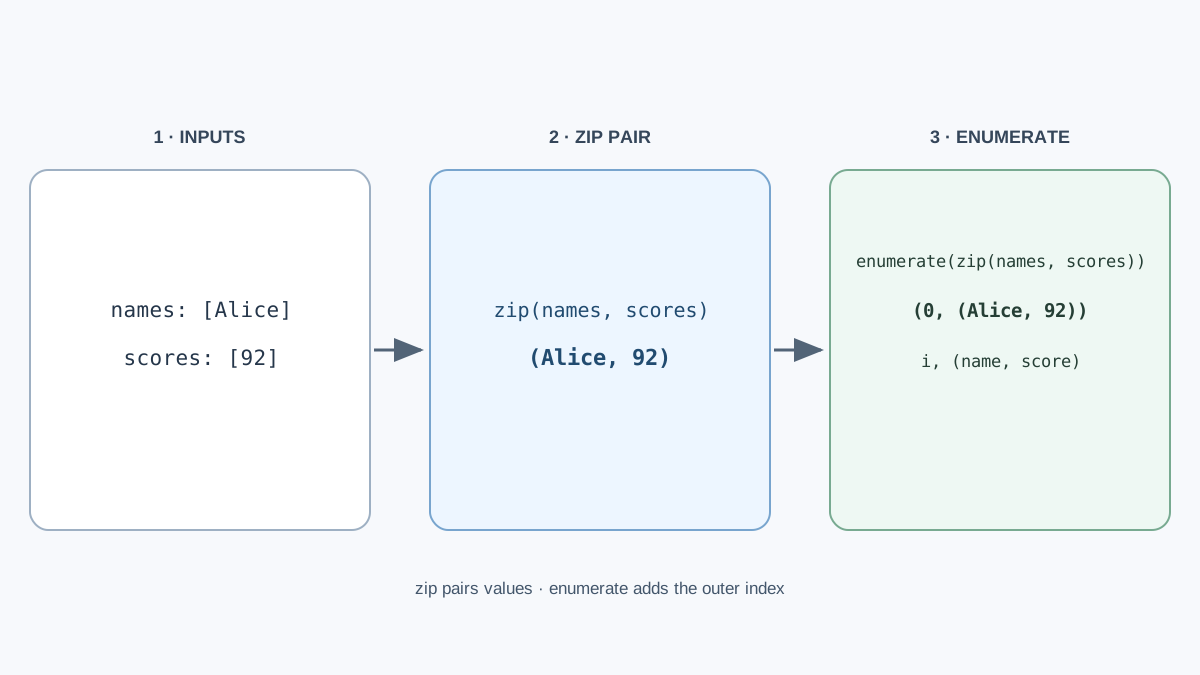
Sometimes you need both: paired values from two lists, plus a number for each row. That is when you nest them.
names = ["Alice", "Bob", "Charlie"]
scores = [92, 87, 95]

for i, (name, score) in enumerate(zip(names, scores)):
    print(i, name, score)
0 Alice 92
1 Bob 87
2 Charlie 95
The parentheses around (name, score) are required, and this is the part that trips people up. Here is why.
zip(names, scores) produces tuples like ("Alice", 92). Then enumerate() wraps each of those in another tuple with an index: (0, ("Alice", 92)). So each iteration hands you an outer tuple containing an index and an inner tuple.
The loop target i, (name, score) mirrors that shape. i takes the index. (name, score) takes the inner tuple and splits it further. If you drop the inner parentheses, Python tries to unpack the outer tuple into three names and fails.
If you do not need the inner values split apart, you can keep the tuple whole:
for i, pair in enumerate(zip(names, scores)):
    print(i, pair)
0 ('Alice', 92)
1 ('Bob', 87)
2 ('Charlie', 95)
Which one should you reach for?
| Situation | Use | Why |
|---|---|---|
| One sequence, need the position | enumerate() | Adds an index without a manual counter |
| Several sequences, no numbering needed | zip() | Pairs values directly, no index lookup |
| Several sequences, need the position too | enumerate(zip(...)) | Both, at the cost of one extra layer of nesting |
| One sequence, only need the values | plain for item in items: | Adding enumerate() just to ignore the index is clutter |
My rule: add the index only when something downstream actually uses it. If you write for i, item in enumerate(items): and never mention i in the loop body, delete it.
Knowledge check
Check your understanding
Answer this question before you continue.
Mismatched Lengths and the Silent Drop
This is the single most dangerous behavior of zip() for beginners, and it does not raise an error.
By default, zip() stops as soon as the shortest input runs out. Any leftover items in the longer lists are dropped — no warning, no exception, no trace.
products = ["keyboard", "mouse", "monitor", "webcam"]
prices = [49, 25, 180]

for product, price in zip(products, prices):
    print(product, price)
keyboard 49
mouse 25
monitor 180
The webcam is gone. If that fourth price was simply missing from your data, you now have a report that looks complete and is not. This is the kind of bug that survives testing and shows up in front of a customer.
Making it loud with strict=True
Python 3.10 added a strict argument to zip(). When you pass strict=True, mismatched lengths raise a ValueError instead of quietly truncating.
products = ["keyboard", "mouse", "monitor", "webcam"]
prices = [49, 25, 180]

for product, price in zip(products, prices, strict=True):
    print(product, price)
ValueError: zip() argument 2 is shorter than argument 1
Now the bug announces itself at the exact line where it happens, instead of hiding in the output.
Warning:
strict=Truerequires Python 3.10 or newer. If you are on an older version, check withpython --versionbefore relying on it. On older versions, you can compare lengths yourself withlen()and raise your own error.
The practical rule: use strict=True whenever the two lists are supposed to line up. Leave it off only when you deliberately want to truncate to the shorter one — for example, when you are zipping a long stream against a short list of fixed labels.
Knowledge check
Check your understanding
Answer this question before you continue.
When Not to Reach for These
Both tools are useful, and both can add noise when they are not needed. A few guardrails:
- If you only need the values, a plain
for item in items:is still the right loop. Addingenumerate()just to ignore the index makes the code longer for no gain. - If you need the index only to look up a value in a second list,
zip()is almost always cleaner. Comparefor i, pet in enumerate(pets): print(pet, owners[i])withfor pet, owner in zip(pets, owners): print(pet, owner). The second one says what it means. - If you need to walk a sequence backwards, use
reversed(). It is the direct tool for that job, andenumerate()andzip()are not substitutes. - If you need to repeat an action until a condition changes rather than walk a collection, that is a
whileloop. This article is about iterating over data, not about repeating until something is true.
Where This Shows Up in Real Code
These two built-ins are not academic. They show up constantly in small, practical scripts.
Numbering rows in a report. Any time you print a summary for a human, enumerate(items, start=1) gives you clean numbering without a counter variable.
Pairing two columns of data. Names with emails, products with prices, filenames with sizes — zip() is the natural way to walk them together before writing them out.
Building a dictionary from two lists. dict(zip(keys, values)) turns two parallel lists into a dictionary in one line. This is a common move when you have a header row and a data row from a file.
Walking files alongside labels. A small cleanup script often has a list of filenames and a list of categories, and needs to process them in step. zip() keeps them aligned.
The pattern to notice is simple: whenever you catch yourself maintaining an index by hand, or reaching into a second list with items[i], that is a signal that one of these built-ins probably belongs there.
Practice: Number It and Pair It
Reading code is not the same as writing it. Try these three tasks in a file called practice.py and run them.
Task 1. Take a list of five items — anything you like — and print each one numbered starting at 1. Use enumerate() with start=1. Your output should look like:
1 first item
2 second item
3 third item
4 fourth item
5 fifth item
Task 2. Take two lists of equal length, such as cities and countries, and print them paired on one line each using zip(). Your output should look like:
Tokyo Japan
Paris France
Cairo Egypt
Task 3 (stretch). Combine both so each line shows the number, the first value, and the second value. Your output should look like:
1 Tokyo Japan
2 Paris France
3 Cairo Egypt
Then do the part that actually teaches you something: deliberately break it. Add an extra item to one of the lists and run the zip() version again. Watch the extra item vanish with no error. Then add strict=True and read the ValueError. Seeing the silent drop once is worth more than reading about it ten times.
The Decision Rule to Carry Forward
Reach for enumerate() when you need positions. Reach for zip() when you need parallel values. Reach for both only when you genuinely need both.
The deeper skill is not memorizing syntax. It is noticing when you are fighting the language. A manual counter, an items[i] lookup, a range(len(...)) that exists only to produce an index — those are all signs that Python already has a cleaner answer waiting.
Pick one loop in your own code that uses range(len(...)) and rewrite it with enumerate() or zip(). Run both versions. Compare the output. That single rewrite will teach you more than another article on the topic.
Knowledge check
Final check
Finish the article by checking the ideas you just learned.
References
Want a more structured Python path?
Use the Python Starter Pack to turn scattered tutorials into a focused practice path.
Python for Artificial Intelligence Starter Pack
Build a Python foundation you can actually use. The Python for AI Starter Pack brings together a guided path through setup, core programming concepts, data structures, files, JSON, APIs, debugging, and practical projects—so you can move quickly from running your first program to understanding and building useful software.
- 264-page illustrated PDF
- 12 guided Python chapters
- Visual concept diagrams
- Self-assessment quizzes
- Bonus deep-dive sections
- Files, JSON, APIs, debugging & projects
- Foundation for data, automation & AI
Coming soon


