
Python Generators and Lazy Iteration: Use yield to Produce Values on Demand
A function that returns one finished thing forces you to pay for every value before you use the first one. A generator lets you pay as you go.

Key topics
A function that returns one finished thing forces you to pay for every value before you use the first one. A generator lets you pay as you go.
Here is a small program that a lot of beginners write without thinking twice:
def first_million():
    numbers = []
    for n in range(1_000_000):
        numbers.append(n)
    return numbers

for n in first_million():
    print(n)
    if n == 2:
        break
You asked for three numbers. Python built a million. Every value was computed, stored in a list, and held in memory before your loop printed 0, 1, and 2. Then the loop stopped, and the other 999,997 values sat there doing nothing.
That is not a bug. It is the natural result of a mental model most of us start with: a function runs, produces a result, and returns it. One call, one finished thing.
Generators break that model on purpose. A generator function hands you one value, pauses, remembers exactly where it stopped, and waits. When you ask for the next value, it picks up from that spot. Nothing is computed early. Nothing is stored that you have not asked for.
By the end of this article you will be able to write a generator function with yield, read its output, explain the difference between an iterable and an iterator, and know when a generator is the wrong tool.
Why Build a Whole List When You Only Need the Next Value?
The list-building function above is not wrong. It is just eager. It does all the work up front, whether or not you need the results.
That is fine when the data is small and you plan to use all of it. It becomes a problem when:
- The sequence is large enough that holding it all in memory hurts.
- Each value is expensive to compute, and you might stop early.
- The sequence has no end at all — a stream of readings, a log that keeps growing, a counter that never stops.
The eager version has to finish before you can start. The lazy version lets you start immediately and stop whenever you want.
That word — lazy — is not an insult here. In programming, lazy means "compute it when someone actually asks for it." Lazy iteration is the practice of producing values one at a time, on demand, instead of all at once.
Generators are Python's cleanest way to write lazy sequences. You already know how to write functions and for loops. A generator function is just a function that learned how to pause.
Iterable vs Iterator: The One Distinction That Makes yield Make Sense
You have been looping over things since your first for loop. Lists, strings, and range objects all work in a for loop. Anything you can loop over is called an iterable.
But here is the part that usually gets skipped. The for loop is not pulling values out of the list directly. It asks the list for a helper object — an iterator — and then asks that helper for one value at a time.
An iterator is the thing that actually hands out values. It remembers its position, so each request gives you the next item instead of starting over.
You can watch this happen with two built-in functions: iter() gets the iterator, and next() asks for the next value.
colors = ["red", "green", "blue"]

it = iter(colors)

print(next(it))
print(next(it))
print(next(it))
red
green
blue
Three calls, three values, in order. The iterator kept track of where it was. Now watch what happens when you ask for a fourth value:
print(next(it))
Traceback (most recent call last):
  File "<stdin>", line 1, in <module>
StopIteration
StopIteration is not an error you did anything wrong to cause. It is the iterator's way of saying "I am done." A for loop catches that signal for you and quietly ends the loop. That is the whole trick behind every for loop you have ever written:
- Call
iter()on the iterable to get an iterator. - Call
next()on the iterator to get a value. - Repeat until
StopIterationshows up, then stop.
Note: An iterable is something you can loop over. An iterator is the object that does the looping, one step at a time. Lists are iterable but not iterators. Generators are both.
Keep that picture in your head. A generator is a shortcut for building an iterator without writing all the plumbing yourself.
Knowledge check
Check your understanding
Answer this question before you continue.
Your First Generator: A Tiny Runnable Example
Create a file called countdown.py:
def countdown(start):
    print("countdown starting")
    while start > 0:
        yield start
        start -= 1
    print("countdown finished")

for number in countdown(3):
    print(number)
Run it:
python countdown.py
countdown starting
3
2
1
countdown finished
Read that output slowly, because it tells the whole story.
countdown starting printed first — but only after the for loop asked for the first value. The function did not run when you called countdown(3). It ran when the loop needed something.
Then 3 appeared. The function paused at the yield. It did not continue to start -= 1 until the loop asked for the next value. Then 2, then 1, then the loop asked one more time, the while condition failed, countdown finished printed, and the function ended.
Now the part that surprises almost everyone. Try calling the function without looping:
result = countdown(3)
print(result)
<generator object countdown at 0x...>
That is not a list. It is not a number. It is a generator object — the iterator itself, sitting there, waiting, having run zero lines of your function body.
You can drive it manually with next():
gen = countdown(3)
print(next(gen))
print(next(gen))
print(next(gen))
countdown starting
3
2
1
Same values, same order, same pause-and-resume behavior. The for loop was just calling next() for you.
Knowledge check
Check your understanding
Answer this question before you continue.
What yield Actually Does to Your Function
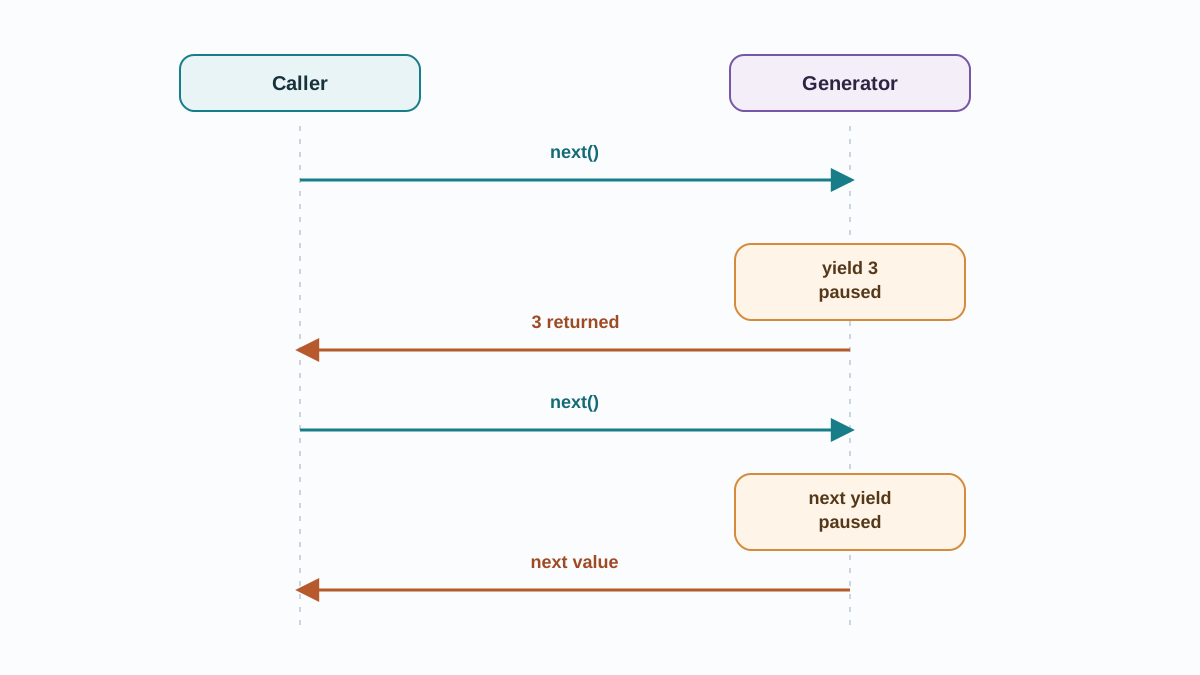
The lazy explanation is "yield is like return." That explanation is wrong in a way that will bite you later, so let us replace it.
return ends the function. It hands back one value, the function's local variables are gone, and calling it again starts from the top.
yield pauses the function. It hands back one value, but the function's local variables stay alive, and the next request resumes on the line right after the yield.
Here is a version with print statements on both sides of the yield, so you can see the pause:
def trace():
    print("A: before first yield")
    yield 1
    print("B: after first yield")
    yield 2
    print("C: after second yield")

gen = trace()
print("created generator")

print(next(gen))
print(next(gen))
print(next(gen))
created generator
A: before first yield
1
B: after first yield
2
C: after second yield
Traceback (most recent call last):
  File "<stdin>", line 1, in <module>
StopIteration
Notice the order. created generator printed before anything inside the function ran. The body did not start until the first next(). Then each next() advanced the function to the next yield and stopped there.
The third next() ran the last print, then hit the end of the function and raised StopIteration — the same signal a for loop catches to end cleanly. You already saw that signal in the colors example, and it means the same thing here: no more values.
This is why the sequence stays correct. The local variable start in countdown survived between calls. The loop position survived. The function did not restart — it continued.
Tip: If you ever wonder whether a function is a generator, look for
yieldin its body. Noyield, no generator. A function that only usesreturnwill never pause.
Knowledge check
Check your understanding
Answer this question before you continue.
Producing Values on Demand: A Practical Comparison
Now that you have seen the mechanism, here is the tradeoff in one table.
| List-building function | Generator function | |
|---|---|---|
| Memory | Holds every value at once | Holds one value at a time |
| When work happens | All up front, before the first value | On demand, one value per request |
| Reusable? | Yes — loop over it as many times as you like | No — consumed once |
| Indexable? | Yes — data[0], slicing, len() | No — you must consume it in order |
| Best for | Small data you will reuse | Large, streamed, or endless data |
The memory difference is the one that shows up in real work. Here is a generator that reads a file line by line:
def read_lines(path):
    with open(path) as f:
        for line in f:
            yield line.strip()

for line in read_lines("server.log"):
    if "ERROR" in line:
        print(line)
This never loads the whole file. If server.log is two gigabytes, you still only hold one line in memory at a time. The list version — f.readlines() — would pull the entire file into memory before your loop even started.
Generators also let you describe sequences that have no end:
def counter():
    n = 0
    while True:
        yield n
        n += 1

gen = counter()
for _ in range(5):
    print(next(gen))
0
1
2
3
4
That while True would hang forever if it were a normal function. As a generator, it is fine, because the caller decides when to stop. The generator produces; you consume.
Warning: Generators are not automatically faster. For small data, a list is often just as quick and easier to work with. The win is about memory and when work happens, not raw speed. Do not rewrite every function into a generator out of habit.
Knowledge check
Check your understanding
Answer this question before you continue.
When to Use a Generator — and When Not To
Here is the decision rule I use, and it has held up across a lot of real code:
Reach for a generator when the sequence is large, streamed, expensive to compute, or possibly infinite — and you consume it once.
Reach for a list when you need to index, slice, sort, count, or loop over the data more than once.
That second half matters more than beginners expect, because of the exhaustion trap. A generator is consumed once. When it is done, it is done. Looping over it again gives you nothing — and no error to warn you.
gen = (n * n for n in range(4))

print(list(gen))
print(list(gen))
[0, 1, 4, 9]
[]
The second list(gen) is empty. Not broken — exhausted. The generator already handed out all its values, and it has no memory of them to give again.
If you need to reuse the data, you have two clean options:
# Option 1: rebuild the generator each time
def squares(limit):
    for n in range(limit):
        yield n * n

print(list(squares(4)))
print(list(squares(4)))
[0, 1, 4, 9]
[0, 1, 4, 9]
# Option 2: convert to a list once, if the data is small enough
squares_list = list(squares(4))
print(squares_list[2])
print(len(squares_list))
4
4
Option 1 keeps the memory savings and pays the cost of recomputing. Option 2 gives up the memory savings but buys you indexing, len(), and reuse. Pick based on which cost you would rather pay.
Common Beginner Mistakes with Generators
These are the ones I see most often, and each one has a clear fix.
Mistake 1: Expecting the function to run when you call it.
def greet():
    yield "hello"

print(greet())
<generator object greet at 0x...>
Nothing ran. The body only starts when you ask for a value. Fix: loop over it, or call next().
Mistake 2: A stray return that ends the sequence early.
def numbers():
    yield 1
    return
    yield 2

for n in numbers():
    print(n)
1
The yield 2 never runs. A bare return inside a generator ends it, just like StopIteration. If your output stops earlier than expected, look for a return above the missing values.
Mistake 3: Treating a generator like a list.
gen = (x for x in range(5))
print(gen[0])
TypeError: 'generator' object is not subscriptable
That TypeError is not a bug to work around. It is the language telling you the tool does not fit the job. If you need indexing, you wanted a list.
Practice: Write and Break Your Own Generator
Reading about generators is not the same as writing one. Do these in order, and check your output against the expected behavior.
Task 1: Even numbers up to a limit.
Write a generator function evens(limit) that yields every even number from 0 up to but not including limit. Print them with a for loop. Expected: evens(10) prints 0 2 4 6 8, one per line.
Task 2: Consume it twice.
Take the generator from Task 1, store it in a variable, loop over it once, then loop over the same variable again. Expected: the first loop prints the numbers; the second loop prints nothing. Write one sentence explaining why, using the exhaustion idea from the decision section.
Task 3: Filter a file line by line.
Write a generator matching_lines(path, keyword) that opens a file and yields only the lines containing keyword. Test it on any text file you have. Expected: only matching lines print, and the file is never fully loaded into memory.
Task 4 (stretch): An endless generator.
Write a generator that yields increasing numbers forever. Use it from the caller side with a for loop and a break after five values. Expected: five numbers print, then the loop stops cleanly. The generator itself never ends.
Where Generators Show Up in Real Code
You will not write generators only in exercises. They show up wherever data arrives in pieces:
- Log and CSV processing. Read a large file line by line, filter for the rows you care about, and never load the whole thing.
- Chunked reports. Feed data to a report or cleanup script in batches instead of building one giant list.
- Streams of results. API pages, database rows, sensor readings — process each item as it arrives rather than waiting for the full set.
- Built-in tools you already use. Functions like
range(),enumerate(), andzip()return lazy iterators. You have been using this idea without naming it.
That last point is worth sitting with. Lazy iteration is not an exotic feature you have to go find. It is already threaded through the tools you use every day. Generators just let you write your own.
The Rule to Take With You
When the sequence is large, streamed, or consumed once, reach for yield. When you need to index, slice, sort, count, or loop over the data more than once, build a list.
That single rule will keep you out of most generator trouble.
Your next step: take one function you have already written that builds and returns a list, and rewrite it as a generator. Run both versions on the same input and compare the output. The moment you see the values arrive one at a time — and the memory stay flat — the mechanism stops being a definition and becomes a tool you own.
Once plain generator functions feel routine, the natural follow-up is generator expressions (the parenthesized cousin of list comprehensions) and the itertools module, which is full of lazy building blocks that compose with the generators you now know how to write.
Knowledge check
Final check
Finish the article by checking the ideas you just learned.
References
Want a more structured Python path?
Use the Python Starter Pack to turn scattered tutorials into a focused practice path.
Python for Artificial Intelligence Starter Pack
Build a Python foundation you can actually use. The Python for AI Starter Pack brings together a guided path through setup, core programming concepts, data structures, files, JSON, APIs, debugging, and practical projects—so you can move quickly from running your first program to understanding and building useful software.
- 264-page illustrated PDF
- 12 guided Python chapters
- Visual concept diagrams
- Self-assessment quizzes
- Bonus deep-dive sections
- Files, JSON, APIs, debugging & projects
- Foundation for data, automation & AI
Coming soon


