
List Comprehensions for Beginners
A list comprehension is a compact way to build a new list by transforming or filtering an existing one. It is not a replacement for every loop—it is a tool…

Key topics
A list comprehension is a compact way to build a new list by transforming or filtering an existing one. It is not a replacement for every loop—it is a tool for the specific job of producing a list from another iterable.
Why List Comprehensions? The Problem They Solve
If you have worked with lists and for loops in Python, you have probably written code like this:
numbers = [1, 2, 3, 4, 5]
squares = []
for n in numbers:
    squares.append(n * n)
print(squares)
[1, 4, 9, 16, 25]
This works, but it repeats the same pattern every time you want to transform or filter a list: create an empty list, loop, append. As your scripts grow, that boilerplate starts to crowd out the actual logic.
A list comprehension collapses those four lines into one without hiding what the code does. You still see the transformation and the source list at a glance. That is the heart of python list comprehensions: a loop that builds a list, compressed into a single readable expression.
The Basic List Comprehension Syntax
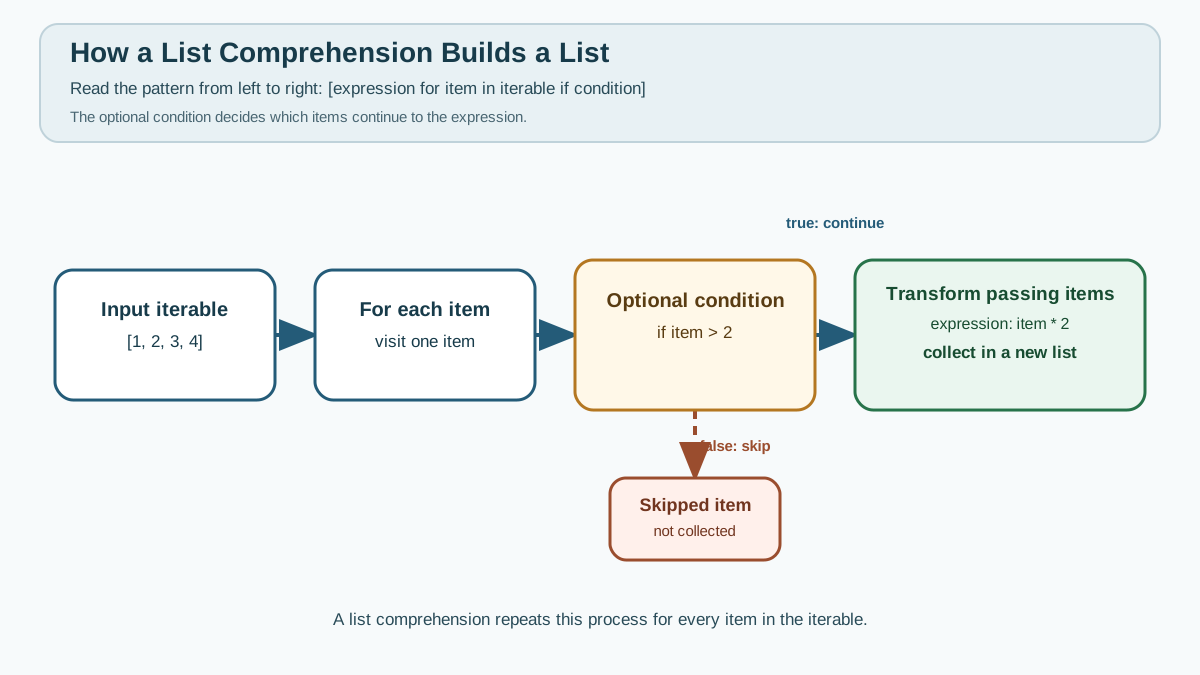
Here is the mental model:
[expression for item in iterable]
The same "square each number" example as a list comprehension:
numbers = [1, 2, 3, 4, 5]
squares = [n * n for n in numbers]
print(squares)
[1, 4, 9, 16, 25]
Read it as: "Make a list of n * n for each n in numbers."
n * nis the expression: what you want to produce for each item.for n in numbersis the loop: it visits each item innumbers.- The square brackets
[ ]tell Python to collect the results into a new list.
The expression runs once per item, and the results land in a brand-new list. The original numbers list is untouched.
Knowledge check
Check your understanding
Answer this question before you continue.
Translate a Loop into a Comprehension
The finished line is easy to read, but the real skill is turning your own loop into one. Here is the reliable sequence:
- Find the append. In the loop,
squares.append(n * n)tells you the expression isn * n. - Find the loop variable. In
for n in numbers, the variable isn. - Find the iterable. It is
numbers. - Assemble the parts. Put the expression first, then
for, then the iterable:[n * n for n in numbers].
The order flips: what you append goes to the front, and the loop moves to the back. Once you see that mapping, you can convert almost any list-building loop.
Let's apply the same method to a filter. Start with a loop that keeps only even numbers:
numbers = [1, 2, 3, 4, 5, 6]
evens = []
for n in numbers:
    if n % 2 == 0:
        evens.append(n)
print(evens)
[2, 4, 6]
Now translate it. The append is evens.append(n), so the expression is n. The loop variable is n, the iterable is numbers, and the condition n % 2 == 0 becomes a trailing if:
numbers = [1, 2, 3, 4, 5, 6]
evens = [n for n in numbers if n % 2 == 0]
print(evens)
[2, 4, 6]
The if at the end filters the items: only values where the condition is True reach the expression. Everything else is skipped.
Tip: Run both the long loop version and the comprehension version. The output is identical, but the comprehension is easier to scan.
Knowledge check
Check your understanding
Answer this question before you continue.
Common Beginner Mistakes (and How to Fix Them)
Common mistake: Forgetting the brackets
## Incorrect
squares = n * n for n in numbers
This raises a syntax error. Always wrap the comprehension in square brackets:
## Correct
squares = [n * n for n in numbers]
Common mistake: Putting if before for
The if condition goes after the for part:
## Incorrect
evens = [n if n % 2 == 0 for n in numbers]
This will not work. The correct order is:
## Correct
evens = [n for n in numbers if n % 2 == 0]
Knowledge check
Check your understanding
Answer this question before you continue.
Common mistake: Breaking the line without parentheses
A comprehension is meant to be a single line. If it gets long, wrap it in parentheses and indent the continuation lines:
squares = [
    n * n
    for n in numbers
    if n > 0
]
For most beginner cases, keep it on one line until the logic genuinely needs more room.
Tip: If you get a syntax error, check your brackets and the order of
forandiffirst.
Debugging tip
If the output is not what you expect, print the original list and your result side by side. Then check the expression and the condition separately. A comprehension is a loop in disguise, so trace it the same way you would trace a loop.
Filtering vs. Labeling Every Item
There is a subtle difference worth knowing before you combine patterns. A trailing if skips items that fail the condition. An expression-level if ... else ... produces a value for every item, choosing between two outputs.
numbers = [1, 2, 3, 4]
labels = ["even" if n % 2 == 0 else "odd" for n in numbers]
print(labels)
['odd', 'even', 'odd', 'even']
Here every number gets a label; nothing is skipped. If you want to drop items, use the trailing if. If you want to transform every item, use if ... else ... inside the expression.
Knowledge check
Check your understanding
Answer this question before you continue.
Combine Transformation and Filtering
The real payoff comes when you do both at once. Say you have a list of raw names and you want the cleaned-up version of only the names that are not empty:
raw_names = [" Alice ", "", "Bob ", "  Carol"]
clean_names = [name.strip() for name in raw_names if name.strip()]
print(clean_names)
['Alice', 'Bob', 'Carol']
Trace it with the same method. The expression is name.strip(), the loop variable is name, the iterable is raw_names, and the trailing if name.strip() keeps only names that still have content after stripping. One line does the filtering and the cleanup together.
Notice that this version calls name.strip() twice: once to test the condition and once to build the output. That is fine for a short line, but it is a small signal. When you need the same cleaned value in both the condition and the result, a regular loop that computes the value once and stores it in a named variable is often clearer:
raw_names = [" Alice ", "", "Bob ", "  Carol"]
clean_names = []
for name in raw_names:
    cleaned = name.strip()
    if cleaned:
        clean_names.append(cleaned)
print(clean_names)
['Alice', 'Bob', 'Carol']
Both produce the same result. The comprehension wins on brevity; the loop wins when naming the intermediate value makes the intent easier to follow. Pick the one that keeps the decision readable.
When to Use List Comprehensions (and When Not To)
List comprehensions shine when:
- You are transforming every item in a list.
- You are filtering a list down to a subset.
- The logic is short enough to read in one line.
Avoid them when:
- The logic is multi-step or hard to follow.
- You need to do more than build a list, like printing or logging inside the loop.
- The line becomes too long to read comfortably.
| Use a list comprehension when... | Use a regular loop when... | Example |
|---|---|---|
| You transform or filter a list in one step | The logic is multi-step or hard to read | [n * 2 for n in nums if n > 0] |
| The code stays short and clear | You need side effects or debugging inside the loop | A loop that prints each item as it builds the list |
| The condition and expression use the value once | One computed value is needed in both the condition and the result | A loop that strips a name once, stores it, then checks it |
Practical judgment: If a comprehension is getting hard to read, switch back to a regular loop. Readability beats cleverness every time.
Practice Task: Write Your Own List Comprehension
Task: Given a list of numbers, create a new list containing only the squares of the odd numbers.
Starter code:
numbers = [1, 2, 3, 4, 5, 6, 7]
## Your code here
Pause here. Write your own comprehension before reading further. Combine the filtering pattern and the transformation pattern in one line: filter for odd numbers first, then square what remains. Run your code and check the result against what you expect.
Expected output:
[1, 9, 25, 49]
Solution:
numbers = [1, 2, 3, 4, 5, 6, 7]
odd_squares = [n * n for n in numbers if n % 2 != 0]
print(odd_squares)
[1, 9, 25, 49]
Explanation: The if n % 2 != 0 keeps only the odd numbers, and the expression n * n squares each one that passes the filter.
Extension: Try the same task with a regular loop first, then convert it to a comprehension using the four-step method. Compare how much shorter the comprehension is.
What's Next?
Keep the bounded rule in mind: translate a list-building loop into a comprehension when it is a clear transform or filter, read the result aloud, and keep the regular loop when the steps or side effects deserve names. A comprehension is a tool for producing a list, not a license to compress every loop.
Once you are comfortable here, you can explore comprehensions over other data types. For now, practice converting your own loops, and keep an eye on when a comprehension stops being readable—that is the signal to switch back to a plain loop.
Knowledge check
Final check
Finish the article by checking the ideas you just learned.
References
Want a more structured Python path?
Use the Python Starter Pack to turn scattered tutorials into a focused practice path.
Python for Artificial Intelligence Starter Pack
Build a Python foundation you can actually use. The Python for AI Starter Pack brings together a guided path through setup, core programming concepts, data structures, files, JSON, APIs, debugging, and practical projects—so you can move quickly from running your first program to understanding and building useful software.
- 264-page illustrated PDF
- 12 guided Python chapters
- Visual concept diagrams
- Self-assessment quizzes
- Bonus deep-dive sections
- Files, JSON, APIs, debugging & projects
- Foundation for data, automation & AI
Coming soon


