
Lists in Python
A Python list is not just a container. It is an ordered, changeable collection that stores many values in one variable and lets you grow, shrink, or…

Key topics
A Python list is not just a container. It is an ordered, changeable collection that stores many values in one variable and lets you grow, shrink, or reorder them as your program runs. Before you memorize the methods, watch what the list remembers: position, order, and the freedom to change.
What Is a List in Python?
A list stores several values together in a single variable. If you wanted to track your three favorite movies, you could use three separate variables:
movie1 = "Inception"
movie2 = "Toy Story"
movie3 = "Spirited Away"
That works for three movies. Now imagine ten, or a hundred. Creating a new variable for each one becomes unmanageable fast. A list solves this by holding all the values in one place:
movies = ["Inception", "Toy Story", "Spirited Away"]
A list is a data structure: a way to organize data so your program can work with it efficiently. Where a single variable holds one value, a list holds a whole collection under one name. If variables and data types are still unfamiliar, review those fundamentals before continuing.
How to Create a List
Create a list with square brackets [] and separate each item with a comma:
numbers = [10, 20, 30, 40, 50]
Lists can hold different types of values at once. You can mix strings, numbers, booleans, and even other lists:
mixed_list = ["apple", 3, 4.5, True]
You can also create an empty list to fill in later:
empty_list = []
Note: Yes, you can mix data types in one list. Python does not force a list to hold only one kind of value, which is part of why lists are so flexible.
Knowledge check
Check your understanding
Answer this question before you continue.
Watch a List Change: One Complete Experiment
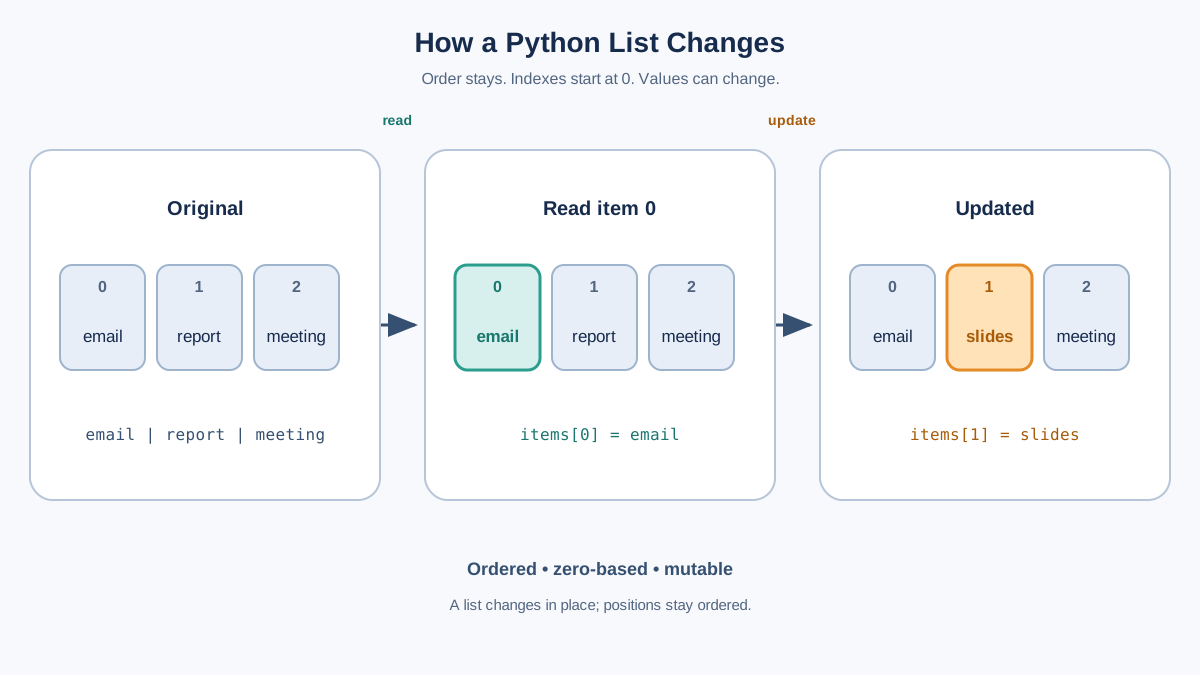
Before we break the operations into pieces, run one small script that shows the whole idea at once. Create a list, read one item, change another, and print the list after each step:
tasks = ["email", "report", "meeting"]
print(tasks)

print(tasks[0])

tasks[1] = "slides"
print(tasks)
['email', 'report', 'meeting']
email
['email', 'slides', 'meeting']
Three things just happened, and each one is the core of how python lists work:
- The list kept its order —
"email"stayed first. - The first item was read by its position, not by its value.
- The list changed in place —
"report"became"slides"without creating a new list.
That is the mental model to carry through the rest of this article: a list is ordered, zero-based, and mutable. Every method below is just a different way to act on those three facts.
Accessing Items in a List
Each item in a list has a position called an index. Python uses zero-based indexing, so the first item is at index 0:
colors = ["red", "green", "blue"]
print(colors[1])
green
If you try to access an index that does not exist, like colors[3], Python raises an error. Counting starts at 0, not 1.
You can also use negative indexing to reach items from the end:
colors[-1]is"blue"(the last item)colors[-2]is"green"(the second-to-last item)
Common mistake: Beginners often reach for
colors[3]expecting the third item. Remember thatcolors[2]is the third item because the first is at index0.
Knowledge check
Check your understanding
Answer this question before you continue.
Changing and Updating List Items
Because lists are mutable, you can change their contents after you create them. Update any item by assigning a new value to its index:
colors = ["red", "green", "blue"]
colors[1] = "yellow"
print(colors)
['red', 'yellow', 'blue']
Mutability is what makes lists different from strings, which cannot be changed in place. A list is a piece of state your program can keep editing as it runs.
The Copy Trap: When Two Names Share One List
Here is the warning that trips up almost every beginner, and it deserves proof, not just a sentence. Assignment does not copy a list. Write a second name and both names point to the same list:
colors = ["red", "green", "blue"]
backup = colors

backup[0] = "purple"
print(colors)
print(backup)
['purple', 'green', 'blue']
['purple', 'green', 'blue']
You changed backup, but colors changed too, because both names were watching the same object. If you want a genuinely separate copy, use .copy():
colors = ["red", "green", "blue"]
backup = colors.copy()

backup[0] = "purple"
print(colors)
print(backup)
['red', 'green', 'blue']
['purple', 'green', 'blue']
Now the two lists move independently. The rule to remember: = shares the list; .copy() duplicates it. Reach for .copy() whenever you plan to change one list but want the other left alone.
Knowledge check
Check your understanding
Answer this question before you continue.
Adding and Removing Items
Lists can grow and shrink as you need them. Here are the most common ways to add and remove items.
Adding Items
append() adds an item to the end of the list:
fruits = ["apple", "banana"]
fruits.append("cherry")
print(fruits)
['apple', 'banana', 'cherry']
insert() adds an item at a specific position:
fruits.insert(1, "orange")
print(fruits)
['apple', 'orange', 'banana', 'cherry']
Tip: Use
append()when you just need to add to the end. Useinsert()only when position matters, because inserting in the middle shifts every later item.
Removing Items
remove() deletes the first matching value:
fruits.remove("banana")
print(fruits)
['apple', 'orange', 'cherry']
remove() expects the value to exist. If you call fruits.remove("mango") and there is no "mango", Python raises a ValueError instead of quietly doing nothing. When absence is possible, check membership first with if "mango" in fruits: before removing.
pop() removes an item by index and returns it. With no argument, it removes the last item:
last_fruit = fruits.pop()
print(last_fruit)
print(fruits)
cherry
['apple', 'orange']
Notice the split: pop() returns the removed value to you and changes the list. That is why the output shows two lines — the value you got back, then the list with that item gone.
Here is the decision rule in one line: use remove(value) to discard a known value you no longer need; use pop(index) when you want to retrieve that item and remove it from the list at the same time. Both shrink the list, but only pop() hands the removed item back to you.
Tip: Use
remove()when you know the value but not its position. Usepop()when you want the removed item back, for example to pull the most recent item off a stack of tasks.
Lists vs. Arrays
Beginners often ask whether lists and arrays are the same thing. In Python, a list is the default general-purpose collection: it can hold mixed types and resize freely. Python does have an array module, but it is a specialized numeric container you reach for only when a program specifically needs to store many numbers of one type efficiently. For everyday tasks, lists are what you want.
| Python list | Python array module | |
|---|---|---|
| Holds mixed data types | Yes | No, one type only |
| Resizes freely | Yes | Yes |
| Best for | General everyday collections | Specialized numeric data of one type |
| Beginner-friendly | Yes | Less common |
Do not let size alone decide for you. A list handles a thousand numbers just fine. Reach for the array module only when your program has a concrete reason to store tightly packed numeric data of a single type — a later topic, not a beginner decision.
When to Use Lists in Real Life
Lists show up everywhere in real programs. Here is one small scenario that uses everything you just learned: a shopping cart.
cart = ["milk", "bread"]
cart.append("eggs")
cart[0] = "oat milk"
cart.remove("bread")
print(cart)
['oat milk', 'eggs']
The cart is ordered, it changes as the shopper acts, and every operation is one you have already seen. That is the pattern to reuse: create the collection, then add, update, or remove items as the program runs.
Other everyday uses follow the same shape — to-do lists, game scores, and sensor readings all store a group of related items that change over time.
Decision rule: Choose a list when order matters and the collection changes. If your real task is looking up a value by a named key, a dictionary is the better tool.
Wrapping Up: Why Python Lists Matter
Lists are one of the first building blocks you will reach for in Python, and the fastest way to make them stick is to stop reading and start changing state. The whole lesson compresses into one loop: change one list, print it, inspect the state, then change it again.
Now make that loop prove you can do all four core operations. Build a list of your favorite songs, read the second one by its index, update it to a different title, append a new song, and remove one you no longer like — printing the list after each step, exactly like the experiment above. If the output matches what you expected each time, you have the create, access, and modify model down.
When you are ready, put the idea to work in practice exercises that combine several data structures, or review the underlying variable and type fundamentals.
Knowledge check
Final check
Finish the article by checking the ideas you just learned.
References
Want a more structured Python path?
Use the Python Starter Pack to turn scattered tutorials into a focused practice path.
Python Starter Pack
A compact LearnPyFast PDF pack covering what Python is, installation, your first program, running Python code, and Python versions.
- 5 curated chapters
- Enhanced PDF edition with bundle-only learning guidance
- Offline-friendly format for focused review
- Source article links for future online updates
Coming soon


