
Dictionaries in Python
Dictionaries have been my favorite data structure throughout my 20 years as a software engineer. When I interviewed at Google, one of the problems I was…

Key topics
Dictionaries have been my favorite data structure throughout my 20 years as a software engineer. When I interviewed at Google, one of the problems I was asked involved the same core idea: mapping a key to a value so the program can find what it needs quickly. That idea deserves more attention than a beginner usually gives it, because it is the engine behind how software answers questions, organizes information, and retrieves the right result in a split second.
Why Dictionaries Matter: The Lookup Mechanism
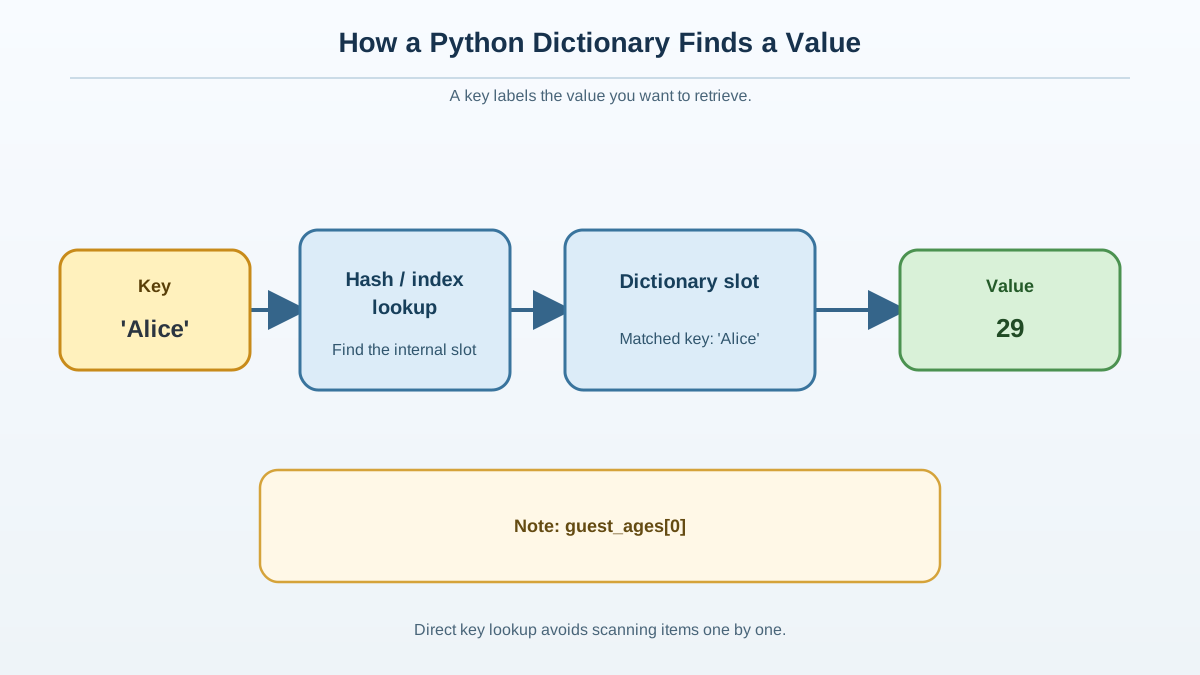
A Python dictionary (or dict) is a built-in data structure for storing and retrieving information by key. Unlike a list, which finds items by position, a dictionary finds items by label. This is the difference between flipping through every entry in a phone book versus jumping straight to the name you want.
Let's see one in action right away:
## Create a dictionary mapping guest names to ages
guest_ages = {
    "Alice": 29,
    "Bob": 34,
    "Charlie": 27
}

print(guest_ages["Alice"])
29
Here is the mental model that governs everything else in this article: label → index → location → value. When you write guest_ages["Alice"], Python takes the label, uses it to find an internal index, locates the stored entry, and returns the value. That index is an internal lookup aid, not a position you can access like guest_ages[0]. A dictionary key is a label, not a number you count through.
But why is dictionary lookup so fast? Under the hood, Python dictionaries use a data structure called a hash table. When you ask for guest_ages["Alice"], Python runs the key through a hash function to get a number, then uses that number to locate the slot where the value is stored. Most of the time, this means you can retrieve, insert, or delete a value in roughly constant time—engineers call this O(1) average-case time complexity. In plain English: as the dictionary grows, a lookup usually still takes about the same amount of work, because you go straight from label to value instead of scanning every item from the beginning. That is an average-case claim, not a guarantee that every operation takes exactly the same time.
Lists vs. Dictionaries: When to Use Each
If you've already learned about lists in Python, you know they are great for storing ordered collections of items you access by position. But lists are not optimized for finding a value by label. If you want the price of a product by its code, or the grade for a student by their ID, a dictionary is the right tool.
| Data Structure | How You Access Items | Use This When... |
|---|---|---|
| List | By index (number) | You care about order or need to process every item |
| Dictionary | By key (label or ID) | You need fast lookup by label, name, or ID |
I still reach for a dictionary whenever the real question is, "What value belongs to this label?"
Knowledge check
Check your understanding
Answer this question before you continue.
Anatomy of a Python Dictionary: Keys and Values
A dictionary is a set of key-value pairs. Each key must be unique and immutable (strings, numbers, or tuples are common). Each value can be any Python object.
## Example: mapping guest names to ages
print(guest_ages)
{'Alice': 29, 'Bob': 34, 'Charlie': 27}
- Keys: "Alice", "Bob", "Charlie" (labels)
- Values: 29, 34, 27 (data)
The rules that matter here are about the key, not the value. Keys must be unique, so a dictionary never holds two entries under the same label. Keys must also be immutable—strings, numbers, and tuples are the safe, common choices—because Python needs a stable value to hash when it looks the key up later. Values, by contrast, can be anything: a number, a string, a list, even another dictionary.
If you try to access a key that isn't present, Python raises a KeyError exception. This is Python's way of signaling that the label you provided doesn't map to any value in the dictionary. For example, running the following code will cause an error:
print(guest_ages["Dana"])
Traceback (most recent call last):
  File "<stdin>", line 1, in <module>
KeyError: 'Dana'
This error output means Python could not find the label "Dana" in the dictionary.
Knowledge check
Check your understanding
Answer this question before you continue.
Adding, Updating, and Removing Items
The next examples continue from the same guest_ages dictionary above. If you are copying code snippets independently, make sure to define guest_ages as shown earlier.
Assignment is where the label model earns its keep. When you assign to a key, Python checks whether that label already exists: if it does, the old value is replaced; if it doesn't, a new entry is added. One syntax handles both cases.
## Add a new guest
guest_ages["Dana"] = 31

## Update an existing guest's age
guest_ages["Alice"] = 30

## Remove a guest
del guest_ages["Bob"]

print(guest_ages)
{'Alice': 30, 'Charlie': 27, 'Dana': 31}
Notice that updating "Alice" did not create a second entry. Because keys are unique, the assignment simply replaced the value stored under that label.
Checking for Keys and Safe Lookup
To check if a key exists, use the in keyword. This checks whether the label is present among the dictionary's keys—not its values:
if "Charlie" in guest_ages:
    print("Charlie is on the list!")
Charlie is on the list!
Tip:
"Charlie" in guest_ageschecks for the label as a key. If you want to check for a value, usein guest_ages.values()instead.
To avoid errors when a key might be missing, use .get(). This method follows the same label-to-value path, but instead of raising an error, it returns a fallback value if the label isn't found:
print(guest_ages.get("Eve", "Not found"))
Not found
.get() is your safety net for uncertain lookups. Use it whenever the key might not exist—reading user input, processing data from a file, or handling anything you didn't type yourself.
Knowledge check
Check your understanding
Answer this question before you continue.
Looping Through a Dictionary
Direct lookup uses a key to jump straight to a value. But sometimes you want to process every item in the dictionary. When you loop through a dictionary, you are iterating over its keys (labels), values, or both. This is sequential traversal, not direct lookup:
## Loop over keys
for name in guest_ages:
    print(name)

## Loop over values
for age in guest_ages.values():
    print(age)

## Loop over key-value pairs
for name, age in guest_ages.items():
    print(f"{name} is {age} years old.")
Alice
Charlie
Dana
30
27
31
Alice is 30 years old.
Charlie is 27 years old.
Dana is 31 years old.
Counting With a Dictionary: The Payoff
Here is where the pieces come together. The real power of a dictionary is not just looking up one value—it is repeatedly updating a value by a key. A classic example is counting how many times each word appears in a sentence. Each word is a label; its count is the value. When you meet a word again, you update the value at that label instead of scanning the whole list:
## Count word occurrences in a sentence
sentence = "the cat and the dog chased the cat"
word_counts = {}
for word in sentence.split():
    word_counts[word] = word_counts.get(word, 0) + 1
print(word_counts)
{'the': 3, 'cat': 2, 'and': 1, 'dog': 1, 'chased': 1}
Notice how .get(word, 0) does the work: if the word is already a key, it returns the current count and you add one; if it isn't, it returns 0 and you start the count at 1. No KeyError, and no manual scan through the collection to find where a word lives. That is the label → index → location → value pattern doing repeated, fast updates.
This is where the dictionary stops being a syntax lesson and becomes a systems idea. The same principle—build an index first so repeated lookup becomes fast—is what powers web search. A search engine builds an index over documents so it can answer a query without reading every page from start to finish, just as a dictionary answers guest_ages["Alice"] without scanning every entry. The two are different structures solving different retrieval problems: a Python hash table maps a key to a value in memory, while a search engine's inverted index maps terms to the documents that contain them. The shared lesson is indexed access. Once you see it in a dictionary, you'll recognize it in databases, caches, compilers, and search engines.
Knowledge check
Check your understanding
Answer this question before you continue.
Common Mistakes and How to Avoid Them
Common mistake: Using a list when you need to look up by label. Lists are for ordered collections; dictionaries are for labeled access.
Common mistake: Using a mutable type (like a list or another dictionary) as a key. Keys need a stable hash so Python can find the same location later; a mutable list could change after insertion, making that lookup unreliable. Strings, numbers, and tuples are the safe, common choices.
Common mistake: Forgetting that keys must be unique. Assigning a value to an existing key replaces the old value.
Common mistake: Confusing keys and values in membership checks.
inchecks keys, not values—if you need to check for a value, usein dictionary.values().
Note: Dictionaries in Python 3.7 and later preserve the order items were added, but their main purpose is still fast lookup by key, not position-based access.
When to Use a Dictionary (and What to Try Next)
Use a dictionary when you need to repeatedly retrieve or update a value by a stable key, label, or ID. If you find yourself writing code that asks, "What value belongs to this label?"—reach for a dictionary.
Ready to practice? Build a dictionary that maps book titles to their authors. Then retrieve one title safely with .get(), update one author's entry, and add a new book. The whole task is one decision: choose a stable label for each value, then let the dictionary do the rest. Once you see the pattern, you'll find it everywhere.
Knowledge check
Final check
Finish the article by checking the ideas you just learned.
References
Want a more structured Python path?
Use the Python Starter Pack to turn scattered tutorials into a focused practice path.
Python Starter Pack
A compact LearnPyFast PDF pack covering what Python is, installation, your first program, running Python code, and Python versions.
- 5 curated chapters
- Enhanced PDF edition with bundle-only learning guidance
- Offline-friendly format for focused review
- Source article links for future online updates
Coming soon


