
Practice Exercises: Data Structures
Reading about lists and dictionaries teaches you the vocabulary. Running exercises teaches you the language. These beginner drills turn the four core…

Key topics
Reading about lists and dictionaries teaches you the vocabulary. Running exercises teaches you the language. These beginner drills turn the four core Python data structures—lists, dictionaries, tuples, and sets—into things you actually operate, not just recognize.
If you need a quick refresher first, skim the concept pages on lists, dictionaries, and tuples and sets. Then come back here and type.
The Method Behind These Exercises
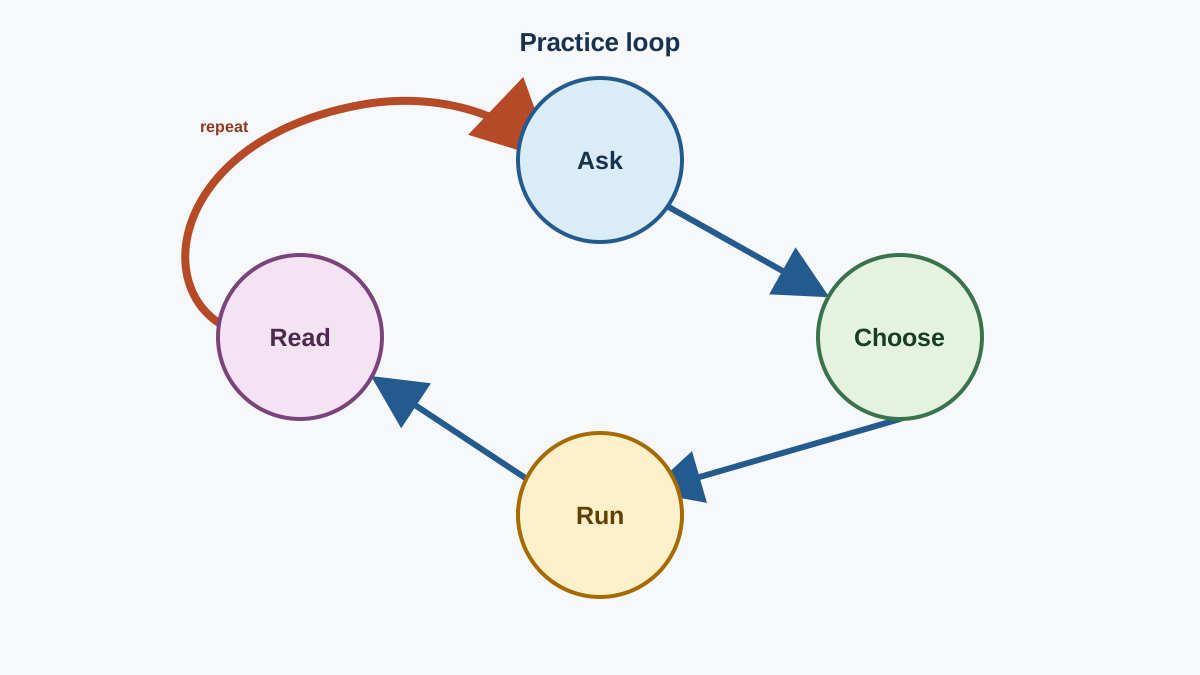
Every task here follows one repeatable loop, and it is worth naming it before you start:
- Ask the question the code must answer. Do you need to look something up by name? Keep a sequence in order? Strip out repeats?
- Choose the structure that makes that question direct. A dictionary answers "give me the value for this name" in one step. A set answers "is this value here?" without scanning.
- Run it and read the output. The output is the evidence. If it does not match what you expected, the mismatch is telling you exactly which assumption was wrong.
That loop is the whole point of these python data structures exercises. You are not memorizing methods. You are learning to look at a data problem and pick the tool that makes the answer obvious.
One loop shape will carry the combined tasks, so get it in your fingers now:
contacts = [
    {"name": "Ada", "phone": "555-0101"},
    {"name": "Grace", "phone": "555-0102"},
]

for contact in contacts:
    print(contact["name"])
Expected output:
Ada
Grace
That is the whole pattern: a list holds records, each record is a dictionary, and a for loop walks the list. Keep this shape in mind—you will build on it.
How to Use These Exercises
Each exercise follows the same shape: a goal, starter code, expected behavior, a hint, a solution, and an explanation. The starter code is deliberately incomplete. Your job is to fill the gap, not to watch a finished program run.
- Write your own version first. Type the code yourself instead of copying it. Your fingers learn what your eyes skip over.
- Predict before you run. Say out loud what the output will be. If you are wrong, the mismatch is a clue, not a failure.
- Break it on purpose. Change one thing, run it again, and watch what moves. That is how a mental model gets built.
- Use any editor you like. A local install, an online playground, or a notebook all work. The tool matters less than the loop: write, run, observe, adjust.
Tip: When output surprises you, print the value you are unsure about. A single
print()turns a guess into a fact.
List Practice Exercises
A list is an ordered, changeable collection. You can add to it, remove from it, and rearrange it. These exercises make that feel automatic.
1. Add and Remove Items
Goal: Change a list by appending and removing items.
Starter code:
colors = ["red", "green", "blue"]
## Add "yellow" to the end, then remove "green".
## Your code here
print(colors)
Expected behavior: "yellow" is added to the end, "green" is removed, and the updated list prints.
Hint: .append() adds to the end. .remove() deletes the first matching value.
Solution:
colors = ["red", "green", "blue"]
colors.append("yellow")
colors.remove("green")
print(colors)
Expected output:
['red', 'blue', 'yellow']
Explanation: .append() and .remove() change the list in place—they do not return a new list. That is a common beginner trap: if you write colors = colors.append("yellow"), you overwrite your list with None. Run that mistake once and you will never make it again.
Knowledge check
Check your understanding
Answer this question before you continue.
2. Access and Change Items
Goal: Read an item by position and replace another.
Starter code:
colors = ["red", "green", "blue"]
## Print the first item.
## Replace the last item with "purple".
## Your code here
print(colors)
Expected behavior: The first item prints, then the list prints with the last item changed to "purple".
Hint: Indexes start at 0. A negative index counts from the end, so -1 is the last item.
Solution:
colors = ["red", "green", "blue"]
print(colors[0])
colors[-1] = "purple"
print(colors)
Expected output:
red
['red', 'green', 'purple']
Explanation: colors[0] reads the first item. Assigning to colors[-1] replaces the last item. Lists are mutable, which means you can reach in and swap a value without rebuilding the whole collection.
Knowledge check
Check your understanding
Answer this question before you continue.
3. Sort and Check Membership
Goal: Sort a list of numbers and test whether a value is present.
Starter code:
numbers = [5, 2, 9, 1, 7]
## Sort the list in place.
## Print whether 3 is in the list.
## Your code here
Expected behavior: The numbers print in ascending order, then False prints because 3 is not in the list.
Hint: .sort() reorders the list in place. The in keyword returns a boolean.
Solution:
numbers = [5, 2, 9, 1, 7]
numbers.sort()
print(numbers)
print(3 in numbers)
Expected output:
[1, 2, 5, 7, 9]
False
Explanation: .sort() mutates the list rather than returning a new one. The in check is the membership test you will reach for constantly—it answers one question: is this value here?
Common mistake: Confusing
.sort()withsorted()..sort()changes the list in place and returnsNone.sorted()returns a new sorted list and leaves the original alone. Use.sort()when you want to keep working with the same list; usesorted()when you need the original order preserved.
Dictionary Practice Exercises
A dictionary maps keys to values. It is the structure you reach for when you want to look something up by name instead of by position.
1. Update and Add Items
Goal: Change an existing value and add a brand-new key.
Starter code:
person = {"name": "Ada", "age": 36, "city": "London"}
## Change the city to "Paris".
## Add a new key "job" with the value "mathematician".
## Your code here
print(person)
Expected behavior: The city updates to "Paris" and a new "job" key appears.
Hint: Assigning to an existing key updates it. Assigning to a new key adds it.
Solution:
person = {"name": "Ada", "age": 36, "city": "London"}
person["city"] = "Paris"
person["job"] = "mathematician"
print(person)
Expected output:
{'name': 'Ada', 'age': 36, 'city': 'Paris', 'job': 'mathematician'}
Explanation: The same assignment syntax does double duty. If the key exists, you overwrite it. If it does not, you create it. That single rule covers most dictionary edits you will ever make.
Knowledge check
Check your understanding
Answer this question before you continue.
2. Look Up and Remove Items
Goal: Read a value by key and delete a key-value pair.
Starter code:
person = {"name": "Ada", "age": 36, "city": "London"}
## Print the value for the "name" key.
## Delete the "age" key.
## Your code here
print(person)
Expected behavior: "Ada" prints, then the dictionary prints without the "age" pair.
Hint: Use square brackets with the key to read a value. Use del to remove a key.
Solution:
person = {"name": "Ada", "age": 36, "city": "London"}
print(person["name"])
del person["age"]
print(person)
Expected output:
Ada
{'name': 'Ada', 'city': 'London'}
Explanation: Reading by key is the whole point of a dictionary—fast lookup by name. del removes the pair entirely. If you try to read a key that does not exist, Python raises a KeyError, which is your signal that the key name or the data is wrong.
3. Choose the Right Structure
Goal: Decide whether a dictionary or a list fits a task, then prove your choice.
Starter code:
## You need to look up a phone number by a person's name.
## Choose a structure, build it, and print the number for "Ada".
## Your code here
Expected behavior: The phone number for "Ada" prints.
Hint: If you want to retrieve a value by name, that is the dictionary's job.
Solution:
phone_book = {"Ada": "555-0101", "Grace": "555-0102"}
print(phone_book["Ada"])
Expected output:
555-0101
Explanation: This is the decision rule in action. The question is "give me the value for this name," so a dictionary makes that answer direct. A list would force you to search by position and remember which index holds which name. When the question is a name lookup, reach for a dictionary.
Common mistake: Using a list-style method on a dictionary. There is no
.append()on a dict, and no.add(). You add entries with assignment:person["job"] = "mathematician". If you reach for a method that does not exist, Python'sAttributeErroris telling you that dictionaries are their own thing, not a list with a different name.
Tuples and Sets Practice Exercises
Tuples are ordered and unchangeable. Sets are unordered collections of unique items. They solve different problems than lists, and these exercises make the difference visible.
1. Create and Use a Tuple
Goal: Build a tuple and read an item from it.
Starter code:
## Build a tuple holding three dimensions: 10, 20, 30.
## Print the second item.
## Your code here
Expected behavior: The second item, 20, prints.
Hint: Tuples use parentheses and support the same index access as lists.
Solution:
dimensions = (10, 20, 30)
print(dimensions[1])
Expected output:
20
Explanation: A tuple is an ordered, immutable sequence. You can read from it by index, but you cannot add, remove, or replace items. That immutability is a feature: it signals that the data should not change, which is why tuples are a natural fit for fixed coordinates, configuration values, and function return values.
Knowledge check
Check your understanding
Answer this question before you continue.
2. Remove Duplicates with a Set
Goal: Use a set to strip duplicate values from a list.
Starter code:
numbers = [1, 2, 2, 3, 4, 4, 5]
## Convert the list to a set so each number appears once.
## Print the result.
## Your code here
Expected behavior: The set prints with each number appearing once.
Hint: Passing a list to set() keeps only the unique values.
Solution:
numbers = [1, 2, 2, 3, 4, 4, 5]
unique = set(numbers)
print(unique)
Expected output:
{1, 2, 3, 4, 5}
Explanation: A set never stores duplicates. Converting a list to a set is the fastest way to remove repeated values. Note that sets are unordered, so the printed order is not guaranteed—do not rely on a set to preserve the order of your original list.
3. Set Operations
Goal: Combine two sets with union and intersection.
Starter code:
a = {1, 2, 3}
b = {3, 4, 5}
## Print the union of a and b.
## Print the intersection of a and b.
## Your code here
Expected behavior: The union prints all unique items from both sets, and the intersection prints only the shared item.
Hint: | means union (everything in either set). & means intersection (only what is in both).
Solution:
a = {1, 2, 3}
b = {3, 4, 5}
print(a | b)
print(a & b)
Expected output:
{1, 2, 3, 4, 5}
{3}
Explanation: Set operations let you answer questions like "which tags do both posts share?" or "which users are in either group?" in one line. The union combines, the intersection narrows, and both return new sets without changing the originals.
Common mistake: Expecting a set to keep insertion order. Sets are unordered, so
{1, 2, 3}may print as{1, 2, 3}today and something else in a different run. If order matters, use a list or tuple. If uniqueness matters, use a set.
Mini-Project: A Contact Book
Now combine the structures. This is where the practice pays off—you are choosing a structure and composing it with others, not just calling a method.
Goal: Build a small contact book, look up a phone number by name, and confirm each number is unique.
Starter code:
contacts = [
    {"name": "Ada", "phone": "555-0101"},
    {"name": "Grace", "phone": "555-0102"},
    {"name": "Alan", "phone": "555-0103"},
]

## 1. Build a dictionary that maps each name to its phone number.
## 2. Print the number for "Grace".
## 3. Print a set of all phone numbers to confirm none repeat.
## Your code here
Expected behavior: The phone number 555-0102 prints, then a set of the three phone numbers prints.
Hint: Loop over the list of dictionaries. For each contact, add an entry to a new dictionary using the name as the key and the phone as the value. Then convert the dictionary's values to a set.
Watch the state change before you write the loop. Start with an empty dictionary, then handle one contact by hand:
phone_book = {}
contact = {"name": "Ada", "phone": "555-0101"}
phone_book[contact["name"]] = contact["phone"]
print(phone_book)
Expected output:
{'Ada': '555-0101'}
See what happened? The loop does that same work once per contact. Each iteration reads the current record's name and phone, then writes one new entry into phone_book. The dictionary starts empty and grows by one key each pass.
Solution:
contacts = [
    {"name": "Ada", "phone": "555-0101"},
    {"name": "Grace", "phone": "555-0102"},
    {"name": "Alan", "phone": "555-0103"},
]

phone_book = {}
for contact in contacts:
    phone_book[contact["name"]] = contact["phone"]

print(phone_book["Grace"])
print(set(phone_book.values()))
Expected output:
555-0102
{'555-0101', '555-0102', '555-0103'}
Explanation: This is the loop shape from the start of the article doing real work. The list holds the records, each record is a dictionary, and the loop builds a lookup dictionary keyed by name. Now you can ask for any contact's number in one line instead of scanning the list. The final line converts the dictionary's values to a set, which confirms each number appears once—a small, purposeful use of the uniqueness rule. You chose a list for the collection, a dictionary for each record, a dictionary for the lookup, and a set for the uniqueness check—four structures, one small program.
Extension: Add a fourth contact to the list and confirm the lookup still works. If you add a duplicate phone number on purpose, watch the set shrink to show the duplicate is gone.
Choosing the Right Structure
When you are not sure which structure fits, ask two questions: does order matter, and can the values repeat?
| Structure | Ordered? | Changeable? | Unique values? | Use this when |
|---|---|---|---|---|
| List | Yes | Yes | No | A sequence you will add to, remove from, or reorder |
| Tuple | Yes | No | No | A fixed sequence that should never change |
| Dictionary | Yes (insertion order) | Yes | Keys are unique | Looking up values by a name or key |
| Set | No | Yes | Yes | Removing duplicates or checking membership |
The table is a decision rule, not a memory test. When you face a real problem, walk the columns: if you need order and change, pick a list. If you need lookup by name, pick a dictionary. If you need uniqueness, pick a set. If you need a fixed sequence, pick a tuple.
Next Practice Task
You have now run all four core structures, made real choices between them, and combined them into a working program. That is the difference between knowing about data structures and being able to use them.
Here is one precise follow-up that turns the contact book into a habit. Rebuild it from memory tomorrow, but change the question: instead of looking up a phone number by name, count how many contacts share each first letter of their name.
That needs a dictionary where each key is a letter and each value is a count. Start with an empty dictionary, loop over the names, and for each name update the count for its first letter. A useful trick: counts[letter] = counts.get(letter, 0) + 1 adds one to an existing key or starts a new key at 1. For the three contacts above, the expected result is {'A': 2, 'G': 1}.
Write the loop, run it, and read the output. If you can reproduce that lookup and count without peeking, the pattern is yours. When you are comfortable, build a simple data project that puts lists, dictionaries, and file handling together in one program.
Knowledge check
Final check
Finish the article by checking the ideas you just learned.
References
Want a more structured Python path?
Use the Python Starter Pack to turn scattered tutorials into a focused practice path.
Python Starter Pack
A compact LearnPyFast PDF pack covering what Python is, installation, your first program, running Python code, and Python versions.
- 5 curated chapters
- Enhanced PDF edition with bundle-only learning guidance
- Offline-friendly format for focused review
- Source article links for future online updates
Coming soon


