
Practice Exercises: Control Flow
Reading about if statements and loops is easy. Writing them is where you find out what you actually understand. That gap between recognizing a concept and…

Key topics
Reading about if statements and loops is easy. Writing them is where you find out what you actually understand. That gap between recognizing a concept and building with it is exactly what these python control flow exercises close.
This is a hands-on set of beginner drills for anyone who already knows the basics of if statements, for loops, and while loops. Each one follows the same method: predict what the code will do, run it, change one small thing, and explain why the output changed. The method is the point. Copying a finished answer teaches you nothing; predicting, breaking, and repairing code is how the skill actually lands.
The Change-and-Observe Method
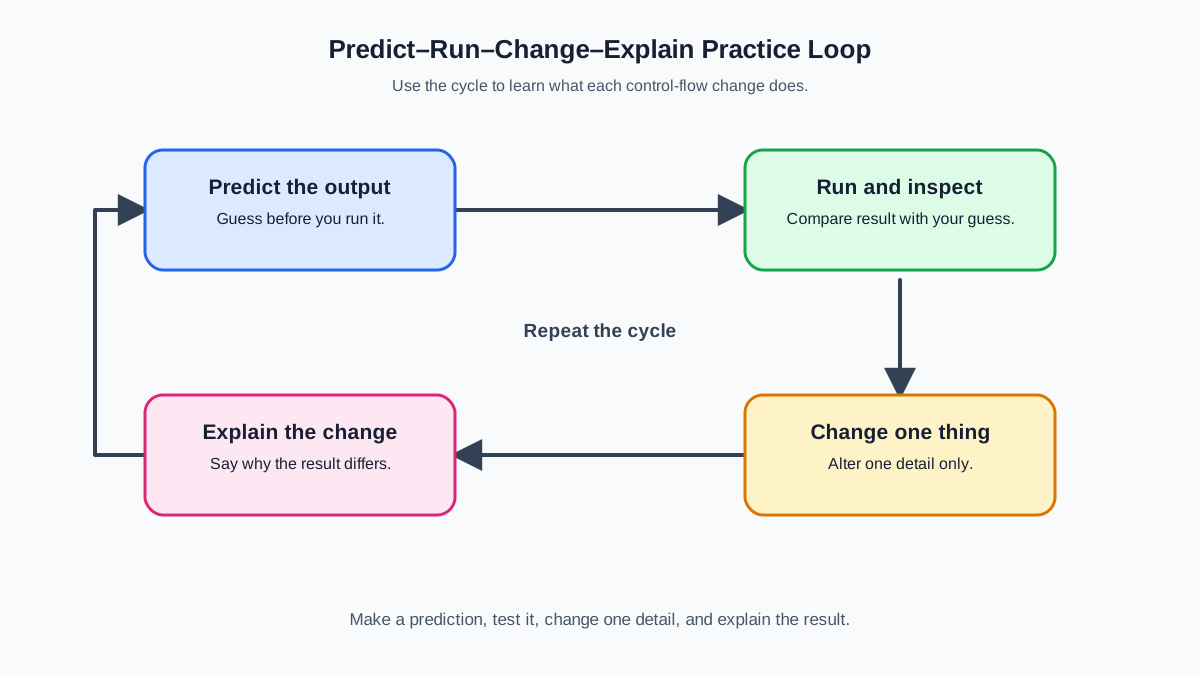
Before the exercises, one note on how to practice so the effort sticks.
- Predict first. Before you run anything, say out loud what you expect to print or which branch you expect to run.
- Run and inspect. Type the code, run it, and compare the real output to your prediction.
- Change one thing. Alter a single value, condition, or loop bound, then run again.
- Explain the difference. If the output changed, name exactly why. If it did not, find the line that made your mental model wrong.
A wrong output is evidence about what your code is actually doing, not a personal failure. When you get stuck, that is the signal to re-read the relevant concept and come back.
The method also gets sharper as you go. In the decision section you predict which branch runs. In the for section you trace how a variable changes across iterations. In the while section you track the condition that keeps the loop alive. Same habit, three levels of reasoning.
A Short Bridge: What input() Actually Returns
Several exercises ask the user for a number. One detail will save you a confusing error: input() always returns text, even when the user types digits.
value = input("Enter a number: ")
print(type(value))
<class 'str'>
That is why the exercises wrap the call in int(input(...)). The int() function converts the text "7" into the number 7 so you can compare it with > or %. If the user types something that is not a number, int() raises an error. These drills assume valid input so you can focus on control flow, not on input validation.
Knowledge check
Check your understanding
Answer this question before you continue.
Decision Exercises
These exercises practice making choices with if, elif, and else. In this section, your prediction job is simple: name which branch will run for a given input.
Exercise 1: Positive, Negative, or Zero
Goal: Ask the user for a number and print whether it is positive, negative, or zero.
Starter code (finish the missing branches):
number = int(input("Enter a number: "))

if number > 0:
    print("Positive")
## Add the missing branches below.
Predict before you write: Which branch runs when the user enters 0? Which runs for -3?
Expected behavior: If the number is greater than 0, print Positive. If it is less than 0, print Negative. Otherwise, print Zero.
Hint: You need three branches. Start with if for positive, use elif for negative, and finish with else for zero.
Try it yourself, then compare with the solution:
number = int(input("Enter a number: "))

if number > 0:
    print("Positive")
elif number < 0:
    print("Negative")
else:
    print("Zero")
Explanation: The if branch runs only when number > 0. The elif runs only when the first condition is false and number < 0. The else catches everything left over, which is exactly zero. Order matters: Python checks the branches top to bottom and runs the first one whose condition is true.
Change one thing: Replace > with >= and predict what changes for the input 0.
Exercise 2: Even or Odd
Goal: Ask the user for a number and print Even or Odd.
Starter code (finish the condition):
number = int(input("Enter a number: "))

if # your condition here:
    print("Even")
else:
    print("Odd")
Predict before you write: What does number % 2 equal for an even number?
Expected behavior: Print Even if the number is divisible by 2, otherwise print Odd.
Hint: The modulo operator % returns the remainder of a division. A number is even when number % 2 == 0.
Try it yourself, then compare with the solution:
number = int(input("Enter a number: "))

if number % 2 == 0:
    print("Even")
else:
    print("Odd")
Explanation: number % 2 gives the remainder when you divide by 2. Even numbers leave a remainder of 0, so the condition is true for them and false for odd numbers. This is one of the most common uses of % in real code.
Change one thing: Change the condition to number % 2 == 1 and predict which inputs now print Even.
Knowledge check
Check your understanding
Answer this question before you continue.
Exercise 3: Age Checker
Goal: Ask the user for their age and print Adult or Minor.
Starter code (finish the comparison):
age = int(input("Enter your age: "))

if # your comparison here:
    print("Adult")
else:
    print("Minor")
Predict before you write: What should print when the user enters exactly 18?
Expected behavior: Print Adult if the age is 18 or older, otherwise print Minor.
Hint: Use >= for "18 or older", not >.
Try it yourself, then compare with the solution:
age = int(input("Enter your age: "))

if age >= 18:
    print("Adult")
else:
    print("Minor")
Explanation: The condition age >= 18 is true for 18 and every age above it. Using > instead would wrongly classify an 18-year-old as a minor. Boundary conditions like this are where beginners most often slip, so it is worth checking the edges of your comparisons deliberately.
Change one thing: Add an elif that prints Senior when the age is 65 or older, and predict the output for 65.
For Loop Exercises
For loops repeat an action over a sequence. In this section your prediction job shifts: instead of naming a branch, you trace how a variable changes across each iteration.
Exercise 4: Print Numbers 1 to 10
Goal: Use a for loop to print the numbers from 1 to 10, each on its own line.
Starter code (finish the loop body):
for number in range(1, 11):
    # print the current number
Predict before you write: How many numbers does range(1, 11) produce?
Expected behavior:
1
2
3
4
5
6
7
8
9
10
Hint: range(1, 11) produces the numbers 1 through 10. The stop value is exclusive.
Try it yourself, then compare with the solution:
for number in range(1, 11):
    print(number)
Explanation: range(1, 11) generates 1, 2, 3, and so on up to but not including 11. That is why the stop value is 11, not 10. Getting the off-by-one right is a classic beginner mistake, and the fix is always the same: remember that range stops before the end value.
Change one thing: Change the stop value to 10 and predict what disappears from the output.
Knowledge check
Check your understanding
Answer this question before you continue.
Exercise 5: The Accumulator Pattern
Goal: Calculate the sum of all numbers from 1 to 100 using a for loop and print the result.
Starter code (finish the loop):
total = 0

for number in range(1, 101):
    # add each number to total

print(total)
Predict before you write: What value does total hold after the loop finishes?
Expected behavior:
5050
Hint: Start total at 0, then add each number to it inside the loop.
Try it yourself, then compare with the solution:
total = 0

for number in range(1, 101):
    total = total + number

print(total)
Explanation: This is the accumulator pattern: you create a variable before the loop, update it inside the loop, and read it after the loop finishes. The variable total starts at 0 and grows by one number each iteration. After the loop, it holds the sum of every number from 1 to 100. The accumulator is the workhorse behind counting, summing, and building results across a loop.
Change one thing: Change total = 0 to total = 1 and predict how the final output changes.
Exercise 6: Filter Inside the Loop
Goal: Use a for loop and an if statement to print all even numbers from 1 to 20.
Starter code (finish the filter):
for number in range(1, 21):
    # print only the even numbers
Predict before you write: Which numbers pass the filter and get printed?
Expected behavior:
2
4
6
8
10
12
14
16
18
20
Hint: Inside the loop, check number % 2 == 0 before printing.
Try it yourself, then compare with the solution:
for number in range(1, 21):
    if number % 2 == 0:
        print(number)
Explanation: The loop visits every number from 1 to 20, and the if filters which ones get printed. This is the core idea of combining loops and conditions: the loop supplies the repetition, and the condition supplies the decision about what to do with each item.
Change one thing: Change the condition to number % 3 == 0 and predict the new output.
While Loop Exercises
While loops repeat as long as a condition stays true. In this section your prediction job becomes the most important one yet: you track the condition that keeps the loop alive and make sure it can change.
Exercise 7: Countdown
Goal: Ask the user for a starting number and count down to 1 using a while loop.
Starter code (finish the loop):
start = int(input("Enter a starting number: "))

count = start
while count >= 1:
    # print count, then make it smaller
Predict before you write: What happens if you forget to change the counter inside the loop?
Expected behavior: If the user enters 5, print:
5
4
3
2
1
Hint: Decrease the counter inside the loop so the condition eventually becomes false.
Try it yourself, then compare with the solution:
start = int(input("Enter a starting number: "))

count = start
while count >= 1:
    print(count)
    count = count - 1
Explanation: The loop keeps running while count >= 1. Each iteration prints the current value and then subtracts 1. Without that count = count - 1 line, the condition would never change and the loop would run forever. Updating the loop variable is the difference between a working countdown and an infinite loop.
Change one thing: Change count = count - 1 to count = count - 2 and predict the output for a starting value of 5.
Knowledge check
Check your understanding
Answer this question before you continue.
Exercise 8: Guess the Number
Goal: Set a secret number, ask the user to guess it, and keep asking until they guess correctly.
Starter code (finish the loop):
secret = 7
guess = int(input("Guess the number: "))

while # your condition here:
    guess = int(input("Wrong! Try again: "))

print("Correct!")
Predict before you write: If the user guesses correctly on the first try, how many times does the loop body run?
Expected behavior: Keep prompting until the user enters 7, then print Correct!.
Hint: Wrap the guessing in a while loop that runs while guess != secret.
Try it yourself, then compare with the solution:
secret = 7
guess = int(input("Guess the number: "))

while guess != secret:
    guess = int(input("Wrong! Try again: "))

print("Correct!")
Explanation: The loop condition guess != secret is true as long as the guess is wrong, so the loop keeps asking. The moment the user enters the secret number, the condition becomes false, the loop ends, and the program prints Correct!. This is a natural fit for a while loop because you do not know in advance how many guesses it will take. Note that the loop can run zero times: if the first guess is correct, the body never executes.
Change one thing: Add a counter that prints how many guesses the user needed.
Note: This drill allows unlimited guesses on purpose so you can focus on the loop condition. In a real program, unlimited retries are usually a design decision, not a default. Limiting attempts is a separate requirement you can add later.
Combining Decisions and Repetition
Real programs rarely use one control flow tool alone. This exercise combines a loop with a decision and an early exit, and it asks you to reason about when a loop should stop.
Exercise 9: Find the First Negative Number
Goal: Given a list of numbers, print the first negative number and stop the loop.
Starter code (finish the loop):
numbers = [3, 7, 0, 4, -5, 8, -2]

for number in numbers:
    # print the first negative number, then stop
Predict before you write: Which negative number should print, and why not the other one?
Expected behavior:
-5
Hint: Use break to exit the loop as soon as you find a negative number.
Try it yourself, then compare with the solution:
numbers = [3, 7, 0, 4, -5, 8, -2]

for number in numbers:
    if number < 0:
        print(number)
        break
Explanation: The loop checks each number. When it reaches -5, the if condition is true, so it prints the number and break immediately ends the loop. Without break, the loop would keep going and also print -2. break is how you stop a loop early once you have found what you were looking for.
Change one thing: Remove the break line and predict how the output changes.
When to Use Which Loop
A quick decision rule for choosing between the two loop types:
| Loop type | Use this when | Beginner mistake |
|---|---|---|
for | You know how many times to repeat, or you are iterating over a sequence like a list or range | Forgetting that range stops before the end value |
while | You repeat until a condition changes, and you do not know the count in advance | Forgetting to update the condition inside the loop, causing an infinite loop |
The short version: if you are counting over a known sequence, reach for for. If you are waiting for a condition to change, reach for while.
Next Steps: Build a Number Guessing Game
You have now practiced decisions, both loop types, the accumulator, filtering, and early exit. The next move is to combine them into one small program that reuses what you just drilled.
Build a number guessing game in three bounded steps:
- Set up the loop. Pick a secret number and use a
whileloop that keeps asking for a guess until the guess matches, exactly like Exercise 8. - Add the comparison branches. Inside the loop, use
ifandelifto printToo highorToo lowafter each wrong guess. - Add a termination rule. Add a counter that stops the loop after a limited number of attempts and prints
Out of guesses.
Each step reuses a pattern you already solved. When you finish, run it, break it, and fix it. That loop of predict, run, change, and explain is the same method you used all the way through this page, and it is how you will keep learning control flow long after these exercises are done.
Knowledge check
Final check
Finish the article by checking the ideas you just learned.
References
Want a more structured Python path?
Use the Python Starter Pack to turn scattered tutorials into a focused practice path.
Python Starter Pack
A compact LearnPyFast PDF pack covering what Python is, installation, your first program, running Python code, and Python versions.
- 5 curated chapters
- Enhanced PDF edition with bundle-only learning guidance
- Offline-friendly format for focused review
- Source article links for future online updates
Coming soon


