
While Loops in Python
A Python while loop is not a fixed counter. It is a repeating gate: Python checks a condition, runs the block while the condition is true, then checks…

Key topics
A Python while loop is not a fixed counter. It is a repeating gate: Python checks a condition, runs the block while the condition is true, then checks again. The loop ends the moment the condition turns false—so the real skill is making sure something inside the loop eventually flips that condition.
What Is a While Loop?
A while loop tells Python: "Keep doing this action as long as this condition is true." It is the programming version of a task you repeat until something changes.
Think of filling a glass of water. You keep pouring while the glass is not full. The action (pouring) repeats as long as the condition (glass is not full) stays true. The moment the glass is full, you stop. A while loop works the same way: it repeats code until the condition it checks becomes false.
That is why a Python while loop is the right tool when you do not know in advance how many times you will repeat something. You only know the condition that must stay true.
Knowledge check
Check your understanding
Answer this question before you continue.
How a While Loop Works
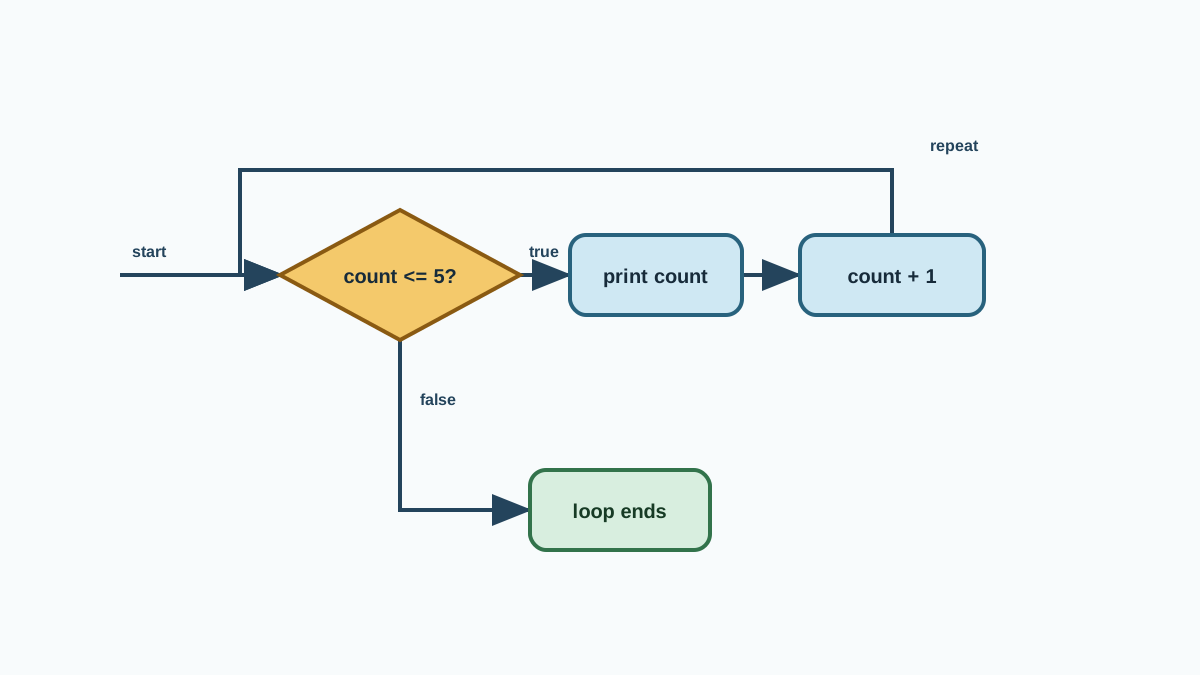
Here is the basic structure:
while condition:
    # Do something
- condition is a test Python checks before every repeat.
- If the condition is
True, the loop body runs. - If the condition is
False, Python skips the loop and continues with the rest of the program. - The code inside the loop is indented. That indentation is what tells Python which lines belong to the loop.
Every while loop answers the same three questions:
- What is the condition? The test Python checks before each run.
- What does the body change? The value or state that moves each pass.
- What value stops the loop? The point where the condition turns false.
Keep those three questions in mind. We will use them to inspect every example from here on.
Let's watch it move with a counting example:
count = 1
while count <= 5:
    print(count)
    count = count + 1
1
2
3
4
5
Here is the sequence. The condition is count <= 5. The body prints count, then changes it by adding 1. The stopping value is 6: once count reaches 6, the condition is false and the loop stops.
Note: The condition is checked before each run of the body, not after. If the condition is false from the start, the loop body never runs at all.
Knowledge check
Check your understanding
Answer this question before you continue.
Common Uses for While Loops
While loops shine when the number of repeats is unknown at the start. Three common situations:
- Repeating until a user chooses to stop. Keep asking for input until the user types "quit".
- Waiting for a condition to change. Keep checking until a value crosses a threshold.
- Input validation. Keep asking until the user gives a valid answer.
Here is a password example that keeps asking until the user gets it right:
password = ""
while password != "python123":
    password = input("Enter the password: ")
print("Access granted!")
The input() function pauses the program, waits for the user to type something, and returns that text as a string. So the loop repeats the input() call until the user types the correct password. Only then does the condition become false and the program move on.
Run it and you will see the loop wait for your typing each pass:
Enter the password: hello
Enter the password: python123
Access granted!
The first check fails, so the loop asks again. The second check passes, so the loop stops and the final print runs. This pattern—repeat until the user gives valid input—is one of the most common real uses of a while loop. It is the same logic behind login screens, menu prompts, and form validation.
Tip: This example is about repetition and condition changes, not password security. In a real program you would never hard-code a password like this.
Knowledge check
Check your understanding
Answer this question before you continue.
Avoiding Infinite Loops
The classic beginner mistake is an infinite loop: a loop whose condition never becomes false, so it runs forever.
count = 1
while count <= 5:
    print(count)
    # Oops! We forgot to update count
Here count never changes, so count <= 5 is always true. The loop prints 1 forever.
Now apply the three questions. The condition is count <= 5. The body prints count but changes nothing. There is no stopping value because the state never moves. That is the whole diagnosis: an infinite loop is a state-change problem, not a syntax mistake.
The fix is to make sure something inside the loop changes the condition:
count = 1
while count <= 5:
    print(count)
    count = count + 1
Common mistake: Forgetting to update the variable used in the condition is a common cause of infinite loops. Before you run any while loop, ask yourself: what changes inside this loop, and will it eventually make the condition false?
If you do hit an infinite loop in a terminal, press Ctrl+C to interrupt the program.
Knowledge check
Check your understanding
Answer this question before you continue.
While Loops vs. For Loops
Python has two main ways to repeat actions, and choosing between them is about what you know ahead of time.
| Loop | Use this when | Avoid when |
|---|---|---|
| while | You repeat until a condition changes and you do not know the count in advance | You need to process every item in a list or sequence |
| for | You know the items or the exact number of repeats ahead of time | You are waiting for a condition that depends on user input or live data |
A good rule of thumb: if you are looping over a known collection, use a for loop. If you are repeating until some condition flips, use a while loop.
Practice: Count Down
Write a while loop that counts down from 5 to 1 and then prints "Blast off!".
Starter code:
count = 5
while count > 0:
    print(count)
    # Your code here
print("Blast off!")
Expected behavior:
5
4
3
2
1
Blast off!
Hint: You need to make count smaller each time so the condition eventually becomes false.
Solution:
count = 5
while count > 0:
    print(count)
    count = count - 1
print("Blast off!")
Explanation: The condition is count > 0. The body prints the current value, then changes count by subtracting 1. The stopping value is 0: once count reaches 0, the condition is false and the loop stops, so the final print runs.
Extension: Change the loop so it asks the user for a number and counts down from that number instead of from 5.
When Not to Use a While Loop
While loops are powerful, but they are not always the right tool.
- Do not use a while loop to walk through a known collection. If you have a list of items and want to touch each one, a for loop is clearer and safer.
- Do not use a while loop when the count is fixed and known. A for loop with
range()is the better fit. - Avoid while loops that depend on a condition you cannot guarantee will change. If nothing inside the loop can flip the condition, you have built an infinite loop.
The decision is about certainty. When you know the items or the count, use a for loop. When you only know the condition that must stay true, use a while loop.
Next Step
Open your editor and build the countdown program above, then try the extension. After that, practice exiting a loop early or skipping parts of it with break and continue. If the conditions that drive these loops still feel shaky, practice if statements again.
Knowledge check
Final check
Finish the article by checking the ideas you just learned.
References
Want a more structured Python path?
Use the Python Starter Pack to turn scattered tutorials into a focused practice path.
Python Starter Pack
A compact LearnPyFast PDF pack covering what Python is, installation, your first program, running Python code, and Python versions.
- 5 curated chapters
- Enhanced PDF edition with bundle-only learning guidance
- Offline-friendly format for focused review
- Source article links for future online updates
Coming soon


