
Common Python Errors for Beginners
Most Python bugs are not mysteries. They are messages: Python tells you what it expected, where it got confused, and which line to look at. Learn to read…

Key topics
Most Python bugs are not mysteries. They are messages: Python tells you what it expected, where it got confused, and which line to look at. Learn to read those messages and you stop guessing and start fixing.
Why Python Errors Happen
Errors are not a sign that you are failing. They are the interpreter's way of saying, "I found something I cannot understand or execute." Every error message is a clue about what your code actually does versus what you meant it to do.
The fastest way to get comfortable with errors is to stop treating them as roadblocks and start treating them as feedback. Run the code, read the message, make one small change, and run it again. That loop—run, read, fix, rerun—is how every programmer learns.
Run each snippet below in the same environment you used for your first script, whether that is a saved file or the interactive interpreter. Seeing the traceback yourself is half the lesson.
How to Read a Python Error Message
When Python hits a problem, it prints a traceback. At first it looks like noise, but it is a structured report with three useful parts:
- The error type: the name at the end, like
SyntaxError,NameError, orTypeError. This tells you which category of mistake you made. - The line number: where Python noticed the problem. Start there.
- The message: a short description, often with a caret (
^) pointing at the exact spot.
Read the last line of the traceback first. That is where Python names the error and usually tells you what it expected. The lines above it show the chain of calls that led there.
Tip: When you see an error, do not rewrite the whole program. Read the message, fix the one thing it points to, and rerun. Most fixes are one line.
A Decision Rule Before You Fix Anything
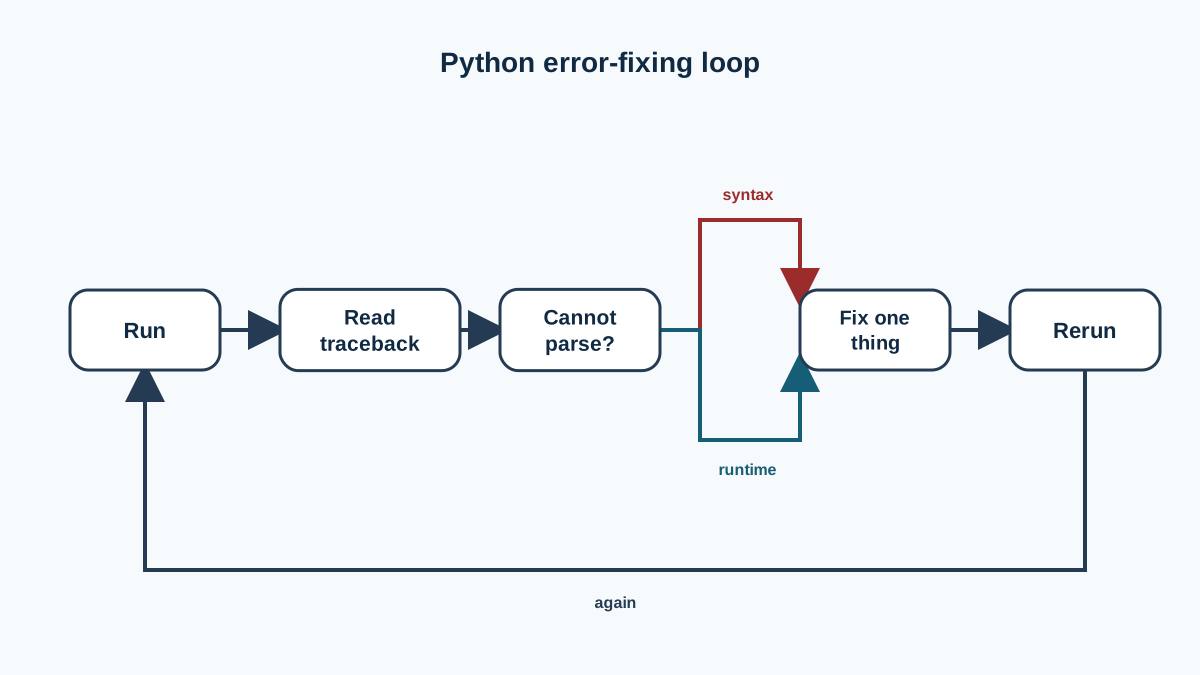
Before you touch the code, ask one question: could Python even parse your program? That single question splits nearly every beginner error into two camps.
- If Python could not parse the code, you have a syntax problem—a missing colon, an unclosed quote, a stray bracket. The fix is structural.
- If Python parsed the code but broke while running it, you have a runtime problem—a name that does not exist, a type that does not fit, an index past the end. The fix is about a value or a position.
From there, the same sequence applies to every error in this article: read the last traceback line, find the value or name it points to, decide what Python expected versus what your code supplied, then change one thing and rerun. Watch how that rule drives each example below.
Syntax Errors: The Rules of the Language
A SyntaxError means Python could not even parse your code—it does not follow the grammar of the language. This is the most common error while you are still learning, because it catches typos and missing punctuation.
Common causes:
- Forgetting a colon (
:) afterif,for,while, ordef - Missing or extra parentheses, brackets, or quotation marks
- A stray comma or an unclosed string
if x == 5
    print("five")
  File "example.py", line 1
    if x == 5
             ^
SyntaxError: expected ':'
Python expected a colon at the end of the if line, and your code supplied nothing there. The caret points right at the missing colon. Add it and the error disappears.
Knowledge check
Check your understanding
Answer this question before you continue.
Indentation Errors: Whitespace Is Part of the Syntax
Python uses indentation to mark blocks of code, where many other languages use curly braces. That means the spaces at the start of a line are part of the structure, not decoration. An IndentationError is really a syntax problem: Python could not parse your code because the block structure was unclear. It just reports that failure with a more specific name.
def greet():
print("hello")  # missing indentation
  File "example.py", line 2
    print("hello")
    ^
IndentationError: expected an indented block after function definition
Python expected the body of greet() to be indented, and your code supplied a line at the same level as the def. To avoid these errors:
- Use four spaces for each level of indentation.
- Never mix tabs and spaces in the same file.
- Let your editor handle indentation automatically.
Consistent indentation does more than avoid errors—it makes the structure of your code visible at a glance.
Knowledge check
Check your understanding
Answer this question before you continue.
Name Errors: Using Something That Does Not Exist
A NameError means you used a name that Python has never seen. The most common cause is a typo, or using a variable before you have assigned it.
name = "Ada"
print(nmae)
Traceback (most recent call last):
  File "example.py", line 2, in <module>
    print(nmae)
          ^^^^
NameError: name 'nmae' is not defined
Python expected a name it had seen before, and your code supplied nmae, which was never assigned. Check the spelling and make sure the name is defined before you use it. Remember that Python is case-sensitive: Name and name are two different names.
Knowledge check
Check your understanding
Answer this question before you continue.
Type Errors: Mixing Incompatible Data
A TypeError happens when you try an operation on data of the wrong kind. The classic beginner case is adding a string and a number.
print("5" + 5)
Traceback (most recent call last):
  File "example.py", line 1, in <module>
    print("5" + 5)
          ~~~~^~~
TypeError: can only concatenate str (not "int") to str
Here the + is doing string concatenation, and string concatenation cannot combine a string and an integer directly. Python expected both sides of this + to be strings, and your code supplied an integer on the right. The fix depends on what result you want:
- If you want arithmetic, convert the string to a number:
print(int("5") + 5)gives10. - If you want text, convert the number to a string:
print("5" + str(5))gives"55".
When you hit a TypeError, decide what output the program should produce, then convert the values so they match that intent.
Knowledge check
Check your understanding
Answer this question before you continue.
ZeroDivisionError: Dividing by Zero
Dividing any number by zero is mathematically undefined, and Python refuses to guess. It raises a ZeroDivisionError.
result = 10 / 0
Traceback (most recent call last):
  File "example.py", line 1, in <module>
    result = 10 / 0
             ~~~^~~
ZeroDivisionError: division by zero
Python expected a number it could divide by, and your code supplied zero. If your program divides by a value that could be zero, check it first:
denominator = 0
if denominator != 0:
    result = 10 / denominator
else:
    print("Cannot divide by zero")
Index Errors: Stepping Past the End
An IndexError happens when you try to reach a position in a list or string that does not exist. Python lists start at index 0, so the last valid index is always one less than the length.
my_list = [1, 2, 3]
print(my_list[3])
Traceback (most recent call last):
  File "example.py", line 2, in <module>
    print(my_list[3])
          ~~~~~~~~^
IndexError: list index out of range
Python expected an index between 0 and 2, and your code supplied 3. The list has three items at indexes 0, 1, and 2. When you loop over a list, iterate over the list directly—for item in my_list:—and you avoid this error entirely.
A Quick Reference for Common Errors
Use this table as your decision aid when you meet an unfamiliar traceback. These are the most common Python errors beginners hit, and each row pairs the message with the smallest fix. For every row, ask the same question: what did Python expect, and what did your code supply?
| Error | What Python expected | Typical fix |
|---|---|---|
SyntaxError | Code that follows Python's grammar | Check colons, parentheses, quotes |
IndentationError | A clearly marked code block | Use consistent spaces, no tabs |
NameError | A name that was already defined | Check spelling and definition order |
TypeError | Matching data types for an operation | Convert types so they match your intent |
ZeroDivisionError | A denominator that is not zero | Guard the denominator before dividing |
IndexError | An index inside the list or string | Remember indexes start at 0 |
Practice: Repair and Verify Each Snippet
Now apply the decision rule instead of just reading about it. For each snippet below, do three things before you read the fix: decide whether Python could parse the code, name the error type you expect, and state what Python expected versus what your code supplied.
## 1
for i in range(3)
    print(i)
## 2
message = "hello"
print(mesage)
## 3
total = 5 + "3"
## 4
items = [10, 20, 30]
print(items[3])
Pause here. Write down your diagnosis for all four before reading on.
Here is the full repair-and-verify sequence. For each snippet, the corrected code runs and prints a visible result, so you can confirm the fix worked.
Snippet 1 is a SyntaxError—the for line is missing its colon, so Python cannot parse it. Add the colon:
for i in range(3):
    print(i)
0
1
2
Snippet 2 is a NameError—mesage is misspelled, so Python never saw that name. Fix the spelling:
message = "hello"
print(message)
hello
Snippet 3 is a TypeError—string concatenation cannot combine an integer and a string. Convert one side to match your intended result. If you want text, convert the number to a string:
total = 5 + str(3)
print(total)
53
Snippet 4 is an IndexError—index 3 is past the end of a three-item list. Use index 2, or loop over the list directly:
items = [10, 20, 30]
print(items[2])
30
Conclusion
Every programmer, no matter how experienced, reads error messages every day. The skill is not avoiding errors—it is reading them quickly and fixing them with one small change. Run the code, read the last line of the traceback, fix the one thing it names, and rerun.
Write a small program that deliberately triggers each error in the table above. Fix it, watch the message disappear, and confirm the corrected output prints what you expect. Repeat until you can predict the error before Python prints it. That practice is what turns error messages from frustration into a working tool.
Knowledge check
Final check
Finish the article by checking the ideas you just learned.
References
Want a more structured Python path?
Use the Python Starter Pack to turn scattered tutorials into a focused practice path.
Python Starter Pack
A compact LearnPyFast PDF pack covering what Python is, installation, your first program, running Python code, and Python versions.
- 5 curated chapters
- Enhanced PDF edition with bundle-only learning guidance
- Offline-friendly format for focused review
- Source article links for future online updates
Coming soon


