
Python IDEs and Editors for Beginners
You don't need the most powerful tool to learn Python. You need one that lets you write a line, run it, and see what happens without fighting the software…

Key topics
You don't need the most powerful tool to learn Python. You need one that lets you write a line, run it, and see what happens without fighting the software first. This guide compares beginner-friendly Python IDEs and editors against three tests—setup friction, visibility into what your code does, and room to grow—so you can pick the tool that gets out of your way.
The One Distinction That Saves Confusion
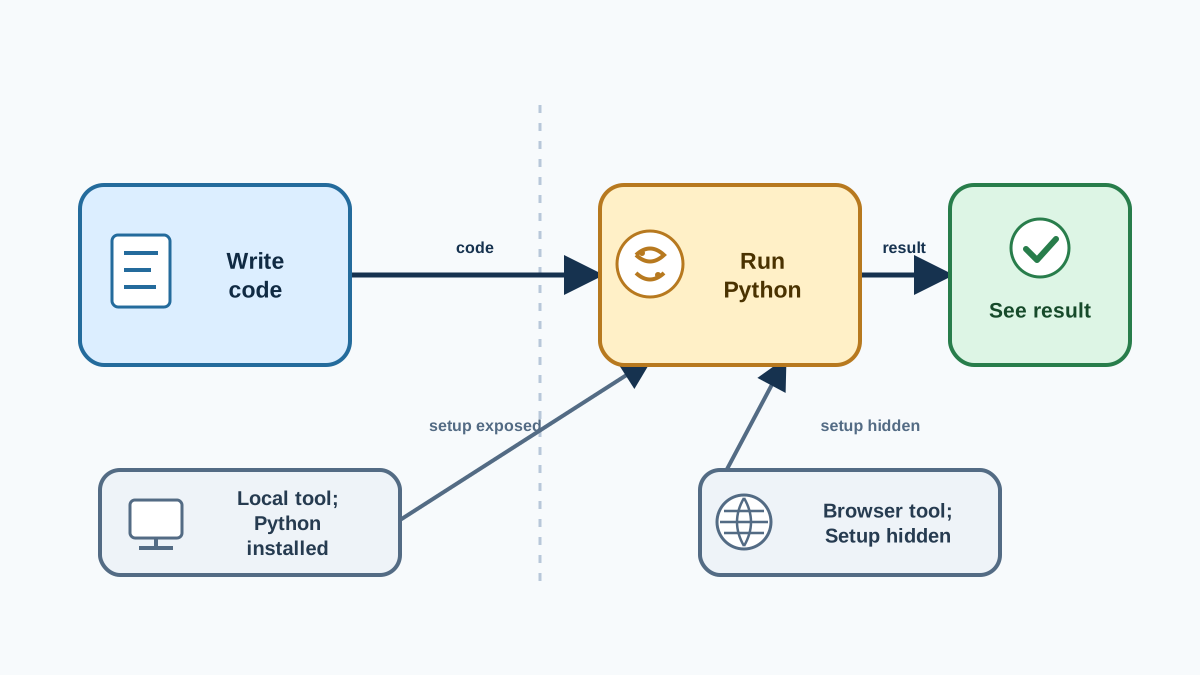
Before you choose a tool, name the split that trips up most beginners: the editor is where you write code, and Python is the program that runs it. They are two separate pieces, and understanding why is the difference between a smooth first hour and a frustrating one.
Python itself is an interpreter—a program that reads your file and executes it line by line. The editor is just the workspace where you type and edit that file. An editor cannot run Python by itself; it needs to hand your code to a Python interpreter.
When you open an online editor in a browser, the site hides that split. You click Run and the browser handles the interpreter for you. When you use a local tool like IDLE or VS Code, you're responsible for making sure the editor can reach a Python installation on your machine. That's not hard, but it's a step that doesn't exist in a browser, and it's the main reason beginners stall.
Keep that split in mind as you read the options below. Every tool on this list is judged by how much of that setup it hides from you.
Knowledge check
Check your understanding
Answer this question before you continue.
The Test Every Tool Must Pass
The tool you start with shapes your first hours with Python. I've watched beginners stall not because Python was hard, but because they picked a tool that demanded configuration before they'd written a single line. So instead of judging tools by their feature lists, I judge them by one operational test: how quickly can you go from an idea to visible output?
That test breaks into three questions:
- Setup friction. How much do you have to install and configure before your first run?
- Visibility. When something goes wrong, how much of what your code is doing can you actually inspect?
- Room to grow. Will this tool still serve you when your programs get bigger?
Here's what "visibility" means in practice: it's how much execution state you can see when your code misbehaves. At the low end, you see only the final output and have to guess why it's wrong. At the high end, you can pause your code mid-run, inspect a variable's current value, and watch it change line by line. That difference is the difference between debugging by reasoning and debugging by watching.
Let's anchor that test with the smallest possible program, then run every tool through it.
Knowledge check
Check your understanding
Answer this question before you continue.
The Write-Run-Observe Loop
Every tool on this list supports the same core loop: write a line, run it, observe the output, change one line, run again. Here's the classic first program:
print("Hello, world!")
Run it, and you should see:
Hello, world!
Now make one small change and run it again:
print("Hello, world!")
print("I changed this line.")
Run it, and you should see:
Hello, world!
I changed this line.
That's the whole loop. The tool that makes this loop easiest is the one worth keeping. As you read the options below, ask of each one: how many clicks and setup steps sit between me and that second run?
Beginner-Friendly Python IDEs
These tools are built to get you coding quickly, with training wheels included.
Thonny
Thonny is designed specifically for beginners and bundles a Python interpreter with it, so you can start writing and running code without installing Python separately. Its standout feature is step-by-step execution: you can watch your code run line by line and see how each value changes.
What does that look like in practice? Instead of running the whole file at once, you pause before a line, inspect the current value of a variable, then continue. Say your program has a typo that makes a number come out wrong. Stepping through it lets you watch that value change line by line and spot exactly where it went off track—rather than staring at finished output and guessing. That's visibility at its highest: you're not just seeing output, you're seeing the state behind it.
Use it when: you want to see exactly what your code does as it runs. Avoid it when: you're building a large project and want a more full-featured environment.
Knowledge check
Check your understanding
Answer this question before you continue.
IDLE
IDLE comes bundled with Python, so if you've already installed Python, you already have IDLE. It's lightweight and includes an interactive shell where you can type code and see results immediately. Because the interpreter is already on your machine, there's no extra setup—you open IDLE and run.
Use it when: you already installed Python and want to start right now. Avoid it when: you want a tool that will scale with you for years.
Popular Python Editors
Maybe you want something that works across many languages, or you'd rather keep your setup simple. These editors are strong beginner options.
Visual Studio Code (VS Code)
VS Code is a free, widely used editor from Microsoft. It's lightweight, customizable, and supports Python through a simple extension. You get syntax highlighting, code suggestions, and a built-in terminal for running your scripts.
The tradeoff is setup. Because VS Code is a general editor, it relies on a Python interpreter you set up separately, and you'll need to install the Python extension and tell it which interpreter to use before your first run. That's a one-time step, and it's the price you pay for a tool you can grow into for years without outgrowing it.
Use it when: you want one tool that will serve you long-term. Avoid it when: you want to write and run your first program with zero configuration.
Knowledge check
Check your understanding
Answer this question before you continue.
Sublime Text
Sublime Text is known for speed and simplicity. It's free to try and easy to use for Python coding, and you can add features with plugins as your needs grow. Like VS Code, it's a general editor, so running Python requires pointing it at an interpreter you've installed separately.
Use it when: you want a fast, lightweight editor and don't mind a small setup step. Avoid it when: you want a guided, all-in-one beginner experience.
Online Python Editors
Don't want to install anything yet? Online tools run right in your browser, work on any computer, and need no setup beyond opening a tab. They bundle the Python interpreter for you, so the write-run-observe loop is one click.
Replit
Replit lets you write, run, and share Python code online. There's no installation—just sign up and start coding. Your work saves to the cloud, and you can collaborate with others if you want.
Use it when: you want to experiment right now with no setup and no local files. Avoid it when: you want to practice with the exact environment Python uses in real work on your own machine.
Trinket
Trinket is an education-focused online Python editor. It makes it simple to try out code, share projects, and even embed your work in a website. It's a low-friction way to start coding immediately.
Use it when: you want the fastest possible start and don't mind working in a browser. Avoid it when: you want to save files on your own machine or build a repeatable project.
Comparing the Options at a Glance
This table applies the same three tests to each tool. Remember that "visibility" means how much execution state you can inspect when something goes wrong, not just whether you can see output.
| Tool | Setup friction | Visibility into your code | Room to grow | Best for |
|---|---|---|---|---|
| Thonny | Low (bundles Python) | High (step through lines, inspect variables) | Medium | Seeing how your code runs |
| IDLE | Lowest (ships with Python) | Medium (interactive shell, basic debugger) | Low | Quick experiments now |
| VS Code | Higher (needs Python + extension) | Medium (debugger after setup) | High | A long-term tool |
| Replit / Trinket | Lowest (browser only) | Low (see output, not internals) | Low | Zero-setup experimenting |
The pattern is worth noticing: the tools with the least setup tend to give you the least room to grow, and the tools with the most room to grow ask for the most setup up front. Your job is to pick the point on that tradeoff that matches where you are today.
How to Choose Your First Tool
Here's a decision rule that works for most beginners. If you have no strong preference, start with Thonny: it bundles Python for you, shows you what your code does step by step, and gives you room to grow. Then override that default only when one of these conditions fits you better:
- Want the least setup possible, right now? Use an online editor like Replit or Trinket.
- Already installed Python and want to start now? Open IDLE.
- Want a tool you'll keep using for years? Try VS Code.
You don't need to commit. Download or open two options, run the same Hello World program in each, and pick the one that makes the write-run-observe loop feel easiest. The best python IDE for beginners is the one you'll actually open tomorrow.
Your Next Step
Pick one tool using the rule above, then put it to the test: write print("Hello, world!"), run it, change one line, and run it again. If the tool made that loop easy, keep it. If it made you fight menus or setup before you saw a single line of output, that friction is your signal to try another option.
The first tool you choose isn't a lifetime commitment—it's a starting point you can outgrow on purpose. Once you've got a working loop, the next step is learning what to write in that editor. If Python is not installed yet, install it before you pick your editor.
Knowledge check
Final check
Finish the article by checking the ideas you just learned.
References
Want a more structured Python path?
Use the Python Starter Pack to turn scattered tutorials into a focused practice path.
Python Starter Pack
A compact LearnPyFast PDF pack covering what Python is, installation, your first program, running Python code, and Python versions.
- 5 curated chapters
- Enhanced PDF edition with bundle-only learning guidance
- Offline-friendly format for focused review
- Source article links for future online updates
Coming soon


