
Defining Functions in Python
A function turns a block of code into a named tool you can call by name. Write the steps once, give them a name, and reuse them across your program instead…

Key topics
A function turns a block of code into a named tool you can call by name. Write the steps once, give them a name, and reuse them across your program instead of copying and pasting. That habit is what separates scripts that grow messy from code you can actually maintain.
What Is a Function in Python?
A function is a named block of code that performs a specific task. Think of it as a recipe: you write the steps once, then follow that recipe whenever you need it, without rewriting the instructions each time.
In Python, functions let you group a set of instructions, give that group a name, and call it whenever you want. This helps you:
- Organize your code into logical chunks
- Avoid repeating the same code in multiple places
- Make your programs easier to read and update
Python already ships with built-in functions like print() and len(). When you write your own, they're called user-defined functions—and that's what this article is about. Learning to define and call your own python functions is a core skill for organizing any real program.
Knowledge check
Check your understanding
Answer this question before you continue.
Define, Call, Observe: Your First Function
Let's make the payoff visible immediately. Here is a complete function, a call, and the output it produces:
def greet():
    print("Hello! Welcome to LearnPyFast.")

greet()
Hello! Welcome to LearnPyFast.
Notice the two distinct steps. The def block is setup: it tells Python what the function will do, but it does not run anything yet. The line greet() is the call: it tells Python to actually execute the indented steps. Defining a function without calling it is like writing a recipe and never cooking the dish.
Now call the same tool twice:
def greet():
    print("Hello! Welcome to LearnPyFast.")

greet()
greet()
Hello! Welcome to LearnPyFast.
Hello! Welcome to LearnPyFast.
That second call is the whole point. Without a function, you would have copied those two print lines everywhere. With one, you write the steps once and reuse the name. If you ever need to change the message, you edit one place instead of hunting through your file.
Knowledge check
Check your understanding
Answer this question before you continue.
How to Define a Function in Python
To define a function in Python, you use the def keyword, then a name, parentheses, a colon, and an indented block of code.
def greet():
    print("Hello! Welcome to LearnPyFast.")
Let's break down each piece:
deftells Python you're about to define a new function.greetis the function name. Pick a name that describes what the function does.()means this function doesn't need any extra information.- The colon ends the definition line.
- The indented line is what the function does when you call it.
Knowledge check
Check your understanding
Answer this question before you continue.
Calling a Function
Defining a function doesn't run it. You have to call it by writing its name followed by parentheses.
greet()
When you call a function, Python jumps to its code, runs the instructions inside, and then returns to where the call happened. You can call the same function as many times as you want.
Common mistake: Writing
greetwithout parentheses does not run the function. It just refers to the function object itself, so nothing happens. Always include the parentheses when you want to call it.
How Data Moves Through a Function
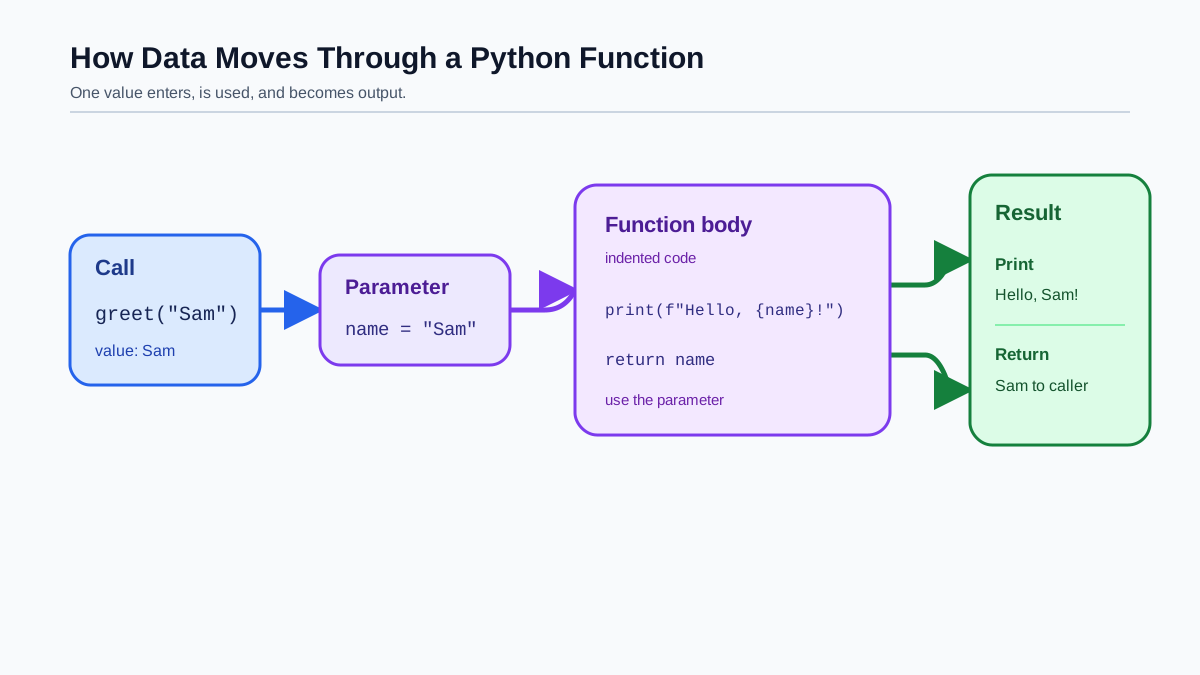
Keep one simple model in your head: the caller supplies inputs, the function runs its indented steps, and the function may print a result or send one back. That single input-process-output loop is what makes functions reusable program components.
A parameter is a variable you place inside the parentheses when you define a function. It lets your function receive information from the caller. Here is a function that takes a name and greets that person:
def greet_user(name):
    print("Hello, " + name + "!")

greet_user("Sam")
Hello, Sam!
In def greet_user(name):, name is the parameter. When you call greet_user("Sam"), the value "Sam" is passed into that parameter, and the function runs its steps using it.
Indentation is not cosmetic in Python—it's part of the syntax. Every line inside the function must be indented (four spaces is the convention). That indentation is what tells Python which lines belong to the function.
Common mistake: Forgetting to indent the code inside a function raises an
IndentationError. If you see that error, check that every line inside your function is indented consistently.
Knowledge check
Check your understanding
Answer this question before you continue.
Return Values: Getting Results Out
Printing is not the only way a function can communicate. Sometimes you want the function to give back a value you can store and use elsewhere. That's what the return statement does.
def add_numbers(a, b):
    return a + b

result = add_numbers(3, 5)
print(result)
8
When a function reaches return, it sends the value back to the caller and stops running. Any code after return inside the same function is skipped.
Here is the decision rule that matters: use print() when you want to see something on screen, and use return when another part of your program needs the value to keep working with it. A function that returns a value becomes a building block—you can store its result, pass it to another function, or use it in a calculation.
Note: If a function has no
returnstatement, it still returns a value—None. That's whyprint(greet())would showNoneafter the greeting.
When a Function Won't Run: Read the Error
When a function doesn't behave, the fix usually starts with reading the error, then checking one of three things:
- The call.
greetrefers to the function;greet()runs it. Missing parentheses is the most common silent failure. - The name. Python is exact. Define
greet_userand callgreat_user, and you'll get aNameError. Double-check spelling. - The indentation. A misplaced indent either raises an
IndentationErroror quietly moves a line out of the function.
Tip: If you're unsure what to name a function, describe what it does in plain English, then turn that into a name. Use lowercase letters and underscores, like
calculate_totalorsend_email. A good name tells you what the function does without reading its body.
Next Steps
The fastest way to make this stick is to run code, inspect the output, and change one small thing to see what breaks. Start with this single drill: write a function that takes a name and prints a greeting, then call it with three different names. Watch how one definition handles three inputs.
Then try these:
- Write a function that prints your favorite quote, then call it twice.
- Write a function that returns the sum of two numbers, then print the result.
Remember the durable rule: define once, call by name, inspect the output, and use return when another part of the program needs the value. When you're ready, practice passing more data into functions and returning values that other parts of the program can use.
Knowledge check
Final check
Finish the article by checking the ideas you just learned.
References
Want a more structured Python path?
Use the Python Starter Pack to turn scattered tutorials into a focused practice path.
Python Starter Pack
A compact LearnPyFast PDF pack covering what Python is, installation, your first program, running Python code, and Python versions.
- 5 curated chapters
- Enhanced PDF edition with bundle-only learning guidance
- Offline-friendly format for focused review
- Source article links for future online updates
Coming soon


