
Importing Modules in Python
An import statement is not a magic incantation. It is a name-resolution request: you tell the running Python program, "find this module and make its names…

Key topics
An import statement is not a magic incantation. It is a name-resolution request: you tell the running Python program, "find this module and make its names available to me." Understand that one mechanism and you can predict why an import succeeds, why it fails, and what to do about it—without memorizing a list of commands.
What a Module Is
A module is a file of Python code—functions, classes, or variables—that you can reuse. Think of it as a mini-program, written by someone else or by you earlier, that you plug into your current project instead of rewriting it.
Modules exist for a simple reason: they let you stop repeating yourself. When a task is common, someone has usually already solved it. Your job is to pull that solution in.
The useful way to sort the modules you will meet is not by their name but by where their code comes from and whether you must install it first:
- Standard library modules ship with Python and are ready to use immediately.
math,random, anddatetimeare examples. - Third-party packages are written by others and installed into your environment before you can import them.
requestsandpandasare examples. - Local modules are files in your own project that you write and then import from other files.
All three use the same import syntax. What differs is where Python finds them. A third-party package must be installed before it is reachable; a local module must sit where the running script can see it; a standard library module is already there.
Knowledge check
Check your understanding
Answer this question before you continue.
How Python Finds a Module
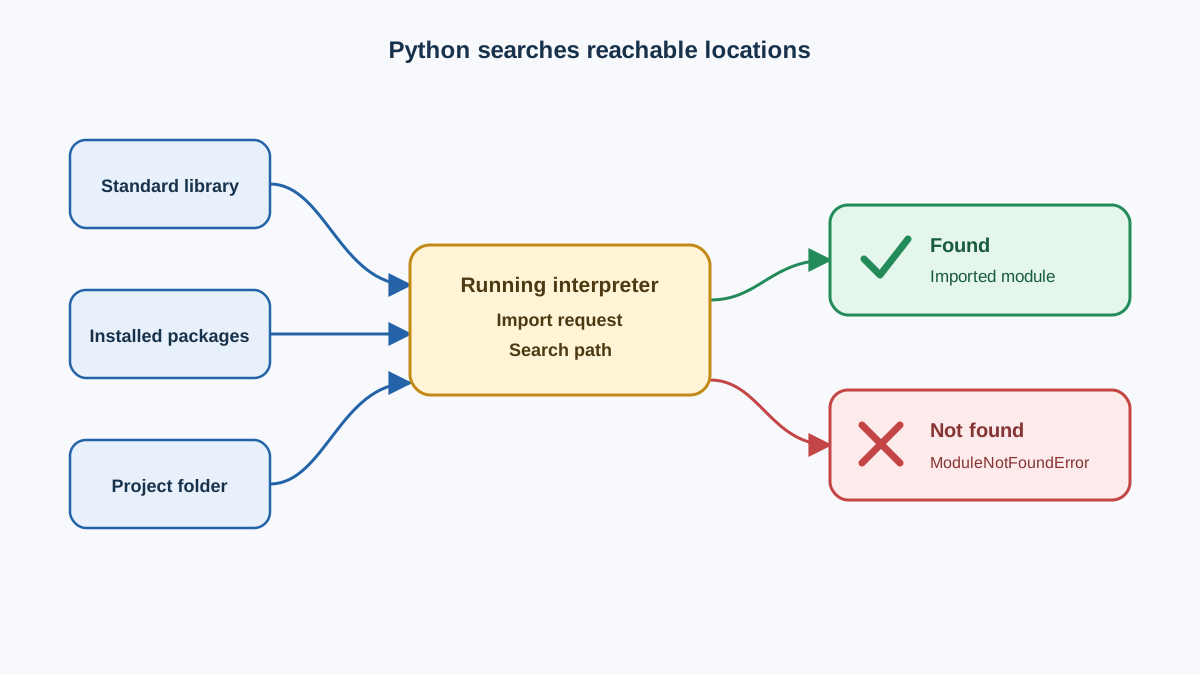
When you write import math, the running interpreter searches the locations it can reach—its own standard library, any installed packages, and the directories on its import path. If it finds the module, it loads it and makes its names available. If it does not, you get an error.
That is the mental model worth keeping: an import succeeds only if the module is reachable from the interpreter that is running your code. This is why "it works on my machine" problems happen. The script and the pip you ran in the terminal can point at different environments, so the module you installed may not be visible to the script you are running.
Knowledge check
Check your understanding
Answer this question before you continue.
Your First Import
Let's make that concrete. Open a Python file and import the math module:
import math

result = math.sqrt(16)
print(result)
4.0
The pattern is always the same: module_name.function_name. The dot is how Python says "look inside this module." Because you imported the whole module, math is now a name in your program, and sqrt lives inside it.
Common mistake
Forgetting the module name in front of the function is the classic beginner slip. sqrt(16) fails with a NameError because sqrt only exists inside math. You have to write math.sqrt(16).
Knowledge check
Check your understanding
Answer this question before you continue.
Importing Specific Parts of a Module
Sometimes you only need one or two things from a module. The from ... import ... statement brings in just what you need:
from math import sqrt

print(sqrt(25))
5.0
Now you can call sqrt(25) directly without typing math. every time. That is convenient when you use a function many times.
You can also import several names at once:
from random import randint, choice
When to use which style
| Import style | Use this when | Avoid when |
|---|---|---|
import math | You use many functions from the module, or you want it obvious where each name came from | You only need one small function and want shorter code |
from math import sqrt | You use one or two functions a lot and want cleaner lines | You import so many names that you lose track of which module they came from |
A good beginner rule: start with import module and the full module.name form. It keeps your code self-documenting—anyone reading it can see exactly where each name came from. Switch to from module import name when the full name makes your lines noisy and you are confident about what you are pulling in.
Common mistake
Avoid from math import *. The star imports every public name from the module into your program, which can silently overwrite your own variables and make bugs hard to trace. It is a shortcut that costs you clarity.
Knowledge check
Check your understanding
Answer this question before you continue.
When an Import Fails
Import errors are normal when you are learning, and they are useful: each one is evidence about what Python could and could not find. When one appears, work through the same reachability question in order.
1. Check the spelling first.
Python is picky about spelling. improt math or import maths both fail. Check the exact name before you do anything else.
2. Ask whether the module is installed and reachable.
If you import a module that is not in the standard library and you have not installed it, Python raises ModuleNotFoundError:
import requests # fails unless requests is installed
ModuleNotFoundError: No module named 'requests'
To fix it, install the module with pip in your terminal:
pip install requests
Then run your script again with the same Python that owns that pip. If the error persists, the script is probably running under a different interpreter than the one you installed into.
Here is the observable check that makes that diagnosis concrete. Ask the interpreter you are running your script with which Python it is:
python -c "import sys; print(sys.executable)"
That prints the full path to the interpreter. Then install the package through that same interpreter:
python -m pip install requests
Using python -m pip instead of a bare pip ties the install to the exact Python you are running. If the path printed above and the interpreter running your script are the same, the module you install will be reachable.
3. Match your from import to how you call it.
If you write from math import sqrt and then call math.sqrt(16), you will get a NameError because math itself was never imported—only sqrt was. Pick one style and stay consistent.
Frequently Asked Questions
Q: Can I import more than one module in a single line?
Yes: import math, random works. But most developers prefer one import per line because it is easier to read and to remove later.
Q: What happens if I import the same module twice?
Python loads each module only once per program run. Importing it again just reuses the already-loaded version, so it does not hurt anything.
Q: How do I see what is inside a module?
Use the dir() function: dir(math) prints a list of the names the module provides.
Next Step: Run One Import
The fastest way to make this stick is to run it. Open a Python file and try this single task: use random to pick a random item from a list.
import random

colors = ["red", "green", "blue"]
print(random.choice(colors))
Run it a few times. Each run prints one of the three colors, and the output changes because choice is random—so do not expect a fixed result. That is the point: you imported a module, called one of its functions, and observed the consequence.
Now make one small change that tests the model you just built. Replace random with a misspelled name, such as import radnom, and run the file again. You should get a ModuleNotFoundError. That error is not a failure of your understanding—it is confirmation that Python really does search for the exact name you gave it and stops when it cannot find it.
When you are ready to reuse your own code the same way you reuse Python's, write a small module yourself. Keep the same rule in mind: choose an explicit import style, run it with the intended interpreter, and read every error as evidence about what Python can find.
Knowledge check
Final check
Finish the article by checking the ideas you just learned.
References
Want a more structured Python path?
Use the Python Starter Pack to turn scattered tutorials into a focused practice path.
Python Starter Pack
A compact LearnPyFast PDF pack covering what Python is, installation, your first program, running Python code, and Python versions.
- 5 curated chapters
- Enhanced PDF edition with bundle-only learning guidance
- Offline-friendly format for focused review
- Source article links for future online updates
Coming soon


