
Function Arguments and Return Values
Arguments are how you feed a function; return values are how it hands you the answer. Master both and you stop writing one-off code and start wiring…

Key topics
Arguments are how you feed a function; return values are how it hands you the answer. Master both and you stop writing one-off code and start wiring together reusable pieces. The whole trick is one rule: pass data in, return data out—and print only when the function's job is display.
What Are Function Arguments?
Function arguments are the values you hand to a function when you call it so it can do its job. They are the difference between a function that always does the same thing and one that adapts to whatever you give it.
Without arguments, you would need a new function for every name, every number, every situation. With arguments, you write one function and feed it different inputs.
def greet(name):
    print("Hello, " + name + "!")

greet("Alice")
greet("Bob")
Hello, Alice!
Hello, Bob!
The same greet function handles two different people because the argument changes what it prints. That is the core idea behind python function arguments: one definition, many inputs.
Notice what greet does with its input: it prints it. Printing is visible output, but it is not reusable data. A function that only prints is fine when its job is display. When you want the result to feed the rest of your program, the function should return the data instead. You will see that second half of the model shortly.
Parameters vs. Arguments
Beginners mix up parameters and arguments constantly, and the confusion is worth clearing up early because it makes everything else easier to read.
- Parameters are the names you write inside the parentheses in the function definition. They are placeholders waiting to be filled.
- Arguments are the actual values you pass when you call the function.
def greet(name):      # name is a parameter
    print("Hello, " + name + "!")

greet("Alice")        # "Alice" is an argument
When the function runs, Python matches the argument "Alice" to the parameter name. As a simple mental model, think of the parameter as an empty box and the argument as the value you drop into it. The precise mechanism is simpler than the box image: while the function runs, the parameter name points at the value you passed in.
Tip: Parameters live in the definition. Arguments live in the call. If you can point to which line each word is on, you will never confuse them again.
Knowledge check
Check your understanding
Answer this question before you continue.
Choosing an Argument Style
Python gives you a few ways to pass arguments, and each one solves a different problem. Pick by the decision you are making, not by memorizing a list.
Positional arguments are matched to parameters by their order. Use them for short, obvious calls where the order is hard to get wrong.
Keyword arguments are passed by name, using parameter=value. Order stops mattering because you say exactly which parameter gets which value. Use them when a call has several values and you want the intent visible.
Default arguments give a parameter a fallback value, so you can call the function without supplying that argument at all. Use them for optional settings that most callers will not override.
def describe_pet(animal, name="Unknown"):
    print(f"I have a {animal} named {name}.")

describe_pet("dog", "Buddy")                # positional
describe_pet(animal="cat", name="Mittens")  # keyword
describe_pet("hamster")                     # uses default for name
I have a dog named Buddy.
I have a cat named Mittens.
I have a hamster named Unknown.
A common beginner mistake is mixing the order of positional arguments. If a function expects (animal, name) and you pass ("Buddy", "dog"), Python will not catch it—it will just assign the values in order and quietly produce nonsense. When order matters, keyword arguments make your intent visible.
Common mistake: Calling a function without a required positional argument raises a
TypeError. Python will not guess a value for you. If you want an argument to be optional, give its parameter a default value.
Knowledge check
Check your understanding
Answer this question before you continue.
How Functions Return Values
Arguments get data in. Return values get data out. This is the second half of the input/output model: a function that returns a value lets you capture the result and use it anywhere else in your program.
def add(a, b):
    return a + b

result = add(2, 3)
print(result)
5
The return statement does two things: it stops the function and sends a value back to the caller. Note what it does not do—it does not display anything. The value is handed to the caller, and here the caller stores it in result and then prints it. That is why the print sits outside the function.
Because return stops the function, any code you place after it never runs. This is a common debugging surprise:
def add(a, b):
    return a + b
    print("This line never runs")

print(add(2, 3))
5
The function returns 5 and ends. The print after return is dead code—Python never reaches it. If you want a function to both compute and report, do the reporting in the caller, not after the return.
Now watch a returned value do real work instead of just being printed. A returned value can be used in a calculation or a decision:
def add(a, b):
    return a + b

total = add(2, 3)
if total > 4:
    print("The total is large:", total)
The total is large: 5
The function returned 5; the caller decided what to do with it. That is the boundary between the two roles: the function computes and returns, the caller prints, compares, or stores.
If a function has no return statement, it returns None by default. This trips up beginners who expect a function to hand back its last computed value.
def add_and_print(a, b):
    print(a + b)

result = add_and_print(2, 3)
print(result)
5
None
The function printed 5, but it returned None. If you need the value, use return, not print.
Knowledge check
Check your understanding
Answer this question before you continue.
Chaining Functions Together
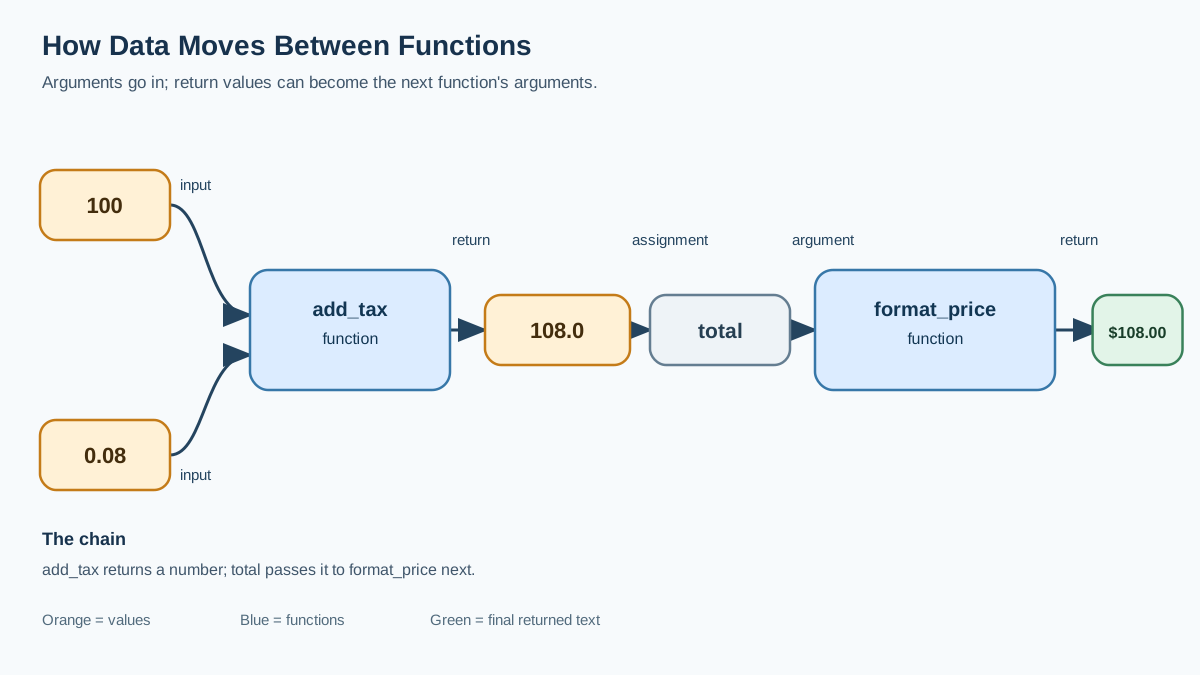
Here is where arguments and return values stop being two separate ideas and become one mechanism. A returned value can become the next function's argument. That is how you build larger programs from small pieces.
def add_tax(price, tax_rate):
    return price * (1 + tax_rate)

def format_price(amount):
    return f"${amount:.2f}"

total = add_tax(100, 0.08)
print(format_price(total))
$108.00
Follow the data: add_tax takes 100 and 0.08, returns 108.0, and stores it in total. Then total is passed into format_price as its argument, which returns the formatted string. One function's return value becomes the next function's input. That is the whole trick behind composing functions.
Knowledge check
Check your understanding
Answer this question before you continue.
Why Arguments and Return Values Matter
Arguments and return values are what turn a function from a one-time script into a reusable building block. The same function can be called a hundred times with different inputs and produce different results, and each result can feed the next step of your program.
Keep the decision rule in mind as you write: pass data in, return data out, and print only when the function's job is display. A function that follows that rule is easy to test, easy to reuse, and easy to chain with the next one.
Consider a shopping-cart total. You pass in prices and quantities as arguments, and the function returns the total cost. That total can then flow into a discount calculation, a receipt, or a checkout summary—without rewriting the math each time.
The pattern is always the same: take input, do work, hand back a result. Once that pattern feels natural, you can chain functions together and build larger programs from small, testable pieces.
Your Next Step
Write a function that takes two numbers as arguments and returns their product. Then write a second function that takes that product and a tax rate, and returns the final price. Call the first function, store its result, and pass it into the second—exactly like the chaining example above, but with your own functions. Before you start, decide which function returns data and which one prints, and keep them separate. Run it, check the output, and you will have wired two functions together with nothing but arguments and return values.
Knowledge check
Final check
Finish the article by checking the ideas you just learned.
References
Want a more structured Python path?
Use the Python Starter Pack to turn scattered tutorials into a focused practice path.
Python Starter Pack
A compact LearnPyFast PDF pack covering what Python is, installation, your first program, running Python code, and Python versions.
- 5 curated chapters
- Enhanced PDF edition with bundle-only learning guidance
- Offline-friendly format for focused review
- Source article links for future online updates
Coming soon


