
Practice Exercises: Functions
Reading about functions teaches you the rules. Writing them teaches you the mechanism. These python functions exercises are built so you run code, inspect…

Key topics
Reading about functions teaches you the rules. Writing them teaches you the mechanism. These python functions exercises are built so you run code, inspect the output, make a small change, and watch the consequence—the fastest way I know to make function concepts stick.
Before you start, you should already be comfortable defining a function, passing arguments, using return, and writing a basic if or for loop. If any of that feels shaky, review how to define functions and how arguments and return values work first, then come back and write.
The Contract That Makes Functions Work
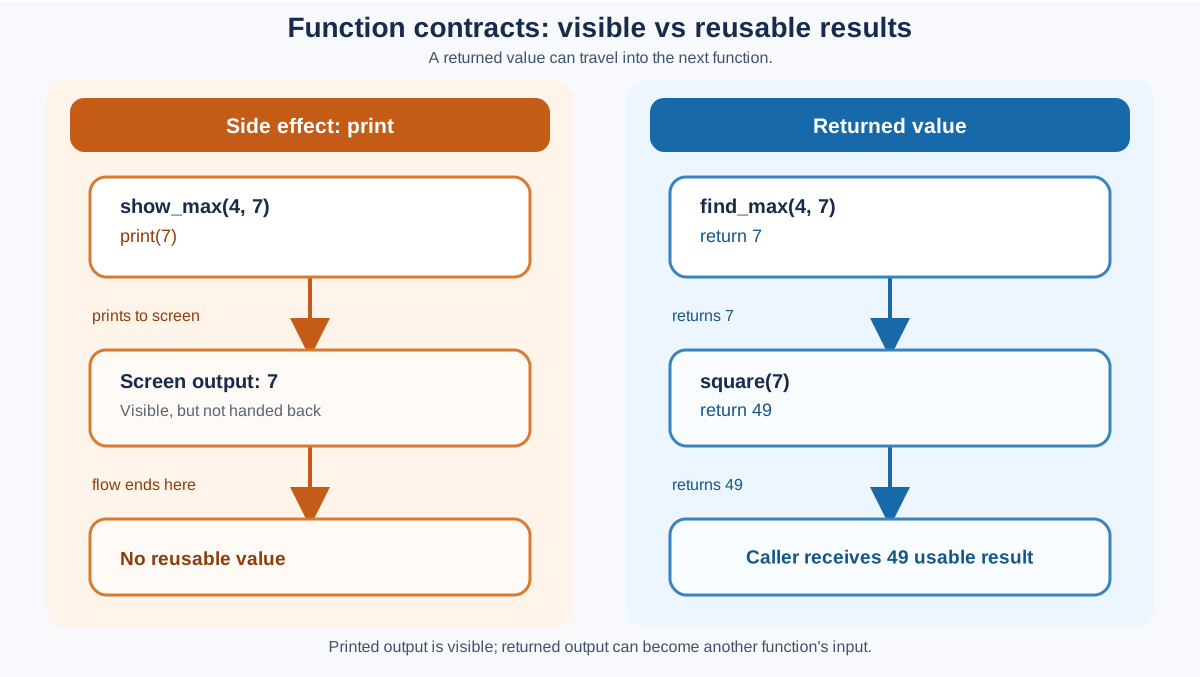
Every function you write is a small contract. It promises: give me these inputs, and I will hand back this output, or I will perform this visible side effect. Most beginner bugs are not syntax bugs. They are contract bugs—the function printed when it should have returned, or it returned a value nobody stored.
Here is the failure that exposes the whole idea. Suppose you want to square the larger of two numbers:
def find_max(a, b):
    if a > b:
        print(a)
    else:
        print(b)

def square(number):
    return number * number

print(square(find_max(4, 7)))
Run that and you will see an error. find_max printed 7 to the screen, but it handed nothing back, so square received None and crashed. The function looked like it worked—output appeared—yet it broke the moment you tried to use its result.
That is the mental model this set of exercises repairs. A function that prints is showing you something. A function that returns is giving you something you can build on. The exercises below are a ladder: each stage adds one responsibility to the contract until you can compose functions the way the broken example above tried to.
How to Work Through These Exercises
Each exercise follows the same shape: a goal, starter code, expected behavior, a hint, a solution, and an explanation. Do not read the solution first. The whole point is to hit the wall, look at the error or the wrong output, and fix your mental model.
- Write the function yourself before peeking. Copying a solution feels productive and teaches almost nothing.
- Run it with the sample input. Compare your output to the expected behavior.
- Change one thing at a time. If it breaks, you know exactly which change caused it.
- Treat errors as evidence. An error message is the interpreter telling you what it actually saw, not a judgment on you.
Each exercise ends with a done when check. That is your test list: verify a normal case, then probe one boundary. If both pass, you have evidence the function works, not just a guess.
Tip: Keep a scratch file open and run every exercise as you go. Reading code is passive. Running code is where the learning happens.
Stage 1: Side Effects
Exercise 1: Greet Someone
Goal: Write a function that takes a name and prints a greeting.
Starter code:
def greet(name):
    # your code here
    pass

greet("Alice")
Expected behavior: Calling greet("Alice") prints Hello, Alice!.
Hint: Use an f-string to build the message, then print it.
Solution:
def greet(name):
    print(f"Hello, {name}!")

greet("Alice")
Expected output:
Hello, Alice!
Explanation: This function's contract is a side effect: it displays output rather than returning a value. It takes one argument, name, and prints a formatted string. Notice there is no return statement, so the function returns None by default—fine here, because the job is to show output, not hand a value back.
Done when: greet("Alice") prints Hello, Alice!, and greet("Bob") prints Hello, Bob!.
Optional extension: Add a second parameter, greeting, so greet("Bob", "Good morning") prints Good morning, Bob!.
Knowledge check
Check your understanding
Answer this question before you continue.
Stage 2: Returned Values
Exercise 2: Add Two Numbers
Goal: Write a function that takes two numbers and returns their sum.
Starter code:
def add_numbers(a, b):
    # your code here
    pass

result = add_numbers(3, 5)
print(result)
Expected behavior: add_numbers(3, 5) returns 8, so print(result) shows 8.
Hint: Use return, not print, inside the function.
Solution:
def add_numbers(a, b):
    return a + b

result = add_numbers(3, 5)
print(result)
Expected output:
8
Explanation: This is the core difference between print and return, and it is the exact bug from the opening example. return hands the result back to the caller so it can be stored in a variable and used later. If you used print(a + b) inside the function, the value would appear on screen but result would hold None, and you could not do anything further with it. This is the first rung of the ladder: a function that produces a value instead of just showing one.
Done when: add_numbers(3, 5) returns 8, and add_numbers(-2, 10) returns 8 too. Try a negative input to confirm the function does not assume positive numbers.
Optional extension: Write a subtract_numbers function the same way, then call both and print the results.
Knowledge check
Check your understanding
Answer this question before you continue.
Exercise 3: Find the Square
Goal: Write a function that takes a number and returns its square.
Starter code:
def square(number):
    # your code here
    pass

print(square(4))
Expected behavior: square(4) returns 16.
Hint: Multiply the number by itself.
Solution:
def square(number):
    return number * number

print(square(4))
Expected output:
16
Explanation: Squaring is a pure calculation: one input in, one computed value out, no side effects. This is the shape most functions you write will take—arguments in, a value out. You will reuse this exact function in the final integration task, so keep it clean.
Done when: square(4) returns 16, and square(0) returns 0. Zero is the boundary that catches a function that accidentally adds instead of multiplies.
Optional extension: Write a cube function that returns number * number * number.
Stage 3: Decisions
Exercise 4: Check Even or Odd
Goal: Write a function that returns True if a number is even and False if it is odd.
Starter code:
def is_even(number):
    # your code here
    pass

print(is_even(7))
print(is_even(8))
Expected behavior: is_even(7) returns False and is_even(8) returns True.
Hint: The modulo operator % gives the remainder of a division. An even number divided by 2 has remainder 0.
Solution:
def is_even(number):
    return number % 2 == 0

print(is_even(7))
print(is_even(8))
Expected output:
False
True
Explanation: number % 2 == 0 is a comparison that evaluates to a Boolean. Returning that comparison directly is cleaner than writing an if statement that returns True or False in separate branches. This is a common beginner habit worth breaking early.
Done when: is_even(8) returns True, and is_even(0) returns True. Zero is even, and it is the boundary that catches a function that mishandles the remainder of zero.
Optional extension: Write is_odd that returns True for odd numbers, then test both on the same inputs.
Knowledge check
Check your understanding
Answer this question before you continue.
Exercise 5: Find the Maximum
Goal: Write a function that takes two numbers and returns the larger one.
Starter code:
def find_max(a, b):
    # your code here
    pass

print(find_max(10, 20))
Expected behavior: find_max(10, 20) returns 20.
Hint: Use an if statement to compare the two values.
Solution:
def find_max(a, b):
    if a > b:
        return a
    return b

print(find_max(10, 20))
Expected output:
20
Explanation: This function uses a decision inside the function body. If a is greater than b, it returns a; otherwise it returns b. There is no else needed because return ends the function immediately—if the first condition is false, the code simply falls through to the second return. Note that this version returns a value; the broken version in the opening printed it. Compare the two and you will see the difference the ladder is teaching.
Done when: find_max(10, 20) returns 20, and find_max(7, 7) returns 7. The equal-input case is the boundary: your function should return one of them without crashing.
Optional extension: Write find_min that returns the smaller of two numbers.
Stage 4: Loops and State
The next two exercises add a new contract responsibility: carrying state across repeated work. A function that loops still follows the same rule—arguments in, a value out—but now it has to remember something while it works.
Exercise 6: Count Vowels
Goal: Write a function that takes a string and returns the number of vowels (a, e, i, o, u) in it.
Starter code:
def count_vowels(text):
    # your code here
    pass

print(count_vowels("hello"))
Expected behavior: count_vowels("hello") returns 2.
Hint: Loop over each character and count how many are in the string "aeiou".
Solution:
def count_vowels(text):
    count = 0
    for char in text:
        if char in "aeiou":
            count += 1
    return count

print(count_vowels("hello"))
Expected output:
2
Explanation: This function combines a loop, a membership check, and an accumulator variable. count starts at 0 and increases by 1 each time a character is a vowel. The in operator checks whether char appears in the string "aeiou". This is the first function that carries state across loop iterations and then returns it—a step up the ladder toward composition.
Done when: count_vowels("hello") returns 2, and count_vowels("") returns 0. The empty string is the boundary: the loop never runs, so the accumulator should stay at 0.
Optional extension: Make the function case-insensitive by checking char.lower() against the vowels.
Knowledge check
Check your understanding
Answer this question before you continue.
Exercise 7: Repeat a Message
Goal: Write a function that takes a message and a count, and prints the message that many times.
Starter code:
def repeat_message(message, times):
    # your code here
    pass

repeat_message("Hi!", 3)
Expected behavior: Calling repeat_message("Hi!", 3) prints Hi! three times, once per line.
Hint: Use a for loop with range(times).
Solution:
def repeat_message(message, times):
    for _ in range(times):
        print(message)

repeat_message("Hi!", 3)
Expected output:
Hi!
Hi!
Hi!
Explanation: This function takes two arguments and uses a loop to repeat an action. The underscore _ is a common convention for a loop variable you do not actually use. The function prints output directly, so it does not need a return statement.
Done when: repeat_message("Hi!", 3) prints three lines, and repeat_message("Hi!", 0) prints nothing. The zero case is your boundary test: range(0) is empty, so the loop body never runs. Decide whether that is the behavior you want, then confirm it.
Optional extension: Change the function to return a single string with the message repeated, using "\n".join([message] * times).
Stage 5: Composition
Exercise 8: Reverse a String
Goal: Write a function that takes a string and returns it reversed.
Starter code:
def reverse_string(text):
    # your code here
    pass

print(reverse_string("Python"))
Expected behavior: reverse_string("Python") returns "nohtyP".
Hint: Python has a slice syntax that can step backward through a sequence.
Solution:
def reverse_string(text):
    return text[::-1]

print(reverse_string("Python"))
Expected output:
nohtyP
Explanation: The slice [::-1] reads the string from the end to the beginning. It is a compact, idiomatic Python trick. If you want to see the mechanism, you can also build the reversed string with a loop that prepends each character to a result. Both return the same value; the slice version is shorter, the loop version shows the mechanics. For this practice, either is fine—what matters is that the function returns the reversed string rather than printing it.
Done when: reverse_string("Python") returns "nohtyP", and reverse_string("") returns "". The empty string is the boundary: reversing nothing should give back nothing, not an error.
Optional extension: Write is_palindrome that returns True if a string reads the same forward and backward, using your reverse_string function.
Exercise 9: Calculate the Area of a Rectangle
Goal: Write a function that takes a width and height and returns the area.
Starter code:
def rectangle_area(width, height):
    # your code here
    pass

print(rectangle_area(5, 3))
Expected behavior: rectangle_area(5, 3) returns 15.
Hint: Area is width times height.
Solution:
def rectangle_area(width, height):
    return width * height

print(rectangle_area(5, 3))
Expected output:
15
Explanation: This is a real-world calculation wrapped in a reusable function. Once written, you can call rectangle_area anywhere in your program without repeating the multiplication logic—that is the point of functions. It also gives you a second helper to compose in the integration task.
Done when: rectangle_area(5, 3) returns 15, and rectangle_area(0, 5) returns 0. A zero dimension is the boundary that catches a function that adds instead of multiplies.
Optional extension: Add a rectangle_perimeter function that returns 2 * (width + height).
The Integration Task: Build a Function That Uses Functions
Now you have practiced each rung of the ladder separately. The real payoff of functions is passing one function's result into another. This task forces you to compose what you have already written—and it repairs the exact failure from the opening.
Goal: Write a function bigger_square that takes two numbers, finds the larger one, and returns its square.
Starter code:
def bigger_square(a, b):
    # your code here
    pass

print(bigger_square(4, 7))
Expected behavior: bigger_square(4, 7) returns 49, because 7 is larger and 7 squared is 49.
Hint: You already wrote find_max and square. Call one inside the other.
Solution:
def find_max(a, b):
    if a > b:
        return a
    return b

def square(number):
    return number * number

def bigger_square(a, b):
    return square(find_max(a, b))

print(bigger_square(4, 7))
Expected output:
49
Explanation: This is composition. bigger_square does not redo the comparison or the multiplication—it delegates each job to a function that already does it. find_max returns the larger number, and that returned value becomes the argument to square. If you had written print instead of return in either helper, this chain would break exactly the way the opening example did: the caller would receive None and square would fail. That is why the print-versus-return distinction matters so much.
Done when: bigger_square(4, 7) returns 49, and bigger_square(7, 4) returns 49 too. The reversed input is the boundary that confirms your function picks the larger number regardless of argument order.
Optional extension: Write bigger_area that takes two width/height pairs and returns the area of the larger rectangle, using rectangle_area and find_max.
Common Function Mistakes to Avoid
Printing when you should return. If you print a result inside a function, the caller gets None back. Use return when you need the value later—the opening example, Exercise 2, and the integration task all show why.
Forgetting all required arguments. Calling a function with fewer arguments than it defines raises a TypeError. Provide every required argument unless the parameter has a default value.
Reusing a function name. Defining a second function with the same name overwrites the first. Keep names unique and descriptive.
Assuming a missing return returns something useful. A function without a return statement returns None. That is correct only when the function's job is to print or mutate something, not to produce a value.
Ignoring boundaries. Empty strings, zero counts, and equal inputs are not exotic. They are the first inputs a real user will throw at your function. Decide what your function should do at the edge, then test it.
Next Steps
You have now written functions that take arguments, return values, make decisions, loop, and compose with each other. That is the core of function practice. If you want one more challenge, build bigger_of_squares: take two numbers, square each one, and return the larger square by reusing square and find_max. Test it with (3, 4)—the answer is 16—and with (4, 3) to confirm argument order does not matter.
When that works, you have internalized the pattern: define the function, call it with real input, inspect the output, and change one thing at a time. Functions stop being a concept you read about and become a tool you reach for.
The natural next step is to practice organizing the functions you just wrote into reusable modules and imports, so the same helpers can be shared across files instead of living in one script.
Knowledge check
Final check
Finish the article by checking the ideas you just learned.
References
Want a more structured Python path?
Use the Python Starter Pack to turn scattered tutorials into a focused practice path.
Python Starter Pack
A compact LearnPyFast PDF pack covering what Python is, installation, your first program, running Python code, and Python versions.
- 5 curated chapters
- Enhanced PDF edition with bundle-only learning guidance
- Offline-friendly format for focused review
- Source article links for future online updates
Coming soon


