
How to Read Environment Variables in Python
Your script works on your laptop. Then you hand it to a teammate, or push it to a server, and it dies on line 4 because the folder path only exists on your…

Key topics
Your script works on your laptop. Then you hand it to a teammate, or push it to a server, and it dies on line 4 because the folder path only exists on your machine. Or worse: it runs fine, and your API key is now sitting in a public repository, one git log away from anyone who wants it.
Both failures have the same root cause. You put a value that belongs to the environment inside the code. The fix is a mechanism, not a slogan: settings live outside your .py file, and Python reads them at runtime. Let's build that mechanism in four lines, then make it safe.
Your First Read: os.getenv in Four Lines
Set a test variable in your terminal first, so the output isn't empty. On macOS or Linux:
export GREETING="hello from the environment"
On Windows PowerShell:
$env:GREETING = "hello from the environment"
Now the script:
import os

greeting = os.getenv("GREETING")
print(greeting)
Run it:
python read_greeting.py
Expected output:
hello from the environment
Notice what happened. The string "hello from the environment" never appears in your source file. Python asked the operating system for a slot named GREETING, and the operating system answered.
An environment variable is a named value that lives in your operating system's environment — outside your code — and your program reads it at runtime. Think of it as a labeled slot the operating system hands to every process it starts. Your script asks for the slot by name; the machine decides what's inside. That one sentence is the whole mental model. Everything else is syntax.
Now the important detail: os.getenv returns a string, or None if the variable does not exist. Not an empty string. Not an error. None. Try it — comment out the export line, open a fresh terminal, and run the script again. You'll see:
None
That None is the source of roughly half the bugs beginners hit with environment variables. It travels silently through your program until something three functions later tries to use it and explodes with a confusing error.
One more thing to internalize now: environment variable values are always strings. If you store PORT=8000, you get the string "8000", not the integer 8000. Booleans are worse — the string "False" is truthy in Python, because any non-empty string is. We'll fix both of those in the validation section.
Knowledge check
Check your understanding
Answer this question before you continue.
Why Not Just Hard-Code the Values?
Before going further, it's worth seeing the pattern that gets beginners into trouble, so you recognize it in your own code:
API_KEY = "sk_live_abc123def456"
BASE_URL = "http://localhost:8000"
REPORT_FOLDER = "/Users/yourname/Documents/reports"
This runs on exactly one machine, for exactly one person. Change any of those three values and you edit source code. Move to a server and the path breaks. Share the repo and the key leaks.
Three reasons this matters, and they compound:
- Portability. The same script runs on your laptop, your teammate's laptop, and a server without edits.
- Separation of environments. Development and production need different values. You should not be editing source to switch between them.
- Secret hygiene. A secret committed to a repository stays in the history even after you delete the line. Git remembers. Every clone remembers. Every backup remembers.
os.getenv vs os.environ: Which One to Use
Python gives you two ways to read the same underlying data, and beginners waste real time wondering which is "correct." Both are correct. They differ in what happens when the key is missing.
os.environ behaves like a dictionary:
import os
print(os.environ["GREETING"]) # works if set
print(os.environ["MISSING"]) # raises KeyError
os.getenv returns None instead of raising:
import os
print(os.getenv("GREETING")) # "hello from the environment"
print(os.getenv("MISSING")) # None
print(os.getenv("MISSING", "guest")) # "guest"
You'll also see os.environ.get("KEY") in other people's code. It behaves identically to os.getenv — same None on missing, same optional default. Don't be surprised by it; just pick one style and stay consistent.
Here's the decision table:
| Access style | Missing key behavior | Use this when |
|---|---|---|
os.getenv("KEY") | Returns None | The setting is optional and you'll handle absence |
os.getenv("KEY", "default") | Returns "default" | The setting has a sensible fallback |
os.environ["KEY"] | Raises KeyError | A missing value should stop the program loudly |
My rule: use os.getenv for optional settings, use os.environ["KEY"] when a missing value should crash immediately. A crash at startup with a clear KeyError is far cheaper than a None that surfaces as a mysterious failure in the middle of a batch job.
Warning:
os.environis a live mapping of every variable on the machine. Printing it dumps your entire environment — including anything sensitive that happens to be set. Don't doprint(os.environ)in a real script. Print the specific keys you care about.
Knowledge check
Check your understanding
Answer this question before you continue.
Defaults, Required Values, and Validation
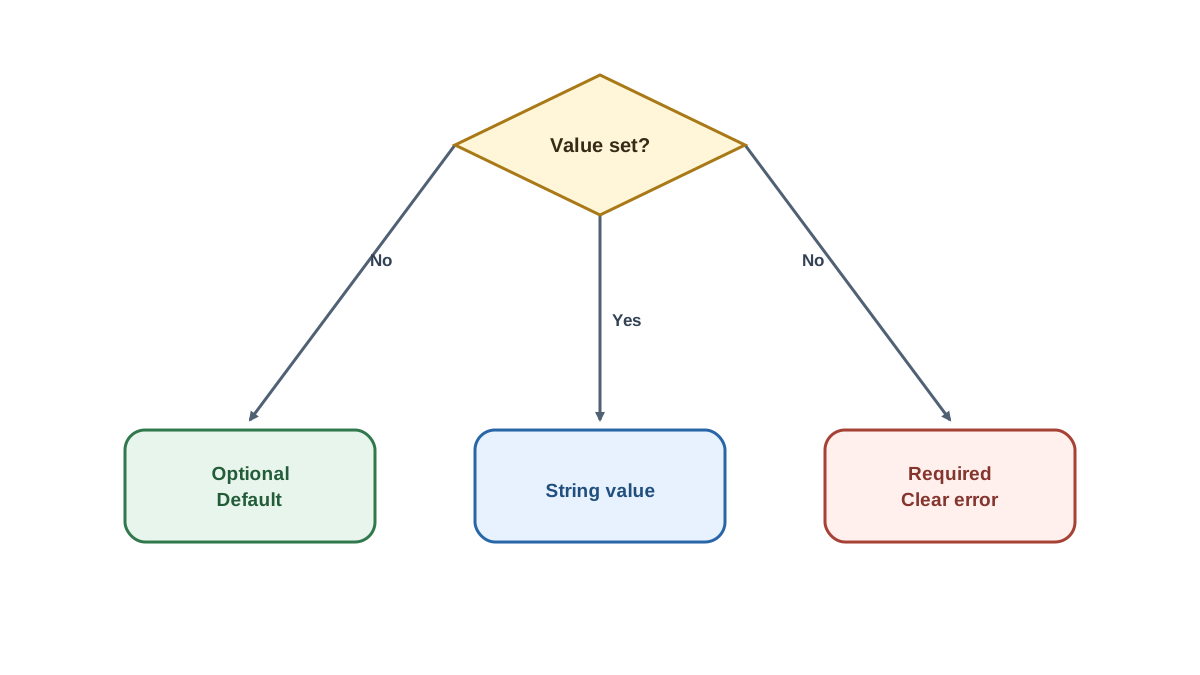
Reading a value is easy. Reading it safely is where beginners get burned. The goal is simple: a missing value should either have a clearly chosen fallback, or fail immediately with a message that names the problem.
Start with defaults for genuinely optional settings:
import os

port = int(os.getenv("PORT", "8000"))
debug = os.getenv("DEBUG", "false").lower() == "true"

print(f"Starting on port {port}, debug={debug}")
Two conversions worth pausing on. int(...) turns the string "8000" into the number 8000. And the boolean check compares against "true" after lowercasing, because "False" is a truthy string — if you write bool(os.getenv("DEBUG")), you'll get True for the value "False". That mistake is common enough to be a rite of passage.
For required settings, fail fast with a readable message. A small helper keeps this tidy:
import os

def require_env(name):
    value = os.getenv(name)
    if value is None:
        raise RuntimeError(f"Missing required environment variable: {name}")
    return value

api_key = require_env("API_KEY")
print("API key loaded")
Run it without API_KEY set:
RuntimeError: Missing required environment variable: API_KEY
Compare that to the alternative: api_key is None, your code proceeds, and forty lines later you get TypeError: expected string or bytes-like object. The helper costs six lines and saves you an hour of tracing.
There's a real tradeoff here, and it's worth stating plainly. A default that hides a misconfiguration can be worse than a crash. If your production database URL silently falls back to localhost, you won't find out until a customer does. Defaults are for values where the fallback is genuinely correct — a port, a debug flag, a log level. Required values get no default.
Knowledge check
Check your understanding
Answer this question before you continue.
Common Mistakes Beginners Make
These are the ones that actually cost time.
Setting the variable in one terminal and running the script from another. The environment is per-process and per-session. A variable exported in one shell window does not exist in a different one, or in your IDE's run button. If os.getenv returns None and you're sure you set it, check where you set it.
Expecting a .env file to load itself. Plain Python does not read .env files. If you create one and your script can't see the values, that's why — you need a library, which we'll cover next.
Confusing an empty string with a missing variable. os.getenv("KEY") returns "" if the variable exists but is set to nothing, and None if it doesn't exist at all. Those are different states. If your check is if value: you'll treat both as falsy, which may or may not be what you want. Be explicit: if value is None:.
Editing os.environ and expecting it to stick. Assigning os.environ["KEY"] = "value" changes the environment for the current process only. It does not touch the machine, and it disappears when the script exits.
Forgetting that subprocesses inherit the parent's environment. If your script sets a variable and then launches another process, that child sees the value. This is usually convenient, but it can hide a mistake during testing — the child "works" only because the parent set something the child should have required.
Knowledge check
Check your understanding
Answer this question before you continue.
Keeping Secrets Out of Your Source Code
This is the payoff. Everything above is mechanics; this is why the mechanics matter.
A secret in source code is a secret in version control history, in every clone, in every backup, and in every fork. Deleting the line later does not delete the value. If you've already pushed it, treat the key as compromised and rotate it — that's the honest advice, and it's cheaper than hoping nobody looked.
The pattern is straightforward:
- Set secrets in the shell or the deployment environment, never in the
.pyfile. - If you use a
.envfile for local convenience, add it to.gitignorebefore your first commit. Then commit a.env.examplewith placeholder names so teammates know which variables exist:
# .env.example
API_KEY=your-key-here
BASE_URL=http://localhost:8000
A small library like python-dotenv can load a .env file into the environment for you:
from dotenv import load_dotenv
import os

load_dotenv()
api_key = os.getenv("API_KEY")
Treat that as a convenience layer, not a security tool. It moves values from a file into the process environment; it does not encrypt anything.
And be honest about the boundary: environment variables reduce exposure in source code, but they are not secret storage. They can leak through logs, error messages, crash dumps, and process listings. They're a strong improvement over hard-coding, not a vault.
Where This Shows Up in Real Scripts
You'll use this pattern constantly once you notice it:
- API scripts read the key and base URL from the environment, so the same script works against a test server and production.
- File-processing and report scripts read input and output folder paths, so they run on any machine without edits.
- Small web apps read a port, a debug flag, and a database URL — exactly the three settings that differ between your laptop and a server.
This is also the pattern deployment platforms expect. When you eventually push code to a host, you'll configure environment variables in a dashboard instead of editing files. Learning it now means that step is familiar rather than mysterious.
Practice: Make One Script Portable
Take a script you've already written — anything with a hard-coded folder path or a fake API key — and do this:
- Move the hard-coded value into an environment variable. Read it with
os.getenv. - Add a sensible default for one optional setting, like a port or a filename.
- Add a fail-fast check for the required one, using the
require_envhelper. - Run it twice: once with the variable set, once without. Confirm you get the two different behaviors you expect — a working run, and a clear error naming the missing variable.
- If you're using a
.envfile, add it to.gitignoreand write a.env.examplewith placeholder names.
The decision rule to carry forward: optional setting, use a default; required setting, fail fast with a clear message; secret, keep it out of the file entirely.
When your settings grow past a handful of values — nested options, lists, per-environment blocks — environment variables start to strain. That's the point to move to a configuration file, and it's the natural next step from here.
Knowledge check
Final check
Finish the article by checking the ideas you just learned.
References
Want a more structured Python path?
Use the Python Starter Pack to turn scattered tutorials into a focused practice path.
Python for Artificial Intelligence Starter Pack
Build a Python foundation you can actually use. The Python for AI Starter Pack brings together a guided path through setup, core programming concepts, data structures, files, JSON, APIs, debugging, and practical projects—so you can move quickly from running your first program to understanding and building useful software.
- 264-page illustrated PDF
- 12 guided Python chapters
- Visual concept diagrams
- Self-assessment quizzes
- Bonus deep-dive sections
- Files, JSON, APIs, debugging & projects
- Foundation for data, automation & AI
Coming soon


