
How to Make an API Request with Python
You already know how to work with dictionaries and JSON. Now it's time to make your scripts talk to the outside world. The first time you pull live data…

You already know how to work with dictionaries and JSON. Now it's time to make your scripts talk to the outside world. The first time you pull live data from a web API into your own program, Python stops being a toy and starts being a tool.
Here's the good news: making an API request with Python's standard library takes about five lines of code. No extra installs. No complicated setup. Just you, your editor, and a live connection to the internet.
Let's build that first request together.
What an API Request Actually Does
Before we write code, let's get a clear picture of what's happening under the hood.
An API (Application Programming Interface) is a public doorway that a server opens so other programs can ask for data. Think of it like a restaurant window: you stand outside, place your order, and the kitchen hands you your food through the window. You never need to walk into the kitchen yourself.
When your Python script makes an API request, it's placing an order. The server receives your request, prepares the data, and sends it back.
The most common type of request is called a GET request. "GET" here means exactly what it sounds like: your script is asking the server for a resource without changing anything on the server's side. It's a read-only operation. You're saying, "Give me this data," and the server answers with the data — or with an error explaining why it can't.
Every HTTP request has two parts that matter for this tutorial:
- Method — the action you want to perform (like GET)
- URL/endpoint — the specific address where the data lives
When you type a URL into your browser, your browser sends a GET request. When your Python script calls an API, it does the same thing — just without the visual page rendering.
The server's response comes back as raw bytes. Those bytes represent text, and that text is usually formatted as JSON. And here's where your existing knowledge pays off: JSON is just a structured way of arranging text, and Python can turn it directly into a dictionary.
You already know how to read dictionaries. The new skill here is the asking.
Knowledge check
Check your understanding
Answer this question before you continue.
Your First GET Request with urllib
There are several ways to make HTTP requests in Python. The most popular third-party library is called requests, but it requires installation. For this tutorial, we'll use urllib.request, which comes built into Python's standard library.
Why start with urllib? Because it works anywhere Python runs — no pip install, no virtual environment setup, no dependency management. You can focus entirely on learning the request pattern.
Here's a complete, runnable script that makes a GET request to a public test API and prints the response:
import urllib.request

url = "https://jsonplaceholder.typicode.com/todos/1"

with urllib.request.urlopen(url) as response:
    body = response.read()

print(body)
Save this as first_request.py and run it:
python first_request.py
You should see something like this:
b'{\n "userId": 1,\n "id": 1,\n "title": "delectus aut autem",\n "completed": false\n}'
Let's walk through what each line does:
import urllib.request— this imports the module that handles opening URLs. It's part of Python's standard library, so it's always available.url = "..."— this is the endpoint we're asking for data from. JSONPlaceholder is a free public test API designed exactly for this kind of practice.urllib.request.urlopen(url)— this sends the GET request and waits for the server's response.response.read()— this reads the response body, which is the actual data the server sent back.print(body)— this shows us what we received.
Notice the b prefix before the output: b'{...}'. That means the response came back as bytes, not as a regular string. Bytes are raw data — the form data takes when it travels across the internet. Before we can work with it as text, we need to decode it.
This is a small but common beginner surprise. The fix is simple:
import urllib.request

url = "https://jsonplaceholder.typicode.com/todos/1"

with urllib.request.urlopen(url) as response:
    body = response.read()

text = body.decode("utf-8")
print(text)
Now the output looks like clean, readable JSON:
{
  "userId": 1,
  "id": 1,
  "title": "delectus aut autem",
  "completed": false
}
Note: The
withstatement here is a context manager. It ensures the connection to the server is properly closed after we're done reading, even if something goes wrong in between. This is a good habit to build early.
Knowledge check
Check your understanding
Answer this question before you continue.
Turning the Response into JSON
Right now, we have JSON as text. But text is just characters — you can't easily access individual fields from a string. To work with this data the way you already know how, we need to convert it into a Python dictionary.
That's where the json module comes in. You've seen it before when working with JSON files. The same tool works here:
import json
import urllib.request

url = "https://jsonplaceholder.typicode.com/todos/1"

with urllib.request.urlopen(url) as response:
    body = response.read()

text = body.decode("utf-8")
data = json.loads(text)

print(data)
The json.loads() function (note the "s" — it stands for "string") takes JSON text and converts it into a Python dictionary:
{'userId': 1, 'id': 1, 'title': 'delectus aut autem', 'completed': False}
Now data is a regular dictionary. You can access values exactly the way you already know how:
print(data["title"])
print(data["completed"])
Output:
delectus aut autem
False
That's the whole bridge: JSON text → Python dictionary → access values with dictionary skills you already have.
Knowledge check
Check your understanding
Answer this question before you continue.
Handling Errors: When the Server Says No
Here's something that surprises many beginners: the server always answers. But the answer isn't always what you asked for.
When you make an API request, the server responds with a status code — a three-digit number that tells you how the request went. The most common ones you'll encounter:
| Status Code | Meaning | What It Tells You |
|---|---|---|
| 200 | OK | The request succeeded. The data you asked for is in the response. |
| 404 | Not Found | The URL doesn't point to anything the server recognizes. |
| 500 | Internal Server Error | The server broke while trying to handle your request. |
A successful connection is not the same as a successful answer. The server can happily connect and then tell you, "I don't have what you're looking for."
With urllib, an HTTP error status like 404 or 500 raises an exception called urllib.error.HTTPError. This is different from a connection failure, where the server never answered at all. That raises urllib.error.URLError.
Here's the distinction that matters:
- The server answered with an error code (like 404 or 500). The connection worked; the answer was bad. Python raises
HTTPError. - No answer came at all (connection failure). The request never completed. Python raises
URLError.
Both are worth handling. Let's build one script that handles both cases cleanly:
import json
import urllib.request
import urllib.error

url = "https://jsonplaceholder.typicode.com/todos/1"

try:
    with urllib.request.urlopen(url) as response:
        body = response.read()
        text = body.decode("utf-8")
        data = json.loads(text)

        print("Status code:", response.status)
        print("Title:", data["title"])
        print("Completed:", data["completed"])

except urllib.error.HTTPError as e:
    print(f"The server answered with an error: {e.code} {e.reason}")

except urllib.error.URLError as e:
    print(f"Could not reach the server: {e.reason}")
If the request succeeds, you'll see output similar to this:
Status code: 200
Title: delectus aut autem
Completed: False
If the URL points to a resource that doesn't exist, you'll see something like:
The server answered with an error: 404 Not Found
If the domain itself can't be reached, you'll see something like:
Could not reach the server: [Errno -2] Name or service not known
Common mistake: New learners often try to catch
URLErrorfirst and forget that a successful connection can still return an error status code. These are two separate failure types, and you need to handle both. The order matters too:HTTPErroris a subclass ofURLError, so it must be caught first.
Knowledge check
Check your understanding
Answer this question before you continue.
The Complete Pattern
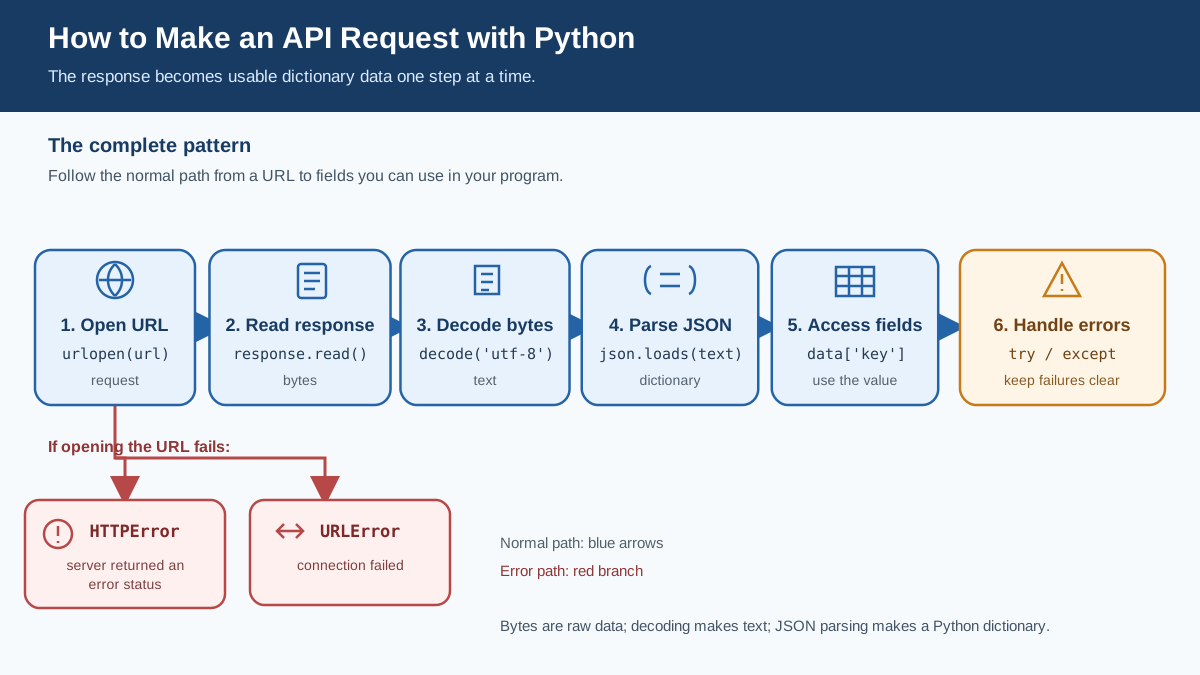
Let's put everything together into one clean script you can reuse as a template:
import json
import urllib.request
import urllib.error

url = "https://jsonplaceholder.typicode.com/todos/1"

try:
    with urllib.request.urlopen(url) as response:
        body = response.read()
        text = body.decode("utf-8")
        data = json.loads(text)

        print("Status code:", response.status)
        print("Title:", data["title"])
        print("Completed:", data["completed"])

except urllib.error.HTTPError as e:
    print(f"The server answered with an error: {e.code} {e.reason}")

except urllib.error.URLError as e:
    print(f"Could not reach the server: {e.reason}")
This is the full pipeline:
- Open the URL and get the response object.
- Read the body as bytes.
- Decode the bytes into text.
- Parse the text into a dictionary with
json.loads(). - Access the fields you need.
- Handle HTTP errors and connection failures separately.
Common Beginner Mistakes
Here are the mistakes I see most often when beginners make their first API calls. Each one has a clear symptom and a simple fix.
Forgetting to decode the bytes
Symptom: You call json.loads() on the response body and get an error about bytes, like TypeError: the JSON object must be str, bytes or bytearray, not ....
Fix: Decode the body first with .decode("utf-8") before passing it to json.loads().
Parsing JSON before checking for errors
Symptom: You get a confusing crash when the server returns an error page instead of JSON. The error body isn't JSON, so json.loads() fails.
Fix: Let the try/except block catch HTTPError before you try to parse anything.
Confusing the response object with the parsed data
Symptom: You print the response object and see something like <http.client.HTTPResponse object at 0x7f8b1c3b4d30> — a memory address, not your data.
Fix: Remember the pipeline: response object → .read() → bytes → .decode() → text → json.loads() → dictionary. Each step transforms the data into a more usable form.
Hard-coding a URL that changes or goes offline
Symptom: Your script worked yesterday and fails today with a connection error.
Fix: This is normal. Public APIs change, move, or shut down. When it happens, check the API's documentation for the current endpoint. This is why the error-handling patterns above matter — they turn a mysterious crash into a clear message.
Practice: Pull Data from a Public API
Now it's your turn to combine everything into one working script.
Your task: Fetch a todo item from the JSONPlaceholder API and print its title and completion status.
Here's the URL to use:
https://jsonplaceholder.typicode.com/todos/1
A successful run should print something like:
Title: delectus aut autem
Completed: False
Here's a starter skeleton with the pieces you need:
import json
import urllib.request
import urllib.error

url = "https://jsonplaceholder.typicode.com/todos/1"

# Your code here:
# 1. Open the URL inside a try block
# 2. Read and decode the body
# 3. Parse the JSON into a dictionary
# 4. Print the title and completed fields
# 5. Catch HTTPError and URLError separately
When you have that working, try two small extensions:
- Fetch todo item 2 and todo item 3 by changing the URL. Notice how the same script works for different data.
- Change the URL to
https://jsonplaceholder.typicode.com/todos/999999and watch your error handling kick in with a 404.
This tiny script is the smallest real-world version of what automation scripts do every day: reach out to a service, pull data, and do something useful with it.
Once you've mastered this pattern, a natural next step is to fetch several items in a loop and write the results to a file. That's exactly the kind of script that saves you hours of manual work.
Run the practice task. Break it. Fix it. Then build something slightly bigger with it. That's how the skill becomes yours.
Knowledge check
Final check
Finish the article by checking the ideas you just learned.
Want a more structured Python path?
Use the Python Starter Pack to turn scattered tutorials into a focused practice path.
Python for Artificial Intelligence Starter Pack
Build a Python foundation you can actually use. The Python for AI Starter Pack brings together a guided path through setup, core programming concepts, data structures, files, JSON, APIs, debugging, and practical projects—so you can move quickly from running your first program to understanding and building useful software.
- 264-page illustrated PDF
- 12 guided Python chapters
- Visual concept diagrams
- Self-assessment quizzes
- Bonus deep-dive sections
- Files, JSON, APIs, debugging & projects
- Foundation for data, automation & AI
Coming soon


