
How to Read a Configuration File with Python
Every script starts with a simple promise: I'll just change this value when I need to. Then the script grows, the value gets buried deeper, and you find…

Every script starts with a simple promise: I'll just change this value when I need to. Then the script grows, the value gets buried deeper, and you find yourself hunting through lines of code to change one folder path or one timeout. A configuration file separates what your script does from what you want it to do—so the next change takes seconds, not archaeology.
Why hard-coded values become a problem
Imagine a tiny script that cleans up old files in a downloads folder:
import os
import time

folder = "/home/you/Downloads"
days = 30

for filename in os.listdir(folder):
    path = os.path.join(folder, filename)
    if os.path.isfile(path):
        age_days = (time.time() - os.path.getmtime(path)) / 86400
        if age_days > days:
            print(f"Would remove: {filename}")
Now ask yourself: what happens when you want to clean a different folder? Or keep files for 60 days instead of 30? You open the script, find the right line, edit it, and hope you didn't miss a second place where that value appears.
That's the core problem with hard-coded values: the setting and the logic live in the same place. Every change means touching code, and every touch risks breaking something.
A configuration file fixes this by giving settings their own home. The script reads values from a file at startup, and when you want different behavior, you edit the file—not the code.
We'll use JSON for this article. If you've worked with JSON in Python before, you already know the basics: it's a text format that stores data as key-value pairs, and Python's json module handles the conversion.
What you need before you start
You should be comfortable with two things: importing modules in Python, and the basics of JSON syntax. If you've used import json and seen a JSON object like {"name": "Ada"}, you're ready.
Here's the sample configuration file we'll use throughout this article. Create a file named config.json in the same folder as your Python script:
{
  "folder": "/home/you/Downloads",
  "days": 30,
  "log_file": "cleanup.log"
}
These settings describe a file-cleanup script: which folder to clean, how old files must be before deletion, and where to write a log.
No external packages needed. The json module is built into Python, so you can run every example in this article with just your standard installation.
The quickest way to read a JSON config file
Let's get a working solution in front of you immediately. Save this as load_config.py:
import json

with open("config.json") as f:
    config = json.load(f)

print(config)
Run it from the same folder as your config.json:
python load_config.py
Expected output:
{'folder': '/home/you/Downloads', 'days': 30, 'log_file': 'cleanup.log'}
Here's what each line does:
open("config.json")opens the file for reading.json.load(f)reads the file and converts the JSON text into a Python dictionary.- The dictionary is stored in
config, and now you can access any setting by its key.
Try it yourself:
print(config["folder"])
print(config["days"])
This is the shortest path to reading a config file in Python. But it assumes the file exists and contains valid JSON. Real life isn't always that tidy, so let's make this pattern sturdier.
Knowledge check
Check your understanding
Answer this question before you continue.
Applying safe defaults for missing settings
What happens when someone edits config.json and removes the days setting?
print(config["days"])
You get a KeyError:
KeyError: 'days'
The script crashes over a missing optional setting. That's unfriendly behavior for a config file—especially when you have a sensible fallback value.
Python's dictionary .get() method solves this. It returns the value if the key exists, and a default if it doesn't:
days = config.get("days", 30)
print(days)
If days is in the file, you get its value. If not, you get 30. No crash.
Here's the before-and-after in context:
# Before: crashes if the key is missing
days = config["days"]
# After: falls back to 30
days = config.get("days", 30)
A good decision rule: use .get() with a default for optional settings—things like colors, timeouts, or log levels. Reserve strict access with config["key"] for required settings that should stop the script if missing.
One important boundary: .get() only handles missing keys. If days exists but holds a bad value like "thirty", .get() won't save you. Defaults cover absent settings, not malformed ones. We'll handle that next.
Knowledge check
Check your understanding
Answer this question before you continue.
Catching a missing or broken config file
Two realistic failures will hit you eventually: the file isn't there, or the JSON inside it is malformed.
Missing file. If config.json doesn't exist, Python raises a FileNotFoundError:
FileNotFoundError: [Errno 2] No such file or directory: 'config.json'
Malformed JSON. If the file has a typo—say, a missing comma or an extra brace—you get a JSONDecodeError:
json.decoder.JSONDecodeError: Expecting ',' delimiter: line 3 column 1 (char 24)
Both errors are informative, but they're not friendly. A beginner running your script deserves a clearer message. Wrap the loading code in a try/except block:
import json
try:
with open("config.json") as f:
    config = json.load(f)
except FileNotFoundError:
print("Could not find config.json. Create it in this folder and try again.")
raise SystemExit(1)
except json.JSONDecodeError:
print("config.json is not valid JSON. Check for missing commas or braces.")
raise SystemExit(1)
Notice what changed from the earlier version: instead of setting config = {} and continuing, the script prints a friendly message and stops. That's deliberate. A missing config file is not an optional setting—it's a sign that something needs your attention before the script can run safely.
If you want to see the failure in action, temporarily rename your config.json file and run the script. You'll get the friendly message.
This level of error handling is enough for a beginner. Don't over-engineer it—just cover the two realistic cases.
Knowledge check
Check your understanding
Answer this question before you continue.
Using the settings in a real script
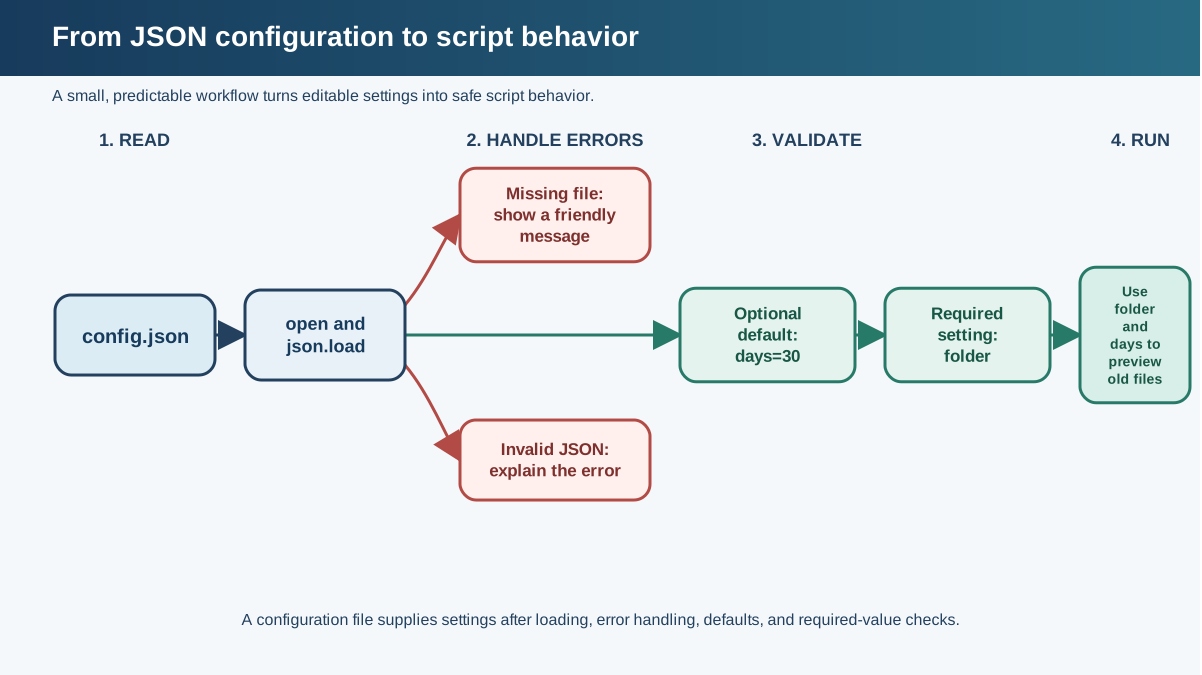
Now let's connect everything. Here's a small file-cleanup script that reads its settings from config.json. The first version only previews what would be removed—no files are deleted yet:
import json
import os
import time

try:
    with open("config.json") as f:
        config = json.load(f)
except FileNotFoundError:
    print("Could not find config.json. Create it in this folder and try again.")
    raise SystemExit(1)
except json.JSONDecodeError:
    print("config.json is not valid JSON. Check for missing commas or braces.")
    raise SystemExit(1)

folder = config.get("folder")
days = config.get("days", 30)

if not folder:
    print("config.json must include a 'folder' setting.")
    raise SystemExit(1)

if not os.path.isdir(folder):
    print(f"Folder not found: {folder}")
    raise SystemExit(1)

now = time.time()
old_files = []

for filename in os.listdir(folder):
    path = os.path.join(folder, filename)
    if os.path.isfile(path):
        age_days = (now - os.path.getmtime(path)) / 86400
        if age_days > days:
            old_files.append(filename)

print(f"Found {len(old_files)} file(s) older than {days} days in {folder}")
for filename in old_files:
    print(f"  Would remove: {filename}")
Run it:
python cleanup_preview.py
The exact output depends on the files in your folder, but you'll see something like:
Found 3 file(s) older than 30 days in /home/you/Downloads
  Would remove: old_report.pdf
  Would remove: backup_2023.zip
  Would remove: temp_notes.txt
Test this against a disposable folder you create for practice—make a few dummy files, set the folder path in config.json, and watch the preview list change as you edit the settings.
Once the preview shows exactly the files you expect, you can add the deletion step:
for filename in old_files:
    path = os.path.join(folder, filename)
    os.remove(path)

print(f"Removed {len(old_files)} file(s).")
Here's the payoff: to clean a different folder or keep files longer, you edit config.json—not the script. The logic stays untouched. That's the whole point of separating settings from code.
Knowledge check
Check your understanding
Answer this question before you continue.
Common beginner mistakes
Three mistakes trip up nearly everyone when they start reading config files.
Mistake 1: Passing a file path to json.load().
# Wrong: json.load() expects an open file object
config = json.load("config.json")

# Right: open the file first
with open("config.json") as f:
    config = json.load(f)
The symptom is a TypeError saying the argument must be a file-like object. The fix is always the same: open the file, then load.
Mistake 2: Assuming values keep their type.
JSON numbers load as Python integers or floats. JSON booleans load as Python True/False. But JSON strings stay strings—so "30" in quotes is text, not a number. If you compare it with > against an integer, you'll get a confusing error. Check your config file: unquoted values for numbers and booleans, quoted values for text.
Mistake 3: Hard-coding the config path.
# Fragile: only works when run from this exact folder
with open("/home/you/projects/cleanup/config.json") as f:
If you move the script, the path breaks. A better beginner instinct is to keep config.json in the same folder as the script and use a plain filename like "config.json". That works as long as you run the script from that folder. For more control later, you can look into building paths relative to the script's own location—but for now, keep them together.
When to use a JSON config file (and when not to)
JSON is a great fit for simple key-value settings that a person will edit by hand. It's readable, it's built into Python, and you already know its syntax.
One real limitation: JSON doesn't support comments. You can't write // days before deletion inside the file. The fix is simple—keep a short README next to the config file, or create a config.example.json with sample values and descriptive key names.
Other formats exist. INI files use sections and are parsed with Python's configparser module. TOML is a newer format designed specifically for configuration and supports comments. Both are worth knowing eventually, but for your first config file, JSON's simplicity and zero-install convenience are hard to beat.
Your next step
Take one of your own small scripts—anything with a hard-coded value you've wished you could change without editing code. Pull those values into a config.json file, load them with the pattern from this article, and replace the hard-coded values with config.get() calls.
Start with something small: a folder path, a filename, a number. Once you feel how nice it is to change behavior without touching code, you'll want this pattern everywhere. It pairs naturally with practical scripts like renaming files in bulk or cleaning messy CSV data—both become far more reusable when their settings live in a config file.
Knowledge check
Final check
Finish the article by checking the ideas you just learned.
References
Want a more structured Python path?
Use the Python Starter Pack to turn scattered tutorials into a focused practice path.
Python for Artificial Intelligence Starter Pack
Build a Python foundation you can actually use. The Python for AI Starter Pack brings together a guided path through setup, core programming concepts, data structures, files, JSON, APIs, debugging, and practical projects—so you can move quickly from running your first program to understanding and building useful software.
- 264-page illustrated PDF
- 12 guided Python chapters
- Visual concept diagrams
- Self-assessment quizzes
- Bonus deep-dive sections
- Files, JSON, APIs, debugging & projects
- Foundation for data, automation & AI
Coming soon


