
Build a Simple Log Analyzer with Python
Somewhere on a server, a program is keeping a diary. Every few seconds it writes a line about what just happened: a user logged in, a request completed, a…

Somewhere on a server, a program is keeping a diary. Every few seconds it writes a line about what just happened: a user logged in, a request completed, a warning appeared, something failed. Nobody reads that diary line by line. It is too long, too repetitive, and too easy to miss the one error buried between hundreds of routine entries.
That diary is a log file. And the tool that makes it useful is a small Python script that reads every line, counts what matters, and hands you a summary you can actually act on.
That is exactly what you will build here: a simple Python log analyzer that turns a structured text file into a clear report.
What a Log Analyzer Actually Does
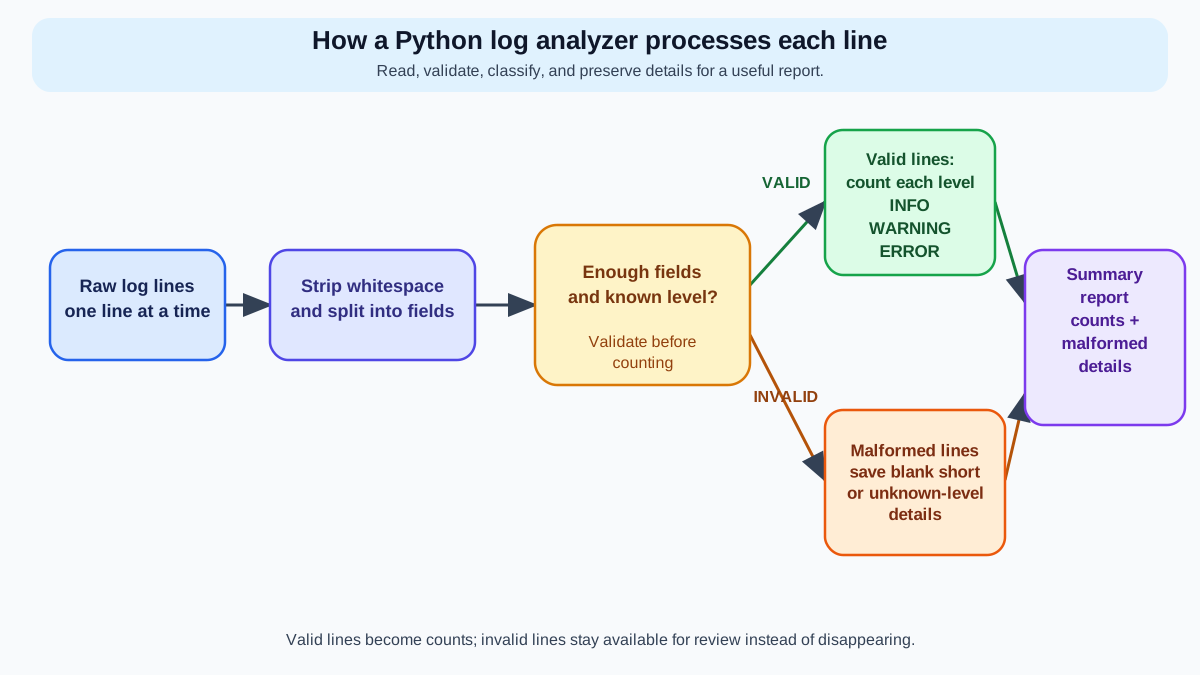
A log file is a plain text record where each line describes one event. Programs, servers, and applications write these lines automatically so that when something goes wrong, there is a trail to follow.
Most logs share a similar shape. Each line has a timestamp, a level that says how serious the event is, and a message describing what happened. The level is the part you care about most: INFO means routine activity, WARNING means something looks off, and ERROR means something actually failed.
Here is a small sample log so you can see the structure you will work with:
2025-06-01 08:12:01 INFO User login successful
2025-06-01 08:12:03 INFO File uploaded: report.pdf
2025-06-01 08:12:05 WARNING Disk space below 20%
2025-06-01 08:12:07 ERROR Database connection timed out
2025-06-01 08:12:09 INFO User logout
2025-06-01 08:12:11 ERROR Failed to send email notification
Each line follows the same pattern: a timestamp, a level, and a message. When a log has thousands of lines, scanning it by hand does not scale. Your eyes glaze over around line fifty. The one ERROR you needed to find hides in the middle of the file like a needle in a haystack that is also on fire.
A Python log analyzer fixes that. It reads every line, recognizes the pattern, counts how many times each level appears, and reports the totals. The deliverable for this project is a script that does three things:
- Counts each event type (
INFO,WARNING,ERROR) - Reports the totals clearly
- Flags lines it cannot understand
By the end, you will have a reusable tool you can point at any structured log file.
What You Will Build and What You Need
The finished script will do two things when you run it: print a summary to your terminal and write the same summary to a report file you can save or share.
You do not need any external libraries for this project. Python's standard library is enough. No pip install required.
Here is the project structure:
log-analyzer/
├── app.log
└── analyze_log.py
One sample log file and one Python script. That is the whole project.
Before you start, make sure these skills feel familiar. You will use them constantly:
- Opening and reading a file with
open()and aforloop - Making decisions with
ifstatements - Storing counts in a dictionary
- Wrapping logic in functions so you do not repeat yourself
If any of those feel shaky, that is fine. You will see them all in action here, and the project itself will make them click harder than any isolated example could.
Start with a Tiny Run Before the Full Script
The biggest mistake beginners make on a project like this is writing the entire script at once, running it, and then staring at a wall of errors with no idea which layer broke.
Build in layers instead. Verify each layer before stacking logic on top of it.
The first layer is simple: can Python read the file at all? Create a file called app.log in your project folder and paste the sample log from earlier into it. Then create analyze_log.py with this tiny script:
with open("app.log") as file:
    for line in file:
        print(line)
Run it from your terminal:
python analyze_log.py
You should see every line of the log printed back at you:
2025-06-01 08:12:01 INFO User login successful

2025-06-01 08:12:03 INFO File uploaded: report.pdf

2025-06-01 08:12:05 WARNING Disk space below 20%

2025-06-01 08:12:07 ERROR Database connection timed out

2025-06-01 08:12:09 INFO User logout

2025-06-01 08:12:11 ERROR Failed to send email notification
Notice the blank lines between each entry. That happens because every line in the file already ends with a newline character, and print() adds another one. You can strip that extra whitespace with the .strip() method:
with open("app.log") as file:
    for line in file:
        print(line.strip())
Now the output matches the file exactly.
This tiny run proves something important: your file path is correct, Python can open the file, and you can iterate over its lines. That is the foundation everything else builds on.
Knowledge check
Check your understanding
Answer this question before you continue.
Count Event Types with a Dictionary
Now for the core of the analyzer: counting how many times each level appears.
The natural tool here is a dictionary. Think of it as a tally sheet. Each level name is a key, and its count is the value. As you read each line, you find the level word and add one to its tally.
counts = {}

with open("app.log") as file:
    for line in file:
        line = line.strip()
        parts = line.split()
        level = parts[2]
        counts[level] = counts.get(level, 0) + 1

print(counts)
Let us walk through what happens on each line.
line.split() breaks the line into pieces wherever there is whitespace. The sample line 2025-06-01 08:12:01 INFO User login successful becomes a list of words:
["2025-06-01", "08:12:01", "INFO", "User", "login", "successful"]
The level is the third piece, so parts[2] grabs it. Python lists start at index zero, which trips up many beginners. Index 0 is the date, index 1 is the time, and index 2 is the level.
The line counts[level] = counts.get(level, 0) + 1 is where the counting happens. The .get() method looks up the current count for that level. If the level has never been seen before, .get() returns the default value 0 instead of crashing. Then you add 1 and store the result back.
That default value matters. If you wrote counts[level] += 1 without checking whether the key existed, the script would crash the first time it met a level it had never seen. The .get() method is the beginner-safe way to handle a first-seen key.
Run the script:
python analyze_log.py
You should see:
{'INFO': 3, 'WARNING': 1, 'ERROR': 2}
The dictionary now holds your counts. Three INFO lines, one WARNING, two ERROR lines. That matches the sample log exactly.
The output works, but it is not pretty. A dictionary printed raw is fine for debugging, not for reading. Let us improve the display:
counts = {}

with open("app.log") as file:
    for line in file:
        line = line.strip()
        parts = line.split()
        level = parts[2]
        counts[level] = counts.get(level, 0) + 1

for level, count in counts.items():
    print(f"{level}: {count}")
Now the output reads like a real summary:
INFO: 3
WARNING: 1
ERROR: 2
You have just built the heart of a Python log analyzer. Everything from here is refinement.
Knowledge check
Check your understanding
Answer this question before you continue.
Define What Counts as a Valid Line
Before you add error handling, you need a clear contract for what your script should accept. Without one, you will not know whether a line is valid or broken.
Here is the contract for this project:
- A valid line has three or more whitespace-separated parts.
- The first part is a date.
- The second part is a time.
- The third part is a level:
INFO,WARNING, orERROR. - The rest of the line is the message.
That third rule matters more than beginners expect. If you only check that a line has three parts, a line like 2025-06-01 08:12:15 DEBUG would slip through and get counted as a valid event. But DEBUG is not one of the levels this analyzer tracks. It is an unknown level, and the report should say so.
Why does this distinction matter? Because the whole point of the tool is to give you an honest summary. If your script silently counts an unknown label as a valid event, the report lies to you. A line that does not match the contract belongs in the malformed bucket, not in the counts.
Knowledge check
Check your understanding
Answer this question before you continue.
Spot Lines That Do Not Fit the Pattern
Real logs are messy. They contain blank lines, partial entries, and unexpected formats. A program crashes mid-write. A developer adds a custom message that breaks the pattern. A log rotation tool leaves an empty line behind.
A good analyzer does not pretend those lines do not exist. It reports them.
Here is the problem with the current script: if it meets a blank line, line.split() returns an empty list. Trying to grab parts[2] from that list crashes with an IndexError because there is no third piece.
The fix is to check whether a line has enough parts before trying to read its level. Lines that do not fit the pattern get collected separately so you can inspect them later:
counts = {}
malformed_lines = []

with open("app.log") as file:
    for line in file:
        line = line.strip()

        if not line:
            continue

        parts = line.split()

        if len(parts) < 3:
            malformed_lines.append(line)
            continue

        level = parts[2]

        if level not in ("INFO", "WARNING", "ERROR"):
            malformed_lines.append(line)
            continue

        counts[level] = counts.get(level, 0) + 1

print("Event counts:")
for level, count in counts.items():
    print(f"  {level}: {count}")

print(f"\nMalformed lines skipped: {len(malformed_lines)}")
Three guards protect the script now. The first checks if not line: and skips empty lines entirely. The second checks whether the line has at least three parts before touching parts[2]. The third checks whether the level is one the analyzer actually tracks. If a line is too short or carries an unknown level, it goes into the malformed_lines list and the script moves on.
To see this in action, add a couple of broken lines to your app.log:
2025-06-01 08:12:01 INFO User login successful
2025-06-01 08:12:03 INFO File uploaded: report.pdf
2025-06-01 08:12:05 WARNING Disk space below 20%
2025-06-01 08:12:07 ERROR Database connection timed out
2025-06-01 08:12:09 INFO User logout
2025-06-01 08:12:11 ERROR Failed to send email notification
This line is completely malformed
2025-06-01 08:12:15
2025-06-01 08:12:17 DEBUG Cache miss on user profile
Run the script again:
python analyze_log.py
Event counts:
  INFO: 3
  WARNING: 1
  ERROR: 2

Malformed lines skipped: 3
The script counted the valid entries and flagged the three broken lines instead of crashing on them. That is the difference between a script that works on a clean sample and a tool that survives contact with real data.
Common mistake: Checking only the field count is not enough. A line with three parts but an unknown level like
DEBUGwill pass alen(parts) < 3check. Always validate the level against the set of levels your analyzer understands.
Knowledge check
Check your understanding
Answer this question before you continue.
Write the Summary to a Report File
Printed output disappears when the terminal closes. A written report file is something you can save, share, or email. For real reporting workflows, that file is the actual deliverable.
Building a formatted summary string and writing it to a file uses skills you already have. Here is the full script so far, extended to produce a report:
counts = {}
malformed_lines = []

with open("app.log") as file:
    for line in file:
        line = line.strip()

        if not line:
            continue

        parts = line.split()

        if len(parts) < 3:
            malformed_lines.append(line)
            continue

        level = parts[2]

        if level not in ("INFO", "WARNING", "ERROR"):
            malformed_lines.append(line)
            continue

        counts[level] = counts.get(level, 0) + 1

report_lines = []
report_lines.append("Log Analysis Report")
report_lines.append("=" * 20)
report_lines.append("")

for level, count in counts.items():
    report_lines.append(f"{level}: {count}")

report_lines.append("")
report_lines.append(f"Malformed lines skipped: {len(malformed_lines)}")

if malformed_lines:
    report_lines.append("")
    report_lines.append("Malformed line details:")
    for index, line in enumerate(malformed_lines, start=1):
        report_lines.append(f"  {index}. {line}")

report = "\n".join(report_lines)

with open("report.txt", "w") as report_file:
    report_file.write(report)

print("Report written to report.txt")
The script builds a list of strings, joins them into one block of text with newline characters, and writes that block to report.txt.
Run it:
python analyze_log.py
Report written to report.txt
Then open report.txt to confirm the contents:
Log Analysis Report
====================

INFO: 3
WARNING: 1
ERROR: 2

Malformed lines skipped: 3

Malformed line details:
  1. This line is completely malformed
  2. 2025-06-01 08:12:15
  3. 2025-06-01 08:12:17 DEBUG Cache miss on user profile
Including the malformed-line details keeps the report honest and actionable. If your log file has data quality problems, the report says exactly which lines caused them. That turns a vague warning into a repair list.
Wrap the Logic in Reusable Functions
The script works, but everything is jammed into one long block. That makes it hard to test, hard to reuse, and hard to change without breaking something.
Functions fix that. The DRY principle — Don't Repeat Yourself — says you should write each piece of logic once, give it a name, and call it when you need it. This script has three natural jobs: read lines, count levels, and write the report. Give each job its own function:
def read_log_lines(filename):
    with open(filename) as file:
        return [line.strip() for line in file]


def count_levels(lines):
    counts = {}
    malformed_lines = []

    for line in lines:
        if not line:
            continue

        parts = line.split()

        if len(parts) < 3:
            malformed_lines.append(line)
            continue

        level = parts[2]

        if level not in ("INFO", "WARNING", "ERROR"):
            malformed_lines.append(line)
            continue

        counts[level] = counts.get(level, 0) + 1

    return counts, malformed_lines


def write_report(filename, counts, malformed_lines):
    report_lines = []
    report_lines.append("Log Analysis Report")
    report_lines.append("=" * 20)
    report_lines.append("")

    for level, count in counts.items():
        report_lines.append(f"{level}: {count}")

    report_lines.append("")
    report_lines.append(f"Malformed lines skipped: {len(malformed_lines)}")

    if malformed_lines:
        report_lines.append("")
        report_lines.append("Malformed line details:")
        for index, line in enumerate(malformed_lines, start=1):
            report_lines.append(f"  {index}. {line}")

    report = "\n".join(report_lines)

    with open(filename, "w") as report_file:
        report_file.write(report)


lines = read_log_lines("app.log")
counts, malformed_lines = count_levels(lines)
write_report("report.txt", counts, malformed_lines)

print("Analysis complete.")
print(f"Report written to report.txt with {len(malformed_lines)} malformed line(s) skipped.")
Each function has one job. read_log_lines gets the raw lines. count_levels returns the counts and the malformed lines. write_report turns the results into a file. The main flow at the bottom calls each function in order.
This structure makes the script testable. You can call count_levels with a list of lines you invent yourself, without touching any file. You can reuse write_report for any summary data. And when something breaks, you know which function to inspect.
Run the refactored script:
python analyze_log.py
Analysis complete.
Report written to report.txt with 3 malformed line(s) skipped.
The output matches the earlier version. Same behavior, cleaner structure.
Verify the Final Report
A script that runs is not the same as a script that is correct. Before you call this project done, verify that the report matches the source file.
Open report.txt and check three things:
- Every valid
INFO,WARNING, andERRORline inapp.logis counted. - Every line that is blank, too short, or carries an unknown level appears in the malformed details.
- The malformed count matches the number of detail lines listed.
Count the valid lines in app.log by hand. There are three INFO lines, one WARNING, and two ERROR. The report shows exactly those numbers. Now count the broken lines: one completely malformed sentence, one line with only a timestamp, and one DEBUG line. The report lists all three.
That match is the proof your analyzer works. Run this verification on every new log file you feed it, and you will catch parser mistakes before they become misleading reports.
Common Beginner Mistakes and How to Recover
Every beginner hits the same wall on this project. Here is what the errors look like, what they mean, and how to fix them.
FileNotFoundError
FileNotFoundError: [Errno 2] No such file or directory: 'app.log'
This means Python cannot find app.log in the current folder. The most common cause is running the script from a different directory than the one holding the file.
Check where you are running the script from. In your terminal, run pwd on macOS or Linux, or cd on Windows, to print the current directory. Confirm both app.log and analyze_log.py live in that same folder.
IndexError
IndexError: list index out of range
This happens when a line has fewer than three parts and the script tries to grab parts[2]. A blank line or a short partial entry triggers it.
The malformed-line check from earlier prevents this. Always verify a line has enough parts before indexing into it.
The Blank Line Trap
A blank line in the log file produces an empty string after .strip(). Splitting that empty string gives you an empty list, and parts[2] crashes.
The if not line: continue guard handles this. Empty strings are falsy in Python, so the check catches them cleanly.
The Wrong Index
KeyError: '2025-06-01'
If you grab parts[0] instead of parts[2], you are counting dates instead of levels. Remember: index 0 is the date, index 1 is the time, index 2 is the level. When in doubt, add a temporary print(parts) to see exactly what the split produced.
The Unknown Level Slip
A line like 2025-06-01 08:12:17 DEBUG Cache miss has three parts, so a len(parts) < 3 check will not catch it. But DEBUG is not a level your analyzer tracks. Without the level validation, the script counts it as valid and the report silently includes a category you never asked for.
Always validate the level against the set of levels your analyzer understands.
Make It Yours: Next Steps for This Project
You now have a working Python log analyzer. The best way to make it yours is to extend it.
Here are three realistic upgrades, ordered from easiest to most ambitious:
-
Filter by level. Add a variable like
target_level = "ERROR"and only count lines that match it. This turns your analyzer into an error finder. -
Count by hour. The timestamp contains the hour. Split the time part on
":"and count how many events happened in each hour. This reveals usage patterns across the day. -
Accept a filename as a command-line argument. Instead of hardcoding
"app.log", let the user pass the filename when they run the script. This makes the tool work on any log file without editing the code.
If you want to keep building in this direction, cleaning messy CSV data and reading configuration files are natural next projects that use the same skills: reading structured text, validating what you find, and writing a clean output.
Here is your concrete practice task. Create your own log file with a mix of valid entries, a few deliberately malformed lines, and at least one unknown level like DEBUG or TRACE. Run your analyzer on it. Confirm the report counts the valid levels correctly and flags every broken line, including the unknown levels. That verification step is what turns a script that works on a sample into a tool you can trust on real data.
A log file is a diary a program keeps about itself. You just built the tool that reads that diary, finds what matters, and tells you the story in seconds. Point it at a new log file, verify the report against the source, and see what it finds.
Knowledge check
Final check
Finish the article by checking the ideas you just learned.
Want a more structured Python path?
Use the Python Starter Pack to turn scattered tutorials into a focused practice path.
Python for Artificial Intelligence Starter Pack
Build a Python foundation you can actually use. The Python for AI Starter Pack brings together a guided path through setup, core programming concepts, data structures, files, JSON, APIs, debugging, and practical projects—so you can move quickly from running your first program to understanding and building useful software.
- 264-page illustrated PDF
- 12 guided Python chapters
- Visual concept diagrams
- Self-assessment quizzes
- Bonus deep-dive sections
- Files, JSON, APIs, debugging & projects
- Foundation for data, automation & AI
Coming soon


