
Writing Reusable Python Code: DRY Principles for Beginners
Copy-paste feels fast. It is also how small scripts turn into maintenance traps.

Copy-paste feels fast. It is also how small scripts turn into maintenance traps.
Here is a version of a problem I see constantly in beginner code. Imagine you are building a tiny order-report script. Three different places need to format a price the same way:
# order_report.py

item_one = {"name": "notebook", "price_cents": 450}
item_two = {"name": "pen", "price_cents": 125}
item_three = {"name": "desk lamp", "price_cents": 2499}

print(f"{item_one['name']}: ${item_one['price_cents'] / 100:.2f}")
print(f"{item_two['name']}: ${item_two['price_cents'] / 100:.2f}")
print(f"{item_three['name']}: ${item_three['price_cents'] / 100:.2f}")
notebook: $4.50
pen: $1.25
desk lamp: $24.99
That works. Now suppose your business changes: prices should show with a currency symbol like €4.50. You now have to find every copy of that formatting logic and edit it. Miss one, and your report silently mixes currencies. That is not a style problem. That is a maintenance bill you just signed.
Why Copy-Pasted Code Costs You Later
Beginners copy code because it works the first time. The cost arrives on the second edit, when you have to remember every place that logic lives.
Code is read and changed far more often than it is first written. Every duplicated block means that when a requirement changes, you must find all the copies, edit all of them, and trust that you did not miss one. Missing a copy creates a silent bug: no error message, just wrong output.
This problem is common enough that software developers gave it a name: DRY, which stands for Don't Repeat Yourself. The idea is simple: capture one piece of behavior in exactly one place, then reuse it everywhere that behavior is needed.
Knowledge check
Check your understanding
Answer this question before you continue.
What DRY Actually Means (and What It Doesn't)
DRY does not mean you must never write two similar lines. It means you should not have multiple copies of the same job scattered through your code.
Here is the distinction that matters. Two loops that both print values are not automatically duplicates:
# One job: print scores
for score in scores:
    print(score)

# Different job: print names
for name in names:
    print(name)
Those loops look alike, but they do different work. DRY is a judgment about intent and change, not a word-count rule. If you would need to edit two places to make one logical change, that is duplication. If the two blocks would change for different reasons, they are not duplicates.
Knowledge check
Check your understanding
Answer this question before you continue.
The First Reuse Tool: Functions
You already know how to define and call a function. Now let's put that skill to work.
The duplicated price formatting from our opening example is a perfect candidate. Wrap it in a function:
def format_price(item):
    return f"{item['name']}: ${item['price_cents'] / 100:.2f}"

item_one = {"name": "notebook", "price_cents": 450}
item_two = {"name": "pen", "price_cents": 125}
item_three = {"name": "desk lamp", "price_cents": 2499}

print(format_price(item_one))
print(format_price(item_two))
print(format_price(item_three))
notebook: $4.50
pen: $1.25
desk lamp: $24.99
Same output, but the structure changed. The formatting logic now lives in exactly one place. When the currency changes, you edit one function, and every call site updates automatically.
This is the core payoff of writing reusable Python code: you change the logic once, and the fix propagates everywhere the function is used. No hunting through the file for copies. No risk of missing one.
Tip: A good beginner instinct is to ask, "If this behavior changes, how many places do I have to edit?" If the answer is more than one, consider extracting a function.
Knowledge check
Check your understanding
Answer this question before you continue.
When a Function Isn't Enough: Modules
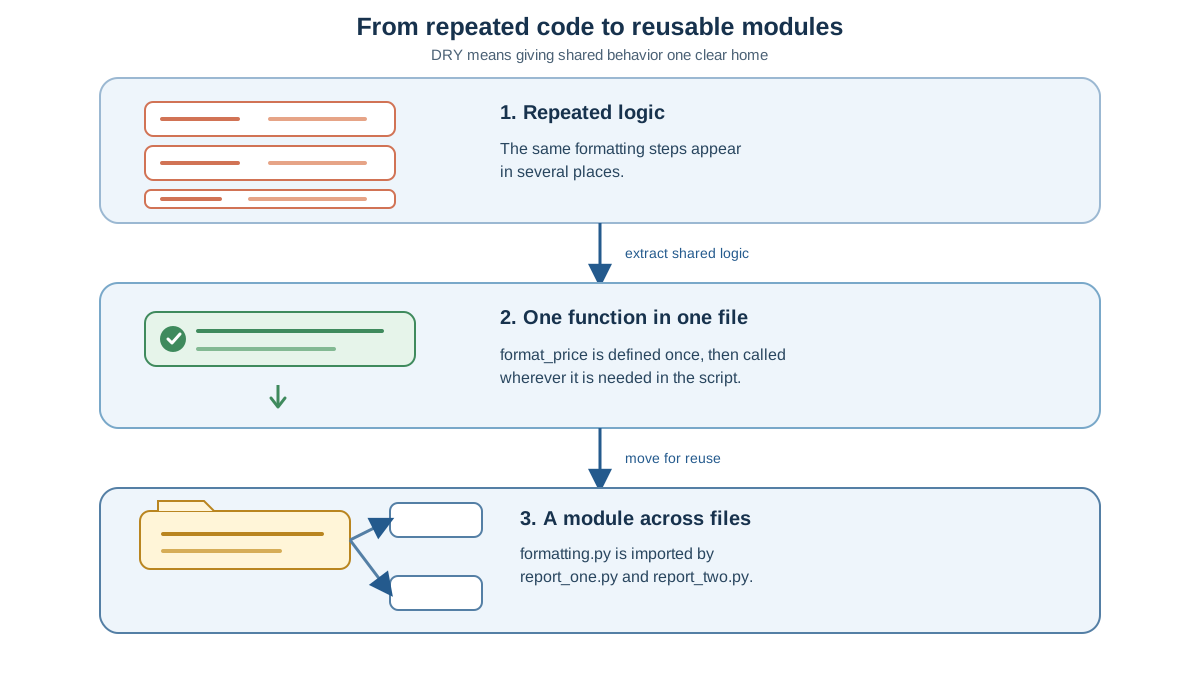
Functions reuse code within one script. But what happens when you need that same helper in a second script?
You could copy the function into the new file. That recreates the exact problem you just solved. The better move is to put the function in a module.
A module is just a .py file that holds code you want to reuse. If you save format_price in a file called formatting.py, any other script in the same folder can import and use it:
# formatting.py

def format_price(item):
    return f"{item['name']}: ${item['price_cents'] / 100:.2f}"
# report_one.py
from formatting import format_price

item = {"name": "notebook", "price_cents": 450}
print(format_price(item))
# report_two.py
from formatting import format_price

item = {"name": "desk lamp", "price_cents": 2499}
print(format_price(item))
Save all three files in the same folder. Then run report_one.py or report_two.py from that folder, and the import will find formatting.py.
The distinction is clean: functions organize behavior inside a file; modules organize functions across files. When you catch yourself needing the same function in a second script, that is the signal to move it into a module.
Knowledge check
Check your understanding
Answer this question before you continue.
A Real-World Habit: Spotting Duplication as You Write
DRY is not a rule you recall after the damage is done. It is a habit you practice while typing.
Here is the trigger I teach beginners: if you are about to paste the same block a second time, pause. Ask yourself whether this is the same job as the block you are copying from. If yes, extract a function first, then call it in both places.
What about the first time you write a block? My rule is simple: wait for the second use. Abstracting too early is the beginner's opposite mistake. You do not need a function for logic that appears once and may never appear again. When the pattern shows up twice, you have real evidence that reuse will pay off.
This habit matters most in the work beginners actually do: automation scripts, data cleanup, small reporting tools. Those projects are full of repeated formatting, validation, and file-handling logic. Each repetition is an invitation to write reusable Python code instead of another copy.
Common Beginner Mistake: Fixing One Copy and Missing the Rest
The classic symptom of duplication failure is subtle. You fix a bug in one copy of the logic, but another copy still holds the old behavior. The program runs without errors. The output is just wrong in one spot.
# First copy — fixed to use two decimal places
price_display = f"${item_one['price_cents'] / 100:.2f}"

# Second copy — still uses the old format
price_display = f"${item_two['price_cents'] / 100}"

# Third copy — also still old
price_display = f"${item_three['price_cents'] / 100}"
Run that with the same item values from earlier, and you get:
$4.50
$1.25
$24.99
Wait. Two of those look right. The second and third lines happen to produce clean numbers because 125 / 100 and 2499 / 100 do not expose the missing decimal formatting. But try price_cents = 1255 in the second copy, and you will see $12.55 instead of $12.55 — no, check that again: 1255 / 100 gives 12.55, which looks fine too. The real trap appears with a value like 1250, which prints as 12.5 instead of 12.50.
The point is not the floating-point details. The point is that the inconsistency is nearly invisible until a specific value exposes it. No error message. No warning. Just wrong output on the day a customer order hits the unlucky number.
This is not a personal failure. It is the predictable cost of duplication, which is exactly why DRY exists. When you catch yourself editing one of several copies, treat that moment as your signal: extract the function now, before the copies drift further apart.
Your Next Step
Pick a small script you have already written. Find one block that appears more than once — a formatting expression, a validation check, a cleanup step. Refactor it into a function. Run the script and confirm the output did not change.
That last part matters. The goal of refactoring is not new behavior. It is the same behavior, organized so the next change is cheaper.
Once you feel comfortable reusing functions across scripts, the natural next step is learning how to build and import your own modules. That is where python code reuse moves from a single file to an entire project.
Knowledge check
Final check
Finish the article by checking the ideas you just learned.
References
Want a more structured Python path?
Use the Python Starter Pack to turn scattered tutorials into a focused practice path.
Python for Artificial Intelligence Starter Pack
Build a Python foundation you can actually use. The Python for AI Starter Pack brings together a guided path through setup, core programming concepts, data structures, files, JSON, APIs, debugging, and practical projects—so you can move quickly from running your first program to understanding and building useful software.
- 264-page illustrated PDF
- 12 guided Python chapters
- Visual concept diagrams
- Self-assessment quizzes
- Bonus deep-dive sections
- Files, JSON, APIs, debugging & projects
- Foundation for data, automation & AI
Coming soon


