
Writing Your First Python Module
A Python module is just a .py file you can reuse from other files. The moment you split one growing script into two files and import one from the other,…

Key topics
A Python module is just a .py file you can reuse from other files. The moment you split one growing script into two files and import one from the other, you stop writing a single program and start building a small system. The real lesson is the boundary between the two files: the module holds reusable definitions, and the script holds the actions that use them. Get that boundary right and you get reuse without copying, plus fewer name collisions—two wins that pay off the first time you import your own code.
What Is a Python Module?
A module is a file containing Python code. The file name, minus the .py extension, becomes the module's name. Inside that file you can put functions, variables, classes, and even other imports, then pull them into any other Python file with an import statement.
You have already used modules without writing one. The math module is a built-in example:
import math
print(math.sqrt(16))
4.0
math is a module someone else wrote. In this tutorial, you will write your own.
Knowledge check
Check your understanding
Answer this question before you continue.
Why Split Code Into Modules?
A single file works fine for a short script. The trouble starts when that file grows: you scroll past hundreds of lines to find one function, you copy the same helper into three projects, and a single bug forces you to read the whole file to locate it.
Modules fix that by giving each piece of code a home and a name. The practical wins:
- Reuse without copying. Write a function once, import it anywhere.
- Find bugs faster. When something breaks, you inspect the one module responsible, not a giant file.
- Keep files readable. Each module stays small enough to hold in your head.
- Share cleanly. A well-named module is easy to hand to a teammate or reuse in a later project.
If you have not yet written a function, practice defining and calling one first, since modules mostly hold functions you want to reuse.
Knowledge check
Check your understanding
Answer this question before you continue.
Create Your First Module
Let's build a small module called greetings.py. It will hold two functions that print a greeting and a farewell.
Create a new file named greetings.py in your project folder and add this code:
## greetings.py

def say_hello(name):
    """Greet someone by name."""
    print(f"Hello, {name}!")

def say_goodbye(name):
    """Say goodbye to someone by name."""
    print(f"Goodbye, {name}!")
That is the whole module. The file name greetings (without .py) is the module name, and the two functions are its contents. Notice what the module does not do: it defines functions but runs nothing on its own. That is the boundary we are building toward.
Knowledge check
Check your understanding
Answer this question before you continue.
Import and Use Your Module
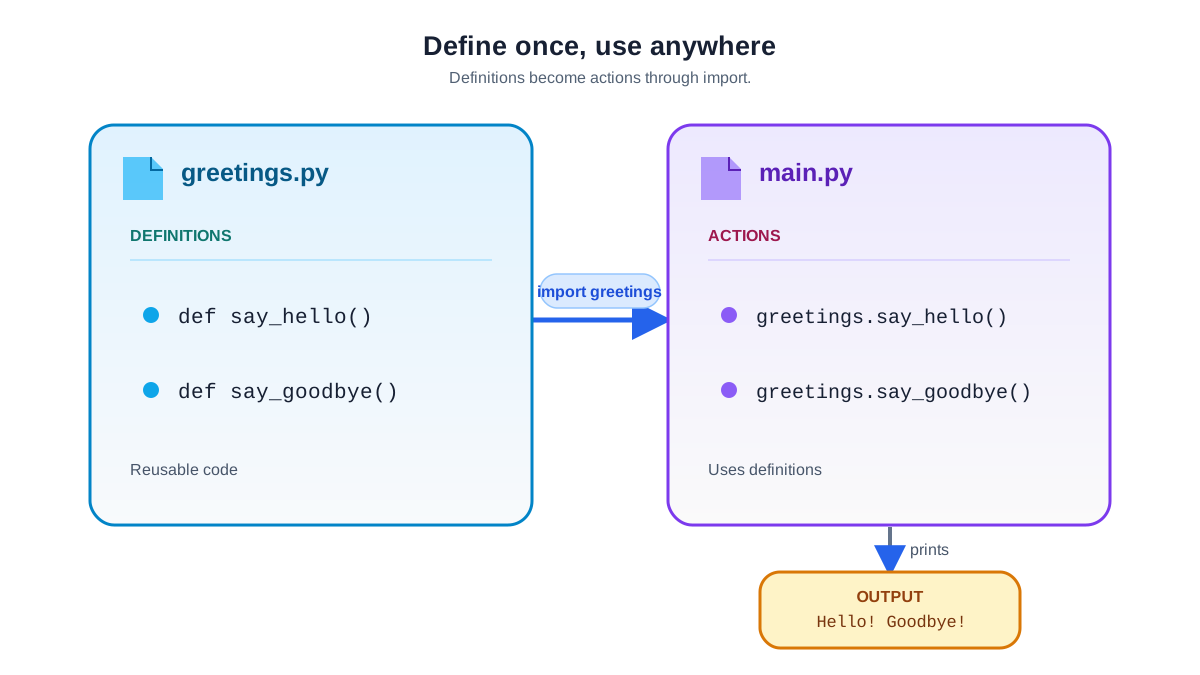
Now create a second file, main.py, in the same folder. This is the script you will run. It holds the actions—the calls that actually do something.
## main.py

import greetings

greetings.say_hello("Alice")
greetings.say_goodbye("Bob")
Before you run it, set up the folder so Python can find both files:
- Put
greetings.pyandmain.pyin the same folder. - Open your terminal in that folder.
- Run
python main.py.
python main.py
Hello, Alice!
Goodbye, Bob!
Notice how the functions are called: greetings.say_hello(...). The import greetings line only adds the name greetings to your script's namespace. To reach the functions inside, you go through the module name. That keeps your names from colliding with functions you define in main.py.
This is the boundary in action. greetings.py owns the definitions; main.py owns the actions. Because the module keeps its functions behind its own name, you can call say_hello from main.py without worrying that a local variable or function with the same name will clash.
If you want a shorter call, you can import the functions directly:
from greetings import say_hello

say_hello("Alice")
Here is the decision rule that keeps this a choice rather than a habit: prefer import greetings when you want to see at a glance where each name came from, or when a name might collide with something you define in main.py. Reach for from greetings import say_hello only for a small, obvious dependency where the shorter call genuinely reads better. The moment you lose the module prefix, you also lose the visible cue that tells you which file owns the function—so use direct imports sparingly.
Knowledge check
Check your understanding
Answer this question before you continue.
When Your Import Fails
Most beginner import errors are not mysterious. They come from a small set of mistakes:
- Wrong file name. The module name must match the file name exactly, including capitalization.
Greetings.pyis not the same module asgreetings.py. - Typo in the import.
import greeting(missing thes) will fail even though the file is right there. - File in the wrong place. Python looks for a local module in the same project folder as the script you run. If
greetings.pylives somewhere else, the import fails.
If you see ModuleNotFoundError, work through that list in order before changing anything else. In most beginner cases, one of those three is wrong.
Common mistake: Moving files or changing folders when the real problem is a typo. Keep
greetings.pyandmain.pyin the same project folder, runpython main.pyfrom that folder, and if the import fails, check the file names and spelling first. The file is almost always right where you left it—the name is what is wrong.
Best Practices for Modules
A module is easy to write. A module that is pleasant to reuse takes a little more care.
- Give it one job. A module named
greetings.pyshould hold greeting logic, not database code. If a file starts doing two unrelated things, split it. - Name for clarity. The file name and function names should say what they do.
greetings.pybeatsutils.pybecause it tells you what is inside. - Document the module. A short docstring at the top tells the next reader what the module is for:
"""Functions for greeting and saying goodbye to users."""

def say_hello(name):
    """Greet someone by name."""
    print(f"Hello, {name}!")
- Keep functions small and focused. A function that does one thing is easy to test, debug, and reuse.
Practice: Build a Calculator Module
Put the pattern to work. Your job is to build a small module and use it from a script—without copying the answer first.
Start with just two functions. Create calculator.py with add and multiply, each taking two numbers and returning the result:
## calculator.py

def add(a, b):
    return a + b

def multiply(a, b):
    return a * b
Now create main.py that imports the module and prints a few results:
## main.py

import calculator

print(calculator.add(5, 3))
print(calculator.multiply(4, 2))
Run it and confirm you see this output:
8
8
Once that works, extend the module on your own. Add a subtract function, then call it from main.py. Then try a variation: import only add with from calculator import add, and confirm the shorter call works. Each change is a small experiment: write the function, run the script, and watch the output confirm your mental model.
If you get stuck, here is the complete calculator.py you can compare against:
## calculator.py

def add(a, b):
    return a + b

def subtract(a, b):
    return a - b

def multiply(a, b):
    return a * b
Next Steps
You now have the core skill: write a .py file, import it, and call its functions. That single pattern—definitions in the module, actions in the script—is the foundation of every larger Python project.
From here, the natural next step is learning how the import system finds your files and how to pull in the standard library's built-in modules. When you have several related modules, you can group them into a package. For now, keep the rule simple: put reusable definitions in the module, keep the actions in main.py, and let the import do the wiring.
Knowledge check
Final check
Finish the article by checking the ideas you just learned.
References
Want a more structured Python path?
Use the Python Starter Pack to turn scattered tutorials into a focused practice path.
Python Starter Pack
A compact LearnPyFast PDF pack covering what Python is, installation, your first program, running Python code, and Python versions.
- 5 curated chapters
- Enhanced PDF edition with bundle-only learning guidance
- Offline-friendly format for focused review
- Source article links for future online updates
Coming soon


