
How to Create and Import a Local Python Package
Your project has three .py files now, and something strange is happening. Yesterday import helpers worked. Today you moved a file, ran the script from a…

Key topics
Your project has three .py files now, and something strange is happening. Yesterday import helpers worked. Today you moved a file, ran the script from a different folder, and Python acts like it has never heard of your code.
Nothing is broken. You just hit the gap between where your code lives and where you run it. A local package closes that gap — and it takes about five minutes to build.
Why Your Imports Break When Files Move
A module is one .py file. A package is a folder that groups modules under a single importable name. That's the whole idea. Everything else is convention.
When you write import helpers, Python doesn't look next to your script. It searches a list of locations called sys.path. The first entry in that list is the folder you launched Python from — your current working directory. Run your script from the project root and your modules are visible. Run it from inside a subfolder and they vanish.
This is why imports feel haunted. The code didn't change. The starting point did.
You already know how to write a module and how a basic import statement works, so we won't re-teach that here. The new skill is giving your modules one stable name that resolves no matter which file starts the program.
Knowledge check
Check your understanding
Answer this question before you continue.
The Smallest Package That Actually Works
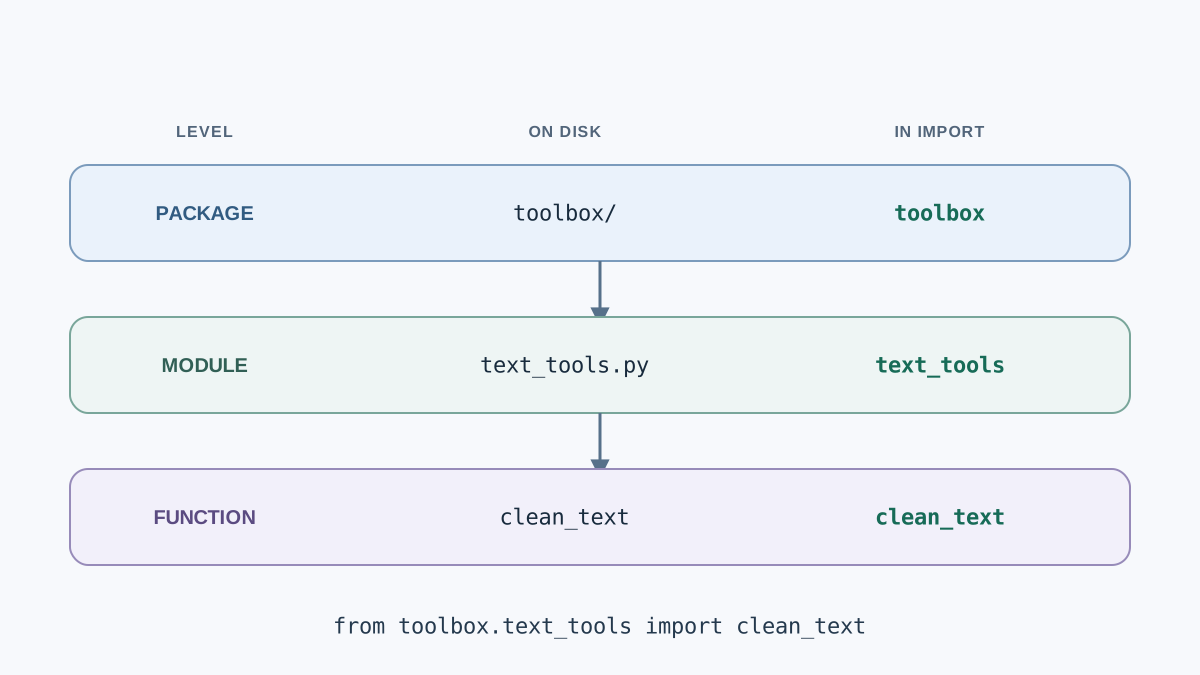
Here's the entire structure. Type it by hand — it's small enough.
my_project/
├── toolbox/
│   ├── __init__.py
│   ├── text_tools.py
│   └── number_tools.py
└── main.py
Three things matter:
toolbox/is the package folder. Its name becomes your import name.__init__.pymarks the folder as a regular package. It runs the first time the package is imported, and it can be completely empty.text_tools.pyandnumber_tools.pyare ordinary modules living inside the package.
Note: Python 3 also supports namespace packages — folders without
__init__.pythat still import. They exist for large, split-up distributions. For a beginner project, the explicit__init__.pyis the predictable choice, so use it.
Knowledge check
Check your understanding
Answer this question before you continue.
Build It: A Tiny Package With Two Modules
Create the folder, then the empty __init__.py. On macOS or Linux:
mkdir -p my_project/toolbox
touch my_project/toolbox/__init__.py
On Windows, create the folders in File Explorer and add an empty file named __init__.py.
Now add the first module.
# my_project/toolbox/text_tools.py

def clean_text(text):
    return text.strip().lower()
And a second one, so you can see a package holding more than one file.
# my_project/toolbox/number_tools.py

def double(number):
    return number * 2
From the project root, confirm the package is found:
cd my_project
python -c "from toolbox.text_tools import clean_text; print(clean_text('  Hello  '))"
hello
Notice the import name: toolbox, the folder name, not text_tools. The module name comes after the dot. Mixing those up is the most common first mistake.
Knowledge check
Check your understanding
Answer this question before you continue.
Importing From Inside the Package
There are two ways to import between modules in the same package, and they behave differently.
Absolute import — the full path from the package name down:
from toolbox.text_tools import clean_text
Relative import — a dot meaning "this package":
from .text_tools import clean_text
| Style | Where it works | When it breaks | Beginner recommendation |
|---|---|---|---|
| Absolute | Anywhere the package is importable | Almost never | Use this by default |
| Relative | Only inside a package | Running the file directly as a script | Use only in deep packages |
The failure mode is worth seeing once. If text_tools.py contains from .number_tools import double and you run it directly:
python toolbox/text_tools.py
ImportError: attempted relative import with no known parent package
That error is Python telling you the truth: a relative import needs a parent package, and running a file directly makes it a standalone script with no parent. The fix is not to patch the import. The fix is to run the file as part of the package, or to use an absolute import.
My rule: use absolute imports in a small project. Reach for relative imports only when the package is deep enough that the full path becomes noise.
Knowledge check
Check your understanding
Answer this question before you continue.
Write a Consumer Script That Uses the Package
Now the payoff — a script that uses your package the way any future program will.
# my_project/main.py

from toolbox.text_tools import clean_text
from toolbox.number_tools import double

print(clean_text("  Mixed CASE  "))
print(double(21))
Run it from the project root:
python main.py
mixed case
42
main.py lives outside toolbox/ on purpose. It's a consumer — it uses the package, it isn't part of the reusable unit. Keeping that boundary clean is what lets you copy toolbox/ into another project later without dragging your script along.
The run command matters too. When you launch python main.py from the project root, Python adds the folder containing main.py — the project root — to the front of sys.path. That's why toolbox/ is found. If you instead run python my_project/main.py from a parent folder, Python adds that parent folder to the search path, not my_project/, and the import fails. The rule is simple: the folder you launch from is the folder Python searches first.
Common Mistakes and How to Read the Error
Errors here are evidence, not verdicts. Each one tells you what Python actually searched.
ModuleNotFoundError: No module named 'toolbox' — usually the wrong working directory, or a folder name that doesn't match the import. Check where you ran the command and check the folder spelling.
ImportError: attempted relative import with no known parent package — you ran a module file directly instead of importing it. Run the consumer script instead.
A module named after a standard library module. If you create random.py inside your package, it can shadow the real random and produce baffling failures. Avoid names like random, json, string, or types for your own files.
Expecting __init__.py to do work it doesn't do. An empty file is fine. It marks the folder; it doesn't register functions for you.
Common mistake: Renaming the package folder and forgetting to update every import. The folder name is the import name, so a rename is a breaking change.
When a Package Is Worth It — and When It Is Not
A package earns its place when two or more files share code, or when the same helper gets imported from several places. That's the trigger.
For a single script under roughly a hundred lines, a package adds folders without adding clarity. Keep it as one file. Structure is a tool for reuse, not a badge of seriousness.
And don't jump ahead. You do not need pyproject.toml, editable installs, or publishing yet. Those solve distribution problems — getting your code into other people's environments. You don't have that problem. You have a folder that needs a name.
Where this leads in practice: the same structure later holds automation helpers, file and data-cleanup utilities, or report generators. The pattern doesn't change as the project grows. Only the number of modules does.
One-line rule: group code when you're importing it twice, not when you're proud of it.
Practice: Extend the Package Yourself
Add a third module to toolbox/ with one function, then import it from main.py.
- Create
toolbox/date_tools.pywith a function that returns today's date as a string. - Add an import line to
main.pyfollowing the same pattern: folder name, module name, function name. - Print the result alongside the existing output.
If the import fails, read the error before changing anything else. Nine times out of ten it's a typo in the folder name or a command run from the wrong directory.
Want more? Move one helper out of main.py and into the package, then re-run. If nothing breaks, you've just done the exact refactor that packages exist to make safe.
Once this feels routine, try running main.py from a different working directory and watch the import fail. That failure is the clearest lesson in the whole article: a package gives your code a name, but you still have to stand in the right place for Python to hear it.
Knowledge check
Final check
Finish the article by checking the ideas you just learned.
References
Want a more structured Python path?
Use the Python Starter Pack to turn scattered tutorials into a focused practice path.
Python for Artificial Intelligence Starter Pack
Build a Python foundation you can actually use. The Python for AI Starter Pack brings together a guided path through setup, core programming concepts, data structures, files, JSON, APIs, debugging, and practical projects—so you can move quickly from running your first program to understanding and building useful software.
- 264-page illustrated PDF
- 12 guided Python chapters
- Visual concept diagrams
- Self-assessment quizzes
- Bonus deep-dive sections
- Files, JSON, APIs, debugging & projects
- Foundation for data, automation & AI
Coming soon


