
Practice Exercises: Modules and Imports
Reading about imports is easy. Running them until they work from memory is where the skill actually forms. You can follow a tutorial on Python modules and…

Key topics
Reading about imports is easy. Running them until they work from memory is where the skill actually forms. You can follow a tutorial on Python modules and understand every line, but the knowledge only sticks when you write the code yourself, hit a wrong-name error, and fix it with your own eyes.
That is what these exercises are for: deliberate drills that turn module syntax into reflex.
How to Use These Exercises
Each exercise follows the same structure: a clear goal, starter code with something missing, expected behavior, a hint if you get stuck, a full solution, and a short explanation of why it works.
Before you start, two ground rules.
Attempt each exercise before peeking at the solution. The gap between "I could follow that" and "I can write that" is wider than most beginners expect. The only way across it is typing code yourself. If you get stuck, read the hint, try again, and only then look at the solution.
Run the code and read the errors. Python's error messages are not punishments. They are diagnostics telling you exactly what the interpreter expected and what it found instead. When you see a NameError or a ModuleNotFoundError, read it carefully. That message is teaching you something about how imports actually work.
These exercises assume you already know the basics of importing modules. If you need a refresher, review the importing modules tutorial first, then come back here.
Exercise 1: Import and Use a Standard Module
Goal: Import the math module and use math.sqrt() to calculate a square root.
Starter code:
# Import the math module, then use math.sqrt() on the number below
number = 144
Expected behavior: The program prints the square root of 144.
Hint: Remember the pattern: module name, then a dot, then the function name.
Solution:
import math

number = 144
print(math.sqrt(number))
Expected output:
12.0
Explanation: When you write import math, Python loads the module and makes its functions available under the math name. That is why you call math.sqrt() and not just sqrt() — the module name comes first so Python knows where to look for the function. This is the basic import-and-use loop you will repeat constantly.
Optional extension: Try another function from the math module, like math.floor(3.7) or math.ceil(3.2). What do you expect each one to return?
Knowledge check
Check your understanding
Answer this question before you continue.
Exercise 2: Import a Specific Name
Goal: Use from math import pi to calculate and print the area of a circle.
Starter code:
# Import pi from the math module, then compute the area
radius = 5
# area = pi * radius ** 2
Expected behavior: The program prints the area of a circle with radius 5.
Hint: After a from import, you call the name directly — no math. prefix needed.
Solution:
from math import pi

radius = 5
area = pi * radius ** 2
print(area)
Expected output:
78.53981633974483
Explanation: The from math import pi form pulls pi directly into your current namespace. You can use pi like any other variable, without typing math.pi every time. The tradeoff? With import math, you always know where a name came from. With from math import pi, the name floats freely, which is convenient but slightly less explicit. For small scripts, either style works. My rule: use import math when you need several functions from the module, and from math import pi when you only need one or two names.
Optional extension: Import two names in one statement, like from math import pi, sqrt, and use both in the same program.
Knowledge check
Check your understanding
Answer this question before you continue.
Exercise 3: Random Numbers with the random Module
Goal: Use the random module to pick a random item from a list.
Starter code:
# Import the random module and pick one random choice from the list
choices = ["rock", "paper", "scissors"]
Expected behavior: Each time you run the program, it prints one random element from the list.
Hint: The random module has a function called choice() that takes a sequence and returns one random element.
Solution:
import random

choices = ["rock", "paper", "scissors"]
print(random.choice(choices))
Expected output (will vary each run):
scissors
Explanation: This is where imports start feeling powerful. The random module gives your program a capability it could not have on its own: genuine unpredictability. random.choice() takes any sequence — a list, a tuple, a string — and returns one element at random. Run the program a few times and watch the output change.
Optional extension: Use random.randint(1, 6) to simulate rolling a six-sided die. Print the result.
Knowledge check
Check your understanding
Answer this question before you continue.
Exercise 4: Fix the Import Mistake
Goal: Find and fix the error in this code.
Starter code:
# This code has an error. Find it and fix it.
print(math.floor(4.7))
Expected behavior: The corrected code runs and prints the number 4.
Hint: Run the code and read the error message. What does it say is undefined?
Solution:
import math

print(math.floor(4.7))
Expected output:
4
Explanation: The original code raises a NameError because math was never imported. Python sees the name math and has no idea what it refers to. This is one of the most common beginner import mistakes: using a module's functions without importing the module first. The fix is always the same — add the missing import at the top of your file.
Optional extension: Try misspelling the module name, like import mth, and run the code. Read the ModuleNotFoundError message. Notice how it tells you exactly which module Python could not find.
Knowledge check
Check your understanding
Answer this question before you continue.
Exercise 5: Combine Two Modules
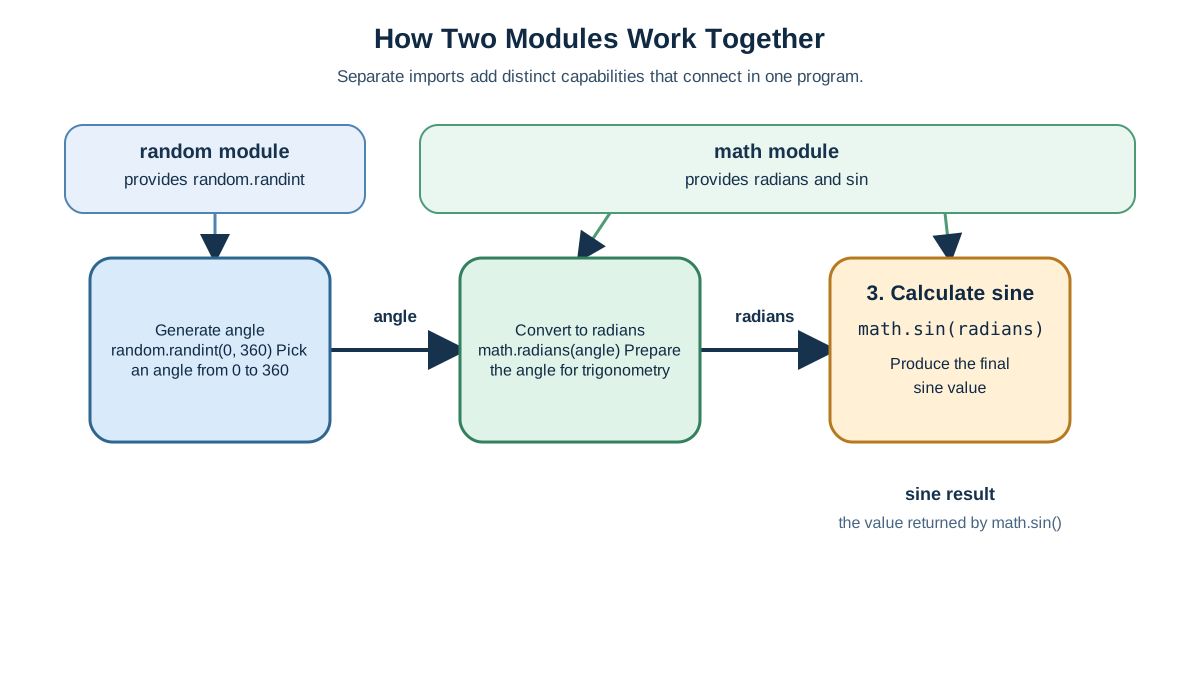
Goal: Use both math and random together in one small program.
Starter code:
# Generate a random angle, then print its sine
# You will need both the math and random modules
Expected behavior: The program generates a random angle between 0 and 360 degrees, converts it to radians, and prints the sine of that angle.
Hint: One module gives you the random value. The other gives you the sine function. Remember that math.sin() expects radians, not degrees — check if math has a conversion function.
Solution:
import math
import random

angle = random.randint(0, 360)
radians = math.radians(angle)
print(math.sin(radians))
Expected output (will vary each run):
0.766044443118978
Explanation: Real programs rarely use just one module. They stack several imports at the top of the file, each one adding a different capability. Here, random supplies the unpredictable angle and math supplies the trigonometric functions. Notice how both imports sit at the top of the file — that is the conventional place for them, even though Python technically allows imports anywhere.
Optional extension: Round the result to two decimal places using the built-in round() function, like print(round(math.sin(radians), 2)).
What to Practice Next
Each exercise drilled one specific skill: the basic import-and-use loop, the from import form, applying a module to a practical task, fixing a missing import, and combining multiple modules in one script. Run through them again tomorrow and see how much faster they go.
The natural next step is writing your own module. Create a small .py file with a function you wrote yourself, then import it into another script. That shift — from consuming built-in modules to building your own — is where the import system turns from a convenience into a tool for organizing real projects.
Consistent small drills build the reflex faster than re-reading theory. Run the code, break it, fix it, and move on. That loop is the whole game.
Knowledge check
Final check
Finish the article by checking the ideas you just learned.
References
Want a more structured Python path?
Use the Python Starter Pack to turn scattered tutorials into a focused practice path.
Python for Artificial Intelligence Starter Pack
Build a Python foundation you can actually use. The Python for AI Starter Pack brings together a guided path through setup, core programming concepts, data structures, files, JSON, APIs, debugging, and practical projects—so you can move quickly from running your first program to understanding and building useful software.
- 264-page illustrated PDF
- 12 guided Python chapters
- Visual concept diagrams
- Self-assessment quizzes
- Bonus deep-dive sections
- Files, JSON, APIs, debugging & projects
- Foundation for data, automation & AI
Coming soon


