
How to Organize a Small Python Project
Every Python project starts as a single script that does one job. Then it grows. You add a feature, then another, then a helper function that needs its own…

Every Python project starts as a single script that does one job. Then it grows. You add a feature, then another, then a helper function that needs its own helper function. One day you open the file and realize that finding anything means scrolling past two hundred lines of code you wrote last month and barely remember.
The fix is not ceremony. It is judgment. The goal of organizing a small Python project is not to make your code look professional on paper. It is to make the next change obvious.
When One File Stops Being Enough
You do not need to organize your project because structure is fashionable. You need it when a single file starts costing you time. Here are the signs:
- You scroll to find a function instead of knowing where it lives.
- Editing one feature feels risky because it might break something unrelated nearby.
- Imports and logic are tangled together, so you cannot tell what the program does without reading the whole thing.
When those symptoms appear, the file has outgrown itself. The real test of good organization is simple: can you find your code, change it, and run it without friction? If yes, your structure is fine. If no, it is time to split things up.
This article assumes you already know how to write and import a module. The question here is not how imports work. It is where your files should live and why.
Start With a Main Entry Point
The first move is to create a main.py file that acts as a table of contents for your project. It should not hold all the logic. It should import functions from other modules and call them in order.
Think of main.py as the front door. Someone should be able to open it and see what the program does without reading every room inside. The filename is a convention, not a rule, but it is a useful one: when you return to a project after a break, you know exactly which file to open first.
Here is a tiny example. Suppose you have a module called greetings.py:
def welcome(name):
    return f"Welcome, {name}!"
Your main.py imports and calls that function:
from greetings import welcome

print(welcome("Alex"))
Run it from the project root:
python main.py
Expected output:
Welcome, Alex!
That is the whole pattern. main.py imports, calls, and stays thin. If you find main.py doing real work beyond calling functions, that work probably belongs in a module.
Knowledge check
Check your understanding
Answer this question before you continue.
Group Code Into Modules by Responsibility
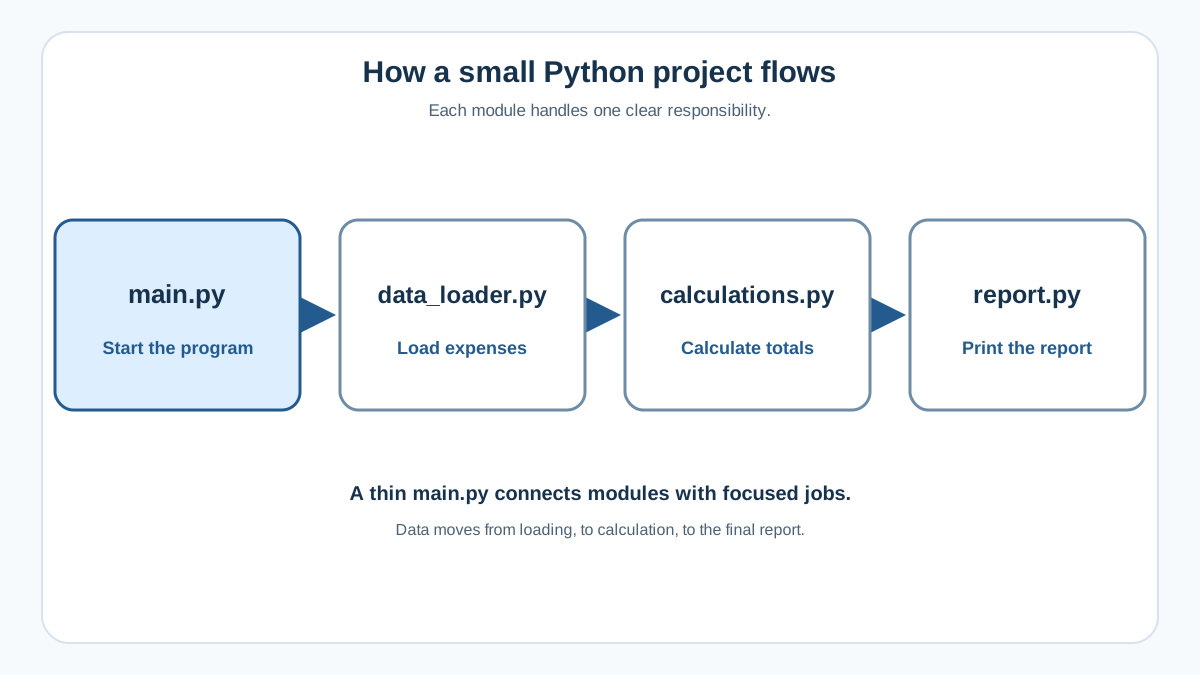
Once you have a main entry point, the next question is how to split the rest of your code. The rule is simple: group by what the code does, not by file size.
A good beginner instinct is to ask, "What job does this function do?" Then put functions with the same kind of job in the same module.
Let us walk through a concrete example. Imagine you have a script that reads expense data from a file, calculates totals by category, and prints a report. The single-file version works, but it mixes three different jobs in one place.
Here is what the tangled version looks like:
import csv

def load_expenses(filename):
    with open(filename) as f:
        return list(csv.DictReader(f))

def total_by_category(expenses):
    totals = {}
    for row in expenses:
        category = row["category"]
        totals[category] = totals.get(category, 0) + float(row["amount"])
    return totals

def print_report(totals):
    for category, total in totals.items():
        print(f"{category}: ${total:.2f}")

expenses = load_expenses("expenses.csv")
totals = total_by_category(expenses)
print_report(totals)
That is only about twenty lines, but already three distinct jobs are competing for your attention. When you need to change how totals are calculated, you have to scan past file reading and report formatting to find the right function.
Now split it into three modules, each with one responsibility:
# data_loader.py
import csv

def load_expenses(filename):
    with open(filename) as f:
        return list(csv.DictReader(f))
# calculations.py
def total_by_category(expenses):
    totals = {}
    for row in expenses:
        category = row["category"]
        totals[category] = totals.get(category, 0) + float(row["amount"])
    return totals
# report.py
def print_report(totals):
    for category, total in totals.items():
        print(f"{category}: ${total:.2f}")
Your main.py then connects them:
from data_loader import load_expenses
from calculations import total_by_category
from report import print_report

expenses = load_expenses("expenses.csv")
totals = total_by_category(expenses)
print_report(totals)
Each module has one clear responsibility. When you need to change how totals are calculated, you open calculations.py. When the report format changes, you open report.py. You never hunt through a wall of code hoping the right function is nearby.
Common mistake: the grab-bag utils.py
A module named utils.py that collects unrelated functions is a warning sign. If you find yourself putting a string formatter, a date parser, and a file helper in the same file because none of them deserve their own module, you have not found the real grouping yet. The functions are probably related by something you have not named. Find that something and name the module after it.
Knowledge check
Check your understanding
Answer this question before you continue.
Run Everything From the Project Root
The reliable pattern for a small project is simple: keep all your Python files in one folder and run main.py from that folder.
If your project folder is called expense_report, you cd into it and run:
python main.py
Why does this matter? When main.py runs, Python needs to find the modules it imports. If you run from the project root, the modules sitting right next to main.py are easy to find. If you run from somewhere else, Python may not know where to look.
The common beginner failure happens when you run Python from inside a subfolder:
cd data
python ../main.py
That often produces a ModuleNotFoundError because Python cannot find the modules that main.py imports. The fix is not clever import tricks. It is running from the root.
Common mistake: If you see
ModuleNotFoundError, check your current directory first. Runpwd(orcdon Windows) to see where you are. Compare it with your project tree. Thencdback to the project root and run the documented command again. Nine times out of ten, that is the whole fix.
The __name__ guard
There is one more detail that keeps imports predictable. When you import a module, Python executes its code. That means a module with top-level print statements will print when imported, not just when run directly.
The if __name__ == "__main__": guard prevents that. Code inside the guard runs only when the file is executed directly, not when it is imported:
def calculate_total(amounts):
    return sum(amounts)

if __name__ == "__main__":
    print(calculate_total([10, 20, 30]))
Import calculate_total from another module and the print statement stays silent. Run the file directly and it prints. This keeps your modules safe to import from anywhere.
Knowledge check
Check your understanding
Answer this question before you continue.
A Simple Folder Layout You Can Copy
For a small project, you do not need packaging tools, configuration files, or nested source folders. A flat layout is enough:
expense_report/
├── main.py
├── data_loader.py
├── calculations.py
├── report.py
└── README.md
That is the whole structure. Each file has one job:
main.pyis the entry point and table of contents.- The other Python files are modules grouped by responsibility.
README.mdreminds you what the project does and how to run it.
You can add folders when they earn their place. A data/ folder makes sense when you have several data files. A tests/ folder makes sense when you start writing automated tests. A .gitignore file makes sense when you start using Git.
What you do not need yet is a src/ folder, a pyproject.toml, or any packaging configuration. Those tools solve real problems, but they solve problems you do not have in a small project. Adding them early is friction without clarity.
Common Mistakes Beginners Make
Circular imports
Two modules importing each other creates a loop that Python cannot resolve cleanly. If data_loader.py imports from calculations.py and calculations.py imports from data_loader.py, you have a circular import.
Grouping by responsibility usually prevents this. When each module has one clear job, the dependency flow is one direction: main.py imports from modules, and modules import from each other only when one genuinely builds on the other. That one-way flow is fine. The problem starts when the flow loops back on itself.
Putting everything in main.py anyway
Splitting code feels like extra work, especially when the script still runs fine as one file. But the cost of splitting is small, and the payoff appears the first time you need to change one behavior without reading the whole program.
Over-structuring too early
Creating packages, src/ folders, and config files for a 200-line script is premature. Structure should remove friction, not add ceremony. If the layout takes more time to maintain than the code it holds, it is working against you.
When More Structure Is Premature
The flat layout above is not the final word on Python project organization. It is the right starting point for a single-purpose script that only you run. More structure pays for itself when your situation changes.
You are ready for more structure when:
- Other people need to run or contribute to your project.
- You want to install your project into your environment.
- You start writing automated tests that need to import your code reliably.
- You reuse the same code across multiple projects.
You are not ready when:
- The script is small enough that you can hold its structure in your head.
- Only you run it.
- It does one job.
- You have not felt the pain of a missing feature yet.
Notice what is missing from that second list: hard line counts. A 300-line script that only you run may be perfectly fine flat. A 100-line script that three people need to install and test may already need more structure. The size of the code matters less than the friction you actually feel.
The decision rule is simple: add structure when it removes friction, not when it adds ceremony. A src/ layout and packaging configuration are valuable tools. They are valuable at the moment they make your life easier, not before.
Your Next Step
Take one existing script that has grown beyond comfortable size. Split it into a main.py entry point plus two or three modules grouped by responsibility. Run it from the project root. Notice how much faster you can find the function you need to change.
That exercise is the whole skill. Project organization is not a set of rules to memorize. It is a judgment you practice: keep things simple until the next change becomes hard, then restructure just enough to make it easy again.
When your project genuinely grows past this point, the natural next direction is learning about packaging and testing. But do not reach for those tools yet. Let the friction arrive first. Then you will know exactly why you need them.
Knowledge check
Final check
Finish the article by checking the ideas you just learned.
References
Want a more structured Python path?
Use the Python Starter Pack to turn scattered tutorials into a focused practice path.
Python for Artificial Intelligence Starter Pack
Build a Python foundation you can actually use. The Python for AI Starter Pack brings together a guided path through setup, core programming concepts, data structures, files, JSON, APIs, debugging, and practical projects—so you can move quickly from running your first program to understanding and building useful software.
- 264-page illustrated PDF
- 12 guided Python chapters
- Visual concept diagrams
- Self-assessment quizzes
- Bonus deep-dive sections
- Files, JSON, APIs, debugging & projects
- Foundation for data, automation & AI
Coming soon


