
Working with JSON in Python
JSON is the closest thing programming has to a shared language. When one program needs to send data to another—across the internet, between a server and an…

JSON is the closest thing programming has to a shared language. When one program needs to send data to another—across the internet, between a server and an app, or from your script into a saved file—JSON is usually the format they use. The good news: Python's built-in json module handles the translation for you. You just need to know which function to call.
Here's the core idea: JSON and Python dictionaries look almost identical, but they are not the same thing. JSON is text. Python dictionaries are live objects in memory. The json module is the translator between them.
What JSON Is and Why Python Uses It
JSON stands for JavaScript Object Notation, but you don't need to know JavaScript to use it. Think of JSON as a text format for storing and exchanging structured data. It is language-neutral, which is exactly why it became the standard way for programs to talk to each other.
If you already know Python dictionaries, you are most of the way there. A JSON object looks very similar:
{
  "name": "Ada",
  "age": 36,
  "languages": ["Python", "JavaScript"],
  "employed": true,
  "manager": null
}
Notice the differences from a Python dictionary. JSON requires double quotes around keys and string values. And the boolean values are lowercase true and false, while Python uses True and False. The null value in JSON becomes None in Python.
Here is the type mapping you will use most often:
| Python | JSON |
|---|---|
dict | object |
list | array |
str | string |
int, float | number |
True | true |
False | false |
None | null |
In practice, you will meet JSON the moment you work with an API, a configuration file, or saved application data. And because JSON is usually stored in files, this tutorial builds on basic file handling in Python. If you have not worked with open() and file reading yet, it is worth a quick review first.
Knowledge check
Check your understanding
Answer this question before you continue.
The Four Functions at a Glance
Before diving into examples, here is the map you will use every time you touch JSON in Python. The json module has four core functions, and they split into two pairs:
| Function | Input | Output | s means |
|---|---|---|---|
json.dumps() | Python object | JSON string | string |
json.loads() | JSON string | Python object | string |
json.dump() | Python object + open file | writes JSON to file | no string |
json.load() | open file | Python object | no string |
Keep this table handy. Every example below is just one row of this map in action.
Turning a Python Dictionary into JSON
Start with the simplest direction: converting Python data into a JSON string. The function you need is json.dumps(), where the s stands for string.
import json

person = {
    "name": "Ada",
    "age": 36,
    "languages": ["Python", "JavaScript"]
}

json_string = json.dumps(person)
print(json_string)
Output:
{"name": "Ada", "age": 36, "languages": ["Python", "JavaScript"]}
That output is valid JSON, but it is not pleasant to read. Everything is crammed onto one line. When you want the output to be human-readable, pass the indent parameter:
json_string = json.dumps(person, indent=2)
print(json_string)
Output:
{
  "name": "Ada",
  "age": 36,
  "languages": [
    "Python",
    "JavaScript"
  ]
}
The indent parameter tells Python how many spaces to use for each level of nesting. I use indent=2 or indent=4 whenever I want to inspect the data myself.
Knowledge check
Check your understanding
Answer this question before you continue.
Turning JSON Back into Python Data
Now reverse the direction. You have a JSON string and you want a Python dictionary you can work with. The function is json.loads()—again, the s stands for string.
import json

json_string = '{"name": "Ada", "age": 36, "languages": ["Python", "JavaScript"]}'

person = json.loads(json_string)
print(person)
print(person["name"])
print(person["languages"])
Output:
{'name': 'Ada', 'age': 36, 'languages': ['Python', 'JavaScript']}
Ada
['Python', 'JavaScript']
Once the JSON string is parsed, you get a normal Python dictionary. You can access values with square brackets and keys, just as you would with any dictionary you created yourself.
Remember the type conversions: JSON true becomes Python True, JSON false becomes False, and JSON null becomes None.
Knowledge check
Check your understanding
Answer this question before you continue.
Reading JSON from a File
JSON data rarely lives in a string inside your code. More often, it sits in a file. To read JSON from a file, use json.load()—no s this time, because you are loading from a file, not from a string.
Suppose you have a file called person.json with this content:
{
  "name": "Ada",
  "age": 36,
  "languages": ["Python", "JavaScript"]
}
Here is how you read it:
import json

with open("person.json", "r") as file:
    person = json.load(file)

print(person)
print(person["name"])
Output:
{'name': 'Ada', 'age': 36, 'languages': ['Python', 'JavaScript']}
Ada
The pattern is the same as reading any text file: open the file, read the content, close it. The with statement handles the closing for you. The only new piece is that json.load() parses the file content into a Python dictionary automatically.
Knowledge check
Check your understanding
Answer this question before you continue.
Writing JSON to a File
The reverse operation—saving Python data as a JSON file—uses json.dump(), again without the s.
Create a script called save_person.py with this content:
import json

person = {
    "name": "Ada",
    "age": 36,
    "languages": ["Python", "JavaScript"]
}

with open("person.json", "w") as file:
    json.dump(person, file, indent=2)
Run it from your terminal:
python save_person.py
Then open person.json in any text editor. You will see the same readable JSON structure from earlier.
If you want proof that the file was written correctly, read it back with json.load():
import json

with open("person.json", "r") as file:
    person = json.load(file)

print(person["name"])
print(person["languages"])
Output:
Ada
['Python', 'JavaScript']
Writing and reading back is a good habit. It confirms that your data survived the round trip intact.
Common Beginner Mistakes with JSON
Everyone hits these when they start. Here is what to watch for.
Confusing the s versions with the file versions. This is the most common mix-up. The rule is simple: json.dumps() and json.loads() work with strings. json.dump() and json.load() work with files. The s stands for string.
Forgetting to import json. The module is built into Python, but you still need to import it before using any of its functions.
Expecting pretty output by default. Without indent, json.dumps() produces one long line. That is valid JSON, but hard to read. Pass indent=2 or indent=4 when you want readable output.
Using single quotes in JSON text. This one trips up almost every beginner. Python accepts single quotes, but JSON does not. If you write JSON by hand as a string, you must use double quotes:
import json

# This will fail
data = "{'name': 'Ada'}"

person = json.loads(data)
Output:
json.decoder.JSONDecodeError: Expecting property name enclosed in double quotes: line 1 column 2 (char 1)
The fix is to use double quotes inside the JSON string:
data = '{"name": "Ada"}'
person = json.loads(data)
print(person)
Output:
{'name': 'Ada'}
When you see a JSONDecodeError, read the message carefully. It usually tells you exactly where the problem is.
Practice: Save, Modify, and Reload Your Own Data
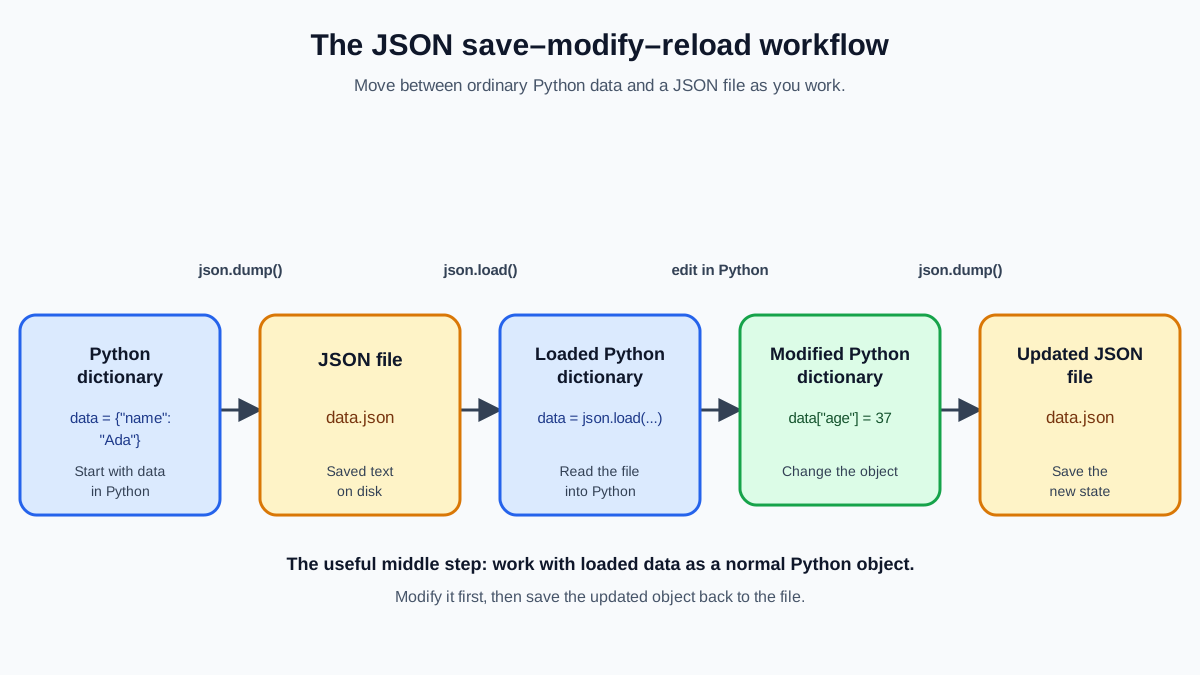
Now combine everything into one small workflow. Build a dictionary that describes something you care about—a favorite book, a game character, or a simple user profile. Write it to a JSON file, read it back, make one change, and save the updated version.
import json

profile = {
    "username": "python_builder",
    "level": 3,
    "skills": ["Python", "JSON", "File I/O"]
}

with open("profile.json", "w") as file:
    json.dump(profile, file, indent=2)

with open("profile.json", "r") as file:
    loaded_profile = json.load(file)

# Now work with the Python object
loaded_profile["level"] = 4
loaded_profile["skills"].append("Debugging")

print(loaded_profile["username"])
print(loaded_profile["level"])
print(loaded_profile["skills"])

# Save the updated data back
with open("profile.json", "w") as file:
    json.dump(loaded_profile, file, indent=2)
Output:
python_builder
4
['Python', 'JSON', 'File I/O', 'Debugging']
Notice what happened here. After json.load() turned the file content into a Python dictionary, you could update values and append to lists just like any other dictionary. Then json.dump() wrote the changed data back to the file. That middle step—working with the data as a live Python object—is the whole reason parsing JSON is useful.
Once that works, try extending it. Add a list of achievements to your dictionary, or store several profiles in one dictionary keyed by username. Then read the file back and confirm you can access the nested data.
The mental model to keep: the json module is a translator. The s versions translate between Python objects and JSON strings. The plain versions translate between Python objects and JSON files. Get that distinction solid, and you can handle JSON anywhere it appears.
A good next step is learning to work with CSV files, another common data format you will meet in real projects. Or take what you have built here and turn it into a small data project that saves and reloads user information.
Knowledge check
Final check
Finish the article by checking the ideas you just learned.
References
Want a more structured Python path?
Use the Python Starter Pack to turn scattered tutorials into a focused practice path.
Python for Artificial Intelligence Starter Pack
Build a Python foundation you can actually use. The Python for AI Starter Pack brings together a guided path through setup, core programming concepts, data structures, files, JSON, APIs, debugging, and practical projects—so you can move quickly from running your first program to understanding and building useful software.
- 264-page illustrated PDF
- 12 guided Python chapters
- Visual concept diagrams
- Self-assessment quizzes
- Bonus deep-dive sections
- Files, JSON, APIs, debugging & projects
- Foundation for data, automation & AI
Coming soon


