
Build a Simple Data Project in Python
The fastest way to make Python feel real is to build something small that collects data, organizes it, saves it to a file, and reads it back. In this…

Key topics
The fastest way to make Python feel real is to build something small that collects data, organizes it, saves it to a file, and reads it back. In this beginner python data project, you'll build a mini contact collector that asks for names and favorite colors, stores each entry, writes everything to a CSV file, then loads that file and answers a question about the data. No third-party libraries needed—just the standard library that ships with Python.
The Data Cycle You're About to Build
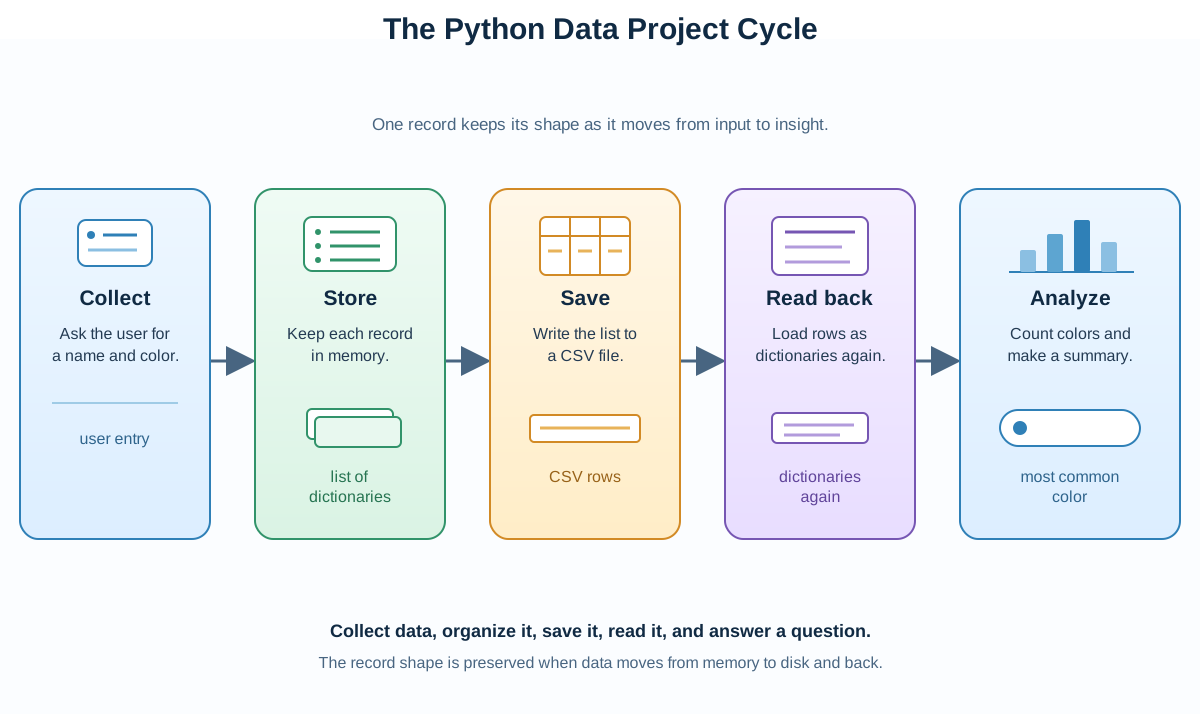
Here's the whole project in one sentence: ask users for their name and favorite color, store each person as a dictionary, keep every dictionary in a list, write the list to a CSV file, then read that file back and count how many people share each color.
The workflow has five steps:
- Collect a name and a favorite color from the user.
- Store each person's data as a dictionary with keys like
"name"and"color". - Append each dictionary to a list so you keep every entry.
- Save the list to a file so the data survives after the program stops.
- Read the file back and compute a small summary from it.
This is the same shape as a contact book, a survey collector, or a simple inventory tracker. Reading about lists and dictionaries is useful, but the concepts only click when you put them to work on a real task. A Python mini project turns abstract ideas into something you can run, break, fix, and reuse.
What You Need to Know First
This project assumes you've met three ideas. If any feel fuzzy, skim the linked guides first—they're short and you can come back.
- Lists in Python: ordered collections of items you can add to and loop over.
- Dictionaries in Python: store data as labeled key-value pairs.
- Basic file I/O in Python: how to open, read, and write files.
You don't need pandas, NumPy, or any other third-party library for this build. The standard library handles the whole job, which keeps the project small and runnable on any machine with Python installed.
Step 1: Plan Your Data
Before writing code, decide what data you're collecting and how you'll organize it. This planning step is where beginners save themselves the most debugging time.
- What are you collecting? A name and a favorite color for each person.
- How will you store one person? As a dictionary:
{"name": "Ada", "color": "blue"}. - How will you store everyone? In a list of dictionaries, so each new person is one more entry.
The rule to remember: a dictionary labels one record, and a list holds many records. When you know that before you type anything, the code writes itself more easily.
Knowledge check
Check your understanding
Answer this question before you continue.
Step 2: Collect Data from Users
Now let's gather the data. We'll use a while loop that keeps asking for entries until the user types quit.
people = []

while True:
    name = input("Enter your name (or type 'quit' to stop): ")
    if name.lower() == 'quit':
        break
    color = input("What is your favorite color? ")
    person = {"name": name, "color": color}
    people.append(person)
Here's what each line does:
people = []starts an empty list that will hold every person.- The
while Trueloop keeps running until we tell it to stop. input()waits for the user to type something and returns it as a string.name.lower() == 'quit'checks whether the user typedquitin any capitalization, thenbreakends the loop.- Each person becomes a dictionary, and
people.append(person)adds it to the list.
Common mistake: Forgetting the
break. If you leave it out, the loop never ends and the program keeps asking for names forever. Thebreakis your exit door—don't skip it.
Knowledge check
Check your understanding
Answer this question before you continue.
Step 3: Save Data to a File
Collecting data is only half the job. If you don't save it, everything disappears when the program ends. Let's write the list to a CSV file, a plain-text format where each line is one record and commas separate the fields.
Here's the key decision: don't build CSV rows by hand with string concatenation. If a user enters a value that contains a comma—say a name like "Ada, Lovelace" or a color like "blue, green"—a manual join silently splits that one field into two columns and corrupts your file. Python's csv module handles that boundary for you, quoting and escaping values correctly. That's the difference between a demo that works on tidy input and a small tool that survives real input.
import csv

with open("people_data.csv", "w", newline="") as file:
    writer = csv.writer(file)
    writer.writerow(["name", "color"])  # Write header
    for person in people:
        writer.writerow([person["name"], person["color"]])
import csvbrings in the standard library module that knows how to write CSV safely.open("people_data.csv", "w", newline="")opens a file for writing, creating it if it doesn't exist. Thenewline=""keeps the writer from adding extra blank lines between rows.writer.writerow(["name", "color"])writes the header row.- The
forloop walks through every person and writes one row per entry.
Tip: The
withstatement closes the file automatically when the block ends. That's the safe way to handle files—you never have to remember to close them yourself.
Warning: The
"w"mode overwrites the file every time the program runs. Each run starts with an emptypeoplelist, so the CSV always contains only the entries from that single run. If you run the program twice, the second run replaces the first file rather than adding to it. That's the behavior you want for now—appending to an existing file is a later variation, not part of this build.
Where Does the File Go?
people_data.csv is created in your current working directory—the folder your terminal is sitting in when you run the script, not necessarily the folder where your editor tab lives. After you run the program, look for the file there. If you can't find it, run pwd (on macOS or Linux) or cd (on Windows) to see which folder you're in.
Knowledge check
Check your understanding
Answer this question before you continue.
Step 4: Put It Together and Run It
Now combine the pieces into one complete script. Save this as people.py in your working folder:
import csv

people = []

while True:
    name = input("Enter your name (or type 'quit' to stop): ")
    if name.lower() == 'quit':
        break
    color = input("What is your favorite color? ")
    person = {"name": name, "color": color}
    people.append(person)

with open("people_data.csv", "w", newline="") as file:
    writer = csv.writer(file)
    writer.writerow(["name", "color"])
    for person in people:
        writer.writerow([person["name"], person["color"]])

print(f"Saved {len(people)} people to people_data.csv")
Run it from the same folder:
python people.py
Then type a couple of entries and quit:
Enter your name (or type 'quit' to stop): Ada
What is your favorite color? blue
Enter your name (or type 'quit' to stop): Linus
What is your favorite color? green
Enter your name (or type 'quit' to stop): quit
Saved 2 people to people_data.csv
The final print line is your first data-derived summary: it counts what you collected and confirms the save happened. That small number is the seed of every analysis you'll build later.
Treat this script as an intermediate checkpoint. It proves the collect-and-save half of the pipeline works. In the next step you'll extend it so one run also reads the file back and answers a question—and you'll see the final version in full.
Step 5: Read the Data Back and Answer a Question
Saving is only useful if you can load the data again. So far your script collects and saves, but it never reads the file back. To close the loop, you'll extend people.py so a single run does the whole job: collect, save, read back, and analyze.
Here's the complete final version. Save it as people.py, replacing the checkpoint version from Step 4:
import csv
from collections import Counter

people = []

while True:
    name = input("Enter your name (or type 'quit' to stop): ")
    if name.lower() == 'quit':
        break
    color = input("What is your favorite color? ")
    person = {"name": name, "color": color}
    people.append(person)

with open("people_data.csv", "w", newline="") as file:
    writer = csv.writer(file)
    writer.writerow(["name", "color"])
    for person in people:
        writer.writerow([person["name"], person["color"]])

print(f"Saved {len(people)} people to people_data.csv")

with open("people_data.csv", "r") as file:
    reader = csv.DictReader(file)
    people = list(reader)

color_counts = Counter(person["color"] for person in people)
print(color_counts)
Here's what the new parts do:
from collections import Counterbrings in a standard-library counting tool.Counterbehaves like a dictionary of frequencies: each key is a color, and its value is how many people chose it.csv.DictReaderreads the header row and reconstructs each record as a dictionary, sopeoplebecomes the same list-of-dictionaries shape you built in memory.Counter(person["color"] for person in people)counts how many people share each favorite color.- The final
printturns the file into an answer.
Now run the final script:
python people.py
Enter three entries this time, and give two people the same color so the count has something to compare:
Enter your name (or type 'quit' to stop): Ada
What is your favorite color? blue
Enter your name (or type 'quit' to stop): Linus
What is your favorite color? green
Enter your name (or type 'quit' to stop): Grace
What is your favorite color? blue
Enter your name (or type 'quit' to stop): quit
Saved 3 people to people_data.csv
Counter({'blue': 2, 'green': 1})
Now the count answers a real question: blue is the most popular color in your collected data. That's the payoff of the whole pipeline. You collect, organize, save, read back, and compute—and the repeated color is what makes the result mean something instead of being a trivial tally.
Remember that each run starts fresh: the people list is empty at the top, and the "w" mode rewrites the CSV. So the counts above come only from the three entries in this run. If you run the script again with different names, the file and the counts reset to that new run.
Common mistake: If you open the CSV in a spreadsheet and a name or color shows up split across columns, that's the manual-join bug we avoided. With
csv.writer, values containing commas are quoted automatically, so the file stays intact.
The Rule That Holds It Together
Look back at what you just did and you'll spot the one rule that makes the whole project work: the shape of your data must survive the trip from memory to disk and back.
In memory, one person is a dictionary and everyone is a list of dictionaries. On disk, the CSV header names the fields and each row is one record. When you read with csv.DictReader, the header turns each row back into a dictionary, so the shape you analyze is the shape you collected. If you ever break that consistency—say, by writing rows by hand and dropping a field—the file still opens, but the data quietly stops meaning what you think it means. Keep the record shape consistent across collection, serialization, and read-back, and your small tool stays honest.
Practice Task
Build a small variation to make the project yours. Pick one of these:
- Collect more fields. Add age or favorite food to each dictionary, to the CSV header, and to the read-back. Watch how one change ripples through every stage.
- Count by color from the file. You already read the file back with
csv.DictReader. Now change the question: instead of printing the wholeCounter, print only the most common color. This forces you to touch the full collect-save-read-analyze cycle. - Ask a new question. Instead of counting colors, count how many names start with the same letter, or how many people share a favorite food if you add that field.
Start with the smallest change that forces you to touch every step: collect, store, save, read back. That's the deliberate drill—practice the bottleneck before you build something bigger.
Next Steps
You've just completed a real Python mini project: you collected input, organized it with lists and dictionaries, saved it to a file, and read it back into a form you can compute on. That's a working data pipeline, even if it's small.
The durable takeaway is the shape rule: keep the record structure consistent as data crosses from memory to disk and back, and every later tool you build on top stays reliable. To test that rule, add a field and watch how the dictionary, the CSV header, and the read-back change together. When you're ready for a different kind of build, the same collect-organize-save pattern powers a to-do list, a quiz program, or a simple inventory tracker. The mechanism transfers: understand the data flow once, and you can rebuild it anywhere.
Knowledge check
Final check
Finish the article by checking the ideas you just learned.
Want a more structured Python path?
Use the Python Starter Pack to turn scattered tutorials into a focused practice path.
Python Starter Pack
A compact LearnPyFast PDF pack covering what Python is, installation, your first program, running Python code, and Python versions.
- 5 curated chapters
- Enhanced PDF edition with bundle-only learning guidance
- Offline-friendly format for focused review
- Source article links for future online updates
Coming soon


