
How to Read Python Error Messages
You run your script. The terminal fills with red text. Your first instinct is to panic, or maybe to scroll past the noise and stare at the last few lines…

You run your script. The terminal fills with red text. Your first instinct is to panic, or maybe to scroll past the noise and stare at the last few lines with dread.
Here is the reframe that will save you hours: that red text is not a verdict. It is a clue sheet.
Python's error messages tell you exactly where the interpreter stopped, what kind of problem it found, and what it thinks went wrong. Learning to read them is a skill, and it is one of the fastest skills you will build as a programmer. In this tutorial, you will learn the structure of Python error messages, the reading order that works, and the most common error types you will meet as a beginner.
Why Error Messages Are Your Best Debugging Tool
Every programmer, at every level, sees errors constantly. I have been writing software for roughly two decades, and I still spend a meaningful part of most days reading error output. The difference between a frustrated beginner and an experienced builder is not that one avoids errors. It is that one knows how to read them.
Here is what Python is doing when it stops your program: it is telling you, in plain language, what it expected and what it found instead. The error message names the problem type, points to the file and line where the problem appeared, and often suggests what you meant to do.
The beginner instinct is to skim the message, guess at the fix, and hope. The builder habit is to read carefully, understand the clue, and make one deliberate change. You can start building that habit right now.
The core skill is simple: read the last line first, then work backward only when you need to.
Anatomy of a Python Error Message
When Python crashes, it prints something called a traceback. A traceback is the full report of where the error happened and how the program got there. It looks intimidating at first, but it has only a few readable parts.
Run this small script and watch what happens:
print("Starting...")
print(10 / 0)
print("Finished!")
Save it as divide.py and run it:
python divide.py
You will see output like this:
Starting...
Traceback (most recent call last):
  File "divide.py", line 2, in <module>
    print(10 / 0)
          ~~~^~~
ZeroDivisionError: division by zero
Let us label the parts:
- The traceback header (
Traceback (most recent call last):) tells you that Python is about to show the path of execution that led to the failure. - The file and line number (
File "divide.py", line 2) tells you where the problem lives. This is the location clue. - The code line (
print(10 / 0)) shows you the exact line of code that caused the crash. - The last line (
ZeroDivisionError: division by zero) names the exception type and gives a short description. This is the what.
The exception type is the category of problem. The description after the colon is Python's plain-English explanation of what went wrong. In this case, you tried to divide by zero, which is mathematically undefined.
Notice that the first print() ran fine. The traceback shows you exactly where execution stopped: at line 2. The line after it never ran.
Knowledge check
Check your understanding
Answer this question before you continue.
Read the Last Line First
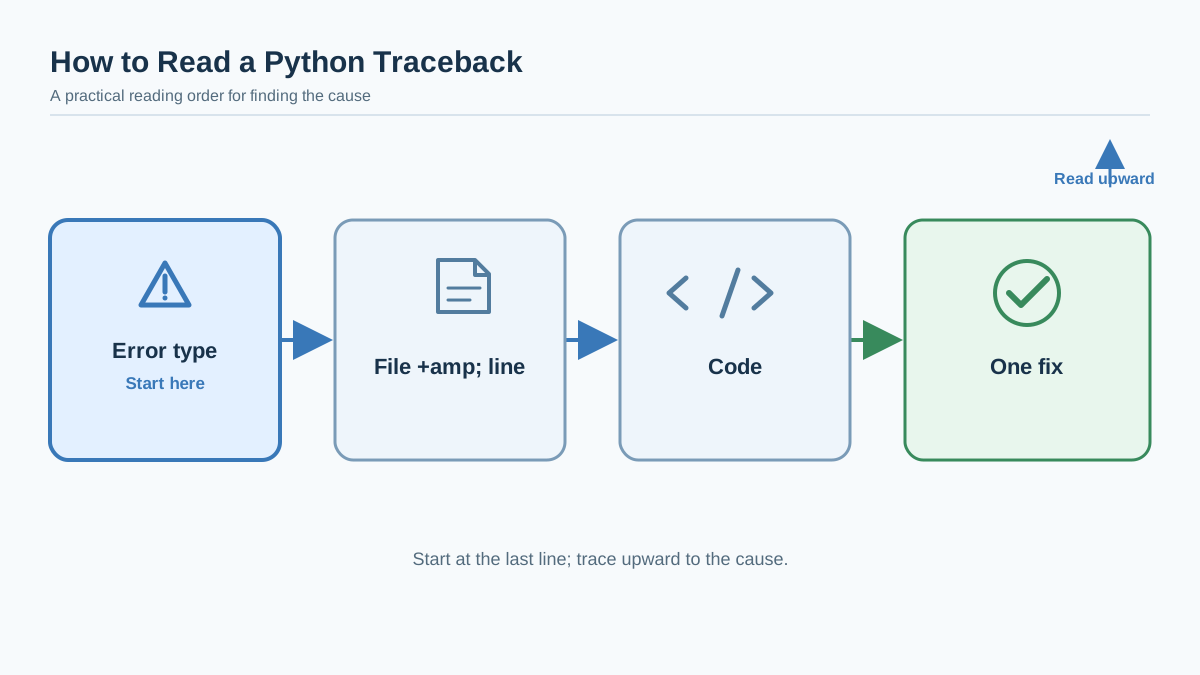
Here is the decision rule that will change how you debug:
The last line tells you what went wrong. The lines above tell you where.
Most of the time, the last line alone is enough to fix the problem. Look at this example:
message = "Hello, world"
print(mesage)
Run it, and you will see:
Traceback (most recent call last):
  File "typo.py", line 2, in <module>
    print(mesage)
          ^^^^^^
NameError: name 'mesage' is not defined. Did you mean: 'message'?
The last line says NameError: name 'mesage' is not defined. That is the whole diagnosis: you used a name that Python does not know. The traceback above confirms the location, and Python even suggests the likely typo.
The fix is obvious once you read the last line: change mesage to message.
When do you need to scroll up? When the last line tells you what but not which line of your code caused it. That happens most often when your program calls a function that fails deep inside another module. The traceback shows the chain of calls, and your job is to find the first line that mentions a file you wrote.
Knowledge check
Check your understanding
Answer this question before you continue.
Common Error Types and What They Mean
You do not need to memorize every Python exception. You need to recognize the handful that will appear constantly while you learn. Here are the ones I see beginners meet most often:
| Exception Type | Plain-English Meaning | Typical Cause |
|---|---|---|
NameError | Python does not know this name | Typo in a variable name, or using a variable before assigning it |
TypeError | An operation does not fit the data types | Adding a string and a number, or calling a function with the wrong arguments |
SyntaxError | Python cannot parse your code | Missing colon, unclosed parenthesis, bad indentation |
IndexError | You asked for an item that does not exist | Using an index that is too large for a list |
KeyError | You asked for a key that is not in a dictionary | Typo in a dictionary key, or the key was never added |
ValueError | The value is wrong for the operation | Converting "abc" to an integer with int("abc") |
A good beginner instinct is to treat the exception type as the headline and the description as the article. The type tells you which category of mistake you made. The description tells you the specific detail.
Here, the goal is to recognize the error type and know the general direction of the fix.
Knowledge check
Check your understanding
Answer this question before you continue.
A Common Mistake: Reading Top to Bottom
When a traceback is long, beginners naturally start at the top and read down. That is a mistake, and it is easy to see why once you know what the top contains.
Long tracebacks usually mean your script called a function from a library, and that library called another function, and somewhere in that chain something failed. The top of the traceback shows library internals: files inside Python itself or third-party packages. Those lines are almost never where the fix belongs.
Here is the recovery habit: jump to the last line first, then look upward for the first line that mentions a file you wrote.
Consider this traceback:
Traceback (most recent call last):
  File "C:\Python\Lib\json\decoder.py", line 353, in raw_decode
    obj, end = self.scan_once(s, idx)
  File "C:\Python\Lib\json\decoder.py", line 219, in JSONDecoder
    return _decode_const(s, idx)
  File "C:\Python\Lib\json\decoder.py", line 217, in decode_const
    raise JSONDecodeError("Expecting value", s, err.value)
json.decoder.JSONDecodeError: Expecting value: line 1 column 1 (char 0)
The top lines are inside Python's json module. You are not going to fix the json library. The last line tells you the real story: Python tried to read JSON data and found nothing valid. The fix belongs in your code, where you passed the data in the first place.
Reading top to bottom makes you feel like you are drowning in someone else's code. Reading bottom-up puts the diagnosis in your hands.
Common mistake: Treating every line of a traceback as equally important. Most of the traceback is the journey. The last line is the destination.
Practice: Decode These Error Messages
Reading about errors is passive. Decoding them is active. Try these three small examples and predict the exception type and the fix before you run them.
Example 1:
fruits = ["apple", "banana", "cherry"]
print(fruits[5])
Example 2:
age = input("Enter your age: ")
print("Next year you will be", age + 1)
Example 3:
def greet(name)
    print("Hello,", name)

greet("Ada")
Now run each one and compare your prediction with the actual output.
Example 1 output:
Traceback (most recent call last):
  File "practice1.py", line 2, in <module>
    print(fruits[5])
          ~~~~~~^^^
IndexError: list index out of range
The list has three items, with indexes 0, 1, and 2. Index 5 does not exist. The fix is to use a valid index or check the list length first.
Example 2 output:
Traceback (most recent call last):
  File "practice2.py", line 2, in <module>
    print("Next year you will be", age + 1)
          ~~~~~~~~~~~~~~~~~~~~~~~~~^~~~~~~
TypeError: can only concatenate str (not "int") to str
The input() function always returns a string. You tried to add a string and a number. The fix is to convert the input with int(age) before doing arithmetic.
Example 3 output:
  File "practice3.py", line 1
    def greet(name)
                   ^
SyntaxError: expected ':'
Python's grammar requires a colon at the end of a def statement. The fix is to add the missing colon.
If you predicted all three correctly, you have already internalized the reading order. If you missed some, that is fine: the pattern becomes automatic with practice.
Knowledge check
Check your understanding
Answer this question before you continue.
The Fastest Way to Build This Skill
Reading error messages is like learning to read a map. You can study the legend all day, but the skill clicks when you actually navigate somewhere.
Here is your next step: deliberately break a small script. Write a program that works, then introduce one bug at a time. Remove a colon. Use a misspelled variable. Ask for a list index that does not exist. Divide by zero. Run the script, read the error message from the bottom up, and fix the bug.
Do this ten times, and the structure of Python error messages will feel familiar. Do it twenty times, and you will start predicting the exception type before Python prints it.
That prediction ability is the real signal that you are learning. Errors stop being walls of red text and start being what they always were: the interpreter telling you exactly where and why it stopped.
Once you can read errors fluently, the next skill is learning how to chase down bugs that do not produce errors at all. That is where print statements and the Python debugger come in. But first, get comfortable with the clue sheet. It will be your companion for as long as you write code.
Knowledge check
Final check
Finish the article by checking the ideas you just learned.
References
Want a more structured Python path?
Use the Python Starter Pack to turn scattered tutorials into a focused practice path.
Python for Artificial Intelligence Starter Pack
Build a Python foundation you can actually use. The Python for AI Starter Pack brings together a guided path through setup, core programming concepts, data structures, files, JSON, APIs, debugging, and practical projects—so you can move quickly from running your first program to understanding and building useful software.
- 264-page illustrated PDF
- 12 guided Python chapters
- Visual concept diagrams
- Self-assessment quizzes
- Bonus deep-dive sections
- Files, JSON, APIs, debugging & projects
- Foundation for data, automation & AI
Coming soon


