
Try except in Python: Handle Errors Without Crashing
You wrote a script that asks the user for a number. You tested it with 10, and it worked perfectly. Then someone typed ten, and the whole program died with…

You wrote a script that asks the user for a number. You tested it with 10, and it worked perfectly. Then someone typed ten, and the whole program died with a wall of red text.
That crash is not bad luck. It is Python doing exactly what you told it to do. The question is whether you want the program to die—or to catch the problem, tell the user what went wrong, and keep running.
That is what try and except are for.
Why Your Script Crashes on Bad Input
Here is a small script that asks for a number and doubles it:
number = input("Enter a number: ")
result = int(number) * 2
print(f"Double that is {result}")
Run it with 5, and you get:
Enter a number: 5
Double that is 10
Now run it with five:
Enter a number: five
Traceback (most recent call last):
  File "double.py", line 2, in <module>
    result = int(number) * 2
ValueError: invalid literal for int() with base 10: 'five'
The program crashed. Why? Because int("five") has no sensible answer. Python cannot turn the word five into the number 5, so it raises an error.
That error is called an exception. An exception is Python's way of saying: "Something went wrong at this exact line, and I cannot continue until someone deals with it." If nothing deals with it, the program stops.
You already know how to read error messages from earlier work. The last line of that traceback—ValueError: invalid literal for int() with base 10: 'five'—tells you exactly what happened. The problem is that knowing what happened does not stop the crash.
try and except give you a way to catch that exception, tell the user what went wrong, and keep the program useful.
The try/except Block, Explained Simply
The idea is straightforward. You put the code that might fail inside a try block. Then you write an except block that says what to do if the failure happens.
try:
    # Code that might fail
except:
    # What to do if it fails
Here is a tiny example. Dividing by zero is another classic crash:
try:
    result = 10 / 0
    print(result)
except:
    print("You cannot divide by zero.")
Run it, and you get:
You cannot divide by zero.
Here is what happened, step by step:
- Python entered the
tryblock. - It tried to compute
10 / 0. - That raised a
ZeroDivisionError. - Python immediately stopped running the rest of the
tryblock. - It jumped to the
exceptblock and ran that code instead.
If the try block succeeds, the except block is skipped entirely. Try changing 10 / 0 to 10 / 2:
try:
    result = 10 / 2
    print(result)
except:
    print("You cannot divide by zero.")
Output:
5.0
No error, no jump to except. The program ran the try block normally and moved on.
That is the whole mechanism. try is the risky zone. except is the safety net.
Knowledge check
Check your understanding
Answer this question before you continue.
Catch the Right Error: Specific Exceptions
The example above works, but it has a problem. The except block catches everything. If your code had a typo, a missing variable, or any other bug inside the try block, the program would print "You cannot divide by zero" and keep going—even though the real problem had nothing to do with division.
That is dangerous. You want to catch the errors you expect, not hide the ones you do not.
The fix is to name the exception you expect:
try:
    number = int(input("Enter a number: "))
    print(f"You entered {number}")
except ValueError:
    print("That was not a valid number.")
Now the except block only runs when Python raises a ValueError—which is exactly what happens when int() receives text it cannot convert.
If the user types 42, the output is:
Enter a number: 42
You entered 42
If the user types hello, the output is:
Enter a number: hello
That was not a valid number.
You can also capture the exception message itself using as:
try:
    number = int(input("Enter a number: "))
    print(f"You entered {number}")
except ValueError as error:
    print(f"Problem: {error}")
Now the user sees the actual reason:
Enter a number: hello
Problem: invalid literal for int() with base 10: 'hello'
A few common built-in exceptions you will meet early on:
| Exception | When it happens |
|---|---|
ValueError | A value has the wrong type or format, like int("five") |
ZeroDivisionError | You try to divide by zero |
TypeError | You use a value with the wrong operation, like adding a string to a number |
IndexError | You access a list index that does not exist |
You do not need to memorize the full list. You just need to know that each exception has a name, and you can catch the specific one you expect.
Knowledge check
Check your understanding
Answer this question before you continue.
Handle Multiple Errors with Several except Blocks
Sometimes one piece of code can fail in more than one way. You can write multiple except blocks, and Python checks them top to bottom, running the first one that matches.
Here is a script that asks for two numbers and divides them:
try:
    first = int(input("Enter the first number: "))
    second = int(input("Enter the second number: "))
    result = first / second
    print(f"{first} divided by {second} is {result}")
except ValueError:
    print("Please enter whole numbers only.")
except ZeroDivisionError:
    print("You cannot divide by zero.")
Three different paths are possible.
If the user enters 10 and 2:
Enter the first number: 10
Enter the second number: 2
10 divided by 2 is 5.0
If the user enters ten and 2:
Enter the first number: ten
Please enter whole numbers only.
If the user enters 10 and 0:
Enter the first number: 10
Enter the second number: 0
You cannot divide by zero.
Each failure gets its own accurate message. That is the payoff of catching specific exceptions: the user learns what actually went wrong, and you learn it too.
Knowledge check
Check your understanding
Answer this question before you continue.
Catching Is Not Recovery: Make the Program Do Something Useful
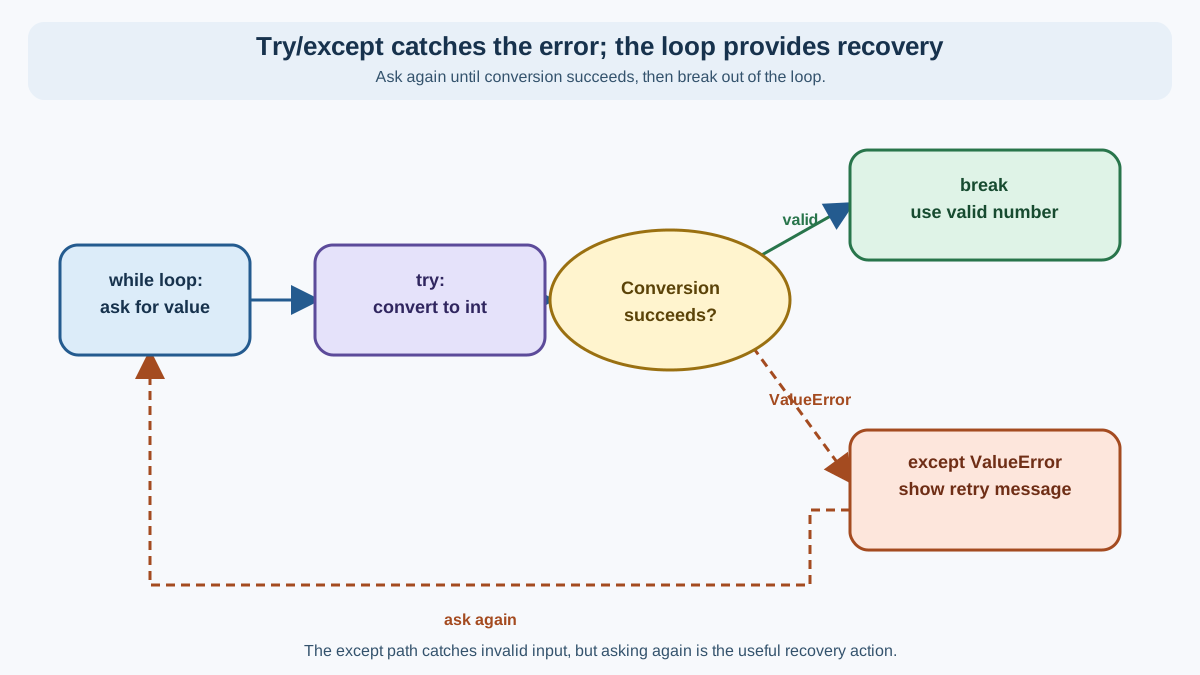
Here is a subtle point that trips up many beginners: catching an exception stops the crash, but it does not finish the job. The except block only runs because something failed. If you want the program to actually recover, you have to decide what recovery means and write it yourself.
Think about the difference. In the examples above, the program printed a friendly message and then reached the end of the script. That is graceful, but it is not really "keeping the program alive" in a useful sense—the task still did not get done.
Real recovery means giving the user another chance. Here is a compact retry loop that keeps asking until the input is valid:
while True:
    user_input = input("Enter a number: ")
    try:
        number = int(user_input)
        break
    except ValueError:
        print("That was not a number. Try again.")

print(f"Thanks! Double that is {number * 2}.")
If the user types seven first, then 7, the output looks like this:
Enter a number: seven
That was not a number. Try again.
Enter a number: 7
Thanks! Double that is 14.
Here is what changed:
- The
while Trueloop keeps the program asking until something breaks the loop. - The
tryblock attempts the conversion. - If the conversion succeeds,
breakexits the loop and the program continues. - If the conversion raises a
ValueError, theexceptblock prints a message, and the loop starts over.
The exception still did its job: it told you the conversion failed. But now your code decides what happens next. That decision—retry, use a fallback value, or stop with a clear message—is the real art of error handling. try and except only give you the moment of control. What you do with that moment is up to you.
Knowledge check
Check your understanding
Answer this question before you continue.
The Trap: Don't Hide Real Bugs
The most common beginner mistake is writing a bare except and then doing nothing:
try:
    result = first / second
except:
    pass
The pass statement does nothing. If an error happens, the program silently swallows it and moves on.
That feels safe. It is not.
Imagine you have a typo inside the try block:
try:
    result = first / seconed  # Typo: 'seconed' is not defined
except:
    pass

print("Program finished!")
The program prints Program finished!—but it never computed result. The variable result does not exist. Any code that uses it later will crash, or worse, quietly behave incorrectly.
You just hid a real bug behind a fake safety net.
My rule is simple: catch the exceptions you expect, and let the rest surface. If an unexpected exception appears, that is not a failure of your error handling. That is a gift—it is telling you about a bug you did not know you had.
When to Use try/except (and When Not To)
try and except are for failures that are expected and outside your control. Bad user input is the classic case. So are missing files, failed network connections, and other situations where the outside world does not cooperate.
Here is a quick guide:
| Use try/except when... | Do not use it when... |
|---|---|
| The user might type invalid input | You have a typo in your code |
| A file might not exist | You used a variable name that is not defined |
| A network request might fail | You can fix the problem directly in your code |
The distinction comes down to control. You cannot control what a user types, so you handle it gracefully. You can control whether your code has typos, so you fix those instead of catching them.
Practice: Make a Script That Survives Bad Input
Here is a task to lock in the lesson.
Write a script that asks the user for a number, converts it with int(), and prints a friendly message. If the user types something that is not a number, the script should print a helpful message and not crash.
Your script should behave like this:
Enter a number: 7
Thanks! You entered 7.
And when the input is invalid:
Enter a number: seven
Sorry, that is not a valid number.
Hint: The conversion int(user_input) raises a ValueError when the input is not numeric. Catch that specific exception.
Try it yourself before reading further.
Here is one working solution:
user_input = input("Enter a number: ")

try:
    number = int(user_input)
    print(f"Thanks! You entered {number}.")
except ValueError:
    print("Sorry, that is not a valid number.")
That is the pattern you will use again and again: attempt the risky operation, catch the specific failure, and give the user a clear path forward.
Your Next Step
You now know how to keep a program useful when the outside world misbehaves. That is a real skill—every program that talks to users, reads files, or touches a network needs it.
Before you move on, make the practice script stronger. Change it so that instead of stopping after one bad input, it keeps asking until the user enters a valid number. You will need a while loop and a break statement, just like the retry example above.
When you have that working, try a slightly different failure: write a script that opens a file the user names, and handle the case where the file does not exist. You will meet FileNotFoundError there. The mental model is the same: expect the failure, catch the specific exception, and decide what the program should do next.
Knowledge check
Final check
Finish the article by checking the ideas you just learned.
References
Want a more structured Python path?
Use the Python Starter Pack to turn scattered tutorials into a focused practice path.
Python for Artificial Intelligence Starter Pack
Build a Python foundation you can actually use. The Python for AI Starter Pack brings together a guided path through setup, core programming concepts, data structures, files, JSON, APIs, debugging, and practical projects—so you can move quickly from running your first program to understanding and building useful software.
- 264-page illustrated PDF
- 12 guided Python chapters
- Visual concept diagrams
- Self-assessment quizzes
- Bonus deep-dive sections
- Files, JSON, APIs, debugging & projects
- Foundation for data, automation & AI
Coming soon


