
How to Write Your First Python Tests
You have been checking your functions the honest way: run the code, look at the printed result, and decide whether it looks right. That works when you have…

You have been checking your functions the honest way: run the code, look at the printed result, and decide whether it looks right. That works when you have one function and a handful of cases you remember to try. It stops working the moment your code grows, because your memory of what to check is the weakest part of the setup.
A test is just a recorded expectation. You write down what a function should return for a given input, and Python checks it for you. Every time you run your tests, you get the same thorough check you would have done by hand—without having to remember what to look at.
If you already know how to define a function and run a Python file, you have everything you need to write your first tests. Let's build that skill now.
Why Stop Checking by Eye
Here is the habit most beginners fall into. You write a function, call it with a few values, and print the results:
def word_length(word):
    return len(word)

print(word_length("python"))
print(word_length(""))
6
0
You look at the output, confirm it matches what you expect, and move on. That feels productive, and for a tiny script, it is.
The problem is that manual checking only covers the cases you remember to run. When you change the function later—maybe to handle spaces differently or to reject empty strings—you have to remember every case you checked before and run them all again. Miss one, and a bug slips through quietly.
A test automates that memory. You write a small piece of code that states an expected result, and Python compares it against what the function actually returns. If the function breaks, the test tells you immediately, with evidence about what went wrong.
Think of tests as turning your eyeballing habit into a repeatable checklist. The computer does the checking; you do the deciding about what matters.
What unittest Gives You
Python ships with a built-in testing module called unittest. There is nothing to install—if Python is on your machine, unittest is already there.
For your first tests, you only need three pieces:
- An
import unitteststatement at the top of your test file. - A class that inherits from
unittest.TestCase. - Methods inside that class whose names start with
test_.
Each test method checks one expectation about your function. Inside those methods, you use assertion methods like assertEqual to state what should happen.
assertEqual translates to plain English as: "this should equal that." You give it two values, and Python checks whether they match.
self.assertEqual(word_length("python"), 6)
Read that line as: "I expect word_length("python") to return 6." If it does, the test passes. If not, the test fails and shows you both values.
There are other assertion methods for different situations, but assertEqual will cover most of what you need as a beginner.
Knowledge check
Check your understanding
Answer this question before you continue.
Write a Function Worth Testing
Let's test a small, familiar function so the focus stays on the testing mechanics rather than on understanding complicated logic.
Create a file called word_utils.py with this function:
def word_length(word):
    """Return the number of characters in a word."""
    return len(word)
This function is deliberately simple. It takes a string and returns its length. The expected output is obvious, which makes it perfect for learning how tests work.
Notice that the function lives in its own file. Tests usually live in a separate file from the code being tested. This separation keeps your test code from getting tangled up with your program logic, and it makes it easy to run tests without executing the whole program.
Write Your First Test File
Now create a second file called test_word_utils.py in the same folder. This file will contain your tests.
import unittest
from word_utils import word_length


class TestWordLength(unittest.TestCase):

    def test_normal_word(self):
        self.assertEqual(word_length("python"), 6)

    def test_empty_string(self):
        self.assertEqual(word_length(""), 0)


if __name__ == "__main__":
    unittest.main()
Let's walk through what each part does.
The import unittest line brings in the testing tools. The from word_utils import word_length line pulls in the function you want to test.
The class TestWordLength inherits from unittest.TestCase. That inheritance is what gives your methods access to assertion tools like assertEqual. You can name the class almost anything, but a descriptive name like TestWordLength makes the file easier to read.
Each method whose name starts with test_ is a test. The first one checks that a normal word like "python" has length 6. The second checks an edge case: an empty string should have length 0.
The final two lines let you run the tests directly from the file. When Python runs this file, unittest.main() finds all the test methods and runs them.
To run your tests, open a terminal in the folder containing both files and run:
python -m unittest test_word_utils.py
You should see output like this:
..
----------------------------------------------------------------------
Ran 2 tests in 0.001s

OK
The two dots represent your two passing tests. Each dot means one test method ran and its expectations matched. The OK at the end means every test passed.
This is the green result you want to see. When your tests pass, you have evidence that your function behaves the way you expect.
Note: For this article, use
python -m unittest test_word_utils.pyas your main way to run tests. The module command tells Python to find and run the test file you name. Running the file directly withpython test_word_utils.pyalso works, but only because of theunittest.main()block at the bottom. Stick with the module command and you will not have to think about that detail yet.
Knowledge check
Check your understanding
Answer this question before you continue.
Make a Test Fail on Purpose
A passing test tells you that your expectations match reality. But you also need to know what a failure looks like, because you will meet one soon enough—probably today.
Let's break something on purpose. Change the function in word_utils.py so it returns the wrong value:
def word_length(word):
    """Return the number of characters in a word."""
    return len(word) + 1
Now run your tests again:
python -m unittest test_word_utils.py
F.
======================================================================
FAIL: test_normal_word (test_word_utils.TestWordLength)
----------------------------------------------------------------------
Traceback (most recent call last):
  File "test_word_utils.py", line 7, in test_normal_word
    self.assertEqual(word_length("python"), 6)
AssertionError: 7 != 6

----------------------------------------------------------------------
Ran 2 tests in 0.001s

FAILED (failures=1)
Let's decode what you are seeing.
The F marker shows that the first test failed. The second test still passed, which is why you see a dot after the F.
The failure section tells you exactly which test failed: test_normal_word. The traceback shows the line that failed and the assertion that did not hold.
The most useful line is the last one in the failure block:
AssertionError: 7 != 6
That line is the evidence. Your function returned 7, but your test expected 6. Python is telling you that your expectation did not match reality.
Here is the key mindset shift: a failure is not a personal mistake. It is evidence. The test output tells you precisely which expectation did not hold and what the function actually returned. You no longer have to guess where the problem is—the test points at it.
Knowledge check
Check your understanding
Answer this question before you continue.
Fix the Function, Not the Test
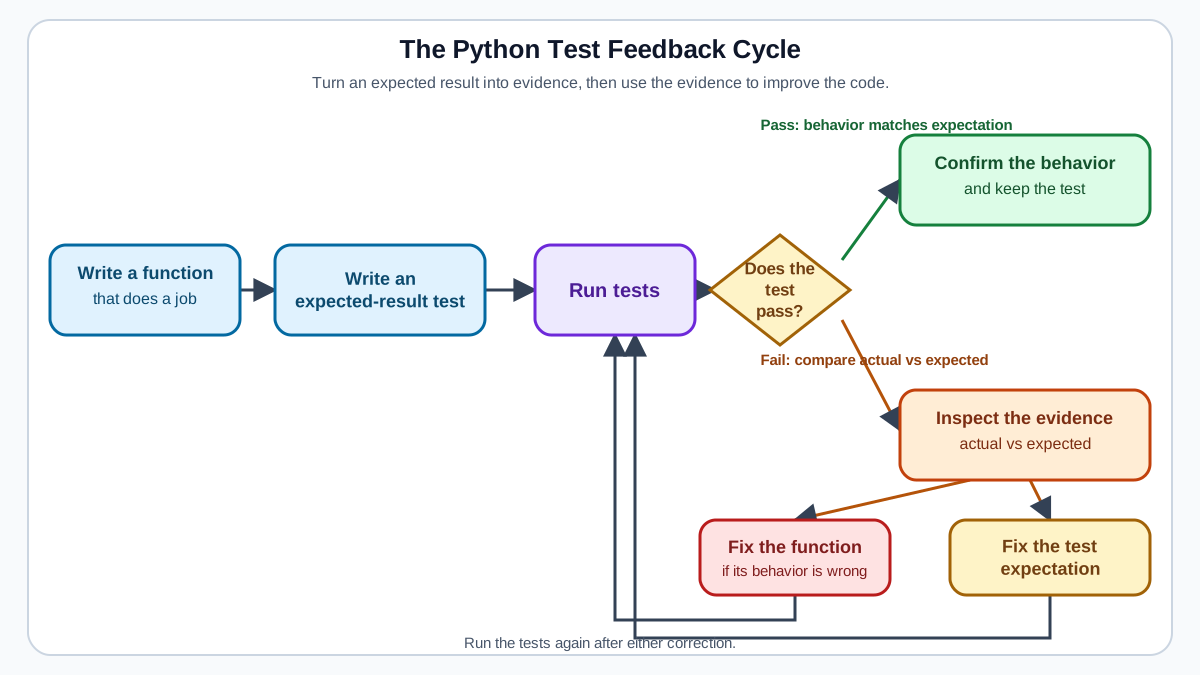
When a test fails, there are two possible causes:
- The function is wrong.
- The test expectation is wrong.
Your job is to decide which one. The test output gives you the evidence to make that call.
Look at the failure from the previous section: AssertionError: 7 != 6. The function returned 7 for "python", but the correct length of that word is 6. The function is wrong, so you fix the function.
def word_length(word):
    """Return the number of characters in a word."""
    return len(word)
Run the tests again:
python -m unittest test_word_utils.py
..
----------------------------------------------------------------------
Ran 2 tests in 0.001s

OK
Back to green.
But what if the function had been right and the test expectation wrong? Suppose you wrote assertEqual(word_length("python"), 7) by accident. The failure output would look identical, but the correct response would be to fix the test, not the function.
Here is the decision rule I use: check what the function should logically return. If the function's output is wrong, fix the function. If the function is correct and your expectation was mistaken, fix the test.
The test output gives you the evidence you need. It shows you the actual value and the expected value side by side. Your job is to judge which one is right, not to guess.
Knowledge check
Check your understanding
Answer this question before you continue.
Where This Shows Up in Real Code
You might be thinking: "Sure, this works for word_length, but what does it have to do with real programs?"
The same contract applies everywhere. A function that cleans a text value, formats a report row, or parses a line from a log file takes an input and returns an output. That input-output relationship is exactly what a test checks.
Imagine a small automation script that reads a list of names and needs to clean them before writing a report. A function like this might exist somewhere in that script:
def clean_name(name):
    """Remove extra spaces and capitalize the first letter."""
    return name.strip().capitalize()
You would test it the same way you tested word_length:
self.assertEqual(clean_name(" ada "), "Ada")
That one test protects a real behavior in your script. If someone later changes the cleaning logic and accidentally breaks the capitalization, the test catches it before the bad data reaches your report.
The function does not need to be impressive. It needs to have a clear input and a clear expected output. Once you can see that pattern, you can test any small piece of logic you write.
Common Beginner Mistakes
When you write your first tests, a few mistakes will probably catch you. Here is what they look like and how to recover quickly.
Forgetting the test_ prefix
If you name a method check_normal_word instead of test_normal_word, unittest will silently skip it. Your test run will show fewer tests than you wrote, and you might not notice.
The symptom: you wrote three tests, but the output says Ran 2 tests.
The fix: make sure every test method name starts with test_.
Forgetting unittest.main() or running the wrong command
If you run your test file directly with python test_word_utils.py and nothing happens, you probably forgot the unittest.main() block at the bottom. Without it, Python just defines the class and exits without running anything.
The symptom: the file runs but produces no test output.
The fix: add the if __name__ == "__main__": block with unittest.main(), or run the file with python -m unittest test_word_utils.py.
Testing only the happy path
It is natural to test the obvious case first: a normal word, a normal number, a normal input. But the bugs that actually bite you often live at the edges.
The symptom: your function passes every test, then breaks when someone passes an empty string, zero, or None.
The fix: add tests for edge cases. For word_length, that means testing an empty string. For a function that divides numbers, that means testing zero. A good beginner instinct is to ask: "What input would embarrass this function?" Then test that input.
Tip: When a test fails and you are not sure whether the function or the test is wrong, write down what the function should logically return for that input. Then compare that answer to both the actual result and the expected result. The one that disagrees with your reasoning is the one to fix.
Practice: Test a Function Yourself
Now it is your turn. Here is a function to test on your own:
def is_even(number):
    """Return True if a number is even, False otherwise."""
    return number % 2 == 0
Save that function in a file called number_utils.py. Then create a test file called test_number_utils.py with this scaffold already in place:
import unittest
from number_utils import is_even


class TestIsEven(unittest.TestCase):

    # Add your test methods here.


if __name__ == "__main__":
    unittest.main()
Your job is to add at least two test methods inside the class:
- A test for a normal even number, like
is_even(4)returningTrue. - A test for an edge case, like
is_even(0)oris_even(-2).
For this function, you will need a different assertion method. assertEqual checks whether two values are equal, but is_even returns a boolean. You can still use assertEqual:
self.assertEqual(is_even(4), True)
Or you can use assertTrue, which reads more naturally:
self.assertTrue(is_even(4))
Both work. Pick whichever feels clearer to you.
When you run your tests, you should see output shaped like this:
..
----------------------------------------------------------------------
Ran 2 tests in 0.001s

OK
Once your tests pass, deliberately break one expectation—change True to False in one test—and run the tests again. Watch the failure output. Then fix the test and confirm everything passes again.
When you finish, you will have written Python tests, run them from a file, interpreted a failure, and fixed the problem based on evidence. That is the full cycle, and it is the same cycle you will use when your functions grow into real scripts and projects.
Automated tests become a habit that compounds. Every function you test today is a function you can change tomorrow with more confidence, because the tests will tell you if you break something. Start with small functions like these, and the skill will carry you far beyond them.
Knowledge check
Final check
Finish the article by checking the ideas you just learned.
References
Want a more structured Python path?
Use the Python Starter Pack to turn scattered tutorials into a focused practice path.
Python for Artificial Intelligence Starter Pack
Build a Python foundation you can actually use. The Python for AI Starter Pack brings together a guided path through setup, core programming concepts, data structures, files, JSON, APIs, debugging, and practical projects—so you can move quickly from running your first program to understanding and building useful software.
- 264-page illustrated PDF
- 12 guided Python chapters
- Visual concept diagrams
- Self-assessment quizzes
- Bonus deep-dive sections
- Files, JSON, APIs, debugging & projects
- Foundation for data, automation & AI
Coming soon


