
How to Debug Wrong Values in Python
If you have been learning Python for a while, you already know how to read an error message. A SyntaxError tells you where to look. A TypeError tells you…

Your program runs. No red error text. No crash. But the answer is wrong.
If you have been learning Python for a while, you already know how to read an error message. A SyntaxError tells you where to look. A TypeError tells you what went wrong. But what do you do when Python happily runs your code and hands you a result that is simply incorrect?
This is called a logic error, and it is one of the most frustrating bugs a beginner can hit. The program is doing exactly what you told it to do—which means somewhere, your assumption about what the code should do is wrong. Your job is to find the line where that assumption breaks.
Here is the core idea: the program is doing something different from what you assume it is doing. Somewhere between your intention and the output, a value is not what you expect it to be.
When you debug wrong values in Python, you are not looking for a broken line of syntax. You are looking for a broken assumption about what a variable holds at a specific moment. The debugging mindset shifts from "where did Python complain?" to "where did my mental model stop matching reality?"
A Small Program That Returns the Wrong Value
Let's look at a concrete example. Suppose you are writing a small script to calculate the average price of items in a shopping cart.
prices = [12.99, 5.49, 23.00, 8.75]
total = 0

for price in prices:
    total += price

average = total / len(prices)
print("Average price:", average)
Run this and you get:
Average price: 12.5575
That looks correct. But now imagine you wrote this version instead:
prices = [12.99, 5.49, 23.00, 8.75]
total = 0

for price in prices:
    total += price

average = total / len(prices) - 1
print("Average price:", average)
The output is:
Average price: 11.5575
The program runs fine. No error. But the average is off by exactly one dollar. This is a classic logic error: the code runs, the output is wrong, and nothing in the error messages will help you because there are no error messages.
This example is small enough to trace by hand. That is exactly what we are going to do.
Knowledge check
Check your understanding
Answer this question before you continue.
Trace the Values, Don't Guess
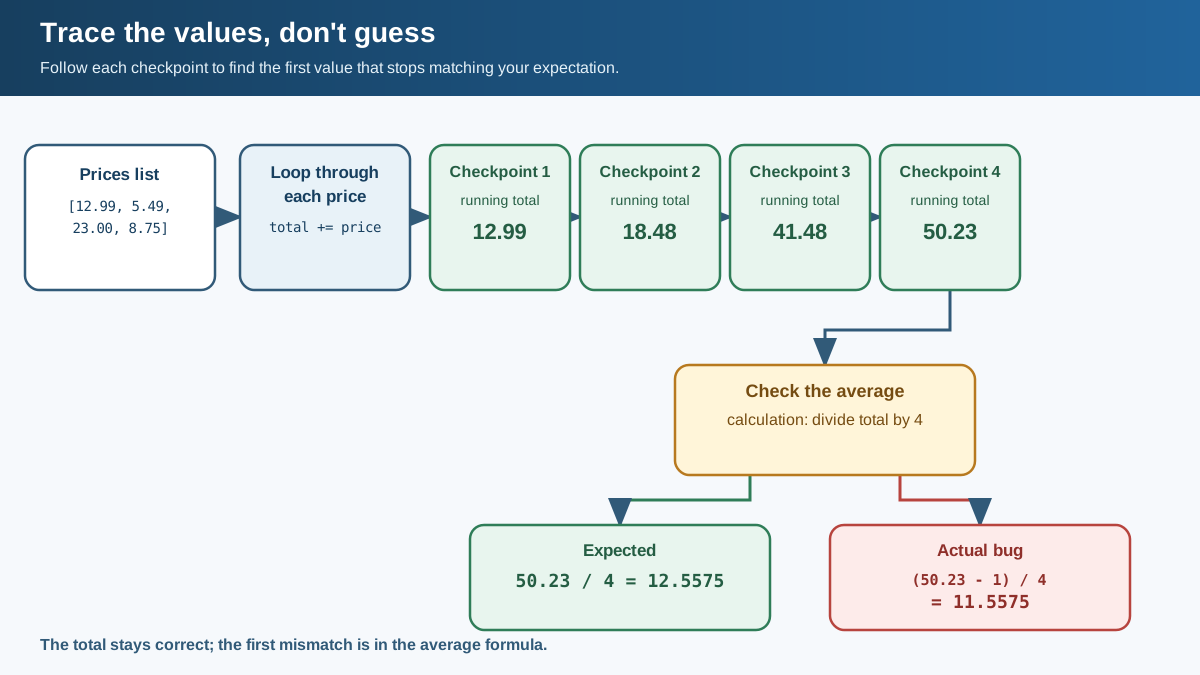
When a program returns a wrong value, some variable holds something unexpected at some point. The fastest way to find it is to trace the values—to read your code line by line and track what each variable contains at each step.
Let's trace the broken average program. We know the expected average is 12.5575. The actual output is 11.5575. The difference is exactly 1, which is suspicious.
Walk through the code:
pricesholds a list of four numbers.totalstarts at 0.- The loop adds each price to
total. After the loop,totalshould be 50.23. averageis calculated astotal / len(prices) - 1.
Here is where the assumption breaks. In Python, division happens before subtraction. So the code does not calculate total / (len(prices) - 1). It calculates (total / len(prices)) - 1. The average is computed correctly, then one is subtracted from it.
The variable total is fine. The list prices is fine. The problem is the order of operations on the line that calculates average.
A good habit here is to use a checkpoint: a line where you pause and ask, "What should this value be right now?" Before the average line runs, you expect total to be 50.23. If it is, the bug is on the average line. If it is not, the bug is earlier.
Knowledge check
Check your understanding
Answer this question before you continue.
Use Print Statements to Make Values Visible
You cannot see inside a running program. The values exist, but they are hidden. A print() statement turns hidden state into visible output you can compare against your expectations.
This is called print debugging, and it is the beginner's best tool for finding wrong values. You already know how to print—now you are going to use it deliberately.
Add print statements at your checkpoints:
prices = [12.99, 5.49, 23.00, 8.75]
total = 0

for price in prices:
    total += price
    print("After adding", price, "total is", total)

print("Final total:", total)
average = total / len(prices) - 1
print("Average price:", average)
Run it and you get:
After adding 12.99 total is 12.99
After adding 5.49 total is 18.48
After adding 23.0 total is 41.48
After adding 8.75 total is 50.23
Final total: 50.23
Average price: 11.5575
The printed values reveal the story. The total builds up correctly: 12.99, then 18.48, then 41.48, then 50.23. The final total matches your expectation. So the bug is not in the loop. It is on the line after the loop, where the average is calculated.
Label each print so you can tell which checkpoint produced it. A print that just says 50.23 is not helpful if you have five prints in your program. A print that says Final total: 50.23 tells you exactly where you are.
Tip: When you find a wrong value, check the values before it first. If the total is already wrong when the loop finishes, do not waste time staring at the average line. The bug is upstream.
Knowledge check
Check your understanding
Answer this question before you continue.
Find the Broken Assumption and Fix It
The printed output shows that total is correct. The problem must be on the line that calculates the average.
Look at the line again:
average = total / len(prices) - 1
Your assumption was probably: "Divide the total by the number of prices, minus one." But Python reads it as: "Divide the total by the number of prices, then subtract one from the result." The division happens first because it has higher precedence than subtraction.
The fix is to remove the stray - 1:
prices = [12.99, 5.49, 23.00, 8.75]
total = 0

for price in prices:
    total += price

average = total / len(prices)
print("Average price:", average)
Now the output is:
Average price: 12.5575
The fix is one line. Finding it took tracing values, adding prints, and comparing what you expected against what the code actually produced. That process is the skill.
Knowledge check
Check your understanding
Answer this question before you continue.
Common Beginner Mistakes When Debugging Wrong Values
When you are hunting a wrong value, a few habits will waste your time. Here is what to avoid.
Printing too much or too little. Dumping every variable on every line buries the signal in noise. Skipping the key checkpoint leaves you guessing. Print at the moments where you have a clear expectation: after a loop finishes, before a calculation, after a function returns.
Fixing the symptom instead of the cause. If the output is slightly off, it is tempting to adjust the output formatting or add a fudge factor. That treats the symptom. The cause is the logic that produced the wrong value. Fix the logic.
Trusting the first wrong-looking value. A value can look wrong at the end of the program when the real problem happened earlier. Always check whether earlier values were already off before you blame the last line.
Forgetting to remove debug prints. Once you find the bug and fix it, delete the print statements you added. They were scaffolding, not part of the finished program.
Changing code randomly. If you make five changes at once and the output changes, you will not know which change mattered. Form one hypothesis, test it, observe the result. Then move to the next hypothesis.
Common mistake: Beginners often rewrite whole sections when a value is wrong. Slow down. The bug is almost always one line, and the printed values will point to it.
Your Next Step: Practice Tracing a Wrong Value
Here is a small exercise. This function is supposed to count how many numbers in a list are greater than 10, but it returns the wrong result:
def count_large(numbers):
    count = 1
    for number in numbers:
        if number > 10:
            count += 1
    return count

result = count_large([5, 15, 20, 3, 12])
print("Numbers greater than 10:", result)
Trace the values. Add print statements. Find the broken assumption. The answer should be 3, but the function returns something else.
When you find it, you will have used the same process that works for real bugs in real programs: make the state visible, find the line where the value stops matching your expectation, and fix the logic—not the output.
Once print statements feel natural, the next step is learning to use Python's built-in debugger, pdb, which lets you pause your program and inspect values without adding prints at all. But for now, remember the rule:
When the program runs but the answer is wrong, your assumption about a value is wrong somewhere. Print the values. Find the line. Fix the logic.
Knowledge check
Final check
Finish the article by checking the ideas you just learned.
References
Want a more structured Python path?
Use the Python Starter Pack to turn scattered tutorials into a focused practice path.
Python for Artificial Intelligence Starter Pack
Build a Python foundation you can actually use. The Python for AI Starter Pack brings together a guided path through setup, core programming concepts, data structures, files, JSON, APIs, debugging, and practical projects—so you can move quickly from running your first program to understanding and building useful software.
- 264-page illustrated PDF
- 12 guided Python chapters
- Visual concept diagrams
- Self-assessment quizzes
- Bonus deep-dive sections
- Files, JSON, APIs, debugging & projects
- Foundation for data, automation & AI
Coming soon


