
Recursion in Python: Trace Calls, Find Base Cases, and Compare with Loops
You write a function. It calls itself. You run it, and either the number is wrong or Python throws a RecursionError at you. Nothing about the code looks…

Key topics
You write a function. It calls itself. You run it, and either the number is wrong or Python throws a RecursionError at you. Nothing about the code looks broken, which is exactly what makes recursion in Python feel like a trick.
It isn't a trick. It's a mental model problem. You've been treating a function call as a one-shot action: call it, get a value, move on. A recursive call doesn't work that way. It pauses, waits, and hands its result back to the call that started it. Once you can see that pause-and-wait in your head, recursion stops being mysterious and becomes a tool you can choose or refuse.
Here's the plan: one tiny runnable function, a trace you can follow with your own eyes, a repeatable way to find the base case, and a clear rule for when a loop is the better answer.
Why a Function That Calls Itself Feels Wrong
A recursive function is an ordinary function that happens to call itself. Python adds nothing new to the language for it. You already know how to define a function, pass arguments, and return a value — recursion just puts a call to the same function inside the body.
The part that breaks your intuition is timing. When countdown(3) calls countdown(2), the first call does not finish. It stops mid-line, waits, and holds its place. That waiting call is a frame: a small record of the function's current arguments and where it paused. Python keeps these frames in a stack — the call stack — one on top of another, like a stack of index cards.
The stack grows downward until something stops the chain. That stopping point is the base case: the input small enough to answer without calling yourself again. When the base case returns, the stack unwinds. Each waiting frame gets its answer, finishes its own line, and returns to the frame below it.
Every correct recursive function satisfies the same two-part contract:
- Base case — a condition that stops the recursion and returns a value directly.
- Recursive step — a call to itself with an argument that moves closer to the base case.
Miss either half and the function either never stops or never finishes correctly.
Your First Recursive Function: Countdown
Start with a function that prints instead of returning. Printing lets you watch the order of calls before you have to reason about returned values.
def countdown(n):
    print(n)
    if n == 0:
        return          # base case: stop here
    countdown(n - 1)    # recursive step: move closer to zero

countdown(3)
Run it with python countdown.py and you get:
3
2
1
0
The base case is n == 0. The recursive step is countdown(n - 1). Notice that the argument shrinks by one on every call, so the value is always walking toward zero. If it didn't shrink — if you wrote countdown(n) inside the body — the function would call itself forever, and Python would eventually stop it with an error.
Note: This version doesn't check its input. Call
countdown(-1)and the base case never triggers, because-1never equals0. You'd get aRecursionError. Guarding inputs is a habit worth building early.
Knowledge check
Check your understanding
Answer this question before you continue.
Trace the Calls: What the Stack Actually Does
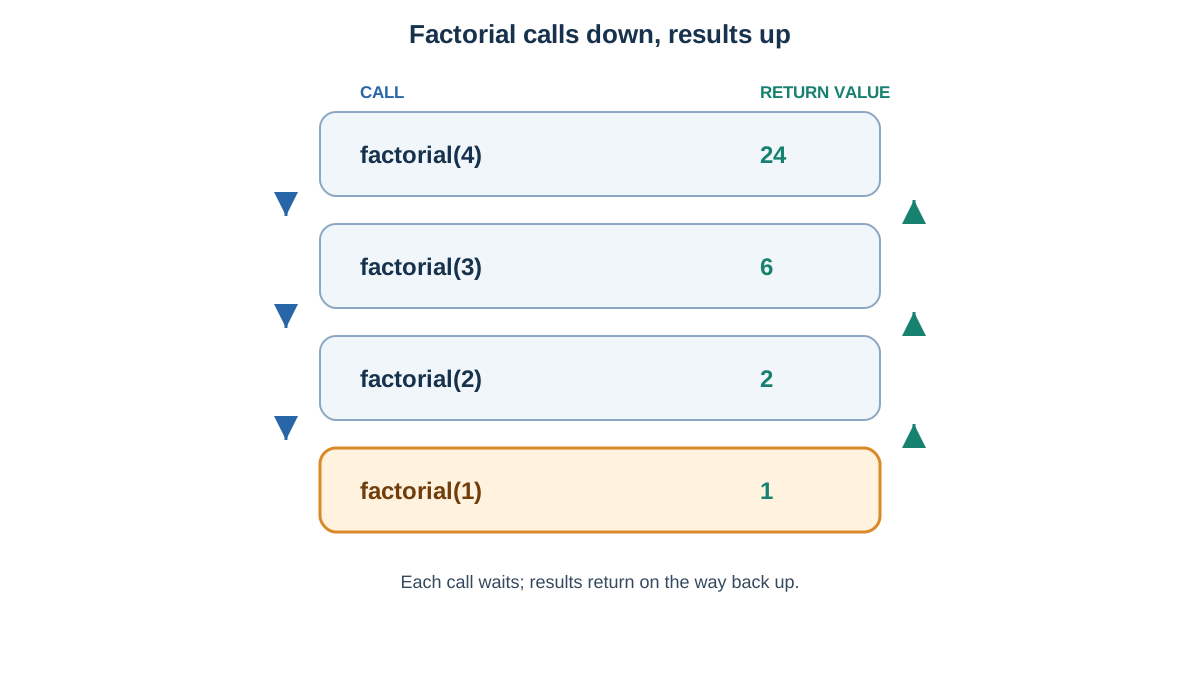
Printing shows you the way down. To see the way back up, you need a function that returns a value. Factorial is the classic: 4! means 4 × 3 × 2 × 1 = 24, and 4! = 4 × 3!.
def factorial(n):
    if n < 0:
        raise ValueError("factorial is not defined for negative numbers")
    if n <= 1:
        return 1                # base case
    return n * factorial(n - 1) # recursive step

print(factorial(4))
24
The guard clause rejects negative input before the base case can quietly turn it into a valid-looking answer. Without it, factorial(-3) would return 1, which is wrong and easy to miss.
Now trace it by hand. Read the tree from the top down, then from the bottom up:
factorial(4)
└── 4 * factorial(3)
    └── 3 * factorial(2)
        └── 2 * factorial(1)
            └── returns 1        ← base case
        └── 2 * 1 = 2            ← unwinding
    └── 3 * 2 = 6
└── 4 * 6 = 24
Four frames stack up before anything returns. Then each frame multiplies its own n by the value handed back from below. The multiplication can't happen until the call beneath it finishes — that's the pause-and-wait in action.
Common mistake
Forgetting return in front of the recursive call:
def factorial(n):
    if n <= 1:
        return 1
    n * factorial(n - 1)   # no return
This computes the right number and then throws it away. The outer call returns None, and print(factorial(4)) shows None instead of 24. If your recursive function returns None, check for a missing return first.
A tracing drill
Before running anything, predict the output of this:
def mystery(n):
    if n == 0:
        return 0
    return n + mystery(n - 1)

print(mystery(3))
Write down your guess, then run it. If you said 6, you traced the stack correctly. If you said something else, walk the tree again — the skill you're building here is the same one you'll use to read recursive code in libraries you didn't write.
Knowledge check
Check your understanding
Answer this question before you continue.
Finding the Base Case Before Writing the Recursion
Beginners often write the recursive step first and bolt on a base case afterward. Flip the order. Ask the smallest-input question: what is the trivial case I can answer without calling myself?
For a sum over a list, the trivial case is an empty list, which sums to 0. For factorial, it's n <= 1, which is 1. For a countdown, it's 0.
Some problems need more than one base case. Fibonacci numbers — where each number is the sum of the two before it — need two stopping points:
def fibonacci(n):
    if n == 0:
        return 0        # first base case
    if n == 1:
        return 1        # second base case
    return fibonacci(n - 1) + fibonacci(n - 2)
Without both, the function would call fibonacci(-1) and keep going into negative numbers forever.
When the base case is missing or unreachable, Python raises RecursionError: maximum recursion depth exceeded. Python caps how deep the stack can grow — the default limit is around 1000 frames — precisely so a runaway function fails with a clear error instead of crashing your machine. You can raise that limit, but for beginner problems it's almost never the right fix. A function that needs 2000 frames usually has a design problem, not a limit problem.
Tip: If you can't state the base case in one sentence, you don't understand the problem well enough to recurse on it yet. Write the loop version first, then come back.
Knowledge check
Check your understanding
Answer this question before you continue.
Recursion vs Loops: Which One Should You Write?
Most problems you can solve recursively, you can also solve with a loop. The choice is about clarity and cost, not capability. Here's the honest comparison:
| Factor | Recursion | Loop |
|---|---|---|
| Readability on flat data | Usually worse | Usually better |
| Readability on nested data | Often much better | Requires manual bookkeeping |
| Memory use | One frame per call | Constant |
| Speed in Python | Slower (call overhead) | Faster |
| Risk of stack overflow | Yes, on deep input | No |
| Best fit | Trees, nested structures, divide-and-conquer | Counting, accumulating, flat sequences |
Here's the same task both ways — summing a list:
def sum_loop(numbers):
    total = 0
    for n in numbers:
        total += n
    return total

def sum_recursive(numbers):
    if not numbers:
        return 0
    return numbers[0] + sum_recursive(numbers[1:])

print(sum_loop([10, 20, 30, 40]))
print(sum_recursive([10, 20, 30, 40]))
100
100
Both return 100. The loop is shorter, faster, and uses no extra stack. The recursive version is arguably closer to how you'd describe the problem in English — "the sum is the first element plus the sum of the rest" — but it also slices the list on every call, which quietly copies data.
My default for beginners: reach for a loop first. Use recursion when the data itself is nested, or when the recursive description is genuinely shorter and clearer than the loop version. One more thing to know: Python does not optimize tail recursion, the pattern where the recursive call is the last thing a function does. In some languages that pattern runs in constant stack space. In Python it doesn't, so deep recursion costs real memory.
Knowledge check
Check your understanding
Answer this question before you continue.
Where Recursion Earns Its Place
Nested data is the honest answer. A flat list is loop territory. A folder tree is not.
def count_files(tree):
    total = 0
    for name, contents in tree.items():
        if isinstance(contents, dict):
            total += count_files(contents)  # nested: recurse
        else:
            total += 1
    return total

project = {
    "src": {"main.py": None, "utils.py": None},
    "tests": {"test_main.py": None},
    "README.md": None,
}

print(count_files(project))
4
The loop version of this needs an explicit stack or queue that you manage yourself — push nested dictionaries, pop them, track what's been visited. That's not impossible, but it's more code and more places to make a mistake. The recursive version says what it means: count the files here, plus the files in every nested folder.
This shape shows up constantly in real code: walking JSON from an API, traversing a comment thread, parsing nested expressions, and divide-and-conquer algorithms like merge sort. Even if you rarely write recursion yourself, you will read it. Recognizing the base case and the recursive step in someone else's code is a skill worth having.
Common Mistakes and How to Fix Them
- Missing base case. Symptom:
RecursionError. Fix: add the stopping condition and return a value directly from it. - Argument that doesn't shrink. Symptom: the same error. Fix: verify every call moves toward the base case — print the argument at the top of the function and watch the sequence.
- Missing
returnon the recursive call. Symptom:Noneinstead of a value. Fix:returnthe result of the recursive call, not just call it. - Mutating a shared list across calls. Symptom: duplicated or corrupted results. Fix: pass new values instead of appending to a list that every frame can see. Each call gets its own local parameter name and its own frame, but if you pass a mutable object like a list, every frame is looking at the same object. A change made in one call is visible in all of them.
When something goes wrong, the fastest debugging move is one line: print(n) at the top of the function. You'll see the actual sequence of arguments, and the bug usually becomes obvious.
Practice: Write and Trace Your Own
Three tasks, in order of difficulty. Do them on paper first where you can.
- Write a recursive sum. Write
sum_recursive(numbers)that adds up a list without a loop. Then rewrite it with aforloop and compare the two. Goal: feel the tradeoff in your own code. Hint: the base case is the empty list. - Trace before you run. Take the
mysteryfunction from earlier and change it toreturn n * mystery(n - 1)with the same base case. Predict the output formystery(4)on paper, then run it and compare. - Repair a broken base case. Write a function with
if n == 0: return 0and call it withn = -1. Read theRecursionError, then fix the condition so negative inputs stop safely. Hint:n <= 0covers more ground thann == 0.
Next step: pick any recursive function you find in a library or a tutorial and identify its base case and recursive step before reading the rest of the code. If you can do that in under a minute, you've got the mental model — and you'll know when a loop is the simpler answer.
Knowledge check
Final check
Finish the article by checking the ideas you just learned.
References
Want a more structured Python path?
Use the Python Starter Pack to turn scattered tutorials into a focused practice path.
Python for Artificial Intelligence Starter Pack
Build a Python foundation you can actually use. The Python for AI Starter Pack brings together a guided path through setup, core programming concepts, data structures, files, JSON, APIs, debugging, and practical projects—so you can move quickly from running your first program to understanding and building useful software.
- 264-page illustrated PDF
- 12 guided Python chapters
- Visual concept diagrams
- Self-assessment quizzes
- Bonus deep-dive sections
- Files, JSON, APIs, debugging & projects
- Foundation for data, automation & AI
Coming soon


