
Python Regular Expressions: Find, Extract, and Validate Text
You have a block of messy text and you need every number, date, or email address hiding inside it. A plain string method can find "cat" in a sentence. It…

Key topics
You have a block of messy text and you need every number, date, or email address hiding inside it. A plain string method can find "cat" in a sentence. It cannot find "any digit, one or more times." That gap is exactly what regular expressions were built to fill.
A regular expression is a pattern string that describes a set of matching strings, not one exact string. Python reaches this tiny pattern language through the standard-library re module, so there is nothing to install. You will learn a handful of symbols here, not the whole syntax. That is deliberate. The full surface area is enormous, and most of it you will look up later.
Why String Methods Stop Being Enough
You already know how to find a fixed substring and replace a fixed character. That covers a surprising amount of real work, and I reach for it first almost every time.
The gap appears when the pattern is a shape, not a literal. "Any digit." "Three digits, then a dash." "A word character repeated one or more times." String methods compare against exact text. Regex compares against a description of text.
That distinction is the whole reason this tool exists. A regular expression is a small embedded language inside Python, and re is your doorway to it. You write a pattern, hand it a string, and ask a question: does this match, where does it match, and what exactly matched?
Your First Regex in Four Lines
Let's get output on screen before any symbol tables. Save this as first_regex.py:
import re

text = "Order 42 shipped on 2024-03-15."
match = re.search(r"\d+", text)

print(match)
print(match.group())
Run it:
python first_regex.py
Expected output:
<re.Match object; span=(6, 8), match='42'>
42
Two things to notice. First, re.search() found the first occurrence of the pattern anywhere in the string. Second, a successful search returns a match object, and match.group() gives you the matched text.
The r before the pattern string is the raw string prefix. It tells Python not to interpret backslashes as escape sequences. Patterns are full of backslashes, so r"..." is the habit you want from day one.
Now the part that trips up nearly every beginner: a failed search returns None, not an empty string and not an error.
import re

match = re.search(r"\d+", "no numbers here")
print(match)
Expected output:
None
Common mistake: Calling
match.group()whenmatchisNoneraisesAttributeError: 'NoneType' object has no attribute 'group'. Always check the match first.
Knowledge check
Check your understanding
Answer this question before you continue.
The Symbols You Actually Need First
You do not need the whole syntax. You need enough to build patterns. Here is the small set that covers most everyday text work.
Character classes describe a kind of character:
\dmatches any digit.\Dmatches any non-digit.\wmatches any word character (letters, digits, underscore).\Wis the opposite.\smatches any whitespace.\Sis the opposite.
Quantifiers describe how many times:
+means one or more.*means zero or more.?means zero or one (optional).{n,m}means between n and m repetitions.
Anchors describe position:
^matches the start of the string.$matches the end of the string.
The dot . matches any character except a newline. It is greedier than beginners expect, so treat it with suspicion until you have tested it.
Parentheses group a sequence so a quantifier applies to the whole group rather than one character. (ab)+ matches ab, abab, and so on.
That is enough to build real patterns. Everything else, including lookarounds and backreferences, is fine to look up later.
Knowledge check
Check your understanding
Answer this question before you continue.
Find, Extract, and Replace: The Four Functions
Picking the wrong function is the most common structural mistake. Here is the decision table I use:
| Function | Question it answers | Use this when |
|---|---|---|
re.search() | Is there a match anywhere? | You want the first match or just a yes/no. |
re.match() | Does the string start with this pattern? | You specifically need an anchored start. |
re.findall() | What are all the matches? | You are extracting a list of values. |
re.sub() | Replace every match. | You are cleaning or reformatting text. |
re.split() | Split on a pattern. | Your separator is a shape, not a fixed string. |
One warning worth repeating: re.match() only checks the beginning of the string. If your pattern could appear mid-string, re.search() is almost always what you meant.
import re

text = "Call 555-1234 or 555-9876."

print(re.search(r"\d{3}-\d{4}", text).group())
print(re.findall(r"\d{3}-\d{4}", text))
print(re.sub(r"\d", "#", text))
Expected output:
555-1234
['555-1234', '555-9876']
Call ###-#### or ###-####.
Notice that re.sub() replaced every digit, not just the first. That is the default, and it surprises people who expect a single replacement.
Knowledge check
Check your understanding
Answer this question before you continue.
Extracting Real Data from Messy Text
Extraction is where regex earns its place. Say you have a log line and you want the date and the error code:
import re

line = "2024-03-15 ERROR code=503 retry=2"
pattern = r"(\d{4}-\d{2}-\d{2}).*code=(\d+)"

match = re.search(pattern, line)
print(match.group(0))
print(match.group(1))
print(match.group(2))
Expected output:
2024-03-15 ERROR code=503
2024-03-15
503
The parentheses create groups. group(0) is the whole match. group(1) is the first captured piece, group(2) the second. This is how you pull a specific value out of a larger pattern instead of grabbing the entire matched string.
Here is the subtlety that catches people: re.findall() behaves differently when groups are present. Without groups, it returns the full matches. With one group, it returns just that group.
import re

text = "2024-03-15 and 2024-04-01"

print(re.findall(r"\d{4}-\d{2}-\d{2}", text))
print(re.findall(r"(\d{4})-(\d{2})-(\d{2})", text))
Expected output:
['2024-03-15', '2024-04-01']
[('2024', '03', '15'), ('2024', '04', '01')]
With multiple groups, findall() returns a list of tuples. If you only wanted the years, use a single group: re.findall(r"(\d{4})-\d{2}-\d{2}", text).
Validating Input Without Fooling Yourself
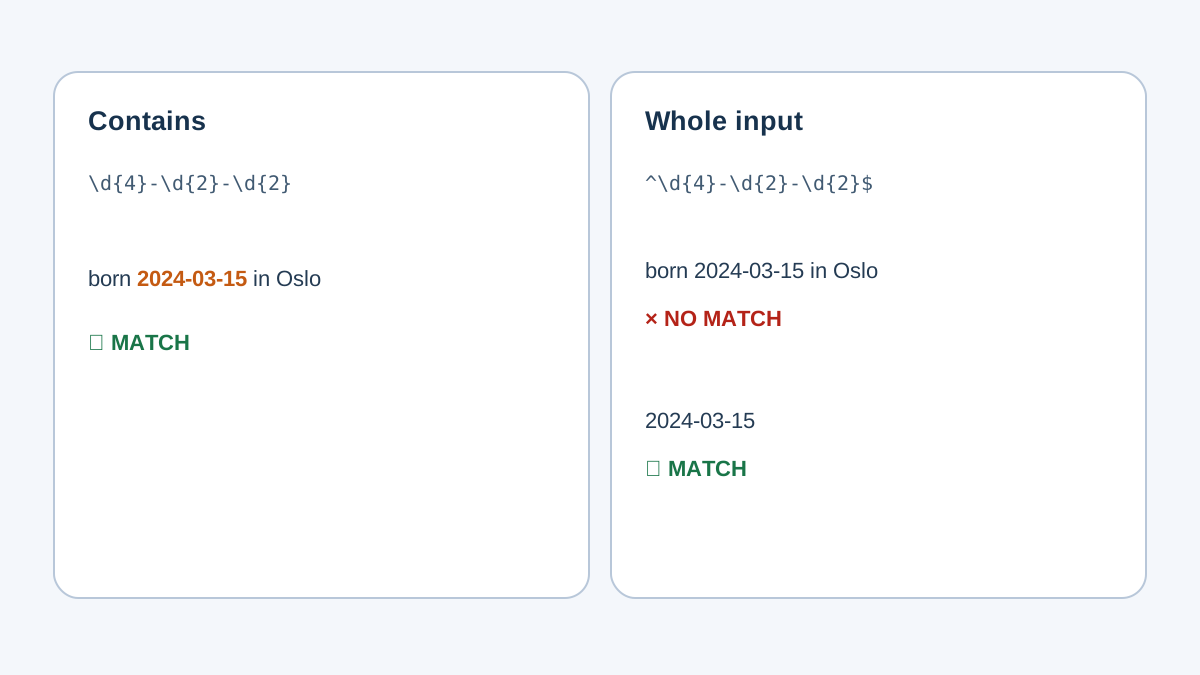
Validation is the use case that gets beginners into trouble, because a match does not prove a value is correct. It proves the value has the right shape.
The key tool is anchoring. Without ^ and $, your pattern matches a substring, which means almost anything passes.
import re

pattern = r"^\d{4}-\d{2}-\d{2}$"

print(bool(re.search(pattern, "2024-03-15")))
print(bool(re.search(pattern, "born 2024-03-15 in Oslo")))
Expected output:
True
False
The second string contains a valid date, but the anchors reject it because the whole string is not a date. That is the difference between "contains a date" and "is a date."
Now the honest part about email validation. A simple pattern checks shape:
import re

pattern = r"^[\w.-]+@[\w.-]+\.\w+$"

print(bool(re.search(pattern, "[email protected]")))
print(bool(re.search(pattern, "not-an-email")))
Expected output:
True
False
This pattern confirms the string looks like an email. It does not confirm the address exists, that the domain resolves, or that it complies with the full email specification. Those are different problems.
Warning: A stricter pattern is not automatically a better one. Over-strict email patterns reject real addresses with plus signs, subdomains, or unusual but valid characters. Match the shape you need, then verify the value another way.
The decision rule: use regex to check format, and use something else to check truth. A format check catches typos. It cannot catch a fake address.
Knowledge check
Check your understanding
Answer this question before you continue.
When Not to Use Regex
Regex is hard to read six months later, including when you wrote it. That readability cost is part of the decision, not an afterthought.
If you are not using a regex feature, you probably do not need regex. The Python documentation makes the same point: for fixed strings and single-character operations, string methods are simpler and faster because they run in optimized C loops instead of the general regex engine.
| Task | Reach for | Why |
|---|---|---|
| Find a fixed substring | str.find() or in | No pattern needed. |
| Replace one character everywhere | str.replace() or str.translate() | Faster and clearer. |
| Split on a known separator | str.split() | No pattern needed. |
| Case-insensitive literal match | str.lower() comparison | Clearer than a flag. |
| Match a shape (any digit, a date format) | re | This is the real job. |
The rule I follow: if the pattern is a literal, use a string method. If the pattern is a shape, use regex.
Common Beginner Mistakes and How to Debug Them
These are the failures you will hit, and how to recover without guessing.
Forgetting the r prefix. Without it, "\d" can trigger confusing escape behavior. Always write patterns as r"...".
Calling .group() on None. Check the match first: if match: before you touch it.
Using re.match() when you meant re.search(). match() only looks at the start. If your pattern can appear anywhere, use search().
Matching too much. A greedy quantifier or a missing anchor lets the pattern swallow more than you intended. Add anchors or tighten the quantifier.
Expecting re.sub() to replace once. It replaces every match by default.
The debugging habit that saves the most time: print the pattern and the input side by side, then test the pattern on one tiny string before running it on the real data. A pattern that works on "2024-03-15" is easier to trust than one tested against a thousand log lines at once.
What to Memorize Now and What to Look Up Later
Worth memorizing: \d, \w, \s, +, *, ?, ^, $, and the four core functions. That small core handles most text tasks you will meet as a beginner.
Fine to look up: lookarounds, backreferences, named groups, flags like MULTILINE and DOTALL, and the full escape table. Nobody holds all of that in their head, and you do not need to.
One habit worth forming: compile a pattern with re.compile() only when you reuse it in a loop. It is not a default you need everywhere.
Build patterns one symbol at a time. Test each step. Print the output. The pattern that grows in front of you is easier to trust than the one you write all at once and hope works.
Practice: Three Small Tasks
Try these before moving on. Each one isolates a single skill.
Task 1: Extract every number. Take a paragraph and print a list of every number in it. Reach for re.findall() and \d+.
Task 2: Validate dates. Given a list of user-entered strings, print which ones look like YYYY-MM-DD. Use anchors and bool().
Task 3: Clean whitespace. Take a messy string and replace every run of whitespace with a single space. Reach for re.sub() and \s+.
For the extension on Task 3, rewrite it with a string method and compare. " ".join(text.split()) does the same job without regex. Ask yourself which version you would rather maintain, and let that answer guide your future choices.
The real next step is to take one extraction pattern and point it at a file or log you already have. Open a log file, read it line by line, and pull out the timestamps or error codes. That is the moment regex leaves the tutorial and starts working for you.
Knowledge check
Final check
Finish the article by checking the ideas you just learned.
References
Want a more structured Python path?
Use the Python Starter Pack to turn scattered tutorials into a focused practice path.
Python for Artificial Intelligence Starter Pack
Build a Python foundation you can actually use. The Python for AI Starter Pack brings together a guided path through setup, core programming concepts, data structures, files, JSON, APIs, debugging, and practical projects—so you can move quickly from running your first program to understanding and building useful software.
- 264-page illustrated PDF
- 12 guided Python chapters
- Visual concept diagrams
- Self-assessment quizzes
- Bonus deep-dive sections
- Files, JSON, APIs, debugging & projects
- Foundation for data, automation & AI
Coming soon


