
Working with Numbers and Strings
Every value in Python carries a type, and every type has rules about what you can do with it. Numbers compute. Strings reshape. The moment you learn to…

Key topics
Every value in Python carries a type, and every type has rules about what you can do with it. Numbers compute. Strings reshape. The moment you learn to check what you're holding, use an operation that fits it, and convert deliberately at the boundary, you stop fighting the language and start building with it.
By the end of this tutorial, you'll do basic math, reshape text, convert between numbers and strings, and combine them without tripping over Python's type rules. Let's start with the smallest useful pieces.
What Are Numbers and Strings in Python?
Before we use them, let's name what we're holding.
Numbers are values you can count or measure. Python has two main numeric types:
- Integers: whole numbers like
5,-3, or100. - Floats: numbers with a decimal point, like
3.14,-0.5, or2.0.
Strings are pieces of text. A string is a sequence of characters wrapped in quotes:
"Hello, world!"
"42"
"Python is fun!"
Notice that 42 and "42" are different things. One is a number you can do math on; the other is text that happens to look like a number. That distinction drives most of the surprises in this tutorial.
Almost every program needs both. Scores, prices, and ages are numbers. Names, messages, and instructions are strings. If you've already covered Python Variables and Data Types, this is where those types start doing real work.
Using Numbers: Basic Math in Python
Python does arithmetic like a calculator, with a few operators you should know:
- Addition:
+ - Subtraction:
- - Multiplication:
* - Division:
/
print(2 + 3)      # 5
print(10 - 4)     # 6
print(6 * 7)      # 42
print(8 / 2)      # 4.0
5
6
42
4.0
Notice the last line: 8 / 2 prints 4.0, not 4. In Python, division always returns a float, even when the result looks like a whole number. That's not a bug—it's a deliberate rule that keeps division predictable.
More Math Operations
Python adds three operators that a plain calculator often hides:
- Exponentiation:
**for powers - Integer division:
//for the whole-number part - Modulo:
%for the remainder
print(2 ** 3)   # 8 (2 to the power of 3)
print(7 // 2)   # 3 (integer division)
print(7 % 2)    # 1 (remainder)
8
3
1
These three are workhorses. Integer division splits things into even groups, and modulo tells you what's left over—which is exactly how you check whether a number is even or odd.
Knowledge check
Check your understanding
Answer this question before you continue.
Integers vs. Floats
Integers and floats can participate in arithmetic together. When you mix them, the result is a float:
print(5 + 2.5) # 7.5
7.5
That compatibility rule stops at numbers. It does not extend to strings. An integer and a float are both numeric, so Python promotes the result to a float. A string is a different kind of value entirely, and Python will not silently guess how to combine it with a number—you'll see that wall in a moment.
Everyday uses are everywhere: current_year - birth_year for an age, coffee_price + muffin_price for a total, (score1 + score2 + score3) / 3 for an average.
Knowledge check
Check your understanding
Answer this question before you continue.
Working with Strings: Handling Text
Strings are how Python stores text. You create one by wrapping characters in quotes:
greeting = "Hello, world!"
print(greeting)
Hello, world!
You can use single quotes ('Hello') or double quotes ("Hello"). Pick one and stay consistent. The only rule that matters: the opening and closing quotes must match.
Simple Python String Operations
Here are the string operations you'll reach for constantly.
Joining (concatenation) with +:
first_name = "Ada"
last_name = "Lovelace"
full_name = first_name + " " + last_name
print(full_name)
Ada Lovelace
Repeating with * and a number:
laugh = "ha"
print(laugh * 3)
hahaha
Getting the length with len():
message = "Python"
print(len(message))
6
Changing case with .upper() and .lower():
word = "Python"
print(word.upper())
print(word.lower())
PYTHON
python
Checking for a substring with the in keyword:
sentence = "Python is fun!"
print("fun" in sentence)
True
Knowledge check
Check your understanding
Answer this question before you continue.
Reshaping Text: Strip and Split
Manipulating a string usually means cleaning it up or breaking it into pieces. Two methods handle most of that work.
.strip() removes extra spaces from the start and end. .split() breaks a string into a list of pieces wherever a separator appears:
raw = "  Ada, Grace, Alan  "
cleaned = raw.strip()
names = cleaned.split(", ")
print(cleaned)
print(names)
Ada, Grace, Alan
['Ada', 'Grace', 'Alan']
This is the shape of real text handling: trim the noise, then split the signal into usable pieces. You'll reach for this pattern constantly once your programs read names, lists, or any input typed by a person.
Knowledge check
Check your understanding
Answer this question before you continue.
Combining Numbers and Strings
Here's where beginners usually hit their first real wall. Numbers and strings are different types, and Python refuses to mix them silently.
age = 25
print("I am " + age + " years old.")
Traceback (most recent call last):
  File "<stdin>", line 1, in <module>
TypeError: can only concatenate str (not "int") to str
Read that error closely. Python isn't confused—it's telling you exactly what happened: you tried to add a string and an integer, and it won't guess what you meant. That's a feature, not a bug. Silent guessing would hide real mistakes.
The fix is to make both sides the same type. Convert the number to a string with str():
age = 25
print("I am " + str(age) + " years old.")
I am 25 years old.
Or use an f-string, which does the conversion for you:
age = 25
print(f"I am {age} years old.")
I am 25 years old.
Converting Between Numbers and Strings
Conversion goes both ways:
- Number to string:
str(42)→"42" - String to integer:
int("42")→42 - String to float:
float("3.14")→3.14
print(str(42))
print(int("42") + 8)
print(float("3.14") + 1.0)
42
50
4.14
This matters the moment you take user input, because input() always returns a string. Converting that string into a number is the standard first step before doing math on it.
Common mistake
Common mistake: Trying to add a string and a number with
+. Python raises aTypeErrorinstead of guessing. Convert withstr(),int(), orfloat()first, or use an f-string and let Python handle the conversion.
The Boundary in Action: Reading Input
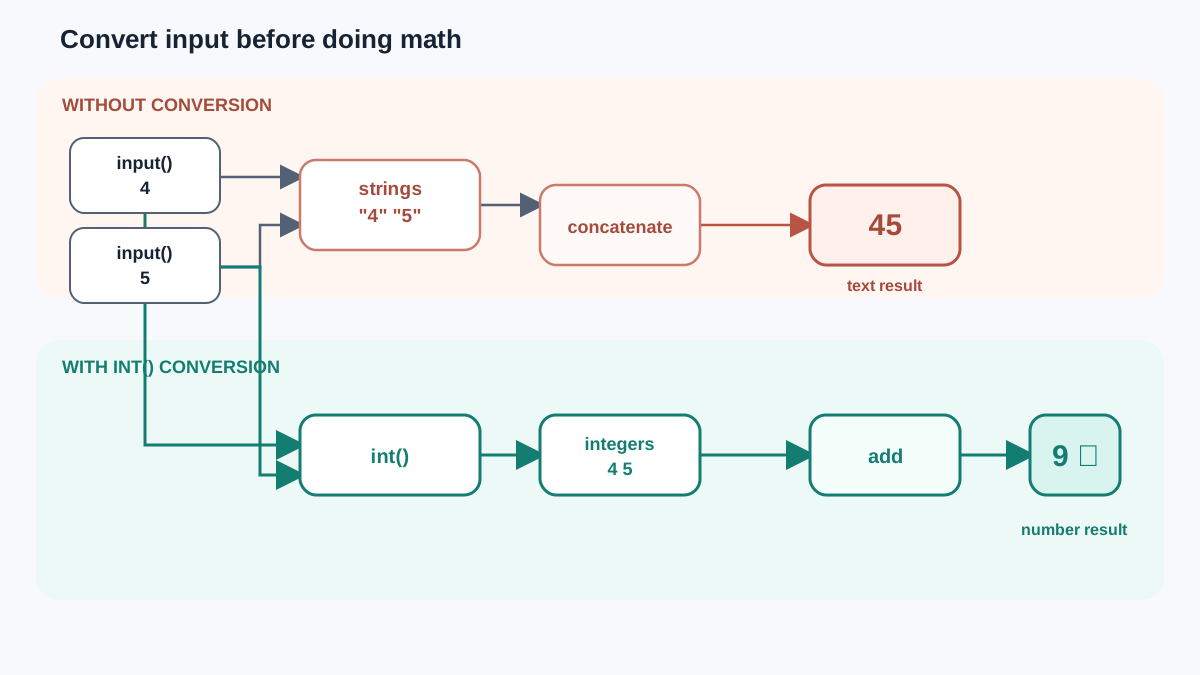
The 42 versus "42" distinction stops being abstract the first time your program asks a person for a number. Watch what happens when you read two values and try to add them:
first = input("First number: ")
second = input("Second number: ")
print(first + second)
First number: 4
Second number: 5
45
You asked for numbers, typed numbers, and got 45. That is not a bug. input() always returns a string, so + concatenated the text "4" and "5" instead of adding the values. Python did exactly what you told it—you just told it to join text.
The fix is to convert at the boundary, the moment you know the input's meaning is numeric:
first = int(input("First number: "))
second = int(input("Second number: "))
print(first + second)
First number: 4
Second number: 5
9
Same input, different result, because now both values are integers before the + runs. That is the decision rule this whole tutorial has been building toward: check what you're holding, use an operation that fits it, and convert deliberately at the boundary when the meaning is numeric.
Practice: Try It Yourself
The fastest way to make this stick is to run code and watch the output. Open a Python file and work through these:
- Add two numbers and print the result.
- Create a string with your name and print a greeting.
- Join a first and last name into one string.
- Repeat a string three times and print it.
- Convert the string
"100"to an integer, add50, and print the result. - Take the string
" Ada, Grace, Alan ", strip it, split it, and print the list. - Read two numbers with
input(), convert them withint(), and print their sum.
For task 5, expect to use int(). If you try to add "100" + 50 directly, you'll get the same TypeError from earlier—and now you'll know exactly why. For task 7, you're applying the boundary rule from the previous section: without int(), two numeric-looking inputs will concatenate instead of adding.
Checking your work:
- If you see an error, read the message. It names the line and usually the type mismatch.
- Change the numbers or strings and rerun. Small edits are how you build intuition.
- When output surprises you, that's evidence about how the language works—not a reason to give up.
What's Next?
You now have the two core building blocks: numbers you can compute with and strings you can reshape. More importantly, you have the rule that keeps them from colliding: convert deliberately at the boundary between text and computation.
The next step is putting that rule to work with real user input, so your programs stop being fixed scripts and start responding to the person running them. Practice reading input, converting it at the boundary, and using the converted value in a calculation.
Knowledge check
Final check
Finish the article by checking the ideas you just learned.
References
Want a more structured Python path?
Use the Python Starter Pack to turn scattered tutorials into a focused practice path.
Python Starter Pack
A compact LearnPyFast PDF pack covering what Python is, installation, your first program, running Python code, and Python versions.
- 5 curated chapters
- Enhanced PDF edition with bundle-only learning guidance
- Offline-friendly format for focused review
- Source article links for future online updates
Coming soon


