
Python String Methods Reference with Examples
You have a messy string. Maybe it has extra spaces at the edges, mixed capitalization, a word you need to swap out, or text you want to break into pieces.…

You have a messy string. Maybe it has extra spaces at the edges, mixed capitalization, a word you need to swap out, or text you want to break into pieces. You know Python can handle it, but you are not sure which method does the job.
That is exactly what this reference is for.
Think of this page as a working desk. On it, you will find the handful of Python string methods that cover most everyday text tasks—cleaning, splitting, searching, replacing, and checking text. Each one comes with a short syntax note and a runnable example so you can see what it does before you use it in your own code.
This is not an exhaustive catalog. Python has dozens of string methods, and you do not need most of them on a regular basis. What you need is a solid grasp of the common ones and a clear idea of where to look up the rest when a task calls for them.
What a String Method Is (and Why It Matters)
Before we dive into the methods themselves, let's make sure we are on the same page about what a method actually is.
A string method is a function that runs on a string value. You call it using dot notation: you write the string (or the variable holding it), then a dot, then the method name followed by parentheses.
name = "ada"
print(name.upper())
ADA
Here, upper() is a method that runs on the string stored in name. It returns a new version of that string with all letters capitalized.
Here is the part that trips up many beginners: strings are immutable. That is a fancy way of saying Python cannot change a string once it exists. When you call a method on a string, Python does not modify the original. Instead, it creates a brand-new string and returns it to you.
This means you usually need to save the result back to a variable if you want to keep it:
name = "ada"
name.upper()
print(name)  # Still "ada" — the method result was never saved

name = name.upper()
print(name)  # Now the variable points to the new string
ada
ADA
If you forget to save the result, the method still runs, but the new string it produces simply disappears. The original variable stays untouched.
Common mistake: Calling a method without assigning the result. If your string does not seem to change, check whether you wrote
text.strip()instead oftext = text.strip().
Now let's look at the methods you will actually use, grouped by the job they do.
Knowledge check
Check your understanding
Answer this question before you continue.
Cleaning Text: strip, lower, and upper
Text from real sources is rarely tidy. User input, files, and web data often arrive with stray spaces at the edges or inconsistent capitalization. These three methods handle the most common cleanup tasks.
strip()
strip() removes whitespace from both the beginning and the end of a string. Whitespace includes spaces, tabs, and newlines.
user_input = "   hello   "
clean = user_input.strip()
print(clean)
hello
Notice that the spaces inside the string—between words—are left alone. Only the edges get cleaned.
If you only need to clean one side, Python also provides lstrip() for the left side and rstrip() for the right side. In practice, you will reach for strip() most of the time.
Knowledge check
Check your understanding
Answer this question before you continue.
lower() and upper()
lower() converts every letter in a string to lowercase. upper() does the opposite.
message = "Hello, World!"
print(message.lower())
print(message.upper())
hello, world!
HELLO, WORLD!
Why does this matter? Because string comparisons in Python are case-sensitive. The string "Python" is not equal to "python". When you are comparing user input against expected values, normalizing the case first prevents frustrating mismatches.
answer = "YES"
if answer.lower() == "yes":
    print("Confirmed!")
Confirmed!
A good beginner instinct: when you receive text from a user or a file, run it through strip() and lower() right away. You will save yourself a whole category of bugs later.
Splitting and Joining Text: split and join
These two methods are opposites, and together they handle a huge amount of real-world text work.
split()
split() breaks a string into a list of smaller strings. With no arguments, it splits on whitespace—spaces, tabs, and newlines all count as separators.
sentence = "Python is fun to learn"
words = sentence.split()
print(words)
['Python', 'is', 'fun', 'to', 'learn']
You can also pass a specific separator. This is extremely useful when you are working with data that uses commas, pipes, or other delimiters.
data = "apple,banana,cherry"
fruits = data.split(",")
print(fruits)
['apple', 'banana', 'cherry']
This pattern shows up constantly when reading CSV files or processing form data.
join()
join() does the reverse: it takes a list of strings and combines them into one string. The syntax looks a little odd at first because the separator comes before the method.
words = ["Python", "is", "fun"]
sentence = " ".join(words)
print(sentence)
Python is fun
The string you call join() on becomes the separator between each item. If you want commas, use ",".join(...). If you want spaces, use " ".join(...).
fruits = ["apple", "banana", "cherry"]
print(", ".join(fruits))
apple, banana, cherry
Here is the comparison that makes the relationship stick: split turns one string into many; join turns many into one. If you can remember that, you will never confuse the two.
Knowledge check
Check your understanding
Answer this question before you continue.
Searching Text: find, startswith, and endswith
When you need to know what is inside a string, these three methods give you quick answers.
find()
find() searches for a substring and returns the index where it first appears. Python strings are zero-indexed, meaning the first character is at position 0.
text = "Hello, Python!"
position = text.find("Python")
print(position)
7
If the substring is not found, find() returns -1. This makes it safe to use in conditions.
text = "Hello, world!"
if text.find("Python") == -1:
    print("The word 'Python' is not in this text.")
The word 'Python' is not in this text.
Knowledge check
Check your understanding
Answer this question before you continue.
startswith() and endswith()
These two methods return True or False, which makes them perfect for checks and filters.
filename = "report_final.pdf"
print(filename.startswith("report"))
print(filename.endswith(".pdf"))
True
True
Both methods are case-sensitive. "Python".startswith("p") returns False, while "Python".startswith("P") returns True.
Reach for startswith() when you need to filter filenames, check URL patterns, or validate prefixes. Use endswith() for file extension checks and similar suffix tests.
Replacing and Checking Text: replace and the is- Methods
replace()
replace(old, new) swaps every occurrence of one substring for another and returns a new string.
text = "I love Java"
updated = text.replace("Java", "Python")
print(updated)
I love Python
Note that replace() swaps all occurrences, not just the first one. If you need to replace only the first occurrence, you can pass a third argument to limit the count, but for most beginner tasks the default behavior is what you want.
The is- Methods
Python provides a family of methods that check what a string contains. Each one returns True or False. The most useful ones for beginners are:
| Method | Returns True if... |
|---|---|
isalpha() | All characters are letters |
isdigit() | All characters are digits |
isspace() | All characters are whitespace |
islower() | All letters are lowercase |
isupper() | All letters are uppercase |
print("hello".isalpha())
print("12345".isdigit())
print("hello123".isalpha())
print("HELLO".isupper())
True
True
False
True
These checks are handy as a first filter on user input. If you ask someone for their age and they type "twenty" instead of "20", isdigit() will reject the input before your program tries to do math with text. Keep in mind that isdigit() only checks whether every character is a digit—it does not check whether the number makes sense for your situation. A value like "999" passes the digit check even if it is not a realistic age. Treat these methods as one useful filter, not the whole validation process.
Tip: The is- methods check the entire string.
"hello123".isalpha()returnsFalsebecause the digits are not letters. If you need to check whether a string contains only letters and numbers together, look upisalnum()when you need it.
Formatting Helpers Worth Knowing: title, capitalize, and count
This final group rounds out your everyday toolkit without bloating the reference.
title() and capitalize()
title() capitalizes the first letter of every word. capitalize() capitalizes only the first character of the string and lowercases everything else.
heading = "python string methods guide"
print(heading.title())
print(heading.capitalize())
Python String Methods Guide
Python string methods guide
Use title() when you are generating headings or display names. Use capitalize() when you want a sentence-style format.
count()
count() tells you how many times a substring appears in a string.
text = "the quick brown fox jumps over the lazy dog"
print(text.count("the"))
2
This is useful for quick frequency checks, like counting how many times a certain word appears in a paragraph.
What to Memorize Now vs. Look Up Later
Here is my honest advice on where to spend your memory.
Memorize these. They will show up in nearly every script you write:
strip(),lower(),upper()for cleaningsplit()andjoin()for breaking apart and reassembling textreplace()for swapping textfind()for locating substringsstartswith()andendswith()for quick checksisdigit()andisalpha()for basic validation
Treat these as lookup-only tools. Python has many more string methods—zfill(), partition(), removeprefix(), swapcase(), and others. They are useful in specific situations, but you do not need them memorized. When a task calls for one, a quick search will remind you of the syntax.
Here is the decision rule that keeps this manageable: if you can name the job—clean, split, search, replace, check—you can find the method. You do not need to memorize every name. You need to know that the tool exists and where to look.
The official Python documentation has the complete list of string methods. Bookmark it and treat it as your reference dictionary.
Putting the Methods Together: A Small Cleanup Script
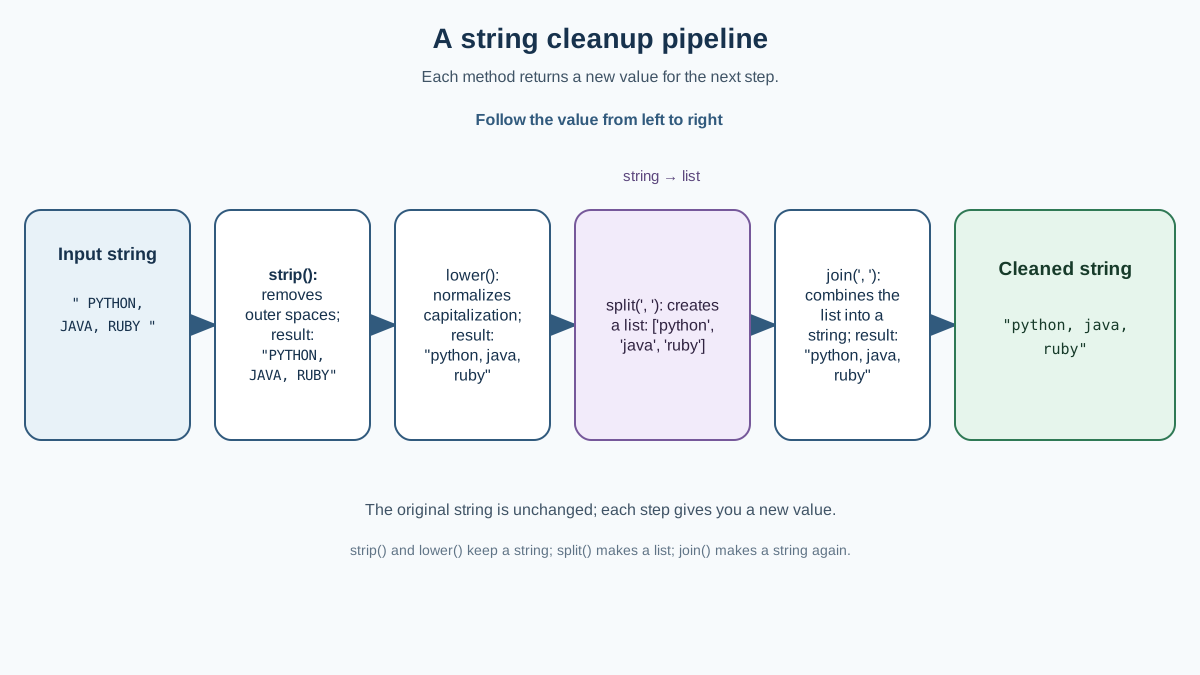
Methods are easier to understand when you see them working together on a realistic task. Here is a short script that takes a messy string and cleans it up step by step.
# A messy string that might come from user input or a file
raw_data = "  PYTHON, JAVA, RUBY  "

# Clean the edges and normalize the case
cleaned = raw_data.strip().lower()

# Split into a list of items
languages = cleaned.split(", ")

# Join back into a readable string
result = ", ".join(languages)

print("Original:", raw_data)
print("Cleaned:", result)
Original:   PYTHON, JAVA, RUBY
Cleaned: python, java, ruby
Notice how each method handles one small job: strip() removes the outer spaces, lower() normalizes the case, split() breaks the text into a list, and join() reassembles the cleaned list into a single string.
If you want to remove duplicate items from a list like this, that is a separate skill involving loops and list operations—not a string method. Keep this example focused on what strings can do on their own.
The best way to make this stick is to experiment. Open a Python file and try this: take one messy string of your own, then work through the jobs in order. First clean it with strip() and lower(). Print the result. Then split it and print the list. Then join it back together and print the final string. Change one method call and watch how the output changes. That small experiment will teach you more than reading a dozen reference pages.
Once you feel comfortable with these methods, the natural next step is to practice them in small exercises. Take a string, clean it, split it, check it, replace part of it, and put it back together. After a few repetitions, you will reach for these tools without thinking—and that is exactly where you want to be.
Knowledge check
Final check
Finish the article by checking the ideas you just learned.
References
Want a more structured Python path?
Use the Python Starter Pack to turn scattered tutorials into a focused practice path.
Python for Artificial Intelligence Starter Pack
Build a Python foundation you can actually use. The Python for AI Starter Pack brings together a guided path through setup, core programming concepts, data structures, files, JSON, APIs, debugging, and practical projects—so you can move quickly from running your first program to understanding and building useful software.
- 264-page illustrated PDF
- 12 guided Python chapters
- Visual concept diagrams
- Self-assessment quizzes
- Bonus deep-dive sections
- Files, JSON, APIs, debugging & projects
- Foundation for data, automation & AI
Coming soon


