
Type Conversion in Python: Casting Between Data Types
Every value in Python carries a type, and Python is strict about it. A string "30" and an integer 30 look alike on screen, but they behave completely…

Every value in Python carries a type, and Python is strict about it. A string "30" and an integer 30 look alike on screen, but they behave completely differently in code. Type conversion (also called casting) is how you move a value from one type to another so your program can do what you actually meant.
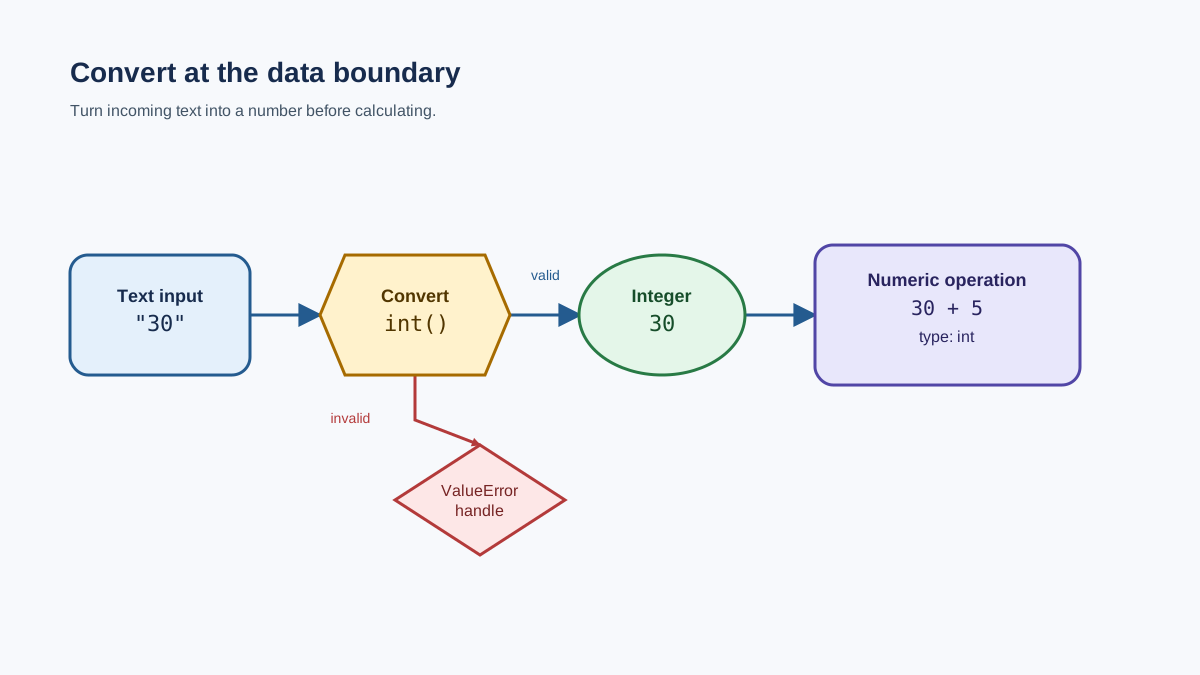
The rule that organizes everything here is simple: convert at the boundary where data enters an operation, then inspect the result. Most of the time that boundary is user input, which arrives as text through input(). Get that one habit right, and the rest of casting becomes a small set of tools you reach for on purpose.
What Is Python Type Conversion?
Type conversion means changing a value from one data type to another. In Python, you do this with built-in functions like int(), float(), and str().
There are two kinds, and you only need to remember them once:
- Implicit conversion happens automatically. When you add an integer and a float, Python promotes the integer to a float so no data is lost.
- Explicit conversion (casting) is when you call a function yourself to force a value into a specific type.
The practical rule for choosing: data that arrives as text—from input(), a file, or an API—usually needs explicit conversion before you can do numeric work. Python may promote compatible numeric operands on its own, but when the result type matters, check it with type() instead of assuming.
If these types are still unfamiliar, review the basic variable and data-type rules first.
When Do You Need to Convert Types?
You will hit type conversion constantly in real programs. The most common trigger is user input.
When you call input(), Python always returns a string—even if the user types a number. That means you cannot do math on it until you convert it. This is the single most common reason beginners reach for casting.
You will also convert types when you want to:
- Combine text and numbers in a message, which requires turning the number into a string.
- Control the result of a calculation, like forcing a decimal result or dropping a decimal.
- Read data from a file or an API, where values often arrive as strings even when they represent numbers.
A classic beginner failure is adding a string and a number:
age = input("How old are you? ")  # User types: 30
print(age + 1)
This raises a TypeError, because age is a string and Python won't add a string and an integer. The fix is to convert at the boundary—right where the input enters the arithmetic:
age = input("How old are you? ")  # User types: 30
age_number = int(age)             # Now age_number is the integer 30
print("Next year, you'll be", age_number + 1)
Next year, you'll be 31
Knowledge check
Check your understanding
Answer this question before you continue.
How to Convert Types in Python
Python gives you three built-in functions you will use almost every day:
int(): Converts a value to an integerfloat(): Converts a value to a floatstr(): Converts a value to a string
The syntax is simple: put the value you want to convert inside the parentheses.
int("123")    # Converts the string "123" to the integer 123
float(5)      # Converts the integer 5 to the float 5.0
str(42)       # Converts the integer 42 to the string "42"
123
5.0
42
One detail worth knowing: int() and float() don't change the original value. They create a new value of the target type. So int("123") returns a new integer 123; the string "123" still exists untouched.
Knowledge check
Check your understanding
Answer this question before you continue.
Practical Examples of Type Conversion
Let's see casting in action with the conversions you will use most. Each example follows the same move: text enters, an operation needs a number, and you verify the type after converting.
Convert String to Integer
Here is a different boundary than the age example—a numeric text field from a form or a file. Watch how type() makes the change visible:
quantity = "12"          # Arrives as text, maybe from a form or file
print(type(quantity))    # <class 'str'>

quantity_number = int(quantity)
print(quantity_number)   # 12
print(type(quantity_number))  # <class 'int'>
<class 'str'>
12
<class 'int'>
The value still looks like 12 on screen, but type() proves it is now an integer you can add, multiply, or compare.
Convert Integer to String
To build a message that mixes text and a number, use str():
score = 99
message = "Your score is " + str(score)
print(message)
Your score is 99
This turns the integer 99 into the string "99" so it can join the rest of the text.
Convert Float to Integer
Using int() on a float removes the decimal part—it does not round:
price = 19.99
whole_price = int(price)   # whole_price is 19
print(whole_price)
19
int(19.99) gives 19, not 20. If you need rounding, use round() instead.
One boundary worth knowing: int() truncates toward zero, not just "down." That matters when you process signed values like balances or measurements:
print(int(3.8))    # 3
print(int(-3.8))   # -3, not -4
3
-3
int(-3.8) gives -3 because it drops the decimal part, moving toward zero. If you want true rounding, round() is the separate tool for that.
Knowledge check
Check your understanding
Answer this question before you continue.
Convert String to Float
When a user might type a decimal, use float():
height = input("Enter your height in meters: ")  # User types: 1.75
height_number = float(height)
print("Your height is", height_number)
Your height is 1.75
This lets you accept both whole numbers and decimals from the same input.
What Happens If Conversion Fails?
Casting only works when the value can actually become the target type. If you try to convert something that doesn't make sense, Python raises a ValueError:
value = "hello"
number = int(value)   # ValueError: invalid literal for int()
Only strings that look like numbers can be converted to numbers. int("hello") will always fail.
To keep your program from crashing, wrap the conversion in a try/except block:
user_input = input("Enter a number: ")
try:
    number = int(user_input)
    print("You entered:", number)
except ValueError:
    print("That wasn't a valid number.")
Now the program responds gracefully instead of stopping with an error.
Knowledge check
Check your understanding
Answer this question before you continue.
Common Mistakes and When to Avoid Casting
Here are the pitfalls I see beginners hit most:
- Forgetting that
input()returns a string. You cannot do math on it until you convert it. - Assuming
int()rounds. It truncates toward zero.int(7.8)is7, not8. - Converting text that isn't a number.
int("hello")raises aValueError. Check your data first, or handle the error. - Casting when you don't need to. If you're only printing a value,
print()already converts it to a string for you. You don't needstr()there. - Skipping the inspection step. After you convert, confirm the result with
type()before you trust it in the next operation.
A quick comparison of the two conversion types:
| Conversion | Who does it | When it happens | Beginner mistake |
|---|---|---|---|
| Implicit | Python, automatically | Mixing types in an expression, like int + float | Assuming the result type instead of checking with type() |
| Explicit | You, with int(), float(), str() | When you need a specific type, like converting user input | Forgetting that invalid strings raise ValueError |
Practice: Try It Yourself
Here's a small task to lock this in. The conversion boundary is marked for you—your job is to complete the two missing lines.
- Ask the user to enter a number.
- Convert the input to an integer.
- Add 10 to the number.
- Print the result.
A starting point:
user_input = input("Enter a number: ")
## TODO: convert user_input to an integer and store it in number
## TODO: add 10 to number and store the result
print("Your number plus 10 is:", result)
Once it runs, test the article's decision rules. What happens if you enter something that isn't a number? What changes if you use float() instead of int()? What happens if you try to convert a float string like "3.5" with int()? Each answer should remind you why you convert at the boundary and inspect the result.
Next Steps
Type conversion is a small skill that unlocks a lot of real code. Keep the decision rule in your pocket: identify the current type, choose the target type based on the operation you need, convert once at the boundary, and handle invalid input. That checklist carries you past user input into files, APIs, and any place where text arrives pretending to be a number.
From here, practice combining numbers and strings while keeping your code readable with clear naming and comments.
Knowledge check
Final check
Finish the article by checking the ideas you just learned.
References
Want a more structured Python path?
Use the Python Starter Pack to turn scattered tutorials into a focused practice path.
Python for Artificial Intelligence Starter Pack
Build a Python foundation you can actually use. The Python for AI Starter Pack brings together a guided path through setup, core programming concepts, data structures, files, JSON, APIs, debugging, and practical projects—so you can move quickly from running your first program to understanding and building useful software.
- 264-page illustrated PDF
- 12 guided Python chapters
- Visual concept diagrams
- Self-assessment quizzes
- Bonus deep-dive sections
- Files, JSON, APIs, debugging & projects
- Foundation for data, automation & AI
Coming soon


