
User Input in Python
A program that never asks a question can only ever do the same thing. The moment you add input(), your script stops being a fixed script and becomes a tool…

Key topics
A program that never asks a question can only ever do the same thing. The moment you add input(), your script stops being a fixed script and becomes a tool that reacts to whoever runs it.
In this tutorial, you'll learn how to get python user input with the input() function, store the answer, convert it when you need a number, and handle the mistakes that trip up beginners.
Why User Input Matters
Think about the programs you use every day. A calculator needs the numbers you type. A login form needs your email. A game needs your commands. None of them would be useful if they ignored you.
User input is how a running program gets information from a real person. It lets your code:
- Ask questions and act on the answers
- Personalize messages, like greeting someone by name
- Collect data, such as ages, choices, or measurements
Before you can build anything interactive, you need this one skill. Let's see how small the first step is.
The input() Function
Python's built-in input() function is the simplest way to get user input. When your program calls it, three things happen:
- Your program pauses and waits.
- The user types a response and presses Enter.
- The program continues, using whatever the user typed.
The most basic call looks like this:
input()
That works, but it gives the user no idea what to type. You can pass a prompt—a message shown before the input—inside the parentheses:
input("What is your name? ")
When this runs, Python displays the prompt and waits for the answer.
Tip: Always include a prompt. A blank
input()makes your program look frozen, and the user has no idea what you're asking for.
Knowledge check
Check your understanding
Answer this question before you continue.
Storing and Using the Input
Calling input() by itself throws the answer away. To do anything with it, store it in a variable:
name = input("What is your name? ")
print("Hello, " + name + "!")
When you run this, you'll see something like:
What is your name? Sarah
Hello, Sarah!
The prompt appears, the program waits, and once Sarah presses Enter, the greeting prints with her name.
If variables are still unfamiliar, review the basic idea first—storing input is just assigning a value to a name.
Knowledge check
Check your understanding
Answer this question before you continue.
The Input Is Always a String
Here's the fact that causes the most beginner confusion: input() always returns a string, even when the user types a number.
If you ask for an age and try to do math with it directly, you'll hit an error:
age = input("How old are you? ")
print(age + 1)  # TypeError: can only concatenate str (not "int") to str
Because age is text like "20", not the number 20, Python refuses to add an integer to it.
To do math, convert the string to a number first:
age = input("How old are you? ")
age = int(age)
print("Next year, you will be " + str(age + 1) + " years old.")
If the user types 20, the program prints Next year, you will be 21 years old.
Use these converters depending on what you need:
int()turns input into a whole number.float()turns input into a decimal number.
height = input("Enter your height in meters: ")
height = float(height)
print("You are " + str(height) + " meters tall.")
Common mistake: Forgetting to convert before doing math. The error message is your clue—read it, convert the value, and rerun.
Knowledge check
Check your understanding
Answer this question before you continue.
Taking Multiple Inputs at Once
Sometimes you want several values on one line. The split() method divides a string into parts, and you can unpack them into separate variables.
To see what split() actually returns, inspect it first:
numbers = input("Enter two numbers separated by a space: ")
print(numbers.split())
If the user types 3 7, the program prints:
Enter two numbers separated by a space: 3 7
['3', '7']
The result is a list of two text pieces. Unpacking assigns the first piece to num1 and the second to num2, and then int() turns each text piece into a number:
numbers = input("Enter two numbers separated by a space: ")
num1, num2 = numbers.split()
num1 = int(num1)
num2 = int(num2)
print("The sum is:", num1 + num2)
If the user types 3 7, the program prints The sum is: 10.
split() breaks the string on spaces by default, so each word or number becomes its own piece. This is a handy shortcut when you want a compact input format.
Build a Small Calculator
Now combine what you've learned into one complete task: ask for two numbers on one line, separated by a space, and print their sum, difference, and product.
numbers = input("Enter two numbers separated by a space: ")
num1, num2 = numbers.split()
num1 = int(num1)
num2 = int(num2)
print("Sum:", num1 + num2)
print("Difference:", num1 - num2)
print("Product:", num1 * num2)
If the user types 3 7, the program prints:
Enter two numbers separated by a space: 3 7
Sum: 10
Difference: -4
Product: 21
This is the same ask-store-convert pattern you've used all along, just applied to two values at once. That pattern is the input boundary behind larger command-line tools and automation scripts: they collect text, convert it where a number is needed, and act on the result.
Knowledge check
Check your understanding
Answer this question before you continue.
When the User Types the Wrong Thing
Here's the boundary most tutorials skip: converting is safe only when the user actually types a number. Ask for an age and type abc, and int() raises a ValueError, stopping the program.
For a real user, that's a dead end. The fix is a small retry loop: keep asking until the input converts cleanly.
while True:
    age = input("How old are you? ")
    try:
        age = int(age)
        break
    except ValueError:
        print("That's not a number. Try again.")
If the user types 20, the loop converts it and moves on. If they type abc, it prints a message and asks again.
Note: This pattern is for expected bad input—the user typing letters where a number belongs. It is not a full error-handling lesson. It just keeps a small interactive program from dying on a foreseeable mistake.
The Rule That Ties It Together
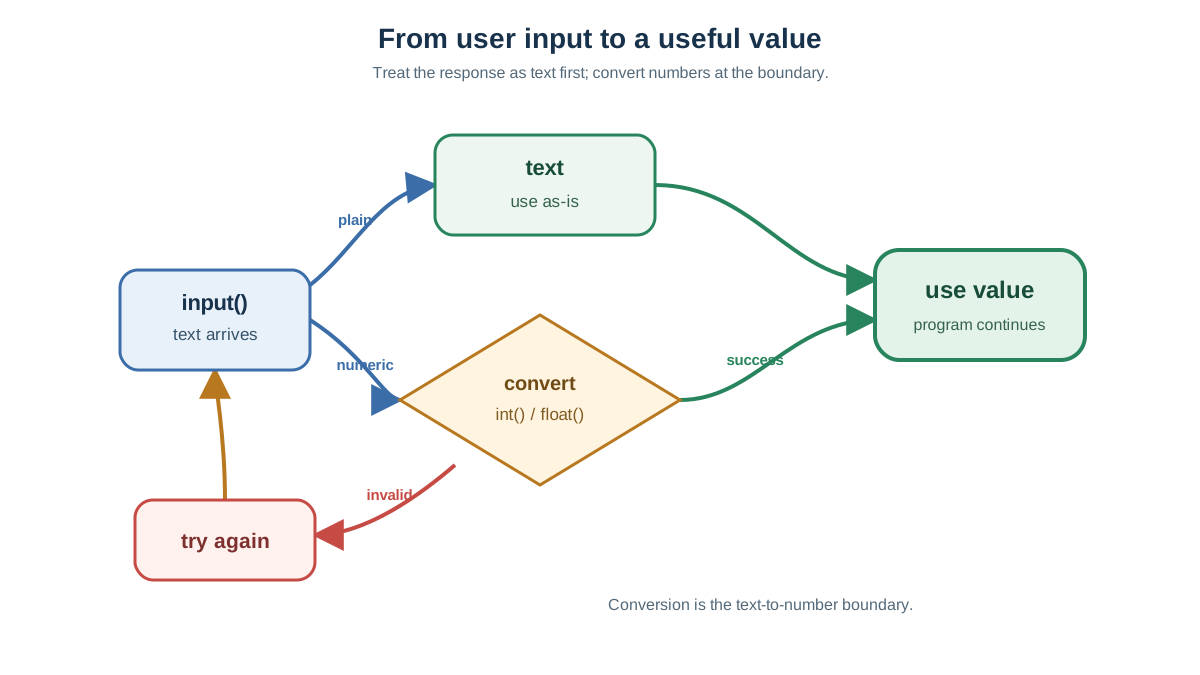
Everything in this tutorial reduces to one decision rule: collect input as text, convert it at the boundary when the program needs a number, and retry when conversion can fail.
- Plain text, like a name or a favorite color? Store it and use it as-is.
- A number you'll do math with? Convert it with
int()orfloat()right after you collect it. - Input a real person could get wrong? Wrap the conversion in a retry loop so the program asks again instead of crashing.
That single rule is what separates a script that works for you from a tool that survives being handed to someone else.
Practice: Build a Validated Calculator
Put the rule to work. Your task: take the calculator from earlier and make it refuse bad input.
The goal is to keep asking for each number until the user enters something that converts cleanly, then print the sum. Write it yourself before you read on.
Here's one working version:
def get_number(prompt):
    while True:
        value = input(prompt)
        try:
            return int(value)
        except ValueError:
            print("That's not a number. Try again.")

num1 = get_number("Enter the first number: ")
num2 = get_number("Enter the second number: ")
print("The sum is:", num1 + num2)
If the user types abc for the first number, the program asks again instead of dying. Once both numbers convert, it prints the sum.
Experiment on Your Own
- Change the validated calculator to use
float()so it accepts decimals. - Ask for a name and a number, then print a personalized message using both.
- Apply a string method like
.lower()to the input before printing it.
Next Steps
You now have the core of interactive programs: ask, store, convert, and use. The rule that ties it together is simple—collect input as text, convert it at the boundary when the program needs a number, and retry when the user can reasonably provide the wrong shape of input.
The natural next move is to finish the validated calculator above, then extend it to handle decimals with float(). That pairs what you just learned with the arithmetic you'll use constantly as you build real programs. When you're ready to shape that raw input into cleaner output, practice formatting and manipulating the values you collect.
Knowledge check
Final check
Finish the article by checking the ideas you just learned.
References
Want a more structured Python path?
Use the Python Starter Pack to turn scattered tutorials into a focused practice path.
Python Starter Pack
A compact LearnPyFast PDF pack covering what Python is, installation, your first program, running Python code, and Python versions.
- 5 curated chapters
- Enhanced PDF edition with bundle-only learning guidance
- Offline-friendly format for focused review
- Source article links for future online updates
Coming soon


