
Python Type Hints: Annotate Function Parameters and Return Values
Your function works perfectly until someone hands it a string where you expected a number. Then it fails three lines deep, far from the call that caused…

Key topics
Your function works perfectly until someone hands it a string where you expected a number. Then it fails three lines deep, far from the call that caused the problem. Type hints are how you write down what a function expects and what it gives back — and they are also how beginners get fooled, because Python reads them and then ignores them at runtime.
Let's fix the mental model first, then prove it with code you can run.
What Type Hints Actually Do
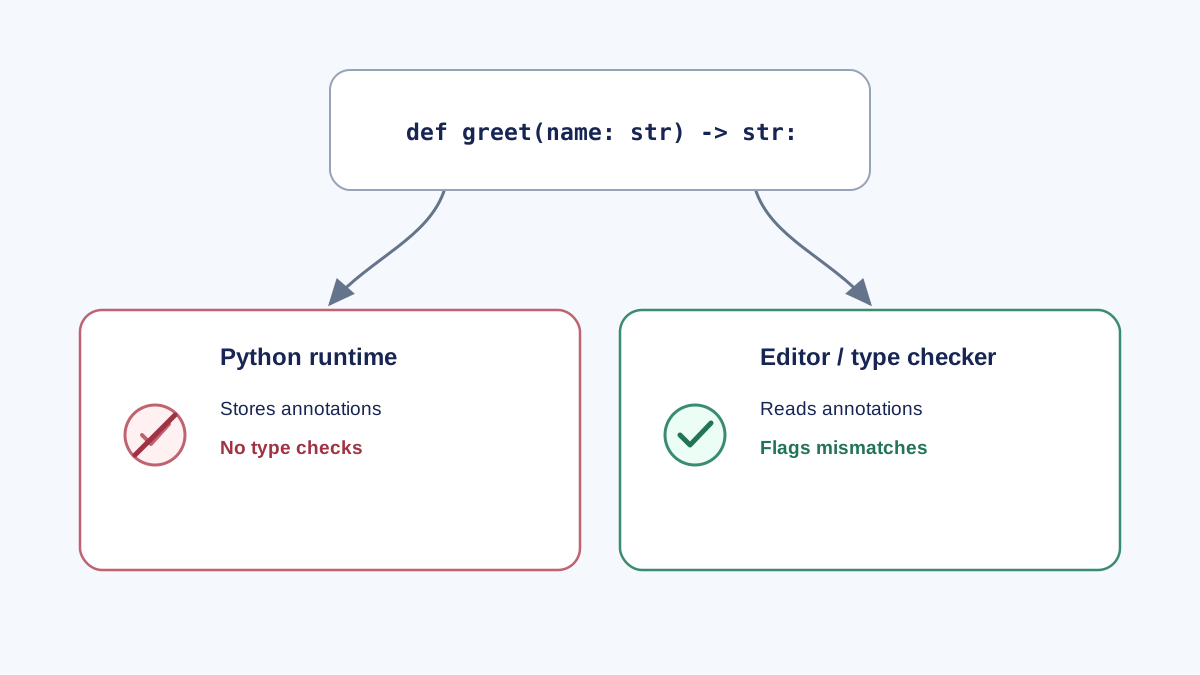
A type hint is an annotation: extra information attached to a variable, a parameter, or a return value. That is the whole mechanism. Python stores the annotation, makes it readable, and moves on.
The interpreter does not check annotations when your function runs. If you come from a language like Java or C++, this is the part that surprises you. In those languages the compiler refuses to build the program when types don't line up. Python will happily run your code, wrong types and all.
So where do hints earn their keep? In the tools that read them: your editor, linters, and static type checkers. A static type checker is a program that reads your source code without running it and reports places where the types don't add up. That's the audience for your annotations.
Keep that split in mind — Python runs the code, tools read the hints — and everything else in this article follows from it.
Knowledge check
Check your understanding
Answer this question before you continue.
Your First Annotated Function
Here's a small function with annotated parameters and an annotated return value. Save it as greet.py:
def greet(name: str, times: int) -> str:
    return f"Hello, {name}! " * times

print(greet("Ada", 2))
Run it:
python greet.py
Expected output:
Hello, Ada! Hello, Ada!
Now the interesting part. Call it with the wrong type:
print(greet("Ada", "2"))
Expected output:
Hello, Ada!
No error. No warning. The annotation said times: int, you passed a string, and Python shrugged. The string "2" multiplied by a string just repeats it once, so you get a single greeting — a silently wrong result instead of a crash.
Read the syntax in pieces:
| Piece | Meaning |
|---|---|
name: str | Annotates the parameter name as a string |
times: int | Annotates the parameter times as an integer |
-> str | Annotates the return value as a string |
times: int = 2 | Sets a default value — a different thing entirely |
That last row matters. The colon annotates; the equals sign assigns a default. def greet(name: str, times: int = 1) means "expect an int, and use 1 if nobody passes one." Mixing those two up is the first mistake most beginners make.
Knowledge check
Check your understanding
Answer this question before you continue.
Annotating Built-in and Collection Types
The simple built-ins cover most of what you'll write: int, float, str, bool, and bytes.
Collections need one extra idea. When a function takes a list, you usually want to say what's inside the list, not just that it's a list. You do that with square brackets:
def total(prices: list[float]) -> float:
    return sum(prices)

def word_counts(words: list[str]) -> dict[str, int]:
    counts = {}
    for word in words:
        counts[word] = counts.get(word, 0) + 1
    return counts

print(total([1.5, 2.25, 3.0]))
print(word_counts(["red", "blue", "red"]))
Expected output:
6.75
{'red': 2, 'blue': 1}
The brackets describe the contents, not the container. list[float] means "a list whose elements are floats." dict[str, int] means "a dictionary with string keys and integer values." tuple[str, int] means a two-element tuple — a string followed by an int. set[int] means a set of integers.
Note: Older code and older Python versions write these as
List,Dict,Tuple, andSet, imported from thetypingmodule. Both forms appear in real projects, so you should be able to read either one. The lowercase bracket form is the modern style.
Two more cases you'll hit quickly. A function that returns nothing gets -> None:
def log(message: str) -> None:
    print(f"[log] {message}")
And a value that might be missing needs a union — a type that says "one of these":
def find_user(user_id: int) -> str | None:
    if user_id == 1:
        return "Ada"
    return None
str | None reads as "a string, or None." Older code writes this as Optional[str] from typing. Same meaning.
Knowledge check
Check your understanding
Answer this question before you continue.
Annotating Variables, Not Just Functions
The colon syntax works on plain variables too:
age: int = 25
name: str = "Ada"
scores: list[int] = [90, 85, 77]
Here's the part to internalize: the annotation is optional, and the assignment is what actually creates the value. Annotating a variable does not lock its type. This is perfectly legal:
age: int = 25
age = "twenty-five"
Python won't complain. Your editor might underline it, and a type checker will flag it, but the interpreter doesn't care. A variable annotation is a note to your tools and your future self, not a declaration the language enforces.
Most of the value lives in function signatures, so that's where I'd spend your annotation budget first.
Knowledge check
Check your understanding
Answer this question before you continue.
What Python Does Not Enforce
You've already seen the interpreter ignore a wrong-typed argument. The useful follow-up is where the annotations go. Every function exposes them through __annotations__:
def double(value: int) -> int:
    return value * 2

print(double.__annotations__)
Expected output:
{'value': <class 'int'>, 'return': <class 'int'>}
That dictionary is the whole point. The annotations sit on the function as data, which is exactly why editors and type checkers can read them and Python's runtime doesn't have to.
When errors do appear in annotated code, they come from the operation inside the function, not from the hint. If double had called value + 1 instead, you'd get a real TypeError — but from the addition, not from the annotation.
Common mistake: Passing the wrong type, seeing no error, and concluding type hints are broken. They aren't broken — they were never a runtime check. The check happens in your tools, before you run anything.
Where Type Hints Pay Off
The honest answer is: not everywhere, and not immediately. But in specific situations, hints change how much work a change costs you.
Your editor uses hints to offer accurate autocomplete and to flag mismatches as you type. A static type checker like mypy reads the same hints and reports inconsistencies before the program runs — think of it as a very thorough linter. And hints act as documentation that lives next to the code, which makes it harder for them to drift out of date than a comment sitting above a function.
The payoff shows up when a script grows. A 20-line script that cleans a CSV file is fine without hints. The same script after three months, with six functions calling each other, is a different animal. When you change what one function returns, hints tell you which callers now expect the wrong thing — before you run the program and watch it fail somewhere unrelated.
I've watched this pattern enough times to trust it: beginners who annotate the functions they keep end up changing those functions with far less fear. The hints turn "I hope nothing else used this" into "the checker already told me what used this."
When to Skip Type Hints
Hints have a cost: keystrokes, visual noise, and a small amount of maintenance. For a five-line throwaway script, that cost buys you almost nothing.
| Situation | Annotate? | Why |
|---|---|---|
| Scratch file you'll delete today | No | The cost outweighs the benefit |
| Quick experiment to test an idea | No | You're exploring, not maintaining |
| Function called from more than one place | Yes | Callers need the contract |
| Code you'll revisit next week | Yes | You are a future stranger to yourself |
| Shared with a teammate | Yes | Hints document intent without a meeting |
A good beginner instinct: annotate the functions you keep, skip the ones you throw away. Start with signatures — parameters and return values — because that's where each annotation carries the most information.
Common Beginner Mistakes
Confusing : with =. def f(x: int) annotates. def f(x: int = 5) annotates and sets a default. They look similar and do different jobs.
Expecting a runtime error. Covered above, but it's the mistake that generates the most confusion. Hints don't police behavior.
Using list[int] on an old Python. Subscripted built-ins like list[int] need Python 3.9 or newer. On 3.8 and earlier you'll get a TypeError at definition time. If you're stuck on an older version, import List from typing and write List[int].
Annotating the return type as the input type. A function that takes a list and returns a count returns int, not list. Read your return statement and annotate what actually comes out.
Forgetting -> None. Functions that print instead of returning still need a return annotation. None is the honest answer.
Copying from __future__ import annotations without knowing why. Older code uses it to make annotations lazy so forward references work. You don't need it in a beginner script.
Practice: Annotate and Break Your Own Function
Take a function you already wrote — anything with at least one parameter and a return value. Then:
- Add parameter and return annotations.
- Run it and confirm the output is identical to before.
- Call it with a deliberately wrong-typed argument. Record what happens: an error, or a silently wrong result?
- Print
your_function.__annotations__and read the dictionary.
For the extension, install a static type checker and run it on the same file:
pip install mypy
mypy your_file.py
Compare what mypy reports against what Python did when you ran the file. That gap — the checker sees the problem, the interpreter doesn't — is the entire lesson in one command.
Then try one more: annotate a function that takes a list[str] and returns a dict[str, int], using the collection syntax from earlier.
The rule to carry forward is short. Annotations describe intent. Python doesn't enforce them. Tools do. Annotate the next function you write, run it, then pass the wrong type on purpose and watch nothing stop you. Once that's comfortable, running a type checker on your own code is the natural next step — and it's the moment hints stop being decoration and start catching real mistakes.
Knowledge check
Final check
Finish the article by checking the ideas you just learned.
References
Want a more structured Python path?
Use the Python Starter Pack to turn scattered tutorials into a focused practice path.
Python for Artificial Intelligence Starter Pack
Build a Python foundation you can actually use. The Python for AI Starter Pack brings together a guided path through setup, core programming concepts, data structures, files, JSON, APIs, debugging, and practical projects—so you can move quickly from running your first program to understanding and building useful software.
- 264-page illustrated PDF
- 12 guided Python chapters
- Visual concept diagrams
- Self-assessment quizzes
- Bonus deep-dive sections
- Files, JSON, APIs, debugging & projects
- Foundation for data, automation & AI
Coming soon


